
LifePro FlexStride Plus
LifePro FlexStride Plus Under Desk Elliptical Exercise Machine User Manual
Model: FlexStride Plus (LP-FLXSTRD-BLU)
1. Introduction
The LifePro FlexStride Plus Under Desk Elliptical is designed to provide a convenient, low-impact cardiovascular workout while seated. This machine helps promote circulation, engage leg muscles, and contribute to overall fitness without disrupting daily activities. Please read this manual thoroughly before initial use to ensure proper assembly, operation, and maintenance.
2. Safety Information
- Consult a physician before starting any new exercise program, especially if you have pre-existing health conditions.
- Ensure the elliptical is placed on a stable, level surface. Use the provided non-slip mat for non-carpeted areas.
- The maximum user weight recommendation for this device is 300 pounds (136 kg). Do not exceed this limit.
- Keep children and pets away from the elliptical during operation.
- Always ensure your chair is stable and secure. Use the provided castor stoppers or tether strap to prevent your chair from moving while exercising.
- Stop exercising immediately if you feel dizzy, faint, or experience any pain.
- Do not stand on the elliptical. It is designed for seated use only.
- Regularly inspect the machine for any signs of wear or damage. Do not use if damaged.
3. Package Contents
Verify that all components are present in the package:
- LifePro FlexStride Plus Under Desk Elliptical
- User Manual (this document)
- Non-slip Mat
- Resistance Band
- Castor Stoppers (for office chairs)
- Tether Strap (to secure elliptical to chair)
- Pedals (left and right)
- Assembly Tools (wrenches, Allen key)

Image: Included accessories for the FlexStride Plus elliptical.
4. Setup
4.1 Assembly
- Carefully remove all components from the packaging.
- Identify the left and right pedals. The pedals are typically marked "L" and "R".
- Attach the pedals to the corresponding crank arms on the elliptical. Turn the left pedal counter-clockwise and the right pedal clockwise to tighten. Use the provided wrench to secure them firmly.
- Ensure all screws and connections are tight before use.
4.2 Placement and Stability
- Place the elliptical on a flat, stable surface. If using on a hard floor, position the non-slip mat underneath the unit to prevent movement.
- For office chairs with wheels, use the provided castor stoppers under the chair wheels to prevent the chair from rolling backward during use.
- Alternatively, use the tether strap to secure the elliptical to the base of your chair for enhanced stability.

Image: Dimensions of the FlexStride Plus elliptical, showing its compact size and integrated handle for portability.
5. Operating Instructions
5.1 Getting Started
- Sit comfortably in your chair with the elliptical positioned in front of you.
- Place your feet firmly on the pedals. The pedals are designed to accommodate various foot sizes.
- Begin pedaling in a smooth, elliptical motion. The machine is self-powered and the LCD monitor will activate automatically.
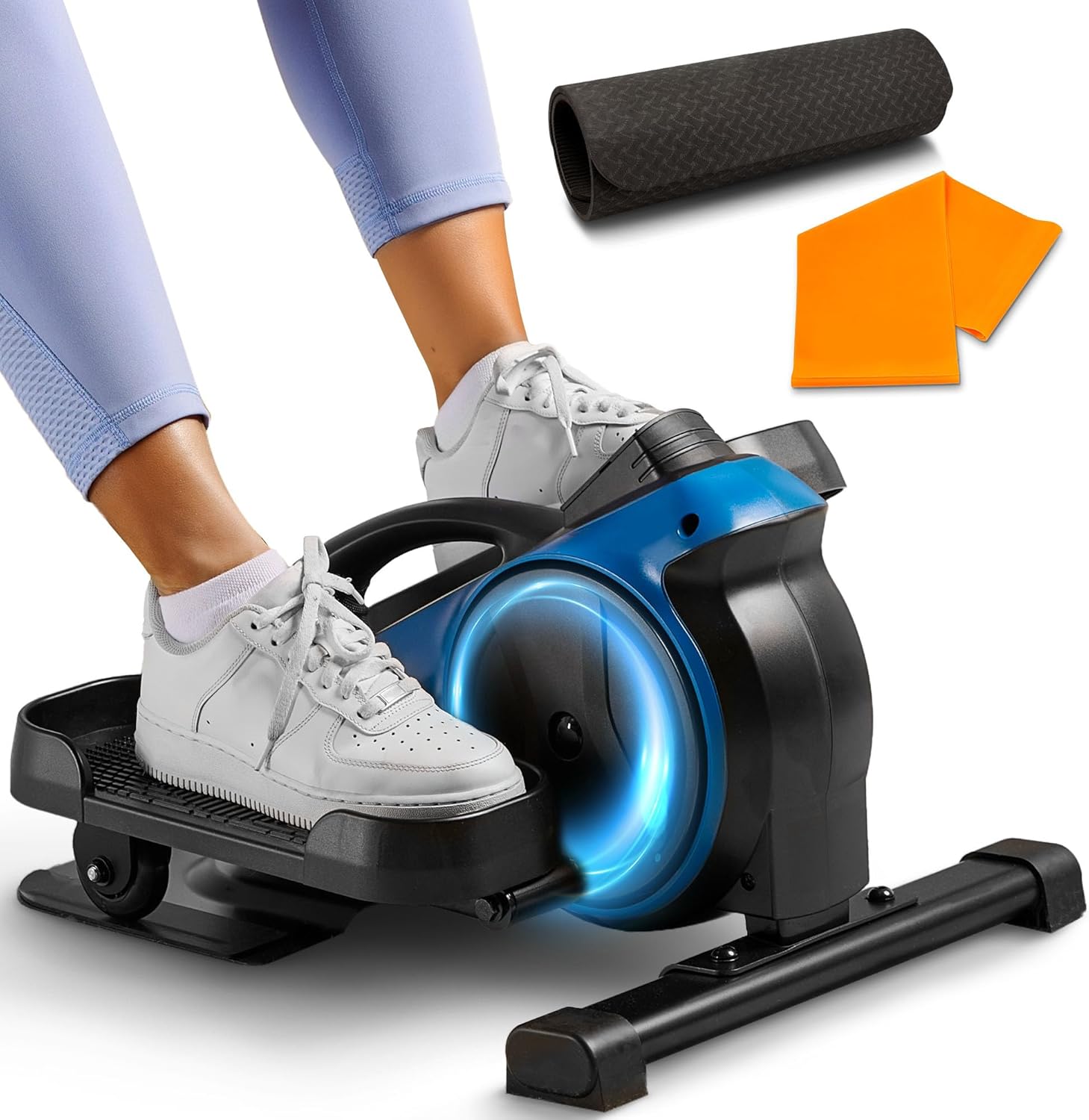
Image: User's feet on the FlexStride Plus elliptical pedals, demonstrating proper foot placement.
5.2 Adjusting Resistance
The FlexStride Plus features 8 levels of magnetic resistance. To adjust the resistance:
- Locate the tension knob on the front of the elliptical.
- Turn the knob clockwise to increase resistance (higher numbers for more challenge).
- Turn the knob counter-clockwise to decrease resistance (lower numbers for less challenge).

Image: The adjustable tension knob on the FlexStride Plus, illustrating the 8 resistance levels.
5.3 Using the LCD Monitor
The integrated LCD monitor tracks your workout data:
- Time: Duration of your workout.
- Strides: Total number of pedal revolutions.
- Calories Burned: Estimated calories expended during your session.
- RPM: Revolutions Per Minute (pedaling speed).
- Distance: Estimated distance covered.
Press the button on the monitor to cycle through different display modes or to reset the values. The monitor is powered by batteries (included) and will automatically turn off after a period of inactivity to conserve power.

Image: The LCD monitor displaying workout metrics, alongside a smartphone showing compatible fitness applications.
5.4 Bluetooth Connectivity and Apps
The FlexStride Plus can connect to compatible fitness applications via Bluetooth to track your progress:
- Download recommended apps such as Zwift, Kinomap, or Fit & Home from your device's app store.
- Enable Bluetooth on your smartphone or tablet.
- Follow the in-app instructions to pair your device with the FlexStride Plus elliptical.
- Once connected, the app will display and record your workout data.
5.5 Quiet Operation
The elliptical features an ultra-low noise flywheel, allowing for quiet operation suitable for various environments, including offices or shared living spaces.

Image: The FlexStride Plus in use, demonstrating its quiet operation suitable for environments where minimal noise is desired.
6. Maintenance
- Cleaning: Wipe down the elliptical with a damp cloth after each use to remove sweat and dust. Avoid abrasive cleaners or solvents.
- Inspection: Periodically check all bolts, nuts, and moving parts to ensure they are securely fastened. Tighten any loose components.
- Storage: Store the elliptical in a cool, dry place away from direct sunlight and extreme temperatures. The built-in handle facilitates easy transport and storage.
- Battery Replacement: If the LCD monitor display becomes dim or unresponsive, replace the batteries. Refer to the monitor's compartment for battery type and replacement instructions.
7. Troubleshooting
| Problem | Possible Cause | Solution |
|---|---|---|
| Elliptical slides during use. | Not properly secured or on a slippery surface. | Ensure the non-slip mat is used on hard floors. Utilize the provided castor stoppers for wheeled chairs or secure the elliptical with the tether strap to your chair. |
| Resistance feels inconsistent or too easy/hard. | Tension knob not adjusted correctly. | Turn the tension knob to adjust resistance levels (1-8). Ensure the knob is fully engaged at your desired setting. |
| LCD monitor is blank or not displaying data. | Batteries are low or depleted. | Replace the batteries in the LCD monitor. Refer to the monitor's battery compartment for specific battery type. |
| Difficulty connecting via Bluetooth to fitness apps. | Bluetooth not enabled, app issues, or pairing problems. | Ensure Bluetooth is enabled on your device. Restart the app and the elliptical. Follow the specific pairing instructions within your chosen fitness application. |
| Mild clicking sound during operation. | Normal operational sound or minor component adjustment needed. | A mild clicking sound can be normal during operation. Ensure all assembly bolts are tight. If the sound is loud or persistent, contact customer support. |
8. Specifications
| Feature | Detail |
|---|---|
| Brand | LifePro |
| Model | FlexStride Plus (LP-FLXSTRD-BLU) |
| Product Dimensions (L x W x H) | 57.66 cm x 46.99 cm x 32.77 cm (22.7" x 18.5" x 12.9") |
| Item Weight | 13.02 kg (28.7 lbs) |
| Maximum Weight Recommendation | 300 Pounds (136 kg) |
| Number of Resistance Levels | 8 |
| Operation Mode | Manual |
| Power Source | Self-Powered (LCD monitor uses batteries) |
| Display Type | LCD (3 Inches) |
| Meter Functions | Calories Burned, Time, Strides, RPM, Distance |
| Material | Iron |
| Color | Blue |
9. Warranty and Support
LifePro products undergo rigorous quality control testing. The LifePro FlexStride Plus Under Desk Elliptical comes with a lifetime warranty and dedicated customer support.
For any questions, concerns, or support needs regarding your FlexStride Plus elliptical, please contact LifePro customer service. Details for contacting support can typically be found on the official LifePro website or through the contact information provided with your product packaging.
LifePro is committed to providing assistance and ensuring customer satisfaction throughout the lifespan of your product.
Related documentsFlexStride Plus


Ask a question about this manual
Ask about setup, troubleshooting, compatibility, parts, safety, or missing instructions. Manuals+ will review the question and use this page’s manual context to help answer it.