
Introduction
This manual provides essential information for the safe and efficient operation, installation, and maintenance of your HVAC 4UXC2018A10N0AA 18,000 BTU Indoor Multi Split Cassette Type Heat Pump. Please read this manual thoroughly before installation and use, and keep it for future reference. This unit is designed to provide both heating and cooling for indoor environments.
Safety Information
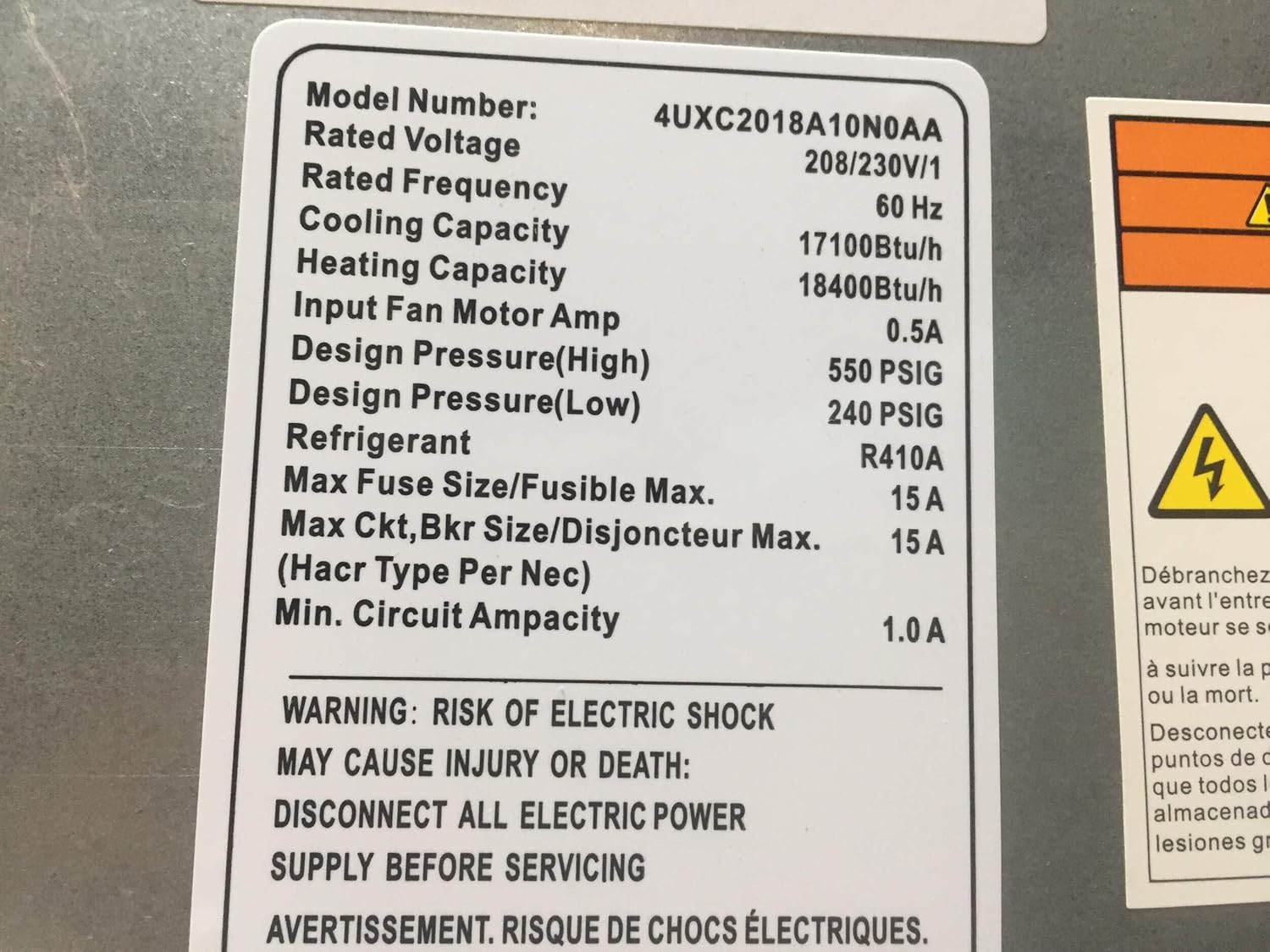
WARNING: RISK OF ELECTRIC SHOCK
MAY CAUSE INJURY OR DEATH:
DISCONNECT ALL ELECTRIC POWER SUPPLY BEFORE SERVICING.
Always ensure that the main power supply to the unit is disconnected before performing any installation, maintenance, or troubleshooting. Only qualified personnel should perform electrical work and installation of this unit. Failure to follow these instructions can result in serious injury or death.
Do not use the wired controller or the heat pump unit in environments with heavy humidity. Excessive humidity can damage the electronic components and pose a safety risk.
Setup and Installation
The installation of this multi-split cassette type heat pump requires professional expertise. It is highly recommended that installation be performed by a certified HVAC technician to ensure proper function, safety, and compliance with local building codes.
Unboxing and Inspection
Carefully unbox the unit and inspect for any signs of shipping damage. Report any damage to your supplier immediately.

This image shows the 4UXC2018A10N0AA indoor multi-split cassette type heat pump unit, still secured within its protective foam packaging, ready for installation. The unit's compact square design is visible, along with some internal components and wiring.

A top-down view of the 4UXC2018A10N0AA heat pump unit, still in its shipping foam. A clear plastic bag containing accessories is visible in the center, along with various connection points on the side of the unit.

This image displays a clear plastic bag containing various accessories for the heat pump, including what appears to be insulation, wiring, and possibly mounting hardware, all neatly packed within the unit's shipping container.
Ensure all components, including the wired controller and any accessories, are present before proceeding with installation.
Operating Instructions
Your heat pump is controlled by a wired LCD controller, providing precise control over the unit's functions.
Close-up of the LCD wired controller. The screen displays a warning: 'It is prohibited to use at heavy humidity environment'. Buttons for 'Enter/Cancel', 'Fan', 'Mode', 'Timer', and 'On/Off' are clearly visible, indicating its function for controlling the heat pump.
Controller Functions:
- On/Off: Press to power the unit on or off.
- Mode: Cycle through operating modes (e.g., Cool, Heat, Fan, Dry, Auto).
- Fan: Adjust fan speed settings (e.g., Low, Medium, High, Auto).
- Timer: Set programmed on/off times for automated operation.
- Enter/Cancel: Confirm selections or cancel current operations.
Note: As indicated on the controller, avoid using the unit in environments with heavy humidity to prevent damage.
Maintenance
Regular maintenance is crucial for the longevity and efficient operation of your heat pump. Always disconnect power before performing any maintenance.
- Filter Cleaning: Regularly clean or replace air filters to ensure optimal airflow and air quality. Refer to the full installation manual for filter access.
- Coil Cleaning: Indoor and outdoor coils should be inspected and cleaned periodically by a qualified technician.
- Drainage Check: Ensure the condensate drain line is clear and free of obstructions to prevent water overflow.
- Professional Inspection: Schedule annual professional inspections and servicing to maintain peak performance and identify potential issues early.
Troubleshooting
If you encounter issues with your heat pump, refer to the following common problems and solutions. For complex issues, contact a certified HVAC technician.
| Problem | Possible Cause | Solution |
|---|---|---|
| Unit does not turn on | No power, tripped circuit breaker, controller issue. | Check power supply, reset breaker, ensure controller is connected and powered. |
| Insufficient heating/cooling | Dirty air filter, blocked outdoor unit, low refrigerant. | Clean/replace filter, clear obstructions, contact technician for refrigerant check. |
| Unusual noises | Loose parts, fan obstruction, compressor issue. | Inspect for loose components, clear obstructions, contact technician. |
| Water leakage | Clogged drain line, improper installation. | Check and clear drain line, contact technician for inspection. |
Specifications
Refer to the following technical specifications for your HVAC 4UXC2018A10N0AA heat pump unit.

A detailed label showing the technical specifications of the 4UXC2018A10N0AA model. Key information includes Model Number, Rated Voltage (208/230V/1), Rated Frequency (60 Hz), Cooling Capacity (17100 Btu/h), Heating Capacity (18400 Btu/h), Refrigerant (R410A), and electrical warnings regarding the risk of electric shock.
| Specification | Value |
|---|---|
| Model Number | 4UXC2018A10N0AA |
| Rated Voltage | 208/230V/1 |
| Rated Frequency | 60 Hz |
| Cooling Capacity | 17,100 Btu/h |
| Heating Capacity | 18,400 Btu/h |
| Input Fan Motor Amp | 0.5A |
| Design Pressure (High) | 550 PSIG |
| Design Pressure (Low) | 240 PSIG |
| Refrigerant | R410A |
| Max Fuse Size/Fusible Max. | 15 A |
| Max Ckt,Bkr Size/Disjoncteur Max. (Hacr Type Per Nec) | 15 A |
| Min. Circuit Ampacity | 1.0 A |
| Overall Dimensions | 9.4"H X 23.5"W X 26.2"D |
| Weight | 44 Lbs |
| UPC | 746213241099 |
| ASIN | B08HNDLC31 |
| Date First Available | September 8, 2020 |
For detailed serial number information, refer to the product packaging:

A shipping label affixed to the product packaging, showing the model number '4UXC2018A10N0A' and a serial number '141201390X'. It also identifies the product as a 'MULTI SPLIT HEAT PUMP'.
Serial Number: 141201390X
Product Code: 1P4UXC2018A10N0A
Warranty and Support
For warranty information, please refer to the documentation provided with your purchase or contact your authorized HVAC dealer. Warranty terms and conditions may vary.
For technical support, service, or to locate an authorized service provider, please contact the manufacturer or your point of purchase. Ensure you have your model number (4UXC2018A10N0AA) and serial number ready when contacting support.


