
Craig CD6951
Craig CD6951 Portable CD Boombox Instruction Manual
Model: CD6951
Introduction
This manual provides comprehensive instructions for the setup, operation, and maintenance of your Craig CD6951 Portable Top-Loading CD Boombox with AM/FM Stereo Radio and Cassette Player/Recorder. Please read this manual thoroughly before using the device to ensure proper function and longevity.
Product Overview
Familiarize yourself with the various components and controls of your boombox.

Figure 1: Front Panel and Key Features. This image highlights the top-loading CD player, LED display, 6-key cassette player/recorder, 3.5mm Aux-in jack, and AM/FM stereo radio functionality.

Figure 2: Open CD and Cassette Compartments. This view shows the top-loading CD compartment open and the front-loading cassette door open, ready for media insertion.
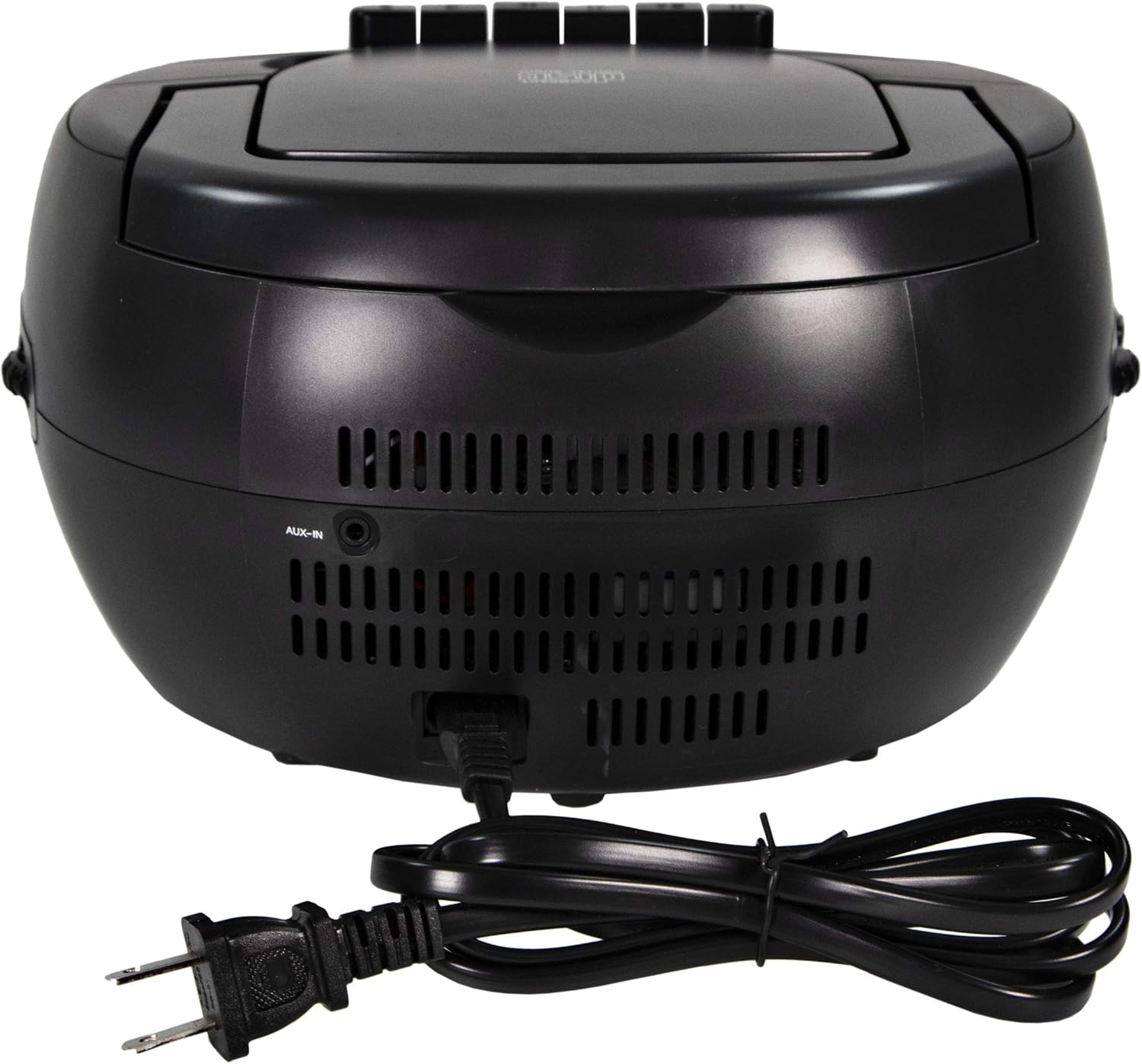
Figure 3: Rear Panel Connections. This image displays the rear of the boombox, featuring the AUX-in port and the AC power cord connection.
Setup
1. Power Connection
The Craig CD6951 can be powered by either AC (alternating current) or DC (direct current) batteries.
AC Power (Household Outlet)
- Ensure the unit is turned off.
- Insert the included AC power cord into the AC IN jack located on the rear of the unit (refer to Figure 3).
- Plug the other end of the AC power cord into a standard household electrical outlet (120V AC, 60Hz).
DC Power (Batteries)
For portable use, the unit requires 6 x 'C' size batteries (not included).
- Ensure the unit is turned off and disconnected from AC power.
- Locate the battery compartment on the bottom of the unit.
- Open the battery compartment cover.
- Insert 6 'C' size batteries, observing the correct polarity (+/-) as indicated inside the compartment.
- Close the battery compartment cover securely.
- When not using the unit for extended periods, remove the batteries to prevent leakage.
Operating Instructions
1. General Controls
- POWER Button: Press to turn the unit on or off.
- VOLUME Control: Rotate the knob (usually on the side) to adjust the audio output level.
- FUNCTION/MODE Selector: Use this switch or button to select between CD, AM, FM, and TAPE/AUX modes.
2. CD Player Operation
The unit supports standard audio CDs and CD-R/CD-RW discs.
- Press the OPEN/CLOSE button or lift the CD compartment lid located on top of the unit.
- Place a CD onto the center spindle with the label side facing up.
- Close the CD compartment lid securely.
- Set the FUNCTION/MODE selector to "CD".
- The LED display will show the total number of tracks.
- Press the PLAY/PAUSE button to begin playback.
- To pause, press PLAY/PAUSE again. Press again to resume.
- To stop playback, press the STOP button.
- To skip tracks, press the SKIP FORWARD or SKIP BACKWARD buttons.
- To fast forward or rewind within a track, press and hold the SKIP FORWARD or SKIP BACKWARD buttons.
- PROGRAM Function: Allows you to program a specific order of tracks.
- In STOP mode, press the PROG button. "PROG" will flash on the display.
- Use the SKIP FORWARD/BACKWARD buttons to select the desired track.
- Press PROG again to confirm. Repeat for up to 20 tracks.
- Press PLAY/PAUSE to start programmed playback.
- REPEAT Function:
- Press REPEAT once during playback to repeat the current track.
- Press REPEAT twice to repeat all tracks on the disc.
- Press REPEAT a third time to cancel the repeat function.
3. Cassette Player/Recorder Operation
The unit features a 6-key cassette player/recorder.
- Press the STOP/EJECT button on the cassette deck to open the cassette door.
- Insert a cassette tape with the open edge facing up and the desired side facing forward.
- Close the cassette door firmly.
- Set the FUNCTION/MODE selector to "TAPE".
- Playback:
- Press the PLAY button to start playback.
- Press the STOP/EJECT button to stop playback.
- Press the PAUSE button to temporarily stop playback. Press again to resume.
- Press the FAST FORWARD or REWIND buttons to quickly advance or rewind the tape.
- Recording (from Radio or CD):
- Insert a blank cassette tape into the cassette compartment.
- Select the desired source (CD or AM/FM Radio) using the FUNCTION/MODE selector.
- Start playback on the source (e.g., play a CD track or tune to a radio station).
- Press the RECORD button on the cassette deck. The PLAY button will also engage.
- To stop recording, press the STOP/EJECT button.
4. AM/FM Radio Operation
- Set the FUNCTION/MODE selector to "AM" or "FM".
- Extend the FM telescopic antenna for better FM reception. For AM, rotate the unit for best reception.
- Rotate the TUNING knob (usually on the side) to select your desired radio station.
- Adjust the VOLUME control to your preferred listening level.
5. Auxiliary Input (AUX-IN)
Connect external audio devices (e.g., MP3 player, smartphone) to the boombox.
- Connect one end of a 3.5mm audio cable (not included) to the headphone jack or line-out jack of your external audio device.
- Connect the other end of the 3.5mm audio cable to the AUX-IN jack located on the rear of the boombox (refer to Figure 3).
- Set the FUNCTION/MODE selector to "AUX".
- Start playback on your external audio device.
- Adjust the volume on both your external device and the boombox for optimal sound.
Maintenance
Cleaning the Unit
- Wipe the exterior of the unit with a soft, damp cloth. Do not use abrasive cleaners or solvents.
- For the CD lens, use a specialized CD lens cleaner disc.
- For the cassette deck, periodically clean the tape heads and pinch rollers with a cotton swab lightly dampened with isopropyl alcohol.
Storage
- When not in use for extended periods, store the unit in a cool, dry place.
- Remove batteries if storing for a long time to prevent leakage.
- Keep the unit away from direct sunlight, heat sources, and excessive dust.
Troubleshooting
| Problem | Possible Cause | Solution |
|---|---|---|
| No power | AC cord not connected; Batteries depleted or incorrectly inserted. | Check AC cord connection; Replace batteries or ensure correct polarity. |
| CD not playing | CD inserted incorrectly; CD dirty or scratched; CD compartment not closed; Mode not set to CD. | Insert CD label side up; Clean or replace CD; Close compartment securely; Select CD mode. |
| Poor radio reception | Antenna not extended/positioned; Weak signal. | Extend FM antenna; Rotate unit for AM; Try moving unit to a different location. |
| Cassette not playing/recording | Tape inserted incorrectly; Tape heads dirty; Mode not set to TAPE. | Ensure tape is correctly inserted; Clean tape heads; Select TAPE mode. |
| No sound from AUX-IN | Cable not connected; Volume too low on device or boombox; Mode not set to AUX. | Check 3.5mm cable connection; Increase volume on both devices; Select AUX mode. |
Specifications
| Model | CD6951 |
| Brand | Craig |
| Product Dimensions (L x W x H) | 10.75 x 10 x 6.14 inches |
| Item Weight | 3.76 pounds |
| Connectivity Technology | Auxiliary |
| Color | Black |
| Speaker Type | Stereo |
| Power Source | AC (cord included) or 6 x 'C' Batteries (not included) |
| CD Compatibility | CD, CD-R, CD-RW |
| Radio Bands | AM/FM Stereo |
Warranty and Support
Information regarding product warranty and customer support was not provided in the available product data. Please refer to the packaging or contact the manufacturer directly for details.
Related documentsCD6951

Ask a question about this manual
Ask about setup, troubleshooting, compatibility, parts, safety, or missing instructions. Manuals+ will review the question and use this page’s manual context to help answer it.