
1. Introduction
Thank you for choosing the Estink Portable Mini Travel Bluetooth Speaker. This manual provides essential information for setting up, operating, and maintaining your speaker. Please read it thoroughly before use to ensure optimal performance and longevity of your device.
2. What's in the Box
Your package should contain the following items:
- Bluetooth Speaker
- Hanging Rope
- Charging Cable
- Manual (this document)
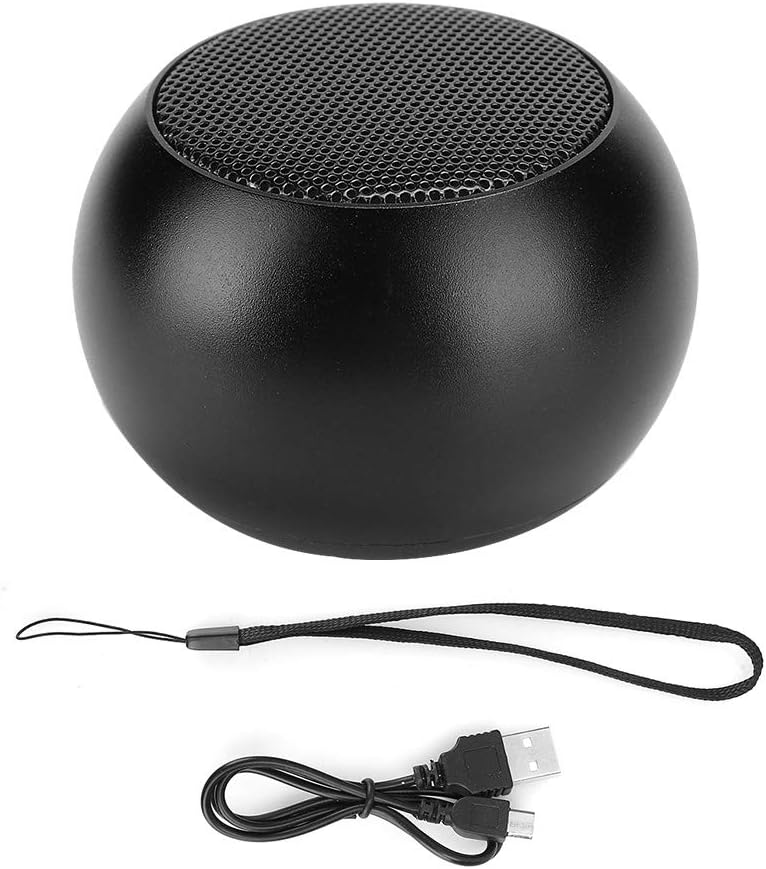
Image: The Estink Bluetooth Speaker shown alongside its hanging rope and charging cable.

Image: A closer view of the hanging rope and the USB charging cable.
3. Product Overview
The Estink Bluetooth Speaker (Model BM3D) is a compact and portable audio device designed for clear sound and easy connectivity. Its luxury aluminum design provides a premium feel, and its small size makes it ideal for travel or everyday use.

Image: Front and rear view of the Estink Bluetooth Speaker, highlighting the speaker grille and the control panel with power button and charging port.
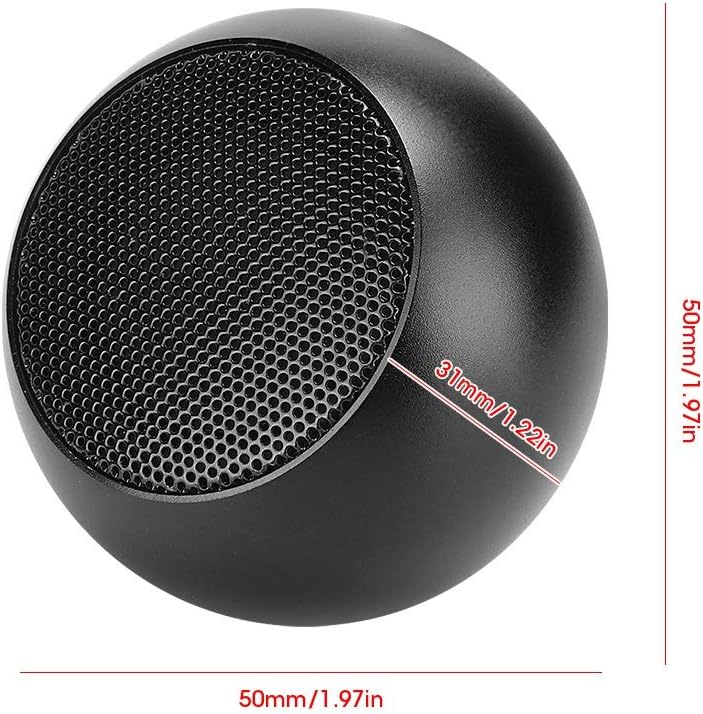
Image: The speaker with its compact dimensions labeled: 50mm (1.97in) width, 50mm (1.97in) depth, and 31mm (1.22in) height.

Image: The speaker depicted as lightweight and portable, suitable for carrying anywhere.

Image: A visual representation of the speaker's 3W drive providing Hi-Fi stereo sound.
Video: An official product video demonstrating the Estink Bluetooth Speaker's features and usage.
4. Setup
4.1 Initial Charging
Before first use, fully charge your speaker. Connect the provided charging cable to the speaker's charging port and the other end to a USB power source (e.g., computer USB port, wall adapter). The charging indicator light will illuminate during charging and turn off when fully charged. A full charge takes approximately 2 hours.
4.2 Powering On/Off
- To Power On: Press and hold the power button (located on the bottom of the speaker) for a few seconds until you hear an audible prompt or see an indicator light.
- To Power Off: Press and hold the power button again for a few seconds until you hear an audible prompt or the indicator light turns off.
5. Operating Instructions
5.1 Bluetooth Pairing
To connect your speaker to a Bluetooth-enabled device:
- Ensure the speaker is powered on and in pairing mode (usually indicated by a blinking blue light).
- On your device (smartphone, tablet, laptop), go to the Bluetooth settings.
- Search for available devices. The speaker will appear as "BM3D" or a similar name.
- Select the speaker from the list to pair. Once connected, you will hear a confirmation tone, and the indicator light will become solid blue.
- The speaker has an excellent connection range of up to 10 meters (33 feet).
5.2 TWS (True Wireless Stereo) Pairing
You can pair two Estink BM3D speakers together to create a true wireless stereo sound experience:
- Ensure both speakers are powered on and not connected to any other Bluetooth device.
- Press and hold the power button on one of the speakers for approximately one second. This speaker will become the primary speaker.
- The two speakers will automatically search for and pair with each other. You will hear a confirmation tone once TWS pairing is successful.
- Once TWS paired, connect your device to the primary speaker via Bluetooth as described in Section 5.1.

Image: Two speakers shown with a smartphone, illustrating the True Wireless Stereo (TWS) pairing capability.
5.3 Hands-free Calling
The speaker features a noise reduction microphone for hands-free calling when connected to your smartphone:
- When a call comes in, the speaker will ring.
- Press the power button once to answer the call.
- Press the power button once again to end the call.
- To reject an incoming call, press and hold the power button for a few seconds.

Image: The speaker in a car setting, demonstrating its use for hands-free calling with its noise reduction microphone.
6. Charging
The speaker is equipped with a 400mAh polymer lithium battery, providing approximately 2-3 hours of continuous playback on a full charge. When the battery is low, you may hear an audible alert or see a blinking indicator light.
- Connect the small end of the charging cable to the speaker's micro USB port.
- Connect the standard USB end to a 5V USB power source.
- Charging time is approximately 2 hours.
7. Maintenance
- Keep the speaker dry. Do not expose it to water or excessive moisture.
- Clean the speaker with a soft, dry cloth. Do not use harsh chemicals or abrasive cleaners.
- Store the speaker in a cool, dry place away from direct sunlight and extreme temperatures.
- Avoid dropping or subjecting the speaker to strong impacts.
8. Troubleshooting
| Problem | Possible Cause | Solution |
|---|---|---|
| Speaker does not power on. | Battery is depleted. | Charge the speaker fully. |
| Cannot pair with Bluetooth device. | Speaker is not in pairing mode or already connected to another device. Device's Bluetooth is off. | Ensure speaker is in pairing mode (blinking light). Disconnect from other devices. Turn on Bluetooth on your device. Move speaker closer to device. |
| No sound or low volume. | Volume on speaker or device is too low. Speaker not properly connected. | Increase volume on both speaker and connected device. Re-pair the speaker. |
| TWS pairing fails. | Speakers are too far apart or already connected to other devices. | Ensure both speakers are disconnected from other devices. Place them close together and try TWS pairing again. |
9. Specifications
| Feature | Detail |
|---|---|
| Model Name | BM3D |
| Brand | Estink |
| Speaker Type | Portable Speaker |
| Loudspeaker Output | 3W |
| Bluetooth Version | 4.2 |
| Bluetooth Range | Up to 10 meters (33 feet) |
| Battery Type | Polymer Lithium Battery |
| Battery Capacity | 400mAh |
| Playback Time | 2-3 Hours |
| Charging Time | 2 Hours |
| Frequency Response | 20HZ-20KHZ |
| Signal-to-Noise Ratio | >= 80DB |
| Product Dimensions (LxWxH) | 50x50x31mm (1.97x1.97x1.22 inches) |
| Item Weight | 68.4g (2.41 oz) |
| Material | Aluminum |
| Control Method | Touch (Power Button) |
| Waterproof | No |
10. Warranty & Support
This product comes with a Limited Warranty. Please refer to the warranty card included in your package for specific terms and conditions.
For technical support or customer service inquiries, please contact your retailer or the manufacturer directly. Keep your purchase receipt as proof of purchase for warranty claims.