
RIBAO TECHNOLOGY BC-40
RIBAO BC-40 Mixed Denomination Money Counter Machine User Manual
Model: BC-40 | Brand: RIBAO TECHNOLOGY
Introduction
This manual provides comprehensive instructions for the RIBAO BC-40 Mixed Denomination Money Counter Machine. It covers essential information regarding setup, operation, maintenance, and troubleshooting to ensure efficient and accurate multi-currency bill counting with advanced counterfeit detection capabilities.
The RIBAO BC-40 is designed for business use, offering features such as mixed denomination counting, multi-currency support, and robust counterfeit detection using CIS, UV, MG, and IR technologies.
1. Setup
1.1 Unboxing and Component Check
Carefully unpack all components from the box. Ensure the following items are present:
- RIBAO BC-40 Money Counter Machine
- Power Cable
- User Manual
- Cleaning Brush
- Dust Cover
- Warranty Card

Figure 1.1: Contents included in the RIBAO BC-40 package, showing the machine, power cable, user manual, cleaning brush, dust cover, and warranty card.
1.2 Placement and Power Connection
Place the machine on a stable, flat surface. Ensure adequate space around the machine for proper ventilation and operation. Connect the power cable to the machine's power input and then to a suitable power outlet.

Figure 1.2: The RIBAO BC-40 Money Counter Machine ready for operation, with bills loaded in the hopper.

Figure 1.3: The RIBAO BC-40 featuring a durable handle for easy portability and robust performance.
For detailed setup instructions, refer to the comprehensive User Manual (PDF) provided with your machine or available for download from the manufacturer's website: RIBAO BC-40 User Manual (PDF).
2. Operating Instructions
2.1 Understanding Counting Modes
The RIBAO BC-40 offers multiple counting modes to suit various needs:
- MIX Mode: Counts the quantity and calculates the total value of mixed denominations for a single currency.
- SDC Mode: Sorts a stack of mixed notes by the first bill's denomination.
- MULTI Mode: Counts the quantity and calculates the total amount of mixed currencies.
- AUTO Mode: Sorts a stack of mixed currencies by the first bill's currency.
- Batch Mode: Processes bills into bundles or customized quantities.
- Accumulation Mode: Keeps a running total of bills added across multiple counts.

Figure 2.1: Visual representation of the six distinct counting modes available on the RIBAO BC-40, illustrating their functions and display outputs.
The machine features a 3.5-inch TFT touch screen for easy navigation and selection of modes. It supports value counting and counterfeit detection for USD, EURO, Canadian Dollar, and Mexican Peso.
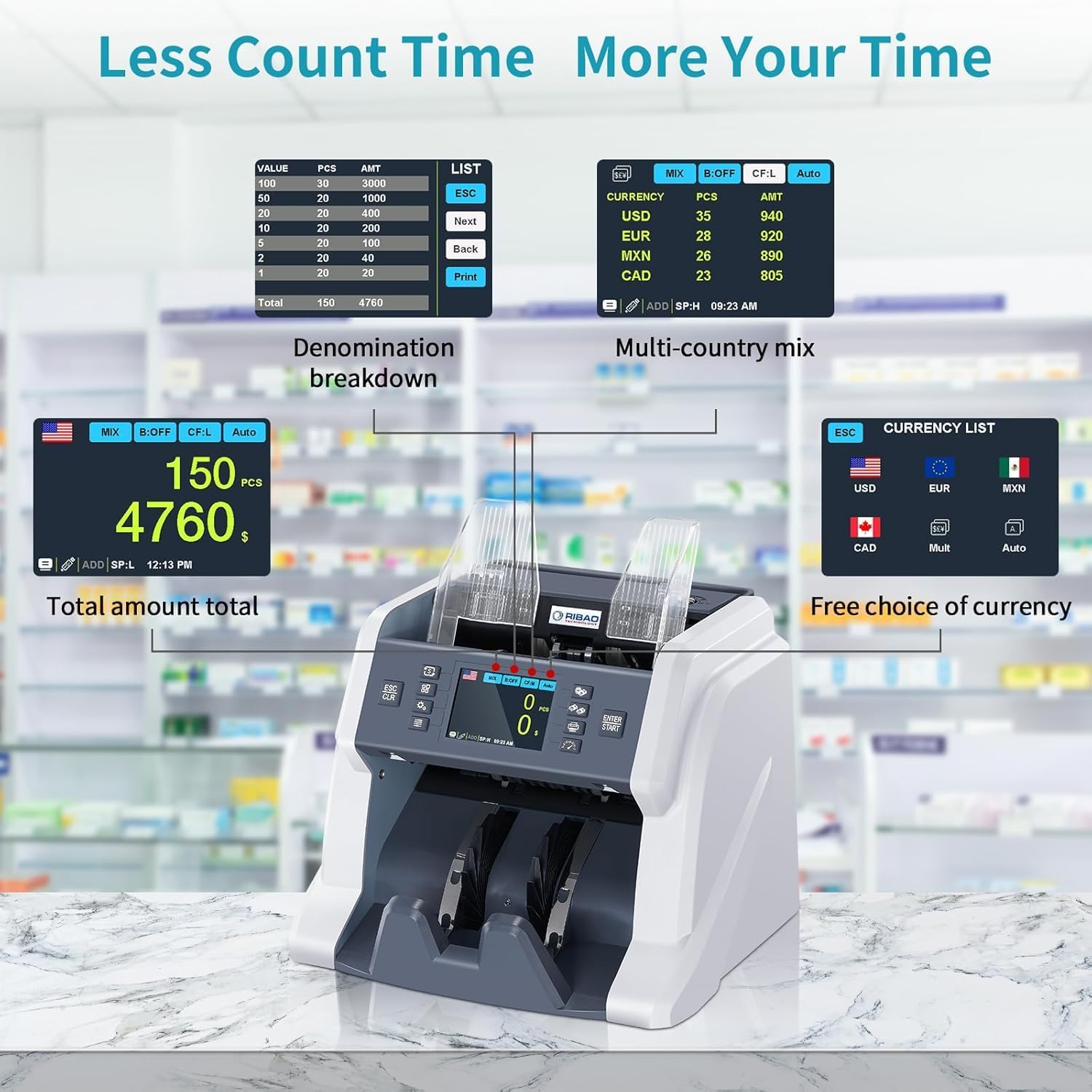
Figure 2.2: The display showing denomination breakdown and multi-country mixed currency counting, highlighting the machine's efficiency.

Figure 2.3: The RIBAO BC-40 positioned next to a point-of-sale system, demonstrating its integration into a business environment as a premium value counter.
2.2 Counterfeit Detection
The BC-40 integrates multiple detection technologies to ensure reliable counterfeit detection:
- UV (Ultra-violet) Detection: Checks for UV features on bills.
- MG (Magnetic) Detection: Checks for magnetic features on bills.
- IR (Infrared) Detection: Utilizes infrared reflection and transmission to check features under IR light.
- CIS (Contact Image Sensor): Provides high-resolution image capture for detailed analysis.
- RGB (Red, Green, Blue) Light Source: Checks features under RGB light.
- Size Detection: Verifies the length and width of bills.

Figure 2.4: An illustration detailing the six counterfeit detection methods employed by the RIBAO BC-40, including UV, MG, IR, RGB, and size detection.

Figure 2.5: A detailed diagram showing the placement and function of various sensors within the RIBAO BC-40 for comprehensive counterfeit detection.

Figure 2.6: An illustration highlighting the Core HD high-frequency image sensor, emphasizing its role in accurate currency recognition with 200DPI high resolution.
For optimal performance, ensure that there are no foreign items such as staples, clips, or coins mixed with banknotes, as this can cause jams and damage the internal parts of the machine. Adjust the note guide 2-5mm wider than the bill size and ensure the feed gap allows one bill to pass but not two.
3. Maintenance
3.1 Daily Cleaning Procedure
Regular cleaning is crucial for maintaining the accuracy and longevity of your RIBAO BC-40. Follow these steps for daily maintenance:
- Prepare a cleaning brush and a soft cleaning cloth.
- Clean the two drum rollers and two friction rollers located in the bill feeding area using the cleaning brush.
- Clean the hopper sensor, a small circular sensor located in the center of the hopper, using the cleaning brush.
- Open the back cover of the machine.
- Clean the two IR emission lights and the two IR reception lights located inside the back compartment using the cleaning brush and then wipe gently with the cleaning cloth.
- Close the back cover securely.
Video 3.1: This video demonstrates the daily cleaning and basic maintenance procedure for the RIBAO BC-40 money counter, including cleaning rollers and sensors.

Figure 3.1: An exploded view illustrating the smooth and durable feeding system components, including friction nudge rubber rollers designed for long-term performance.
4. Troubleshooting
If you encounter issues with your RIBAO BC-40, consider the following common problems and solutions:
- Bill Jams: Ensure banknotes are not folded, torn, or contain foreign objects. Adjust the note guide to the correct width. Open the back cover to clear any jammed notes.
- Error Messages: Refer to the specific error code displayed on the screen and consult the detailed user manual for corresponding solutions. Often, cleaning sensors or clearing jams resolves these.
- Inaccurate Counting/Counterfeit Errors: Ensure sensors are clean (refer to Maintenance section). Verify that the correct counting mode and currency are selected.
For persistent issues or software updates, please contact the US-based service team. Information of counting could be exported to PC or SD card with special software for further checking.

Figure 4.1: Icon representing Frequently Asked Questions, encouraging users to seek further information.
Frequently Asked Questions (FAQ)
- Q: What is the difference between BC-40 and BC-55, MC-40 and MC-50?
- A: BC-55 can install 32 currencies at most, MC-50 can support 20 different currencies at most, BC-40 & MC-40 can support 4 different currencies at most. BC-55 & MC-50 has serial number reading function but BC-40 & MC-40 does not have. MC-40 & MC-50 is upgraded to a 4.3'' larger touchscreen. BC-40 & MC-40 have one CIS, BC-55 & MC-50 both has two CIS, BC-55 is the strongest in counterfeit detection capability.
5. Specifications
| Feature | Detail |
|---|---|
| Brand | RIBAO TECHNOLOGY |
| Model Number | BC-40 |
| Item Weight | 15.17 pounds |
| Product Dimensions | 11.81 x 9.72 x 11.3 inches |
| Manufacturer | RIBAO TECHNOLOGY |
| Counterfeit Detection | CIS/UV/MG/IR |
| Supported Currencies | USD, EURO, Canadian Dollar, Mexican Peso |
| Display | 3.5'' TFT Touch Screen |
6. Warranty and Support
6.1 Warranty Information
The RIBAO BC-40 comes with a 2-year warranty. Please refer to the warranty card included in your package for full terms and conditions.
6.2 Customer Support
RIBAO TECHNOLOGY provides US-based service team support. For any problems regarding error messages, bill jams, software updates, or general inquiries, please contact us by email. Our team is committed to providing outstanding after-sale service.

Figure 6.1: Image highlighting the availability of US-based customer support for the product.
For additional resources and information, visit the official RIBAO TECHNOLOGY store on Amazon: RIBAO TECHNOLOGY Store.
Related documentsBC-40

Ask a question about this manual
Ask about setup, troubleshooting, compatibility, parts, safety, or missing instructions. Manuals+ will review the question and use this page’s manual context to help answer it.