
ZdalaMit NB887UD
Contents
NB887UD NB887 Replacement Remote Control User Manual
Your guide to setting up and operating your new replacement remote control.
1. Introduction
This manual provides detailed instructions for the use and maintenance of your new NB887UD NB887 Replacement Remote Control. Designed for seamless compatibility, this remote offers a direct replacement solution for various Magnavox DVD VCR Combo Player models, ensuring immediate functionality without complex setup procedures.
Compatible Magnavox DVD VCR Combo Player models include: ZV427MG9A, RZV427MG9, ZV427MG9, RZV427MG9A, NB820UD, NB820.
2. Setup
2.1 Battery Installation
The NB887UD remote control requires two (2) AA size alkaline batteries for operation. Batteries are not included with the remote control.
- Locate the battery compartment on the back of the remote control.
- Slide the battery compartment cover downwards to open it.
- Insert two AA alkaline batteries, ensuring the positive (+) and negative (-) terminals align correctly with the markings inside the compartment.
- Slide the battery compartment cover back into place until it clicks securely.
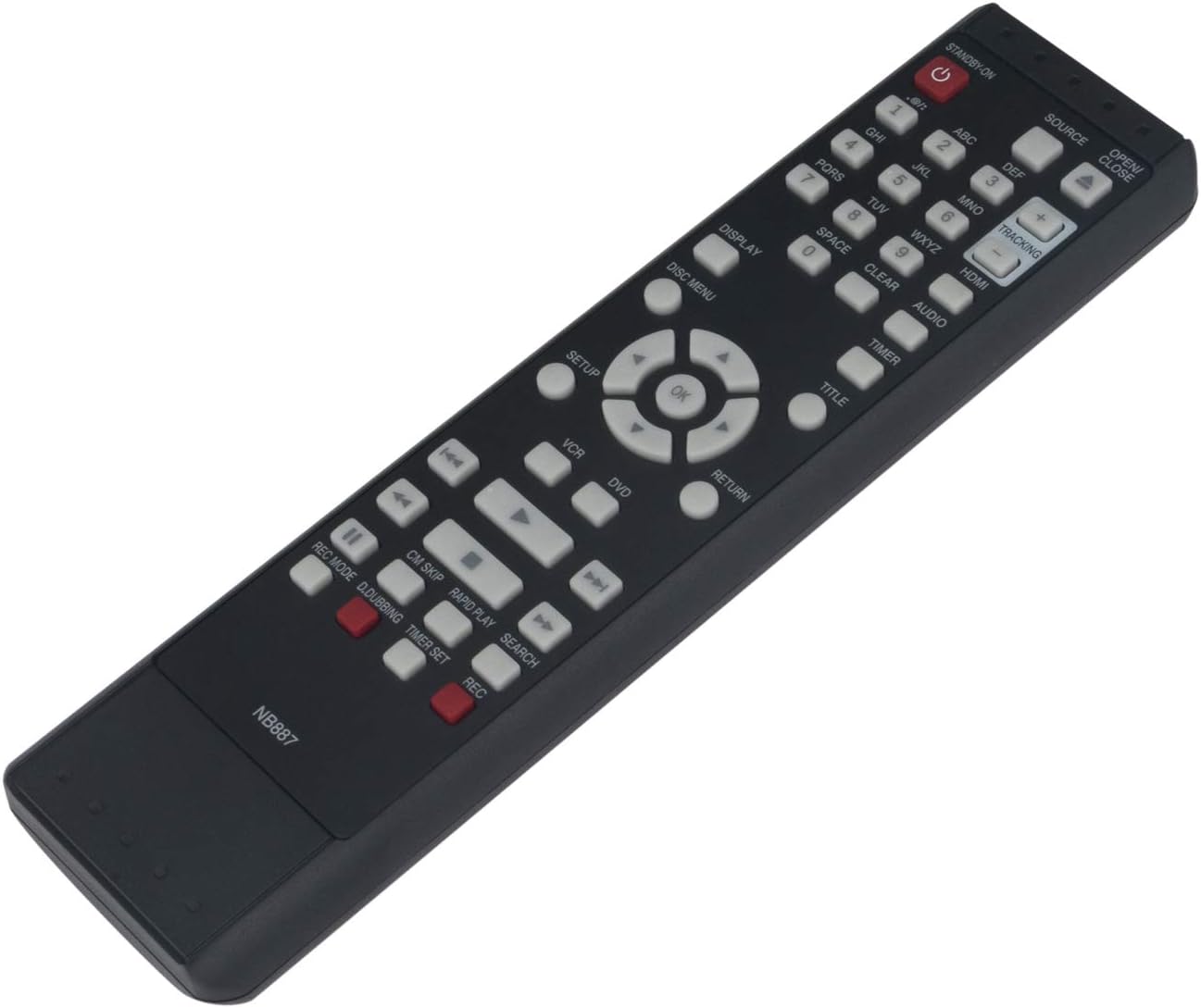
Figure 2.1: Angled view of the NB887UD remote control. The battery compartment is located on the rear side.
2.2 Initial Use
Once batteries are correctly installed, the remote control is ready for immediate use. No programming or pairing is required. Simply point the remote control towards your Magnavox DVD VCR Combo Player and begin operating.
3. Operating Instructions
The NB887UD remote control provides full functionality for your compatible Magnavox DVD VCR Combo Player. Below is a guide to the primary buttons and their functions.

Figure 3.1: Front view of the NB887UD remote control with button layout.
3.1 Button Functions Overview
| Button Name | Function |
|---|---|
| STANDBY-ON | Powers the unit On or Off (Standby mode). |
| SOURCE | Selects the input source (e.g., TV, DVD, VCR). |
| OPEN/CLOSE | Opens or closes the DVD disc tray. |
| 0-9 (Number Buttons) | Direct selection of tracks, chapters, or channels. |
| ABC, DEF, GHI, JKL, MNO, PQRS, TUV, WXYZ | Used for text input or specific functions as indicated by the player. |
| SPACE | Inserts a space during text input. |
| CLEAR | Clears current selection or input. |
| AUDIO | Changes audio tracks or modes. |
| TITLE | Accesses the DVD title menu. |
| DISPLAY | Shows on-screen display information. |
| DISC MENU | Accesses the DVD disc menu. |
| Navigation (▲, ▼, ◄, ►) | Navigates through menus and options. |
| OK | Confirms a selection. |
| SETUP | Accesses the system setup menu. |
| RETURN | Returns to the previous menu or screen. |
| VCR | Switches the unit to VCR mode. |
| DVD | Switches the unit to DVD mode. |
| Playback Controls (◀◀, ▶, ▶▶, ■, ██, ◀, ▶) | Rewind, Play, Fast Forward, Stop, Pause, Skip Back, Skip Forward. |
| CM SKIP | Skips forward by a set commercial length. |
| RAPID PLAY | Initiates rapid playback. |
| SEARCH | Activates search function. |
| REC MODE | Selects recording quality mode. |
| D.DUBBING | Initiates direct dubbing (copying) from DVD to VCR or vice versa. |
| TIMER SET | Sets recording timers. |
| REC | Starts recording. |
| TRACKING (+/-) | Adjusts VCR tracking for optimal picture quality. |
| HDMI | Selects HDMI input (if supported by the player). |
4. Maintenance
4.1 Cleaning the Remote Control
To maintain the appearance and functionality of your remote control, wipe it regularly with a soft, dry cloth. Do not use liquid cleaners, abrasive cleaners, or chemical solvents, as these may damage the surface or internal components.
4.2 Battery Replacement
Replace batteries when the remote control's response becomes sluggish or it ceases to function. Always replace both batteries at the same time with new AA alkaline batteries. Do not mix old and new batteries, or different types of batteries.
5. Troubleshooting
Common Issues and Solutions
- Remote Control Not Responding:
- Ensure batteries are inserted correctly with the correct polarity (+/-).
- Replace old batteries with new AA alkaline batteries.
- Check for any obstructions between the remote control and the Magnavox player's infrared sensor.
- Ensure you are within the effective operating range and line of sight of the player.
- Specific Buttons Not Working:
- Clean the remote control surface, especially around the non-working buttons, to remove any dirt or debris.
- Verify that the remote control is in the correct mode (e.g., DVD or VCR mode) for the function you are trying to perform.
6. Specifications
| Feature | Detail |
|---|---|
| Model | NB887UD / NB887 |
| Compatibility | Magnavox DVD VCR Combo Players (ZV427MG9A, RZV427MG9, ZV427MG9, RZV427MG9A, NB820UD, NB820) |
| Power Source | 2 x AA Alkaline Batteries (not included) |
| Dimensions | 8 x 2 x 0.6 inches (approximate) |
| Item Weight | 2.82 ounces (without batteries) |
| Color | Black |
| Special Feature | Pre-Programmed (No setup required) |
7. Warranty and Support
This replacement remote control is designed for reliable performance. While specific warranty details are not provided in this manual, for any questions, concerns, or support needs regarding your NB887UD NB887 Replacement Remote Control, please do not hesitate to contact the manufacturer, ZdalaMit, or your point of purchase.
Your satisfaction is important, and assistance is available for any operational issues or inquiries.
Ask a question about this manual
Ask about setup, troubleshooting, compatibility, parts, safety, or missing instructions. Manuals+ will review the question and use this page’s manual context to help answer it.