
Galirity SX-990
User Manual for Galirity Bluetooth Headphones
Model: SX-990
Product Overview
The Galirity SX-990 Bluetooth Headphones are designed for convenience and high-quality audio. Featuring a foldable neckband design, retractable earbuds, and noise-cancelling microphone, these earphones are suitable for various activities including running, workouts, and general use. They come with a carry case for easy portability.
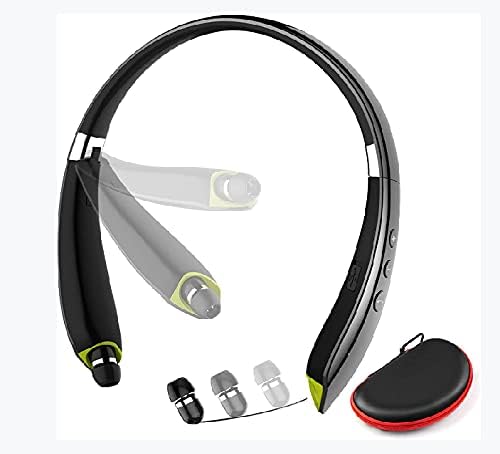
Image: The Galirity SX-990 Bluetooth Headphones, showcasing the neckband design, retractable earbuds, and included ear tips and carry case.
What's in the Box?
- Galirity Bluetooth Headset x 1
- USB Charging Cable x 1
- Ear Tips (S, M, L) x 3 pairs
- User Manual x 1
- Carrying Case x 1

Image: A visual representation of all items included in the product packaging: the Galirity Bluetooth Headset, USB charging cable, various ear tip sizes, the user manual, and a protective carrying case.
Setup
1. Charging the Headset
Before first use, fully charge the headset. Connect the provided USB charging cable to the Micro USB charging port on the headset and the other end to a USB power source (e.g., computer USB port, wall adapter). The LED indicator will show charging status and turn off or change color when fully charged.
2. Powering On/Off
To power on, slide the Power ON/OFF switch to the 'ON' position. To power off, slide the switch to the 'OFF' position.
3. Bluetooth Pairing
- Ensure the headset is powered off.
- Press and hold the Power ON/OFF switch until the LED indicator flashes red and blue alternately, indicating pairing mode.
- On your device (smartphone, tablet, computer), enable Bluetooth and search for available devices.
- Select "SX-990" from the list of found devices.
- Once paired, the LED indicator will stop flashing and remain solid blue (or turn off), and you will hear a confirmation tone.
- If prompted for a password, enter "0000".
4. Selecting Ear Tips
Choose the ear tip size (S, M, L) that provides the most comfortable and secure fit for optimal sound quality and noise isolation.
Operating Instructions
The Galirity SX-990 features intuitive controls located on the neckband for easy access to various functions.
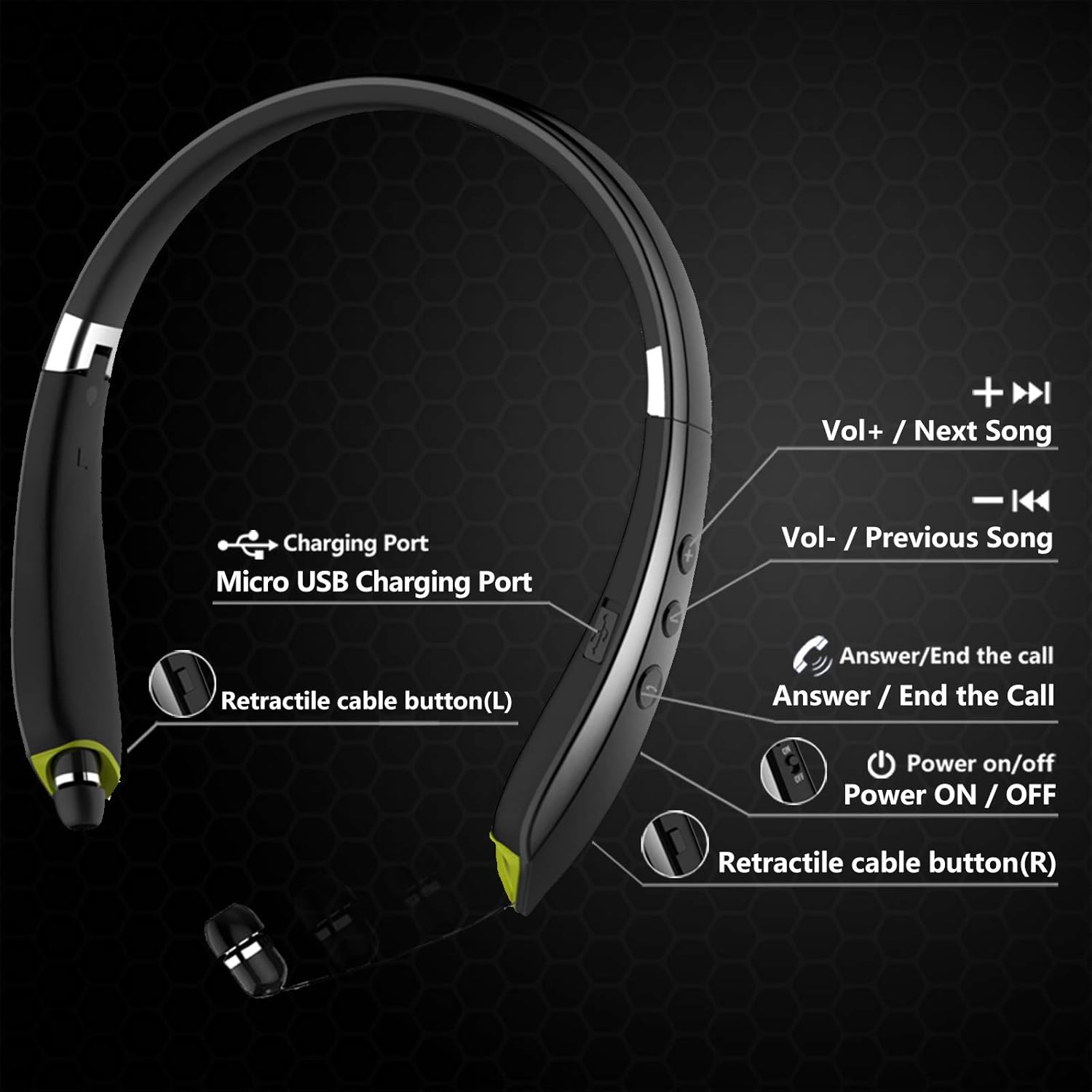
Image: A detailed diagram illustrating the location and function of each control button on the Galirity SX-990 neckband, including volume, track control, call answer/end, power, and retractable cable buttons.
- Volume Up / Next Song: Press '+' button for volume up. Long press '+' button for next song.
- Volume Down / Previous Song: Press '-' button for volume down. Long press '-' button for previous song.
- Answer / End Call: Press the Call button (phone icon) to answer an incoming call or end an active call.
- Retract Earbuds: Press the retractable cable button (L) for the left earbud and (R) for the right earbud to retract them into the neckband.
- Hands-free Calling & Vibrate Alert: The headset supports hands-free calling with its built-in microphone. It will vibrate to alert you of incoming calls, ensuring you don't miss important communications.

Image: A user demonstrating the hands-free calling feature of the Galirity SX-990 headphones, highlighting the convenience of the neckband design and vibrate alert for incoming calls.
Maintenance
- Cleaning: Wipe the headset with a soft, dry cloth. Do not use abrasive cleaners or solvents.
- Storage: When not in use, fold the headset and store it in the provided carrying case to protect it from dust and damage.
- Battery Care: To prolong battery life, avoid fully discharging the battery frequently. Charge the headset regularly, even if not used for extended periods.
- Water Resistance: The headset is sweatproof, making it suitable for sports and exercise. However, it is not designed for submersion in water. Avoid exposing it to heavy rain or extreme moisture.

Image: The Galirity SX-990 headphones in their folded state, demonstrating their compact design for easy storage in a pocket or the included carry case. Also highlights the soft silicone material and 10-inch retractable wires.

Image: Various individuals engaged in physical activities such as running and cycling, wearing the Galirity SX-990 headset, illustrating its sweatproof design suitable for music and workouts.
Troubleshooting
| Problem | Possible Cause | Solution |
|---|---|---|
| Headset does not power on. | Low battery. | Charge the headset fully. |
| Cannot pair with device. | Headset not in pairing mode; Bluetooth off on device; device too far. | Ensure headset is in pairing mode (flashing red/blue). Turn on Bluetooth on your device. Move headset closer to device (within 10 meters). |
| No sound or low sound. | Volume too low; headset not connected; incorrect audio output. | Increase volume on both headset and connected device. Reconnect the headset. Check audio output settings on your device. |
| Poor call quality. | Weak signal; microphone obstruction. | Move closer to your device. Ensure microphone is not covered. |
Specifications
- Model Name: SX-990
- Brand: Galirity
- Connectivity Technology: Wireless (Bluetooth 5.0)
- Headphones Jack: USB (for charging)
- Battery Capacity: 300 mAh
- Music Playtime: Up to 16 hours
- Talking Time: Up to 18 hours
- Standby Time: Up to 300 hours
- Charging Time: Approximately 3.5 hours
- Item Weight: 74 Grams (2.61 ounces)
- Product Dimensions: 6.7 x 6.1 x 6.2 inches
- Material: Plastic, Silicone
- Special Features: Foldable, Microphone Included, Noise Cancellation (CVC 6.0), Retractable cord, Sweatproof, Wireless
- Water Resistance Level: Water Resistant (Sweatproof)
- Control Method: Touch (buttons)
- UPC: 610877799923
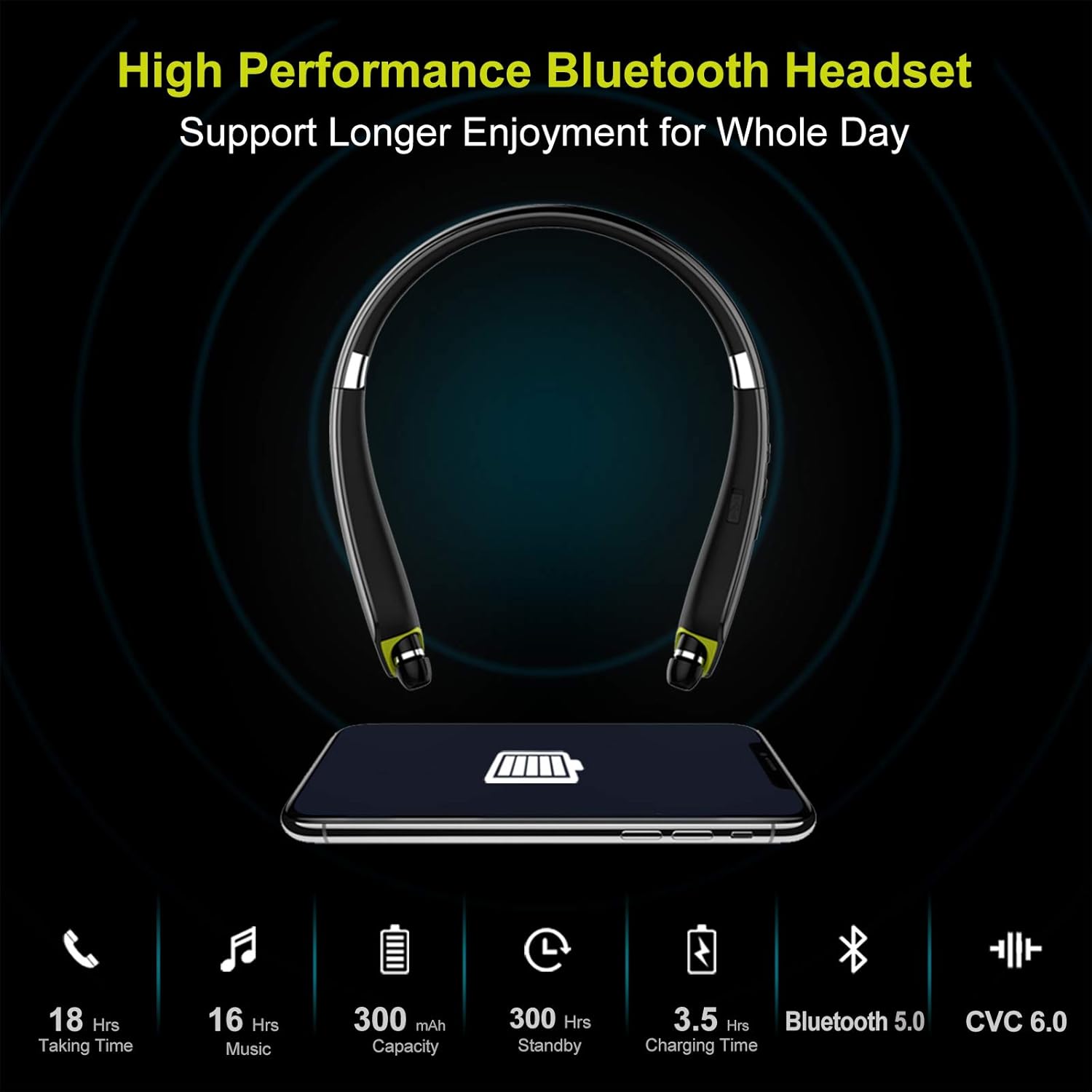
Image: An infographic detailing the high-performance features of the Galirity SX-990 Bluetooth Headset, including 18 hours talk time, 16 hours music time, 300mAh battery capacity, 300 hours standby, 3.5 hours charging time, Bluetooth 5.0, and CVC 6.0 noise cancellation.
Warranty and Support
Galirity products are manufactured to high quality standards. For any issues or inquiries regarding your SX-990 Bluetooth Headphones, please refer to the warranty information provided with your purchase or contact Galirity customer support. Contact details can typically be found on the product packaging or the official Galirity website.
Ask a question about this manual
Ask about setup, troubleshooting, compatibility, parts, safety, or missing instructions. Manuals+ will review the question and use this page’s manual context to help answer it.