
WiZ Connected 929002427614
Contents
WiZ Smart Socket User Manual
Model: 929002427614
Introduction
The WiZ Smart Socket allows you to transform any standard wall outlet into a smart outlet, enabling intelligent control over connected devices. This product is part of the Philips Lighting family, ensuring quality and compatibility within the WiZ ecosystem. Control your devices effortlessly via the WiZ app or voice commands.

The WiZ Smart Socket, shown alongside its retail packaging.
What's in the Box
- 1 x WiZ Smart Socket
Setup Guide
Follow these steps to set up your WiZ Smart Socket and integrate it into your smart home system.
- Download the WiZ App: Search for "WiZ Connected" in your smartphone's app store (iOS or Android) and download the official application.
- Plug in the Smart Socket: Insert the WiZ Smart Socket into a standard wall outlet. Ensure it is securely seated.
- Connect a Device: Plug the device you wish to control (e.g., a lamp, coffee maker) into the WiZ Smart Socket.
- Pair with WiZ App: Open the WiZ app, create an account or log in, and follow the on-screen instructions to add a new device. The app will guide you through connecting the socket to your Wi-Fi network.
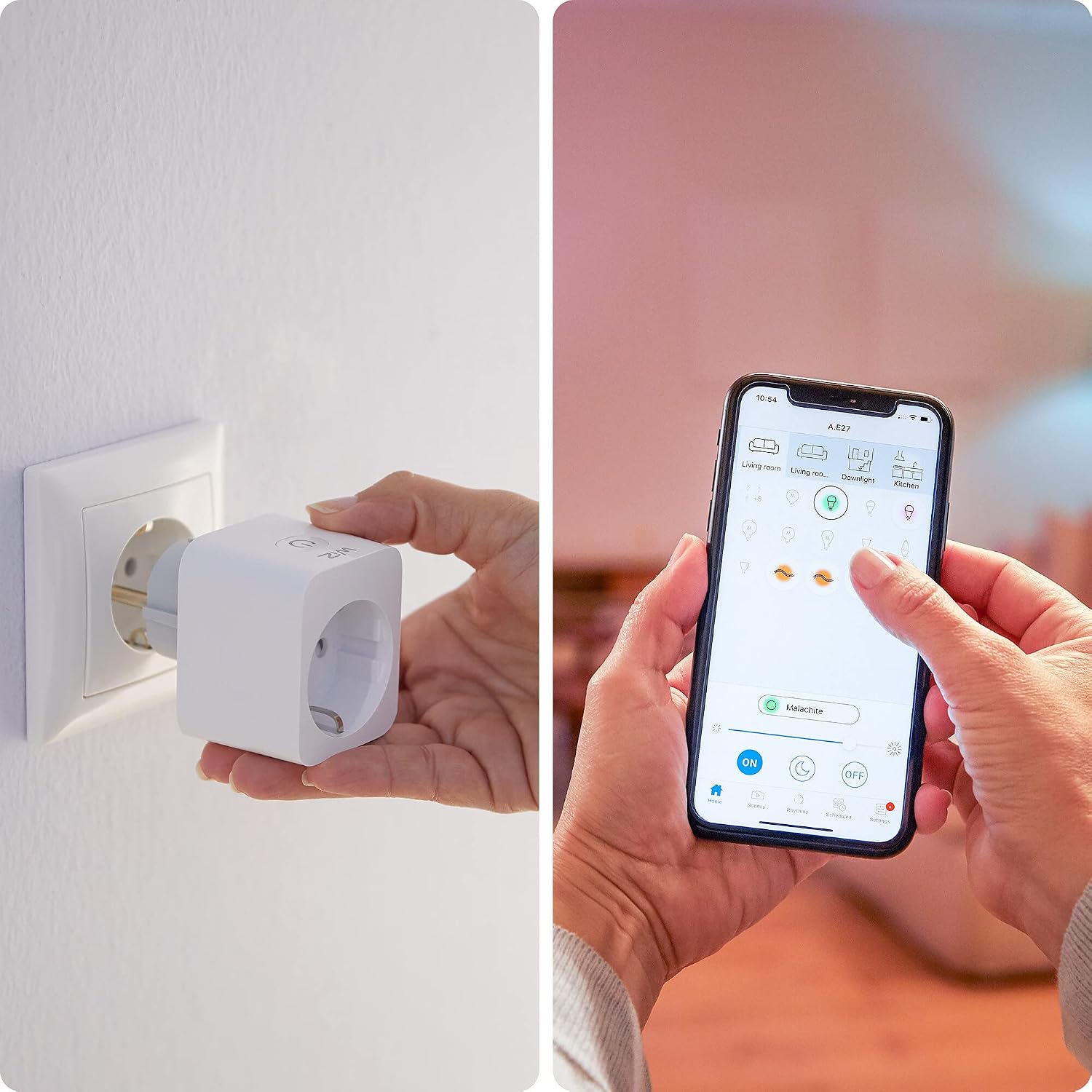
The WiZ Smart Socket being inserted into a wall outlet, with the WiZ app displayed on a smartphone.
Important Note: The WiZ Smart Socket operates on a 2.4 GHz Wi-Fi network. Ensure your router is configured to support this frequency during setup.
Operating Instructions
Once set up, you can control your WiZ Smart Socket and connected devices in several ways:
- WiZ App Control: Use the WiZ app to remotely turn devices on/off, set schedules, timers, and create custom scenes. The app allows for stepless dimming if the connected device supports it and is compatible with dimming via power control.
- Voice Control: The WiZ Smart Socket is compatible with popular voice assistants such as Apple HomeKit, Google Assistant, and Amazon Alexa. Link your WiZ account to your preferred voice assistant's app and use voice commands to control your devices.
- WiZCLICK: For quick control, you can use the WiZCLICK feature (if available and configured) to cycle through modes or turn the device on/off with a physical switch connected to the socket.

A user interacting with the WiZ app on a smartphone to manage smart lighting connected via the WiZ Smart Socket.

The WiZ Smart Socket in use, controlling a coffee maker and decorative string lights, demonstrating its versatility.
Maintenance
To ensure the longevity and optimal performance of your WiZ Smart Socket, follow these maintenance guidelines:
- Cleaning: Disconnect the smart socket from the power outlet before cleaning. Use a soft, dry cloth to wipe the exterior. Do not use liquid cleaners or abrasive materials.
- Environmental Conditions: Avoid exposing the smart socket to extreme temperatures, high humidity, or direct sunlight. It is designed for indoor use only.
- Safety Lock: The smart socket features a safety lock to prevent children's belongings from being inserted into the socket slots. Do not attempt to bypass or tamper with this safety feature.
- Overload Prevention: Do not connect devices that consume more than 2000W to the smart socket. Exceeding this limit can damage the unit and pose a safety risk.
Troubleshooting
If you encounter issues with your WiZ Smart Socket, try the following troubleshooting steps:
| Problem | Possible Cause | Solution |
|---|---|---|
| Device not responding via app/voice. | No Wi-Fi connection, incorrect pairing, or app issue. | Check your Wi-Fi router and internet connection. Ensure the smart socket is within Wi-Fi range. Restart the WiZ app. Try re-pairing the device if necessary. |
| Smart socket is offline. | Power outage, Wi-Fi disconnected, or device malfunction. | Verify power to the outlet. Check your Wi-Fi network. Unplug the smart socket for 10 seconds and plug it back in to reset. |
| Connected device does not turn on/off. | Device not properly plugged in, device malfunction, or smart socket issue. | Ensure the device is securely plugged into the smart socket. Test the device by plugging it directly into a wall outlet. Verify the smart socket is receiving power and is online. |
| Smart socket frequently disconnects. | Weak Wi-Fi signal or network interference. | Move the smart socket closer to your Wi-Fi router. Reduce interference from other electronic devices. Ensure your Wi-Fi network is stable. |
If problems persist, consult the WiZ Connected support resources or contact customer service.
Specifications
| Feature | Detail |
|---|---|
| Model Number | 929002427614 |
| Product Dimensions | 1.65 x 1.93 x 2.32 inches |
| Weight | 3.46 ounces |
| Manufacturer | WiZ |
| Brand | WiZ Connected |
| Color | White |
| Compatible Devices | Alexa, Google Assistant, Apple HomeKit |
| Material | Plastic |
| Total Power Outlets | 1 |
| Connectivity | Wi-Fi (2.4 GHz) |
Warranty and Support
The WiZ Smart Socket is a Philips Lighting brand product. For specific warranty information, please refer to the official WiZ Connected website or the documentation included with your purchase. For technical support, troubleshooting assistance, or to access the latest FAQs, please visit the WiZ Connected support page or contact their customer service directly.
You can also find helpful resources and community support through the WiZ app.
Documents and downloads
Ask a question about this manual
Ask about setup, troubleshooting, compatibility, parts, safety, or missing instructions. Manuals+ will review the question and use this page’s manual context to help answer it.