
Introduction
Thank you for choosing the HANGSUN Cordless Neck Back Massager MG700. This manual provides essential information for the safe and effective use of your massager. Please read it thoroughly before operation and retain it for future reference. This device is designed to provide targeted percussion massage for various body parts, including the neck, back, shoulders, arms, waist, legs, and feet, to help relieve muscle tension and promote relaxation.

Image: The HANGSUN MG700 Cordless Neck Back Massager, showcasing its ergonomic design.
Safety Information
To ensure safe operation, please observe the following guidelines:
- Do not massage any single body part for more than 3 minutes.
- The total massage duration for the entire body should not exceed 20 minutes per session.
- Consult a physician before use if you have any medical conditions, are pregnant, or have a pacemaker.
- Do not use the massager on swollen, inflamed, or injured areas.
- Keep out of reach of children.
- Do not immerse the device in water or use it in excessively humid environments.
Product Features
- Double-Head Percussion Massage: Designed for deep, targeted massage, offering more effective relief than single-head massagers.

Image: Illustration of the double-head massage mechanism targeting muscle tissue.
- Cordless Operation: Equipped with a powerful rechargeable battery, providing up to 150 minutes of use on a full charge for convenient use anywhere.

Image: The cordless massager highlighting its 150-minute battery life and powerful motor.
- Powerful Motor: Delivers up to 3500 pulses per minute for deep, soothing percussion massage.
- Four Massage Modes: Choose from Normal, Soft, Pulse, or Random modes to customize your massage experience.

Image: Close-up of the control panel showing the four massage mode options.
- Five Interchangeable Massage Nodes: Includes various attachments for a personalized massage experience on different body parts.

Image: The five interchangeable massage nodes included with the massager.
Package Contents
The HANGSUN MG700 package includes:
- 1 x HANGSUN Cordless Neck Back Massager MG700
- 5 x Pairs of Interchangeable Massage Nodes (10 individual nodes)
- 1 x Charging Adapter
- 1 x User Manual
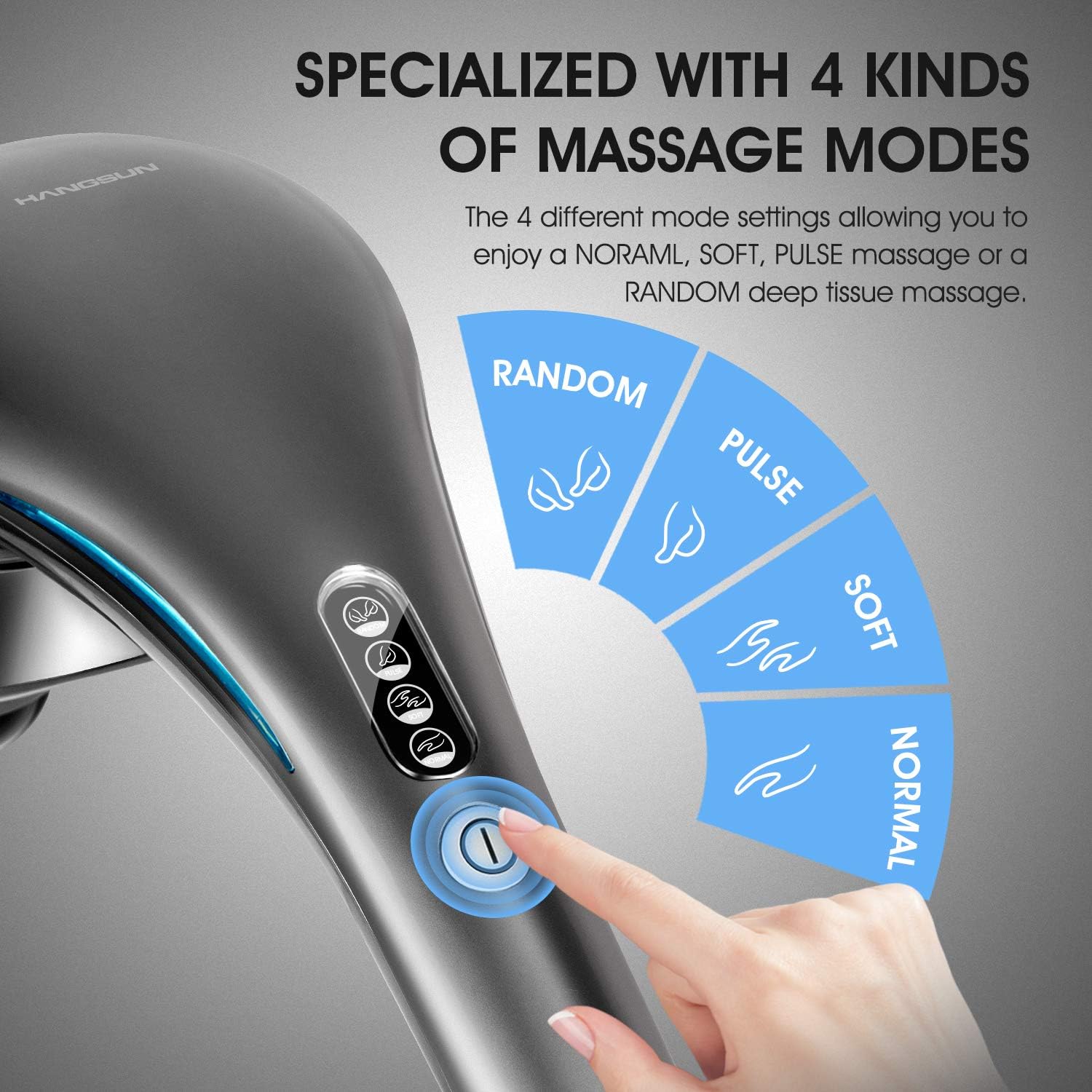
Image: The HANGSUN MG700 massager shown with its full set of interchangeable massage nodes.
Setup
- Charge the Massager: Before first use, fully charge the massager. Connect the charging adapter to the massager's charging port and plug it into a power outlet. The indicator light will show charging status.
Note: The massager will not operate while it is charging.

Image: The massager connected to its charger, with a visual reminder that it cannot be used during charging.
- Attach Massage Nodes: Select the desired pair of massage nodes. Align the nodes with the massage heads and push firmly until they click into place. To remove, pull the nodes off.
Operating Instructions
- Power On/Off: Press the ON/OFF button located on the handle to turn the massager on or off.
- Select Massage Mode: After powering on, press the Mode button (often indicated by a wave icon or similar) to cycle through the four available massage modes: Normal, Soft, Pulse, and Random. The corresponding indicator light will illuminate.
- Adjust Intensity: Use the Speed Control buttons (usually '+' and '-' or multiple buttons for different levels) to increase or decrease the massage intensity to your preferred level.
- Apply to Body: Gently place the massage heads on the desired body area. Move the massager slowly over the muscles.

Image: A woman demonstrating the use of the massager on her neck.

Image: A woman demonstrating the use of the massager on her upper back.

Image: A diagram illustrating multiple body positions where the massager can be applied, including shoulder, arm, back, abdomen, thigh, and leg.
- Session Duration: Adhere to the safety guidelines: no more than 3 minutes per body part and a maximum of 20 minutes per session.
Maintenance
- Cleaning: Disconnect the massager from the charger before cleaning. Wipe the surface of the massager with a soft, damp cloth. Do not use abrasive cleaners or immerse the device in water.
- Storage: Store the massager in a cool, dry place, away from direct sunlight and extreme temperatures.
Troubleshooting
| Problem | Possible Cause | Solution |
|---|---|---|
| Massager does not turn on. | Battery is depleted. | Charge the massager fully. |
| Massager stops during use. | Battery is low or device overheated. | Recharge the battery. Allow the device to cool down if it feels warm. |
| Massage intensity feels weak. | Incorrect mode selected or low battery. | Adjust to a stronger mode or recharge the massager. |
Specifications
- Model: MG700
- Power Source: Battery Powered (Rechargeable)
- Massage Technique: Percussion
- Product Dimensions: 16.93"L x 6.3"W x 5.71"H (43cm L x 16cm W x 14.5cm H)

Image: Diagram illustrating the length, width, and height of the HANGSUN MG700 massager.
- Item Weight: 3.92 Pounds (1.78 Kilograms)
- Material: Aluminium Plastic
- Color: Black, Grey
- Water Resistance Level: Not Water Resistant
Warranty and Support
For warranty information or technical support, please refer to the contact details provided with your purchase or visit the official HANGSUN website. Keep your proof of purchase for any warranty claims.