
Introduction
Thank you for choosing the Lancer Tactical LCD Screen Universal LiPO Airsoft Balance Charger. This manual provides essential information for the safe and efficient operation of your new charger. Please read this manual thoroughly before use and retain it for future reference.
This charger is designed for Lithium Polymer (LiPo) batteries commonly used in airsoft applications. It features an LCD screen for detailed charge information and automatically balances cells for optimal battery health and longevity.
Important Safety Information
Failure to follow these safety instructions can result in fire, personal injury, or property damage.
- Always charge LiPo batteries in a fire-safe location, away from flammable materials.
- Never leave charging batteries unattended.
- Use only with compatible LiPo batteries. Do not attempt to charge other battery types.
- Ensure correct polarity when connecting batteries to the charger.
- Do not charge damaged, swollen, or punctured batteries.
- Keep the charger and batteries away from water and extreme temperatures.
- Disconnect the charger from the power source and battery immediately if any abnormal behavior (e.g., overheating, smoke) is observed.
- This product is not a toy. Keep out of reach of children.
- Must be at least 18 years old to purchase and use this product.
Product Overview
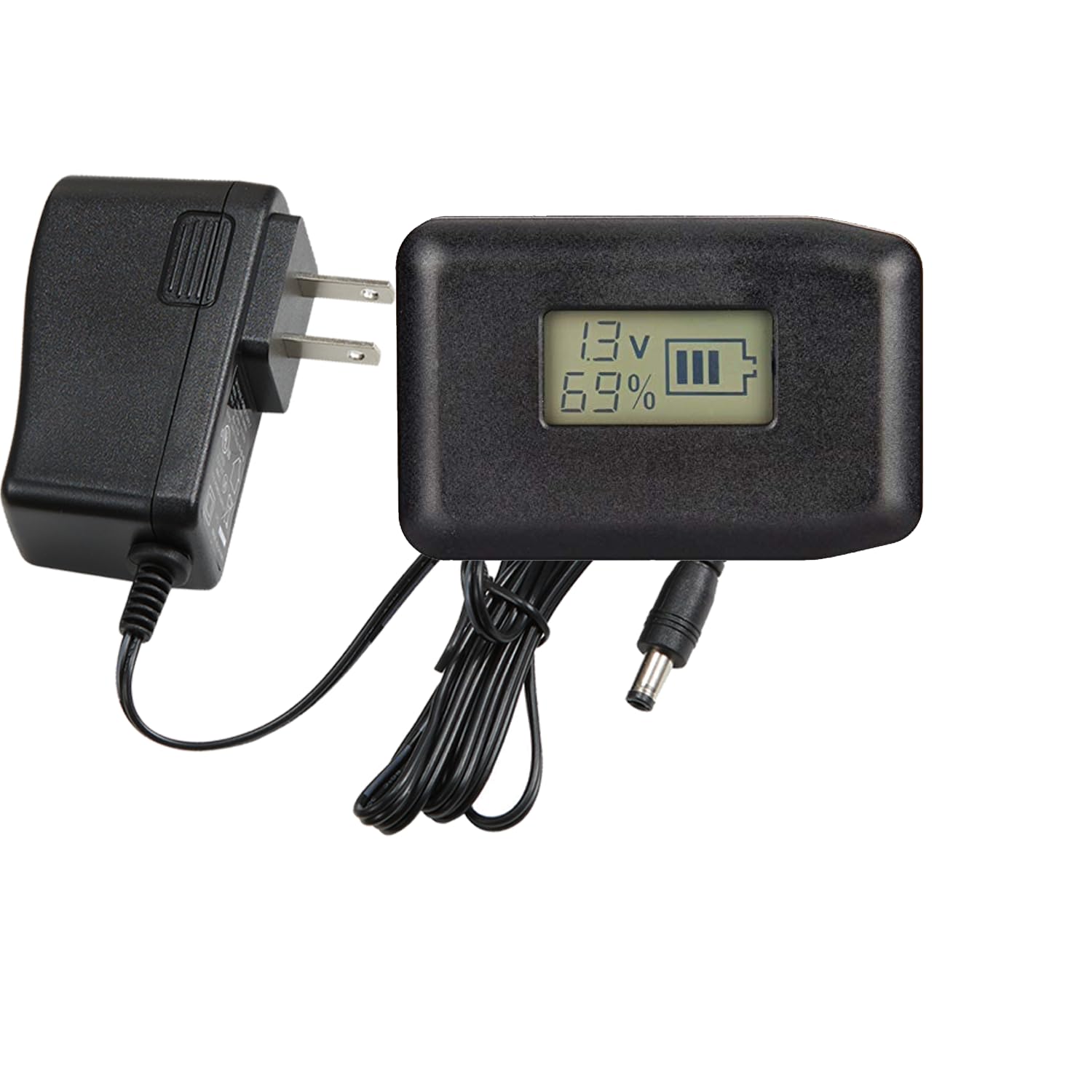
The Lancer Tactical LiPO Balance Charger is a compact and efficient device for maintaining your airsoft LiPo batteries. It features an integrated LCD screen for real-time charging status.
Components
- LiPO Balance Charger Unit with LCD Screen
- AC Power Adapter
- Battery Connection Cable (JST or XT60 compatible)

Setup Instructions
- Unpack the Charger: Carefully remove the charger unit and AC power adapter from its packaging.
- Connect Power Adapter: Plug the DC output connector of the AC power adapter into the input port on the side of the balance charger unit.
- Connect to Wall Outlet: Plug the AC power adapter into a standard wall outlet (100-240V AC). The charger's LCD screen should illuminate, indicating it is powered on.
- Prepare Battery: Ensure your LiPo battery is in good condition and free from any visible damage.

Operating Instructions
This charger is designed for ease of use, automatically detecting and balancing LiPo cells.
- Connect Battery: Connect your LiPo battery's balance lead (white connector) to the corresponding balance port on the charger. Ensure the connector is inserted correctly and fully seated. The charger supports various cell counts, and the correct port must be used.
- Monitor Charging: Once connected, the LCD screen will display the current voltage and charge percentage of the battery. The charger will automatically begin balancing and charging the battery.
- Charging Completion: The charger will automatically cut off charging when the LiPo battery is fully charged. The LCD screen will indicate a full charge or stop displaying active charging information.
- Disconnect Battery: Once charging is complete, disconnect the battery from the charger. First, remove the balance lead, then disconnect the main power lead if applicable.

Understanding the LCD Screen
The LCD screen provides real-time feedback on your battery's status:
- Voltage (V): Displays the current voltage of the battery.
- Percentage (%): Shows the estimated charge level of the battery.
- Battery Icon: A visual representation of the battery's charge status.
Maintenance
- Cleaning: Wipe the charger with a dry, soft cloth. Do not use liquid cleaners or solvents.
- Storage: Store the charger in a cool, dry place away from direct sunlight and moisture when not in use.
- Cable Inspection: Periodically inspect the power adapter cable and battery connection cables for any signs of damage (fraying, cuts). Replace if damaged.
Troubleshooting
| Problem | Possible Cause | Solution |
|---|---|---|
| Charger not powering on / LCD screen is blank. | No power from wall outlet; AC adapter not properly connected; Damaged AC adapter. | Check wall outlet with another device. Ensure AC adapter is securely plugged into both the charger and the wall. Try a different compatible AC adapter if available. |
| Battery not charging. | Battery not properly connected; Battery is severely discharged or damaged; Incorrect battery type. | Ensure the balance lead is fully and correctly inserted into the appropriate port. Inspect the battery for damage. Confirm it is a LiPo battery. |
| Charger or battery becomes excessively hot during charging. | Damaged battery; Overcharging; Poor ventilation. | Immediately disconnect the battery and charger. Do not use the battery if it is swollen or damaged. Ensure adequate ventilation around the charger and battery. |
| LCD screen displays unusual readings. | Faulty battery; Charger malfunction. | Try charging a different, known-good LiPo battery. If the issue persists, the charger may be faulty. |
Specifications
- Brand: Lancer Tactical
- Model Number: 874876941985
- Compatible Devices: LiPo Batteries
- Input Voltage: 14 volts
- Output Voltage: 12.6 volts
- Connector Type: JST or XT60 (for main power, balance ports are standard LiPo balance connectors)
- Number of Ports: 1 (main charging port, multiple balance ports for different cell counts)
- Color: Black
Warranty and Support
For warranty information or technical support, please refer to the Lancer Tactical official website or contact your retailer. Keep your purchase receipt as proof of purchase.
Lancer Tactical Official Website: www.lancertactical.com