
Introduction
This manual provides instructions for the ZdalaMit SE-R0265 Replacement Remote Control, designed for use with various Toshiba DVD Recorder models. Please read this manual carefully before using the remote control to ensure proper operation and longevity of the device.
The SE-R0265 remote control is a direct replacement and requires no programming. Simply insert the batteries, and it is ready for use.
Setup and Battery Installation
The SE-R0265 remote control operates on two AAA size alkaline batteries (not included). Follow these steps to install the batteries:
- Locate the battery compartment on the back of the remote control.
- Press down on the latch and slide the battery cover off.
- Insert two new AAA alkaline batteries, ensuring the positive (+) and negative (-) terminals align correctly with the markings inside the compartment.
- Slide the battery cover back into place until it clicks securely.
Once batteries are installed, the remote control is ready for immediate use with compatible Toshiba DVD Recorders. No additional programming or setup is required.
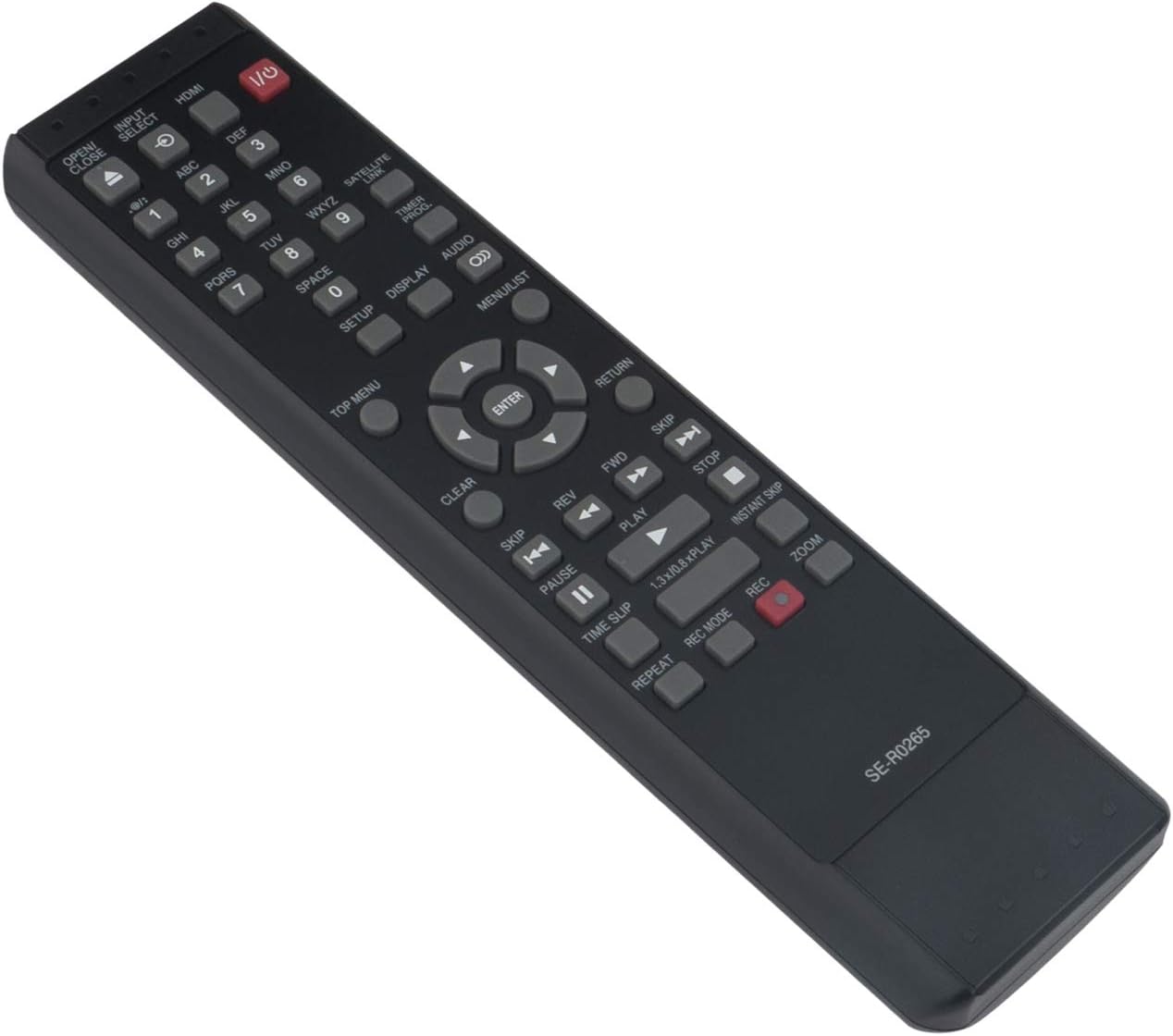
Image: Angled view of the SE-R0265 remote control, highlighting its ergonomic design and button layout.
Operating Instructions
This section details the functions of the buttons on your SE-R0265 remote control. Refer to your Toshiba DVD Recorder's manual for specific operations related to your device.

Image: Front view of the SE-R0265 remote control, displaying all functional buttons.
Button Functions:
- I/O (Power): Turns the DVD Recorder on or off.
- OPEN/CLOSE: Opens or closes the disc tray.
- INPUT SELECT: Cycles through available input sources.
- HDMI: Selects the HDMI input.
- Number Buttons (0-9): Used for direct channel selection, time input, or menu navigation.
- SATELLITE LINK: Activates satellite link functions (if supported by your recorder).
- TIMER PROG: Accesses timer programming settings.
- SETUP: Opens the system setup menu.
- DISPLAY: Shows on-screen display information.
- AUDIO: Changes audio tracks or modes.
- TOP MENU: Accesses the top menu of a DVD.
- MENU/LIST: Opens the disc menu or a list of recorded titles.
- Navigation Buttons (Up, Down, Left, Right, ENTER): Used to navigate menus and confirm selections.
- CLEAR: Clears entries or cancels selections.
- RETURN: Returns to the previous screen or menu.
- SKIP (<< / >>): Skips to the previous or next chapter/track.
- REV (Rewind): Rewinds playback.
- FWD (Fast Forward): Fast forwards playback.
- PLAY: Starts or resumes playback.
- PAUSE: Pauses playback.
- STOP: Stops playback.
- TIME SLIP: Allows for time-shifting functions during recording.
- 1.3x/0.8x PLAY: Adjusts playback speed.
- INSTANT SKIP: Skips forward a preset amount of time.
- REPEAT: Repeats a track or section.
- REC MODE: Selects recording quality or mode.
- REC (Record): Starts recording.
- ZOOM: Zooms in on the picture.
Compatible Toshiba DVD Recorder Models:
This remote control is compatible with the following Toshiba DVD Recorder models:
- D-R420KU, D-R430KU, D-R430, D-R420
- D-KR40, D-KR40KU
- D-R400KU, D-R400
- D-R410, D-R410KU
- D-KR10, D-KR10KU
- DR420KU, DR430KU, DR430, DR420
- DKR40, DKR40KU
- DR400KU, DR400
- DR410, DR410KU
- DKR10, DKR10KU
Maintenance
Battery Replacement:
Replace the batteries when the remote control's response becomes sluggish or stops functioning. Always use new AAA alkaline batteries. Do not mix old and new batteries, or different types of batteries, as this can lead to leakage or damage.
Cleaning:
To clean the remote control, wipe it gently with a soft, dry cloth. Do not use liquid cleaners, abrasive cleaners, or chemical solvents, as these can damage the surface or internal components.
Troubleshooting
- Remote Control Not Responding:
- Ensure the batteries are inserted correctly with the correct polarity (+/-).
- Replace old batteries with new AAA alkaline batteries.
- Check for any obstructions between the remote control and the DVD Recorder's infrared sensor.
- Ensure you are within the effective range and line of sight of the DVD Recorder.
- Certain Functions Not Working:
- Verify that your Toshiba DVD Recorder model is listed as compatible in the "Operating Instructions" section.
- Some advanced functions may require specific settings on your DVD Recorder. Refer to your DVD Recorder's original manual for details.
If you continue to experience issues, please contact the seller for assistance.
Specifications
| Model | SE-R0265 |
| Brand | ZdalaMit |
| Product Dimensions | 6.9 x 2 x 0.6 inches |
| Item Weight | 2.47 ounces |
| Batteries Required | 2 x AAA alkaline batteries (not included) |
| Connectivity Technology | Infrared |
| Compatible Devices | Toshiba DVD Recorders (Home Theater) |
| Special Feature | Ergonomic design |
| Max Number of Supported Devices | 1 |
Warranty and Support
Specific warranty information for this replacement remote control is not provided in the product details. For any questions regarding product functionality, compatibility, or troubleshooting beyond the scope of this manual, please contact the seller directly through your purchase platform.
The seller can provide the most accurate and up-to-date support information for your product.