
Easytry123 Replacement Remote Control (ASIN: B08HGW4KX8)
Instruction Manual
Easytry123 Replacement Remote Control
Model: Replacement Remote Control (ASIN: B08HGW4KX8)
Introduction
This manual provides essential information for the proper use and maintenance of your Easytry123 Replacement Remote Control. This remote is designed as a direct replacement for various Kenwood CD Car Receiver Players, including models such as KDC-X711, KMD-42, KMD-X91, KRC-308S, KRC-309S, KRC-408, KRC-409, KRC-487, KRC-507, KRC-507S, KRC-508, KRC-508S, KRC-509, and KRC-509S. Please ensure your original remote matches the appearance of this replacement for full compatibility.

Image: Angled view of the Easytry123 Replacement Remote Control. This image shows the overall shape and button layout from a slight angle.
Setup
Battery Installation
- Locate the battery compartment on the back of the remote control.
- Slide open the battery compartment cover.
- Insert two (2) AAA batteries, ensuring correct polarity (+ and -) as indicated inside the compartment.
- Close the battery compartment cover securely.
Note: This remote control operates using infrared (IR) technology and typically does not require any pairing process. Simply install the batteries and point the remote directly at your Kenwood CD Car Receiver Player.
Operating Instructions
To operate the remote control, point it directly towards the infrared sensor on your Kenwood CD Car Receiver Player. Ensure there are no obstructions between the remote and the receiver.
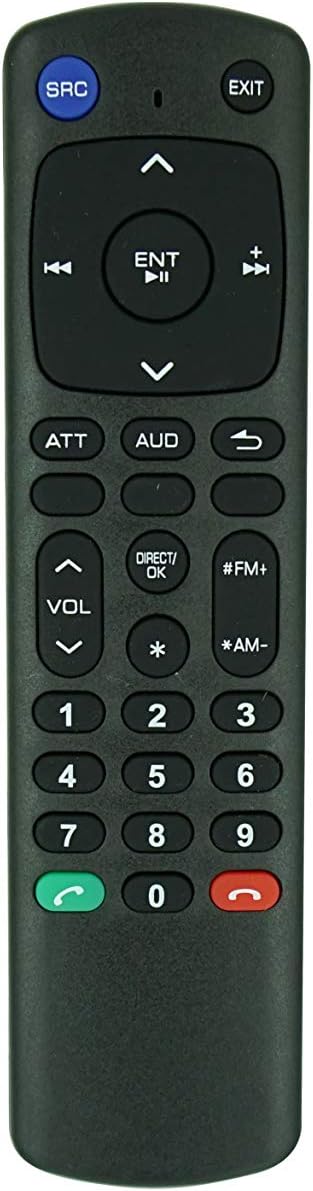
Image: Front view of the Easytry123 Replacement Remote Control. This image clearly displays all buttons and their labels.
Button Functions
| Button | Function |
|---|---|
| SRC | Source selection (e.g., CD, Tuner, AUX) |
| EXIT | Exits current menu or function |
| ENT / OK | Enter or confirm selection |
| Navigation Arrows (Up, Down, Left, Right) | Navigate through menus or tracks |
| VOL < > | Volume control (Volume Up / Volume Down) |
| ATT | Attenuate audio (mute or lower volume temporarily) |
| AUD | Audio settings (e.g., Bass, Treble, Balance) |
| Number Pad (0-9) | Direct track selection, preset station selection, or input numbers |
| DIRECT/OK | Direct input or confirmation |
| #FM+ / *AM- | Radio band selection or preset tuning |
| Green Call Button | May function as answer call or specific mode activation (if supported by receiver) |
| Red End Call Button | May function as end call or specific mode deactivation (if supported by receiver) |
Important Note: As a replacement remote, some advanced or specific functions of your original Kenwood remote may not be fully replicated. Refer to your Kenwood receiver's original manual for detailed functions of your unit.
Maintenance
Battery Replacement
- Replace batteries when the remote's response becomes sluggish or stops working.
- Always replace both AAA batteries at the same time with new ones.
- Do not mix old and new batteries, or different types of batteries.
- Remove batteries if the remote will not be used for an extended period to prevent leakage.
Cleaning
- Wipe the remote control with a soft, dry cloth.
- Do not use liquid cleaners, abrasive cleaners, or chemical solvents, as these may damage the remote's surface or internal components.
Storage
- Store the remote in a cool, dry place, away from direct sunlight and extreme temperatures.
- Avoid dropping the remote or exposing it to excessive force.
Troubleshooting
- Remote not responding:
- Check if the batteries are inserted correctly with the correct polarity.
- Replace old batteries with new AAA batteries.
- Ensure there is a clear line of sight between the remote's IR emitter and the receiver's IR sensor.
- Verify that your Kenwood CD Car Receiver Player model is listed as compatible in the introduction section.
- Some functions do not work:
- This is a replacement remote. While it covers primary functions, it may not replicate every single function of your original remote, especially highly specific or advanced features.
- Confirm the function is supported by your Kenwood receiver model.
Specifications
| Feature | Detail |
|---|---|
| Model | Replacement Remote Control (ASIN: B08HGW4KX8) |
| Brand | Easytry123 |
| Connectivity Technology | Infrared (IR) |
| Controller Type | Button Control |
| Batteries Required | 2 x AAA batteries |
| Compatible Kenwood Models | KDC-X711, KMD-42, KMD-X91, KRC-308S, KRC-309S, KRC-408, KRC-409, KRC-487, KRC-507, KRC-507S, KRC-508, KRC-508S, KRC-509, KRC-509S |
Support
For any questions, concerns, or issues regarding your Easytry123 Replacement Remote Control, please contact the seller directly through the platform where you purchased the product. Provide your order details and a clear description of the issue for prompt assistance.
As this is a replacement product, specific warranty information may vary. Please refer to the seller's return and support policies at the time of purchase.
Ask a question about this manual
Ask about setup, troubleshooting, compatibility, parts, safety, or missing instructions. Manuals+ will review the question and use this page’s manual context to help answer it.