
1. Introduction
Thank you for purchasing the UNITED LED43DU58 43-inch 4K UHD HDR10 LED Television. This manual provides essential information for setting up, operating, and maintaining your new television. Please read these instructions carefully before use and retain them for future reference.

The UNITED LED43DU58 television features 4K Ultra HD resolution, DVB-T2/C/S2 tuners, Dolby Audio, HDMI, and HDR10 support.
2. Safety Information
Always observe the following safety precautions to prevent electric shock, fire, or damage to the television:
- Do not expose the television to rain or moisture.
- Do not open the television casing; refer all servicing to qualified personnel.
- Ensure proper ventilation around the television.
- Keep the television away from direct sunlight, heat sources, and strong magnetic fields.
- Use only the power cord supplied with the television.
- Unplug the television during lightning storms or when unused for long periods.
3. Package Contents
Verify that all items are present in the package:
- UNITED LED43DU58 Television
- Remote Control (requires 2x AAA batteries, included)
- Stand (feet)
- Screws for stand assembly
- User Manual
4. Setup
4.1 Attaching the Stand
- Carefully place the television face down on a soft, flat surface to prevent screen damage.
- Align the stand feet with the corresponding slots on the bottom of the television.
- Secure the stand feet using the provided screws. Do not overtighten.
- Carefully lift the television to an upright position on a stable surface.
4.2 Connecting Cables
Connect your external devices to the television's rear ports. Refer to the image below for port locations.

Rear panel connections of the UNITED LED43DU58 television.
- Power: Connect the power cord to the television and then to a wall outlet.
- HDMI: For high-definition devices like Blu-ray players, game consoles, or set-top boxes. The TV has 3 HDMI ports.
- USB: For connecting USB storage devices for media playback or PVR recording. The TV has 2 USB ports.
- Antenna (DVB-T2/C): Connect an aerial cable for terrestrial digital TV channels.
- Satellite (DVB-S2): Connect a satellite dish cable for satellite digital TV channels.
- CI+ Slot: Insert a Conditional Access Module (CAM) and smart card for encrypted channels.
- SCART: For older analog devices.
- VGA: For connecting a computer.
4.3 Initial Power On and Channel Scan
- Plug in the television and press the power button on the remote control or the TV itself.
- Follow the on-screen instructions to select your language and country.
- The television will automatically begin scanning for available channels (DVB-T2/C/S2). This process may take several minutes.
- Once the scan is complete, you can begin watching television.
5. Operating the Television
5.1 Remote Control Functions
The remote control allows you to access all television functions. Familiarize yourself with the buttons for power, volume, channel selection, input source, menu, and navigation.
5.2 Channel Navigation and Input Source
- Use the CH+/- buttons to change channels.
- Press the SOURCE button to switch between connected devices (HDMI 1, HDMI 2, HDMI 3, AV, USB, DTV, ATV, etc.).
- Access the Electronic Program Guide (EPG) to view program schedules and information.
- The television supports Teletext for text-based information services.
5.3 Picture and Sound Settings
Your television features 4K Ultra HD resolution and HDR10 support for enhanced picture quality. The Full Matrix LED technology provides exceptional colors, deep blacks, and impressive contrasts.

Experience superior clarity with 4K Ultra HD resolution.

Full Matrix LED technology enhances color and contrast.
Adjust picture modes (e.g., Standard, Dynamic, Movie) and individual settings like brightness, contrast, and color saturation through the TV menu. The integrated Q.BOX sound system with two 8-watt Ultra Stereo RMS speakers delivers clear audio. Sound settings can be adjusted via the audio menu.
5.4 USB Recording (PVR)
The television supports recording of programs to an external USB drive. Connect a USB drive to one of the USB ports. You can program the television to record at a specified time, allowing you to watch your favorite series at your convenience.

Record programs via USB and access various digital tuners.
6. Maintenance
6.1 Cleaning the Screen
Gently wipe the screen with a soft, lint-free cloth. For stubborn marks, lightly dampen the cloth with water or a specialized screen cleaner. Never spray liquid directly onto the screen.
6.2 Cleaning the Exterior
Wipe the television's exterior with a soft, dry cloth. Avoid using abrasive cleaners or solvents.
7. Troubleshooting
If you encounter issues with your television, refer to the following common solutions:
| Problem | Possible Solution |
|---|---|
| No Power | Check if the power cord is securely connected and the wall outlet is functioning. Press the power button on the TV or remote. |
| No Picture | Ensure the correct input source is selected. Check cable connections to external devices. Perform a channel scan. |
| No Sound | Check the volume level and ensure mute is not activated. Verify audio cable connections. |
| Remote Control Not Working | Replace the batteries (2x AAA). Ensure there are no obstructions between the remote and the TV's IR sensor. |
| Poor Picture Quality | Check antenna/cable connection. Adjust picture settings in the menu. Ensure the source content is high quality. |
For more complex issues, please contact customer support or refer to the full service manual.
8. Specifications
The following table details the technical specifications of the UNITED LED43DU58 television:

Physical dimensions of the UNITED LED43DU58 television.
| Feature | Specification |
|---|---|
| Model Name | United 43DU58 |
| Model Number | LED43DU58 |
| Screen Size | 43 Inches (109 cm) |
| Display Technology | LED |
| Resolution | 4K (3840 x 2160 pixels) |
| Refresh Rate | 60 Hz |
| Image Enhancement Technology | HDR10 |
| Image Contrast Ratio | 3000:1 |
| Response Time | 8.5 Milliseconds |
| Tuner Technology | DVB-T2, DVB-S2, DVB-C |
| Connectivity Technology | HDMI, USB |
| Total HDMI Ports | 3 |
| Total USB Ports | 2 (USB 2.0) |
| Total VGA Input Ports | 1 |
| Connector Type | CI+, HDMI, USB |
| Special Feature | 3D (Note: This feature is listed in specifications but may require specific content/glasses not included) |
| Display Language Options | English, German, Italian, French, Turkish, Arabic, Polish, Czech, Slovak, Ukrainian |
| Product Dimensions (D x W x H) | 21.5 x 100 x 61 cm |
| Item Weight | 10 Kilograms |
| Voltage | 230 Volts |
| Wattage / Energy Consumption | 55 W / 55 Watts |
| Annual Energy Consumption | 66 Kilowatt-hours |
| Efficiency Class | G |
| Control Method | Remote Control |
| Batteries Required for Remote | 2 AAA (included) |
| Mounting Type | Table Mount |
| Model Year | 2020 |
8.1 Energy Label Information
For detailed energy efficiency information, please refer to the energy label below or visit the EU EPREL database.
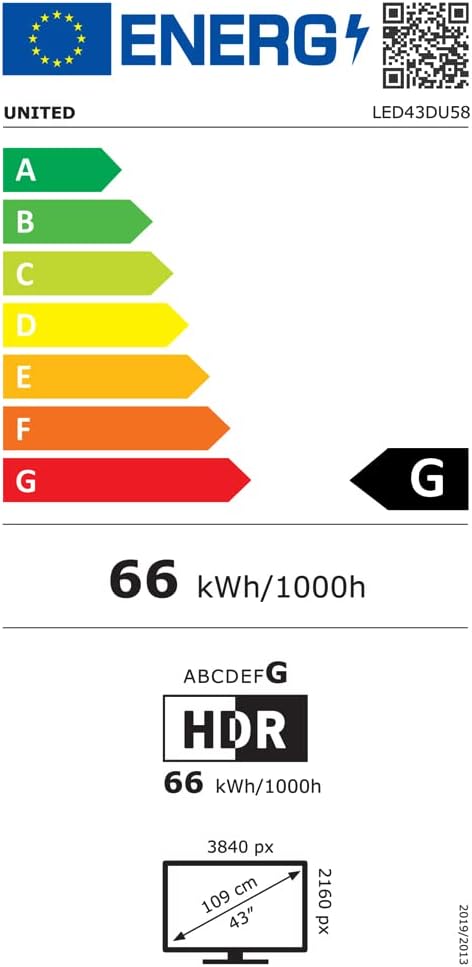
EU Energy Label for UNITED LED43DU58.
Further details available at: https://eprel.ec.europa.eu/qr/498398
9. Warranty and Support
The manufacturer, DGMC SA, provides a minimum general warranty period. Please refer to your purchase documentation for specific warranty terms and conditions.
- Minimum General Warranty: 2 Years
- EU Spare Parts Availability: 5 Years
For technical support or service inquiries, please contact your retailer or the manufacturer's customer service department. Ensure you have your model number (LED43DU58) and purchase details available.


