1. Introduction
The Pyle PDA9HBU is a versatile home audio amplifier and stereo receiver designed to enhance your home theater experience. It features multiple input options including HDMI, optical, coaxial, phono, USB, SD, and auxiliary, along with Bluetooth connectivity for wireless audio streaming. This manual provides detailed instructions for setting up, operating, and maintaining your device to ensure optimal performance.
2. Safety Instructions
- Power Source: Ensure the power supply matches the voltage requirements of the unit (115V/230V switchable).
- Ventilation: Do not block ventilation openings. Allow adequate space around the unit for proper airflow.
- Water and Moisture: Do not expose the unit to rain, moisture, or excessive humidity.
- Heat Sources: Keep the unit away from heat sources such as radiators, heat registers, stoves, or other heat-producing appliances.
- Cleaning: Unplug the unit from the wall outlet before cleaning. Use a dry cloth for cleaning.
- Servicing: Do not attempt to service the unit yourself. Refer all servicing to qualified service personnel.
3. Package Contents
Please check the box for the following items:

Image: Contents of the Pyle PDA9HBU package, showing the amplifier, remote control, and FM antenna.
- Pyle PDA9HBU Stereo Amplifier
- Remote Control
- FM Antenna
4. Product Overview
4.1 Front Panel Controls

Image: Front panel of the Pyle PDA9HBU amplifier, displaying the power button, input selector, volume knob, microphone inputs, and tone controls.
- Power Button: Turns the unit on or off.
- Input Selector: Rotates to choose between different audio sources (HDMI, Optical, Coaxial, Phono, CD/DVD, MP3/BT/AUX, USB/SD).
- Volume Control: Adjusts the master volume level.
- MIC/VOL & ECHO Controls: Adjusts microphone volume and echo effect for karaoke.
- Bass & Treble Controls: Adjusts the low and high frequency response.
- Balance Control: Adjusts the left/right channel balance.
- USB/SD Card Slots: For playing audio files from USB flash drives or SD memory cards.
- AUX Input (3.5mm): For connecting external audio devices.
- LCD Digital Display: Shows current input, track information, FM station, and other status indicators.
4.2 Rear Panel Connections
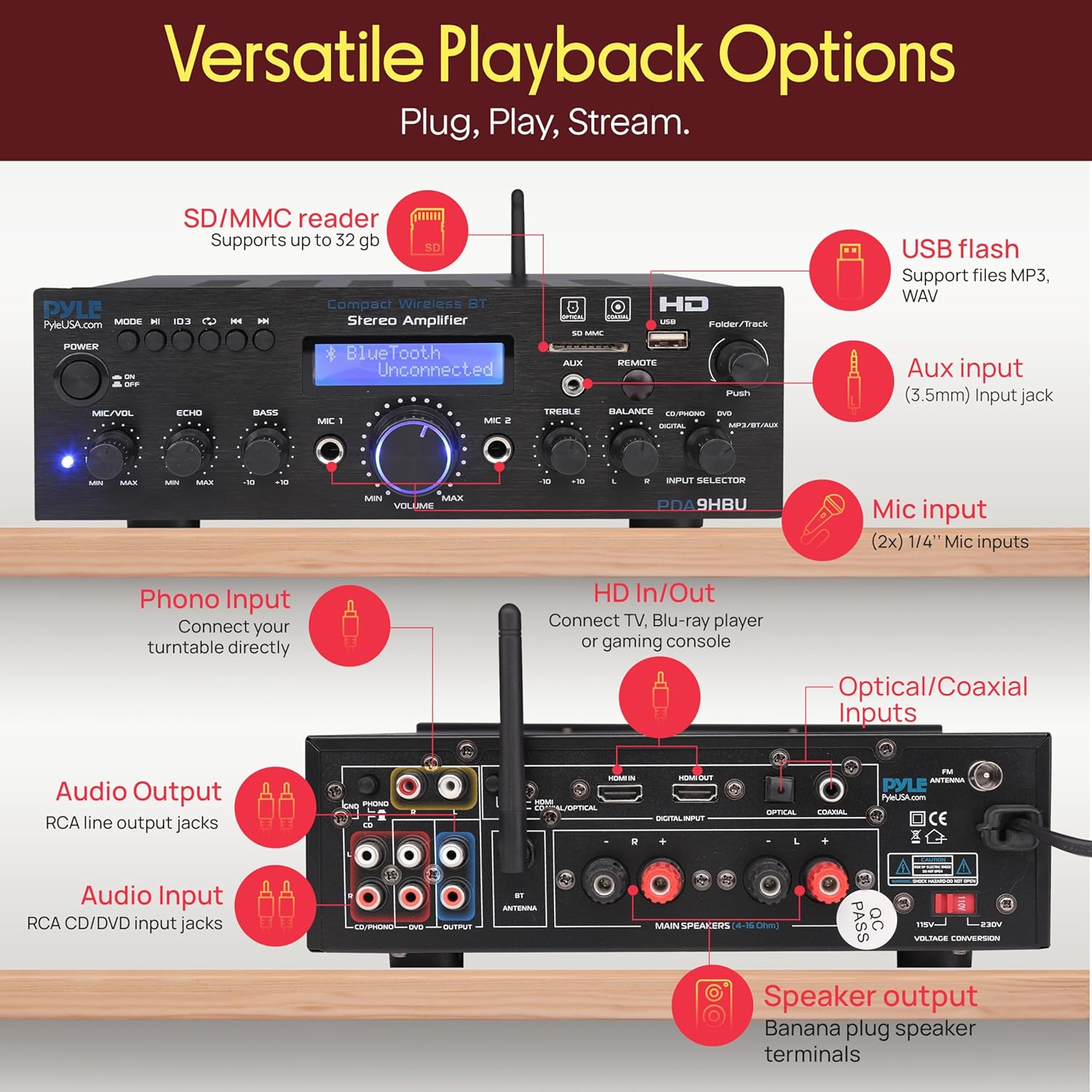
Image: Rear panel of the Pyle PDA9HBU amplifier, detailing HDMI, optical, coaxial, phono, RCA, and speaker output connections.
- HDMI IN/OUT: For connecting HDMI-enabled devices like TVs, Blu-ray players, or gaming consoles.
- Optical/Coaxial Inputs: For digital audio connections.
- Phono Input: For connecting a turntable.
- Audio Input (RCA L/R): For connecting analog audio sources (e.g., CD/DVD players).
- Audio Output (RCA L/R): For connecting to other audio devices or recorders.
- Speaker Output Terminals: For connecting passive speakers (4-8 Ohm).
- FM Antenna Connector: For connecting the included FM antenna.
- Power Input: For connecting the power cable.
5. Setup
5.1 Connecting Speakers
- Ensure the amplifier is turned off and unplugged from the power outlet.
- Connect your passive speakers to the speaker output terminals on the rear panel. Match the positive (+) terminal of the amplifier to the positive (+) terminal of the speaker, and the negative (-) to the negative (-).
- Ensure all connections are secure to prevent short circuits.
5.2 Connecting Audio Sources
Connect your desired audio sources to the appropriate input ports on the rear or front panel:
- HDMI: Use an HDMI cable to connect your TV, Blu-ray player, or gaming console to the HDMI IN port. If connecting to a TV, use the HDMI OUT port to send video to the TV.
- Optical/Coaxial: For digital audio from devices like TVs or media players, use an optical or coaxial cable.
- Phono: Connect your turntable to the PHONO input.
- RCA (L/R): For analog audio devices (e.g., CD player), connect to the AUDIO INPUT (CD/DVD) ports.
- AUX (3.5mm): For portable devices, connect to the AUX input on the front panel.
5.3 Power Connection
- Before plugging in, verify the voltage selector switch (if present) on the rear panel is set to your local voltage (115V or 230V).
- Connect the power cable to the power input on the rear panel and then plug it into a wall outlet.
6. Operating Instructions
6.1 Power On/Off
Press the Power button on the front panel or the remote control to turn the unit on or off.
6.2 Input Selection
Rotate the Input Selector knob on the front panel or use the corresponding buttons on the remote control to choose your desired audio source (e.g., HDMI, Bluetooth, USB/SD, FM).
6.3 Volume Control
Adjust the Volume knob on the front panel or use the volume buttons on the remote control to set the overall sound level.
6.4 Bluetooth Pairing

Image: A smartphone displaying music playback, with concentric circles indicating a wireless Bluetooth connection to the Pyle PDA9HBU amplifier.
- Select the 'MP3/BT/AUX' input using the Input Selector. The LCD display will show 'Bluetooth Unconnected'.
- Enable Bluetooth on your mobile device (smartphone, tablet, laptop).
- Search for Bluetooth devices and select 'PDA9HBU' from the list.
- Once connected, the LCD display will show 'Bluetooth Connected'. You can now stream audio wirelessly.
- The wireless range is approximately 40 feet (12 meters).
6.5 USB/SD Playback

Image: Detailed view of the amplifier's front panel, highlighting the USB and SD card slots, and demonstrating a smartphone charging via the USB port.
- Insert a USB flash drive or SD card into the corresponding slot on the front panel.
- Select the 'USB/SD' input. The unit will automatically begin playing compatible audio files (MP3/WAV).
- Use the Folder/Track knob or remote control buttons to navigate tracks and folders.
- The USB port also functions as a charging port for compatible devices.
6.6 FM Radio Operation
- Connect the included FM antenna to the FM ANTENNA connector on the rear panel.
- Select the 'FM' input.
- Use the automatic station search scan function (refer to remote control instructions) to find and save available FM stations.
- The LCD display will show the current FM station frequency.
6.7 Microphone Usage (Karaoke)

Image: Two individuals enjoying karaoke, singing into microphones connected to the Pyle PDA9HBU amplifier, which is visible in the foreground.
- Connect up to two 6.35mm microphones to the MIC 1 and MIC 2 input jacks on the front panel.
- Adjust the MIC/VOL knob to control the microphone volume.
- Adjust the ECHO knob to add an echo effect to the microphone sound.
6.8 Tone Controls
Use the Bass and Treble knobs on the front panel to fine-tune the audio output to your preference.
6.9 Remote Control Functions
The included remote control provides convenient access to various functions, including power, input selection, volume, mute, track navigation, FM station tuning, and tone adjustments. Refer to the remote control diagram for specific button functions.
7. Maintenance
- Cleaning: Use a soft, dry cloth to clean the exterior of the unit. Do not use liquid cleaners or aerosol sprays.
- Ventilation: Periodically check that the ventilation openings are clear of dust and debris.
- Storage: If storing the unit for an extended period, unplug it from the power outlet and store it in a cool, dry place.
8. Troubleshooting
- No Power:
- Check if the power cable is securely connected to the unit and the wall outlet.
- Ensure the power outlet is functional.
- Verify the voltage selector switch (if applicable) is set correctly.
- No Sound:
- Check all speaker connections.
- Ensure the correct input source is selected.
- Increase the master volume.
- Check if the mute function is activated.
- Verify audio cables from source devices are properly connected.
- Bluetooth Connection Issues:
- Ensure the amplifier is in Bluetooth mode.
- Make sure Bluetooth is enabled on your device and it's within range (approx. 40 ft).
- Try unpairing and re-pairing the device.
- Restart both the amplifier and your Bluetooth device.
- USB/SD Playback Errors:
- Ensure the USB drive or SD card is inserted correctly.
- Check that the audio files are in a supported format (MP3/WAV).
- Try a different USB drive or SD card.
- Remote Control Not Working:
- Check and replace the batteries in the remote control.
- Ensure there are no obstructions between the remote and the amplifier's IR sensor.
9. Specifications
| Feature | Specification |
|---|---|
| Brand | Pyle |
| Model | PDA9HBU |
| Output Power (Max) | 25W (@ 4 Ohm) |
| Output Power (RMS) | 20W x 2 (@ 8 Ohm) |
| Frequency Response | 20 Hz - 20 kHz |
| Tone Control (Bass) | f = 100 Hz +/-8 dB |
| Tone Control (Treble) | f = 10 kHz +/-8 dB |
| Signal-to-Noise Ratio | > 71 dB |
| Total Harmonic Distortion (T.H.D.) | 48 dB |
| Bluetooth Version | 2.1 |
| Bluetooth Wireless Range | 40 ft (approx. 12m) |
| Power Supply | 115V/230V (Switchable) |
| Product Dimensions (L x W x H) | 9.8" x 9.8" x 3.15" (24.89 x 24.89 x 8 cm) |
| Item Weight | 2.97 Kilograms |
| Compatible Devices | Smartphones, tablets, laptops, computers, TVs, gaming consoles, Blu-ray players, speakers |
| Connectivity Technology | HDMI, RCA, Auxiliary, Bluetooth, Optical, Coaxial, USB, SD |
| Audio Output Mode | Stereo |
| Surround Sound Channel Configuration | 2.0 |
10. Warranty and Support
Pyle products are designed for reliability and performance. For warranty information or technical support, please refer to the documentation included with your purchase or visit the official Pyle website. Keep your proof of purchase for warranty claims.


