
FLYLINKTECH CF500
FLYLINKTECH CF500 Car Jump Starter User Manual
Model: CF500 (CEP104)
Product Overview
The FLYLINKTECH CF500 is a versatile and powerful portable car jump starter and power bank designed for emergency vehicle starting and charging electronic devices. It features a high peak current for reliable jump-starting, a large battery capacity for extended use, and multiple charging options including wireless charging.
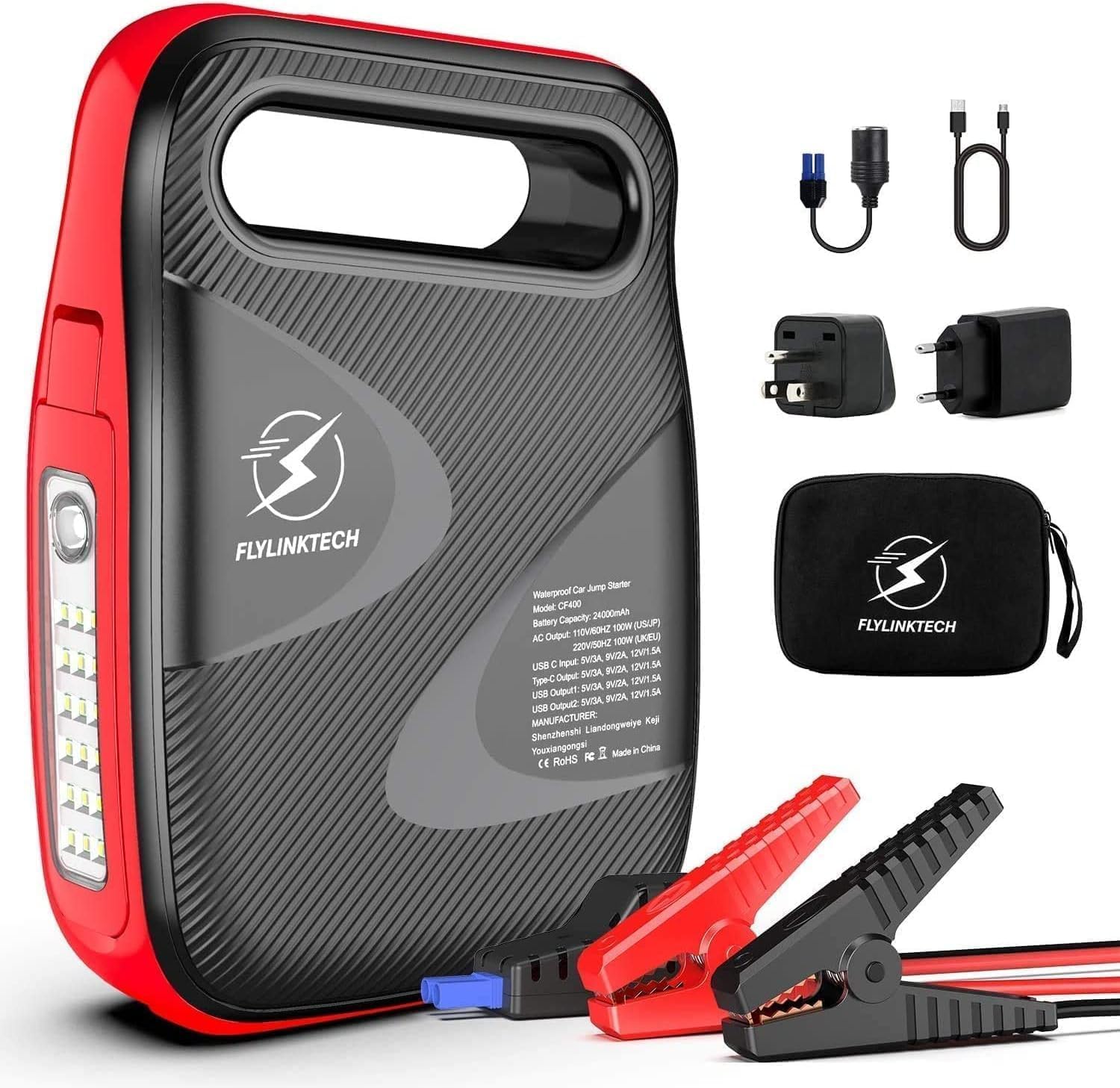
Image: The FLYLINKTECH CF500 jump starter unit shown with its included accessories, including smart clamps, charging cables, and a storage bag.
Key Features:
- Powerful Jump Starter: 1500A peak current, capable of starting 12V vehicles (up to 8.0L gasoline or 6.0L diesel engines).
- High Capacity Power Bank: 18000mAh battery provides ample power for smartphones, tablets, and other USB-powered devices.
- Wireless Charging: Integrated 10W wireless charging pad for compatible devices.
- Quick Charge 3.0: USB output port for rapid charging of supported devices.
- Multi-mode LED Light: Features a 180° rotatable LED light with Normal, SOS, and Strobe modes for illumination and emergency signaling.
- Magnetic Base: Allows the unit to be securely attached to metal surfaces for hands-free operation, especially useful during vehicle maintenance.
Safety Precautions
Please read and understand all safety information before using this product. Failure to follow these instructions may result in electric shock, fire, or serious injury.
- Do not operate the jump starter if it is damaged or has been modified.
- Do not jump start a frozen battery.
- Ensure proper polarity connection (red clamp to positive, black clamp to negative) to avoid sparks or damage.
- Keep out of reach of children.
- Do not expose the unit to rain or wet conditions.
- Store in a cool, dry place when not in use.
- Do not disassemble the unit. Refer all servicing to qualified personnel.
- Wear eye protection when working with batteries.
Package Contents
Verify that all items are present in the package:
- 1 x FLYLINKTECH CF500 Jump Starter
- 1 x Smart Clamps with 8 Safety Devices
- 1 x 3-in-1 Charging Cable (USB to USB-C, Lightning, Micro USB)
- 1 x USB to USB-C Charging Cable
- 1 x Cigarette Lighter Adapter
- 1 x Storage Bag
- 1 x User Manual
- 1 x 2-Year Warranty Card
Product Components
Familiarize yourself with the different parts of the FLYLINKTECH CF500 unit:

Image: A detailed diagram illustrating the various ports and buttons on the FLYLINKTECH CF500 jump starter, including the jump starting port, USB outputs, AC output, Type-C input, ON/OFF button, flashlight, and electricity display lamps.
- Jump Starting Port: Connects to the smart clamps for vehicle jump-starting.
- Type-C Input: For charging the jump starter unit.
- USB Output 1 & 2: For charging electronic devices (USB Output 1 supports Quick Charge 3.0).
- AC Output: For powering small AC appliances (if applicable to model CF500, based on image PT05).
- AC Switch: To activate the AC output.
- ON/OFF Button: Powers the unit on or off.
- Flashlight: Integrated LED light with multiple modes.
- Electricity Display Lamp: Indicates the remaining battery charge level.
- Magnetic Suction Base: Located on the bottom for attaching to metal surfaces.
Setup and Charging the Unit
Before first use, fully charge the FLYLINKTECH CF500. It is recommended to fully charge the unit every 3-6 months to maintain battery health, especially if stored for long periods.
- Connect the provided USB-C charging cable to the Type-C Input port on the jump starter.
- Connect the other end of the USB-C cable to a suitable USB wall adapter (not included) or a car charger.
- The electricity display lamps will illuminate and flash during charging, indicating the charge progress. All lights will be solid when fully charged.
The unit can also be charged via the cigarette lighter adapter using the DC input port (if available on your model, refer to specifications).
Operating Instructions
Jump Starting a Vehicle
Follow these steps carefully to jump start your vehicle:

Image: A visual guide demonstrating the four steps to jump start a vehicle: 1. Turn on the power button. 2. Insert the smart clamp plug into the jump starter. 3. Connect the clamps to the car battery. 4. Turn on the car and then remove the clamps.
- Prepare the Vehicle: Ensure the vehicle's ignition is off and all accessories (lights, radio, A/C) are turned off. Place the vehicle in park (automatic) or neutral (manual) and engage the parking brake.
- Turn On the Jump Starter: Press the ON/OFF button on the FLYLINKTECH CF500 unit. The battery indicator lights will illuminate.
- Connect Smart Clamps: Insert the blue plug of the smart clamps firmly into the jump starting port on the unit. Ensure a secure connection.
- Connect to Battery:
- Connect the RED (+) clamp to the positive (+) terminal of the vehicle's battery.
- Connect the BLACK (-) clamp to the negative (-) terminal of the vehicle's battery.
The indicator light on the smart clamp will show green if the connection is correct and safe to proceed. If it shows red or flashes, check the connections and battery status.
- Start the Vehicle: Once the smart clamp indicator is green, start your vehicle's engine. If it doesn't start on the first attempt, wait at least 30 seconds before trying again. Do not crank for more than 3 seconds per attempt.
- Disconnect Clamps: As soon as the vehicle starts, immediately remove the smart clamps from the vehicle battery terminals, then disconnect the smart clamps from the jump starter unit.
Important: Do not leave the smart clamps connected to the battery after the vehicle has started for more than 30 seconds.
Using as a Power Bank (Charging Devices)
The FLYLINKTECH CF500 can charge various electronic devices:

Image: The FLYLINKTECH CF500 unit connected via USB cables to charge a smartphone and a tablet, demonstrating its power bank capabilities.
- USB Charging: Connect your device's USB charging cable to either USB Output 1 (Quick Charge 3.0) or USB Output 2. The unit will automatically begin charging.
- Wireless Charging: Place your Qi-compatible smartphone directly on the wireless charging pad located on top of the unit. Ensure the phone is centered for optimal charging.
- AC Output (if applicable): For models with an AC outlet, press the AC switch to activate the AC output. Plug your small appliance into the AC outlet. Ensure the appliance's power consumption does not exceed the unit's maximum AC output.
Using the LED Light
The integrated LED light offers multiple modes for various situations:

Image: Icons representing the different modes of the FLYLINKTECH CF500's LED light: Strobe, Torch (Normal), SOS, and Glare, indicating its versatility for illumination and emergency signaling.
- Press the flashlight button once for Normal illumination.
- Press again for Strobe mode.
- Press a third time for SOS signal mode.
- Press a fourth time to turn the light off.

Image: The FLYLINKTECH CF500 unit with its LED light extended and attached to the underside of a car hood via its magnetic base, illustrating its use as a hands-free work light during car repairs.
The LED light can be rotated 180° and features a magnetic base, allowing it to be attached to metal surfaces (e.g., car hood) for hands-free lighting during repairs or in dark environments.
Maintenance
- Recharging: For optimal battery life, recharge the unit every 3-6 months, even if not used. This prevents deep discharge and prolongs the lifespan of the internal battery.
- Cleaning: Use a soft, dry cloth to clean the unit. Do not use harsh chemicals or abrasive materials.
- Storage: Store the jump starter in a cool, dry place, away from direct sunlight, heat sources, and moisture. Ensure it is stored within the recommended temperature range (refer to specifications).
- Battery Care: Avoid fully depleting the battery frequently. Recharge it when the indicator shows low charge.
Troubleshooting
| Problem | Possible Cause | Solution |
|---|---|---|
| Unit does not turn on. | Battery is completely discharged. | Charge the unit fully before use. |
| Vehicle does not jump start. | Incorrect clamp connection; Battery is severely damaged; Vehicle engine size exceeds unit capacity. | Check clamp polarity and ensure secure connection. Ensure battery is not completely dead or damaged. Verify vehicle engine size is within specifications (8.0L Gas / 6.0L Diesel). |
| Smart clamp indicator is red/flashing. | Reverse polarity; Short circuit; Over-temperature. | Disconnect clamps immediately and re-connect with correct polarity. Allow unit to cool down if overheated. |
| Devices not charging via USB/Wireless. | Unit is off; Low battery on unit; Device not Qi-compatible (for wireless). | Turn on the unit. Recharge the unit. Ensure device supports Qi wireless charging. |
Specifications
| Feature | Detail |
|---|---|
| Model | CF500 (CEP104) |
| Peak Current | 1500A |
| Battery Capacity | 18000 mAh (Lithium-ion) |
| Vehicle Compatibility | 12V vehicles, up to 8.0L Gasoline / 6.0L Diesel engines |
| DC Output | 12-16V / 10A (for cigarette lighter adapter) |
| USB Output 1 (QC 3.0) | 5V/3A, 9V/2A, 12V/1.5A |
| USB Output 2 | 5V/2A |
| Wireless Charging Output | 10W |
| Dimensions (L x W x H) | 17.5 x 9.5 x 3.8 cm |
| Weight | 1.15 Kilograms |
| Operating Temperature | -20°C to +60°C |
Note: Specifications are subject to change without notice.
Warranty and Support
Warranty: This FLYLINKTECH product comes with a 2-year warranty from the date of purchase. Please retain your proof of purchase for warranty claims. The warranty covers defects in materials and workmanship under normal use.
Exclusions: The warranty does not cover damage caused by misuse, abuse, unauthorized modification, accident, or natural disasters. It also does not cover normal wear and tear.
Customer Support: For technical assistance, warranty claims, or any questions regarding your FLYLINKTECH CF500 jump starter, please contact FLYLINKTECH customer service. Refer to the contact information provided on the warranty card or the official FLYLINKTECH website.
FLYLINKTECH is committed to providing reliable products and excellent customer service. Your satisfaction is our priority.
Related documentsCF500


Ask a question about this manual
Ask about setup, troubleshooting, compatibility, parts, safety, or missing instructions. Manuals+ will review the question and use this page’s manual context to help answer it.