
1. Introduction
This manual provides essential information for the safe and efficient operation, installation, and maintenance of your Luminous iCruze 3000+ Pure Sine Wave Inverter. Please read this manual thoroughly before using the product and retain it for future reference.
2. Product Overview
The Luminous iCruze 3000+ is a Pure Sine Wave Inverter designed to provide reliable power backup for homes, offices, and shops. It features advanced technology for efficient performance and protection of your appliances.
Key Features:
- Inverter Type: Pure Sine Wave output, ensuring safety for sensitive appliances.
- VA Rating: 2800VA/24V; Peak Load: 2240W.
- Running Load Capacity: Capable of powering essential appliances such as refrigerators, washing machines, geysers, water pumps, photocopiers, fans, LED TVs, and more.
- Advanced LCD Display: Provides inverter battery performance statistics, including battery charging time, backup time, percentage load running, and fault indications.
- Intelligent 32-bit DSP Processor: For enhanced performance and control.
- Protection Features: Includes Input AC MCB, By-Pass switch, no-load shutdown prevention, overload, over-temperature, and short-circuit protection.
- Battery Compatibility: Compatible with 2 x (12V) batteries with capacities between 60 Ah - 220 Ah. Supports flat plate, tubular, and SMF battery types.
- Smart Inverter Conversion: Can be converted to a smart inverter by connecting an external Luminous Connect dongle (Wi-Fi/GSM) to monitor inverter statistics via a mobile application.
- User Settable Controls: Front panel buttons allow for mode selection (ECO/UPS), battery type and capacity settings, and no-load shutdown prevention.
- Dimensions: 30 x 32.6 x 28.4 cm; Weight: 22.5 kg.
Product Visuals:

Figure 1: Front view of the Luminous iCruze 3000+ Pure Sine Wave Inverter.

Figure 2: Key intelligent features of the iCruze 3000+ Inverter, including LCD display, DSP processor, and AC MCB protection.

Figure 3: Additional intelligent features of the iCruze 3000+ Inverter, highlighting quick charging, pure sine wave output, and broad battery compatibility.

Figure 4: The iCruze 3000+ Inverter is designed for noiseless operation due to low harmonic distortion.
Product Video Overview:
Video 1: A brief overview of the Luminous iCruze 3000+ inverter, demonstrating its compact design, reliable power backup capabilities, and compatibility with various battery types. It also shows the connection points for battery and AC input.
3. Setup
Proper setup is crucial for the safe and optimal performance of your Luminous iCruze 3000+ Inverter. Follow these steps carefully:
- Placement: Choose a well-ventilated, dry, and cool location for the inverter. Ensure it is away from direct sunlight, heat sources, and flammable materials.
- Battery Connection: Connect the inverter to two 12V batteries (60Ah - 220Ah capacity each). Ensure correct polarity: connect the positive (+) terminal of the inverter to the positive (+) terminal of the battery, and the negative (-) terminal of the inverter to the negative (-) terminal of the battery. Use appropriate gauge cables for connections.
- AC Input Connection: Connect the inverter's AC input cable to a grounded wall outlet.
- Load Connection: Connect your appliances to the output sockets of the inverter. Ensure the total load does not exceed the inverter's peak load capacity of 2240W.
- Initial Power On: After all connections are secure, switch on the AC MCB (Miniature Circuit Breaker) located on the inverter's rear panel. Then, press the power button on the front panel to turn on the inverter.
Battery Selection Guide:

Figure 5: A guide to selecting the appropriate inverter and battery capacity based on home size and appliance usage.
4. Operating Instructions
The Luminous iCruze 3000+ Inverter is designed for user-friendly operation. The front panel features an LCD display and control buttons for various settings.
Front Panel Controls and Display:
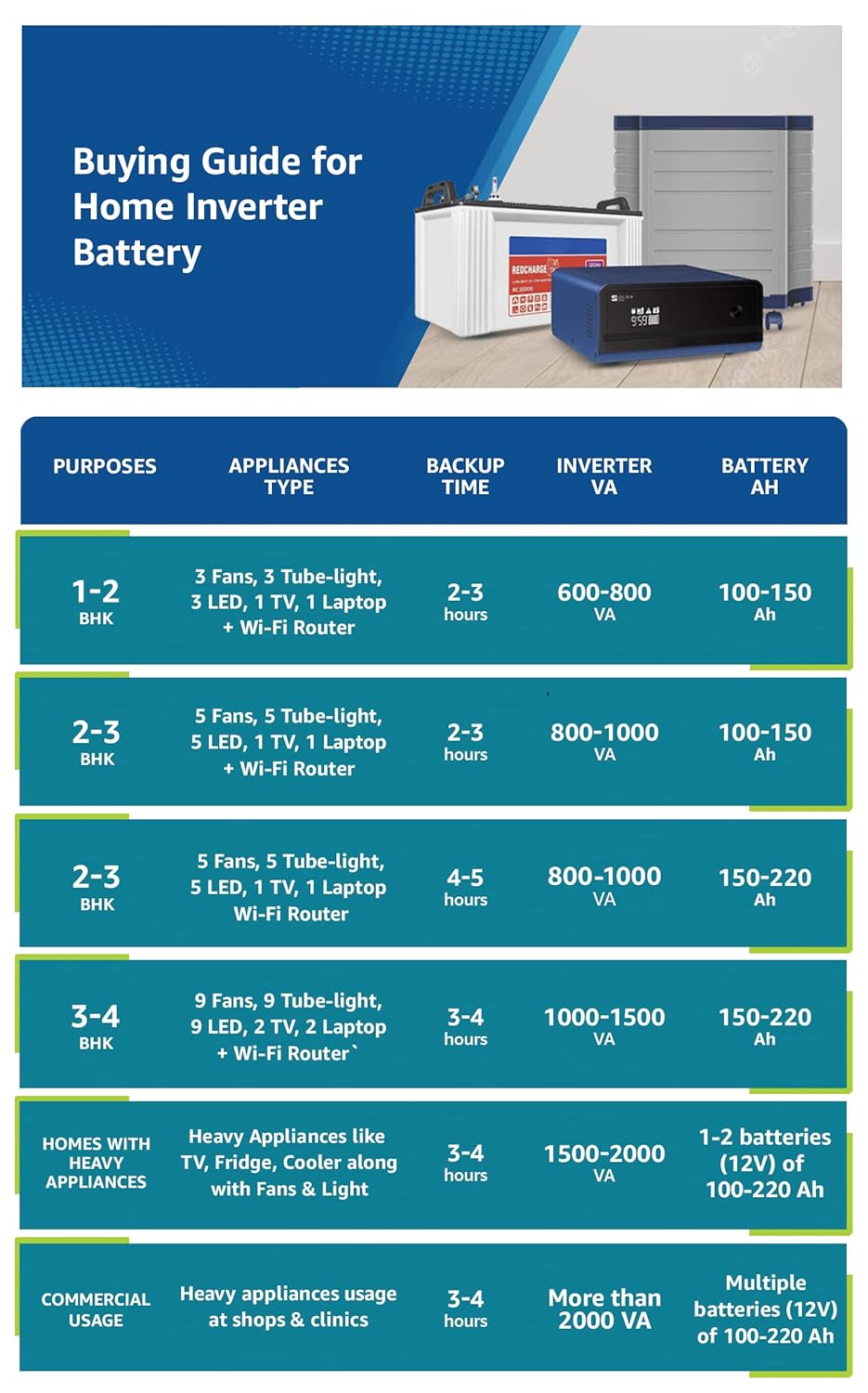
Figure 6: Diagram illustrating the LCD display and control buttons on the inverter's front panel.
- Power Button: Press to turn the inverter ON or OFF.
- LCD Display: Shows real-time information such as battery charge level, input/output voltage, load percentage, backup time remaining, and any fault conditions.
- User Control Buttons: Navigate through menus and adjust settings like:
- Mode Selection: Switch between ECO mode (for energy saving) and UPS mode (for sensitive appliances requiring stable voltage).
- Battery Type: Select the type of battery connected (Flat Plate, Tubular, SMF) for optimized charging.
- Battery Capacity: Input the Ah rating of your batteries for accurate backup time calculations.
- No-Load Shutdown Prevention: Configure settings to prevent the inverter from shutting down when there is minimal load.
- GSM Indicator: Illuminates when the inverter is connected to the internet via a Luminous Connect dongle (sold separately) for mobile app monitoring.
5. Maintenance
Regular maintenance ensures the longevity and efficient performance of your inverter and batteries.
- Keep Clean: Regularly clean the inverter's exterior with a dry cloth. Ensure ventilation openings are free from dust and obstructions.
- Check Connections: Periodically inspect all cable connections (battery terminals, AC input/output) for tightness and corrosion. Loose connections can lead to power loss or overheating.
- Battery Maintenance: If using lead-acid batteries, check electrolyte levels regularly and top up with distilled water as needed. Keep battery terminals clean and free of corrosion.
- Ventilation: Ensure the inverter is always in a well-ventilated area to prevent overheating.
- Avoid Overloading: Do not connect appliances that exceed the inverter's rated capacity.
6. Troubleshooting
This section provides solutions to common issues you might encounter with your Luminous iCruze 3000+ Inverter. For complex problems, contact customer support.
| Problem | Possible Cause | Solution |
|---|---|---|
| Inverter not turning ON | Loose battery connections, discharged battery, AC MCB OFF. | Check battery terminals for tightness. Ensure batteries are charged. Turn ON the AC MCB. |
| No power output from inverter | Overload, short-circuit, inverter in fault mode. | Reduce connected load. Check for short-circuited appliances. Refer to LCD for fault codes. Restart inverter. |
| Short backup time | Battery degradation, incorrect battery capacity setting, high load. | Check battery health. Verify battery capacity setting on inverter. Reduce load during power cuts. |
| Inverter making unusual noise | Fan obstruction, internal component issue. | Ensure fan vents are clear. If noise persists, contact customer support. |
| LCD showing fault indication | Specific error detected by the inverter. | Note the fault code displayed and refer to the detailed troubleshooting section in the full product manual or contact customer support. |
7. Specifications
Detailed technical specifications for the Luminous iCruze 3000+ Pure Sine Wave Inverter.
| Feature | Specification |
|---|---|
| Brand | Luminous |
| Model | iCruze-3000 |
| Inverter Type | Pure Sine Wave |
| VA Rating | 2800VA |
| Voltage | 24 Volts |
| Peak Load / Wattage | 2240 Watts |
| Output Voltage (Inverter Mode) | 220V |
| Power Source | Battery Powered |
| Battery Compatibility | 2 x (12V) batteries, 60 Ah - 220 Ah capacity (Flat Plate, Tubular, SMF) |
| Frequency | 50 Hz |
| Product Dimensions (LxWxH) | 30 x 32.6 x 28.4 cm |
| Item Weight | 22.5 kg |
| Material | Metal, Plastic |
| Mounting Hardware | 1 Inverter |
| Country of Origin | India |
8. Warranty and Support
Your Luminous iCruze 3000+ Pure Sine Wave Inverter comes with comprehensive warranty and support services.
- Warranty: The product is covered by a 36-month warranty against manufacturing defects. Please retain your purchase receipt for warranty claims.
- Package Contents: 1 unit inverter and warranty card.
Customer Support:
For any queries, assistance, or service requests, please contact Luminous customer support:
- Toll-Free Number: 1800-1033-039
- Email: care@luminousindia.com


