Introduction
This manual provides instructions for the ZdalaMit RM-YD035 Replacement Remote Control, designed for use with various Sony Bravia TV models. This remote control requires no programming; simply insert batteries, and it is ready for use.
Setup Instructions
1. Battery Installation
The RM-YD035 remote control operates on two (2) AAA size alkaline batteries (not included). Follow these steps to install them:
- Locate the battery compartment cover on the back of the remote control.
- Press down on the tab and slide the cover off.
- Insert two AAA batteries, ensuring the positive (+) and negative (-) terminals align correctly with the markings inside the compartment.
- Slide the battery compartment cover back into place until it clicks securely.
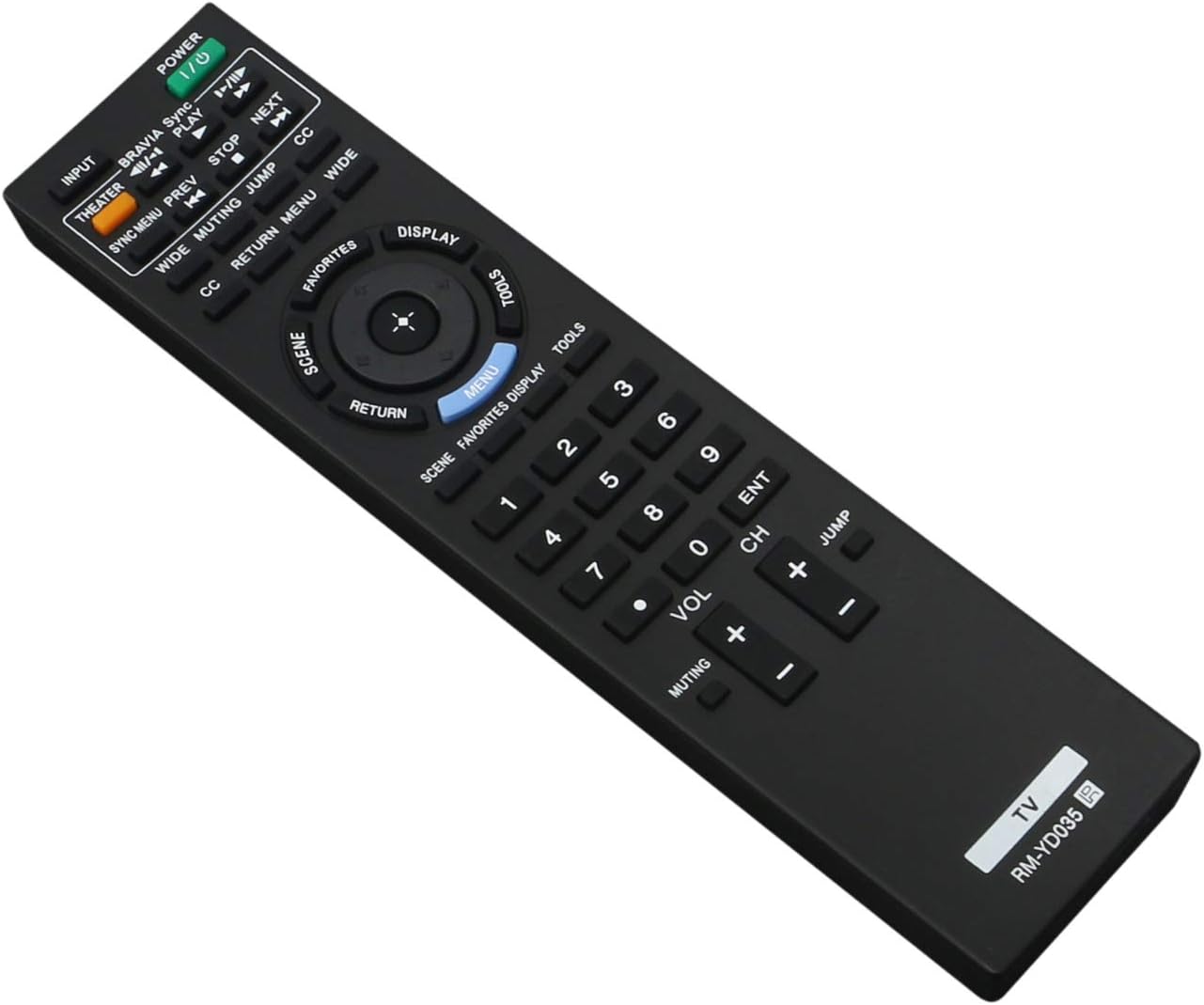
Image: The ZdalaMit RM-YD035 remote control. The battery compartment is located on the back of the device.
2. First Use
After installing the batteries, the remote control is ready to use. Point the remote directly at your Sony Bravia TV and press the POWER button to turn on the television.
Operating Instructions
The RM-YD035 remote control provides full functionality for your compatible Sony Bravia TV. Below is a general overview of key buttons and their functions:

Image: Front view of the ZdalaMit RM-YD035 remote control, highlighting the layout of all control buttons.
- POWER (Green Button): Turns the TV on or off.
- INPUT: Selects the input source (e.g., HDMI 1, AV, Component).
- THEATER: Activates Theater mode for optimized picture and sound settings.
- BRAVIA Sync / PLAY: Controls BRAVIA Sync compatible devices and playback functions.
- PREV / NEXT / STOP: Media playback controls.
- CC (Closed Caption): Toggles closed captions on or off.
- WIDE: Adjusts the screen aspect ratio.
- MUTING: Mutes or unmutes the TV sound.
- JUMP: Switches between the current and previously viewed channels.
- RETURN: Returns to the previous screen or menu.
- MENU: Opens the TV's main menu.
- DISPLAY: Shows on-screen information about the current program or input.
- FAVORITES: Accesses your favorite channels or content.
- TOOLS: Provides quick access to common TV functions and settings.
- Directional Pad (Up, Down, Left, Right) & ENT (Enter): Navigates through menus and confirms selections.
- Number Buttons (0-9): Directly selects channels or enters numerical values.
- VOL (+/-): Adjusts the volume level.
- CH (+/-): Changes the channel up or down.
Maintenance
Cleaning the Remote Control
To clean the remote control, gently wipe it with a soft, dry cloth. Do not use liquid cleaners, sprays, or abrasive materials, as these may damage the remote's surface or internal components.
Battery Replacement
Replace batteries when the remote control's response becomes sluggish or stops working. Always replace both batteries at the same time with new AAA alkaline batteries. Do not mix old and new batteries or different types of batteries.
Storage
If the remote control will not be used for an extended period, remove the batteries to prevent leakage and potential damage to the device.
Troubleshooting
Remote Control Not Responding
- Check Batteries: Ensure batteries are inserted correctly with the correct polarity (+/-) and are not depleted. Replace with fresh AAA alkaline batteries if necessary.
- Line of Sight: Make sure there are no obstructions between the remote control and the TV's infrared sensor. The remote requires a clear line of sight to function.
- Distance: Ensure you are within the effective operating range of the TV's infrared sensor.
- TV Power: Confirm that the TV is powered on and not in standby mode.
Specific Buttons Not Working
If only certain buttons are not functioning, try replacing the batteries first. If the issue persists, ensure the remote is clean and free of debris that might obstruct button presses. If the problem continues, the remote control may require replacement.
Product Specifications
| Feature | Detail |
|---|---|
| Model Number | RM-YD035 |
| Brand | ZdalaMit |
| Product Dimensions | 6.9 x 2 x 0.6 inches |
| Item Weight | 2.12 ounces |
| Batteries Required | 2 x AAA (not included) |
| Compatible Devices | Television (Sony Bravia) |
| Color | Black |
| Special Feature | Ergonomic |
Warranty and Support
For any questions, concerns, or support regarding your ZdalaMit RM-YD035 Replacement Remote Control, please contact the seller or manufacturer directly. Refer to your purchase documentation for specific warranty information and contact details.


