
Introduction
This manual provides comprehensive instructions for the ZdalaMit NC087/NC087UH Replacement Remote Control, designed for use with various Sanyo DVD Player models. This remote control offers a direct replacement solution, requiring no programming for immediate use.
Compatible Sanyo DVD Player models include: FWBP506FF, FWDP105F, FWDP105, FWBP505F, FWBP505FK, FWBP505FN, FWDP175F, FWBP505FP, FWDP175FA, FWBP505FQ, FWDP105FA, FWBP507FF.
Setup
Battery Installation
The remote control requires two (2) AAA size alkaline batteries (not included).
- Locate the battery compartment on the back of the remote control.
- Slide the battery compartment cover downwards to open.
- Insert two AAA batteries, ensuring the positive (+) and negative (-) terminals align correctly with the markings inside the compartment.
- Slide the battery compartment cover back into place until it clicks securely.

Image: Angled view of the NC087 remote control, highlighting the battery compartment on the rear. Ensure correct battery orientation when installing.
Initial Use
Once batteries are installed, the remote control is ready for immediate use. No programming or pairing is required.
Operating Instructions
This section details the primary functions of the buttons on your NC087/NC087UH remote control.
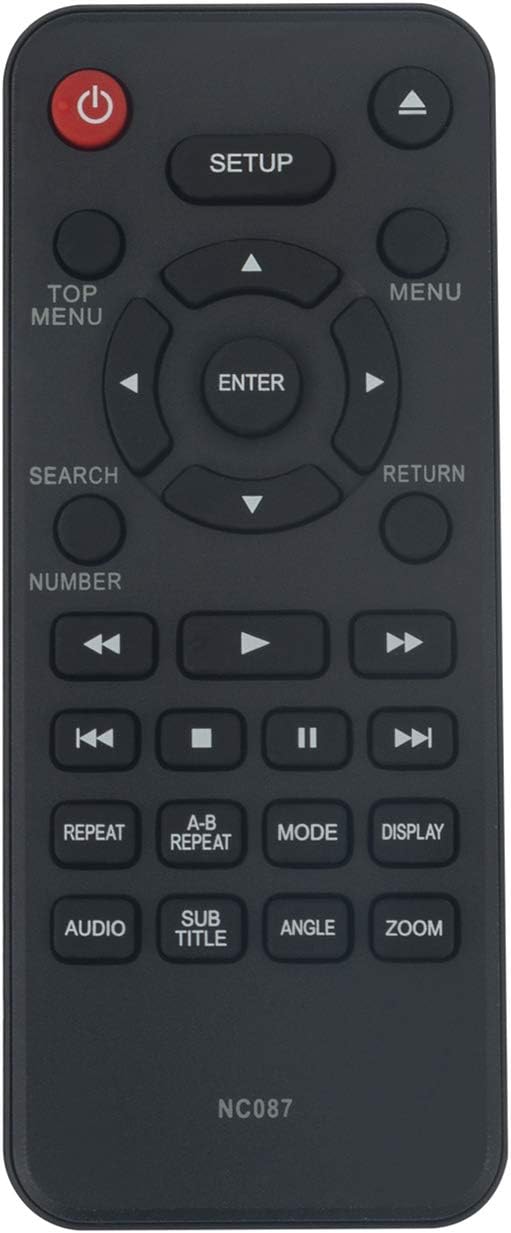
Image: Front view of the NC087 remote control, displaying the layout of all control buttons.
Button Functions
| Button | Function |
|---|---|
| Power (Red Button) | Turns the DVD player On or Off. |
| SETUP | Accesses the DVD player's setup menu. |
| TOP MENU | Returns to the main menu of the DVD. |
| MENU | Accesses the disc's menu. |
| Navigation Arrows (Up, Down, Left, Right) | Navigates through menus and options. |
| ENTER | Confirms selections. |
| RETURN | Goes back to the previous screen or menu. |
| SEARCH | Initiates a search function (if supported by the DVD player). |
| NUMBER | Activates numeric input for track selection or other functions. |
| Play/Pause (►/▮▮) | Starts or pauses playback. |
| Stop (■) | Stops playback. |
| Fast Forward (►►) / Rewind (◄◄) | Fast forwards or rewinds playback. |
| Next Track (►►|) / Previous Track (||◄◄) | Skips to the next or previous track/chapter. |
| REPEAT | Repeats the current track, chapter, or entire disc. |
| A-B REPEAT | Repeats a specific segment between two marked points (A and B). |
| MODE | Cycles through different playback modes. |
| DISPLAY | Shows on-screen display information. |
| AUDIO | Changes audio tracks or languages. |
| SUB TITLE | Toggles or selects subtitle options. |
| ANGLE | Changes camera angles on compatible discs. |
| ZOOM | Zooms in or out on the video display. |
Maintenance
To ensure the longevity and optimal performance of your remote control, follow these maintenance guidelines:
- Cleaning: Wipe the remote control with a soft, dry cloth. For stubborn dirt, slightly dampen the cloth with water or a mild, non-abrasive cleaner. Do not use harsh chemicals or abrasive materials.
- Battery Replacement: Replace batteries when the remote's responsiveness decreases or it stops functioning. Always replace both batteries at the same time with new alkaline batteries.
- Storage: Store the remote control in a cool, dry place away from direct sunlight and extreme temperatures.
- Avoid Liquids: Do not expose the remote control to water or other liquids.
- Dropping: Avoid dropping the remote control, as this can damage internal components.
Troubleshooting
If you experience issues with your remote control, refer to the following common problems and solutions:
- Remote Control Not Responding:
- Check if the batteries are inserted correctly, observing the positive (+) and negative (-) polarity.
- Replace old batteries with new AAA alkaline batteries.
- Ensure there are no obstructions between the remote control and the DVD player's infrared sensor.
- Verify that the DVD player is powered on.
- Buttons Not Functioning Correctly:
- Clean the remote control surface, especially around the buttons, to remove any dirt or debris that might be causing sticking.
- Replace the batteries, as low power can sometimes cause intermittent button response.
- Remote Control Range is Limited:
- Ensure the batteries are fresh.
- Remove any objects that might be blocking the signal path between the remote and the DVD player.
- Make sure you are within the effective operating range of the DVD player's IR receiver.
Specifications
| Feature | Detail |
|---|---|
| Model Number | NC087 or NC087UH |
| Compatible Devices | Sanyo DVD Players (specific models listed in Introduction) |
| Power Source | 2 x AAA Alkaline Batteries (not included) |
| Dimensions (L x W x H) | 5.2 x 2 x 0.5 inches (approximately) |
| Weight | 1.23 ounces (without batteries) |
| Color | Black |
| Special Feature | Ergonomic design |
Warranty and Support
For any questions or assistance regarding your ZdalaMit NC087/NC087UH Replacement Remote Control, please contact the seller or manufacturer directly.
This product is designed as a direct replacement and typically comes with standard consumer guarantees. Please refer to your purchase documentation for specific warranty terms and conditions.
For further inquiries, you may reach out to the seller through the platform where the purchase was made.