
Introduction
Thank you for choosing the Caroma Vibration Plate Exercise Machine. This manual provides essential information for the safe and effective use of your new fitness equipment. Please read it thoroughly before operation and retain it for future reference.
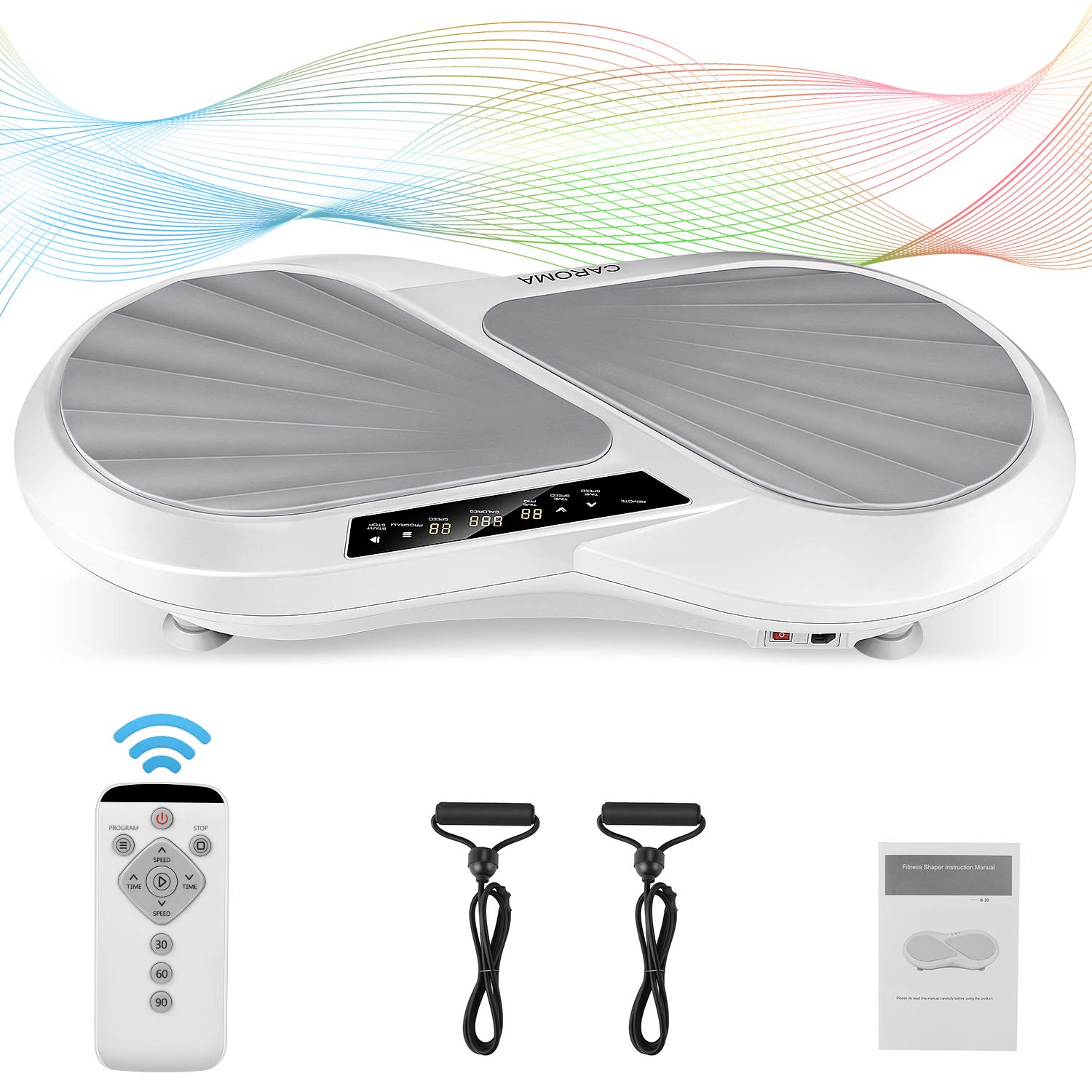
Image: Caroma Vibration Plate Exercise Machine, a compact, gray and white platform with a central control panel.
Important Safety Instructions
To reduce the risk of serious injury, always read and follow all warnings and instructions before using this equipment.
- Consult your physician before starting any new exercise program, especially if you have pre-existing medical conditions.
- Keep children and pets away from the machine during operation.
- Place the machine on a flat, stable surface. Ensure the four non-slip suction cups at the bottom are securely attached to the floor.
- Do not use the machine if it is damaged or malfunctioning.
- Maximum user weight capacity is 120 kg (265 lbs). Do not exceed this limit.
- Wear appropriate athletic footwear and clothing during use.
- Unplug the machine from the power outlet when not in use or before cleaning.
- Do not insert any objects into the machine's openings.
- Use only the provided power cord.
Package Contents
Verify that all components are present in the package:
- 1 x Vibration Platform Machine
- 2 x Resistance Bands
- 1 x Remote Control
- 1 x Power Cord
- 1 x User Manual

Image: The Caroma Vibration Plate Exercise Machine shown with its included accessories: two resistance bands, a remote control, and the user manual.
Setup
- Unpack: Carefully remove all components from the packaging.
- Placement: Choose a flat, stable, and non-slip surface for the machine. Ensure there is sufficient space around the unit for safe operation and movement.
- Secure: Press down firmly on the machine to ensure the four non-slip suction cups on the base adhere securely to the floor.
- Connect Power: Insert the power cord into the machine's power input port, then plug the other end into a grounded electrical outlet.
- Resistance Bands (Optional): If desired, attach the resistance bands to the designated anchor points on the base of the machine.
Operating Instructions
Control Panel Overview
The machine features an intuitive LCD touch screen display and controls. The display shows exercise time, vibration speed, and calories burned.
- Time/Speed Increase/Decrease: Adjusts the duration or intensity of the vibration.
- Remaining Time: Displays the countdown for the current exercise session.
- Calories: Estimates calories burned during the session.
- Speed: Indicates the current vibration speed level (1-99).
- Auto Program: Selects one of the pre-set training programs.
- Start/Stop: Initiates or pauses the vibration.
Remote Control
The included remote control allows for convenient adjustment of settings during your workout without bending down. It mirrors the functions of the main control panel.
Basic Operation
- Power On: Plug in the machine and press the main power switch (usually located on the side or back of the unit). The display will illuminate.
- Start Workout: Step onto the platform. Press the "Start/Stop" button on the control panel or remote. The machine will begin vibrating at a default setting.
- Adjust Speed: Use the "Time/Speed Increase" or "Time/Speed Decrease" buttons to adjust the vibration intensity from 1 to 99 levels.
- Set Time: Adjust the workout duration using the time adjustment buttons. The default time is typically 10 minutes.
- Select Program: Press the "Auto Program" button to cycle through the 4 pre-set training modes. Each program offers a unique vibration pattern and intensity.
- End Workout: Press the "Start/Stop" button to pause or end the vibration. Step off the platform carefully.
- Power Off: Turn off the main power switch and unplug the machine when not in use.
Training Modes and Programs
The Caroma Vibration Plate offers 99 speed levels and 4 distinct training programs to cater to various fitness goals and intensity preferences. These programs simulate different activities:
- Simulated Walking: A gentle vibration for warming up or light exercise.
- Simulated Jogging: A moderate intensity for strengthening exercises.
- Simulated Running: A high-pressure exercise for intense workouts.
- Custom Mode: Allows manual adjustment of speed and time.
Recommended Exercise Poses
Varying your stance and body position on the platform can target different muscle groups and enhance your workout. Here are some examples:
- Standing: Feet shoulder-width apart for a full-body workout.
- Squats: Perform squats while on the platform to engage leg and glute muscles.
- Lunges: One foot on the platform, one off, for targeted leg work.
- Push-ups: Hands on the platform, body in plank position, for upper body and core.
- Seated: Sit on the platform for lower body and core engagement.
- With Resistance Bands: Use the attached resistance bands for arm, shoulder, and back exercises while standing or sitting.

Image: A person demonstrating various exercise poses on the Caroma Vibration Plate, including standing, squatting, and using resistance bands.
Maintenance
- Cleaning: Wipe the machine with a soft, damp cloth after each use. Do not use abrasive cleaners or solvents. Ensure the machine is unplugged before cleaning.
- Storage: Store the machine in a cool, dry place away from direct sunlight and moisture. Its compact design allows for easy storage.
- Inspection: Periodically check the power cord for any damage. Ensure all connections are secure.
Troubleshooting
| Problem | Possible Cause | Solution |
|---|---|---|
| Machine does not power on. | Power cord not properly connected; Main power switch off; Power outlet malfunction. | Ensure power cord is securely plugged in; Turn on the main power switch; Test the outlet with another device. |
| No vibration. | Machine is paused; Speed setting is too low; Overload protection activated. | Press Start/Stop; Increase speed setting; Reduce user weight (if exceeding 120kg). |
| Remote control not working. | Batteries are dead; Obstruction between remote and receiver. | Replace remote control batteries; Ensure clear line of sight to the machine's receiver. |
Specifications
| Feature | Detail |
|---|---|
| Brand | Caroma |
| Model Number | HQA000022 |
| Color | Gray White |
| Material | Acrylonitrile Butadiene Styrene (ABS) |
| Product Dimensions (D x W x H) | 14D x 62W x 14H centimetres (5.5D x 24.4W x 5.5H inches) |
| Maximum Load Capacity | 120 Kilograms (265 lbs) |
| Controls Type | Touch Screen, Remote Control |
| Display Type | LCD |
| Speed Levels | 99 |
| Vibration Frequency | 4-9 Hz |
| Number of Programs | 4 |
| Operation Mode | Automatic |
| Power Source | Corded Electric |
| Rated Power | 200 Watts |
| Voltage | AC 110-120V/60Hz, AC 220-240V/Hz |
| Timer Settings | 1-10 Minutes |

Image: The Caroma Vibration Plate showing its dimensions: 62cm (24.4 inches) length, 39cm (15.4 inches) width, and 14cm (5.5 inches) height.
Warranty and Support
For warranty information or technical support, please refer to the warranty card included in your package or contact Caroma customer service directly. Contact details can typically be found on the manufacturer's official website or on the product packaging.