
Introduction
Thank you for choosing the WEKOME D6 Desktop Mini Bluetooth Speaker. This compact and portable speaker delivers clear sound quality and offers versatile connectivity options. This manual provides detailed instructions on how to set up, operate, and maintain your speaker to ensure optimal performance.
Product Overview

Figure 1: Front view of the WEKOME D6 Mini Bluetooth Speaker, highlighting its compact cylindrical design and control panel.
The WEKOME D6 is a palm-sized desktop speaker designed for portability and ease of use. It features Bluetooth connectivity for wireless audio streaming and a TF card slot for direct music playback. Its robust design ensures clear audio output for various compatible devices.
Key Features:
- Bluetooth Connectivity: Seamless wireless pairing with smartphones, tablets, and laptops.
- Compact Design: Palm-sized for easy portability.
- Clear Sound Quality: Delivers crisp and clear audio.
- Long Battery Life: 500 mAh battery provides approximately 4-5 hours of playback.
- Extended Range: Bluetooth transmission distance of up to 10 meters (33 feet).
- TF Card Support: Maximum support for 32GB TF (MicroSD) cards for direct music playback.
- Output Power: Speaker maximum output power of 10 Watts.
Package Contents
Please check the package for the following items:
- WEKOME D6 Desktop Mini Bluetooth Speaker
- USB Charging Cable
- User Manual (this document)
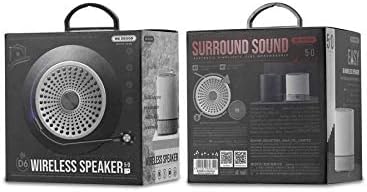
Figure 2: Retail packaging of the WEKOME D6 Mini Bluetooth Speaker, illustrating the product's branding and key information on the box.
Setup
1. Charging the Speaker:
- Connect the small end of the USB charging cable to the charging port on the speaker.
- Connect the other end of the USB cable to a USB power adapter (not included) or a computer's USB port.
- The charging indicator light will illuminate during charging and turn off once fully charged. A full charge typically takes 2-3 hours.
2. Powering On/Off:
- To Power On: Press and hold the Power button for a few seconds until you hear an audible prompt or see an indicator light.
- To Power Off: Press and hold the Power button again for a few seconds.
3. Bluetooth Pairing:
- Ensure the speaker is powered on and in Bluetooth pairing mode (it will usually enter this mode automatically upon first power-on or if no device is connected). The indicator light will typically flash rapidly.
- On your device (smartphone, tablet, laptop), enable Bluetooth and search for available devices.
- Select "WEKOME D6" from the list of found devices.
- Once paired, the speaker will provide an audible confirmation, and the indicator light will stop flashing and remain solid.
- The speaker will automatically reconnect to the last paired device when powered on, if the device's Bluetooth is enabled and within range.
4. TF Card Insertion:
- Locate the TF card slot on the speaker.
- Gently insert a TF (MicroSD) card (up to 32GB) with pre-loaded music files into the slot until it clicks into place.
- The speaker will automatically switch to TF card playback mode if a card is detected.
Operating the Speaker
Control Buttons:
Refer to Figure 1 for the location of the control buttons.
- Power Button: Press and hold to power on/off.
- Volume Up / Next Track Button (+):
- Short press: Increase volume.
- Long press: Skip to the next track.
- Play/Pause Button (||): Short press to play or pause music.
- Volume Down / Previous Track Button (-):
- Short press: Decrease volume.
- Long press: Go to the previous track.
- Mode Button (Dot between + and Play/Pause): Short press to switch between Bluetooth mode and TF card mode (if a TF card is inserted).
Maintenance
- Cleaning: Use a soft, dry cloth to clean the speaker's surface. Do not use abrasive cleaners, alcohol, or other chemical solvents, as these may damage the finish.
- Storage: Store the speaker in a cool, dry place away from direct sunlight and extreme temperatures.
- Battery Care: To prolong battery life, avoid fully discharging the speaker frequently. Charge the speaker regularly, even if not in use for extended periods.
- Water Resistance: This speaker is not water-resistant. Avoid exposure to liquids.
Troubleshooting
| Problem | Possible Cause | Solution |
|---|---|---|
| Speaker does not power on. | Low battery. | Charge the speaker fully. |
| No sound. | Volume too low; Speaker not paired; Incorrect mode. | Increase volume; Ensure speaker is paired; Switch to correct mode (Bluetooth/TF card). |
| Cannot pair with Bluetooth device. | Speaker not in pairing mode; Device Bluetooth off; Too far from speaker. | Ensure speaker is in pairing mode; Turn on device Bluetooth; Move device closer to speaker (within 10M). |
| Music stops playing from TF card. | TF card not inserted correctly; Corrupted files; Unsupported format. | Reinsert TF card; Check TF card for errors; Ensure music files are in a supported format (e.g., MP3). |
Specifications
| Brand | WEKOME |
| Model Name | D6 |
| Connectivity Technology | Bluetooth |
| Speaker Type | Desktop Mini Speaker |
| Speaker Maximum Output Power | 10 Watts |
| Battery Capacity | 500 mAh (approx. 4-5 hours playback) |
| Transmission Distance | 10 meters (33 feet) |
| TF Card Support | Up to 32GB |
| Compatible Devices | Laptop, Smartphone, Tablet |
| Mounting Type | Tabletop |
| Package Dimensions | 12.4 x 11.4 x 7.6 cm |
| Weight | 210 g |
Warranty and Support
For warranty information and technical support, please refer to the warranty card included with your product or contact WEKOME customer service through their official website or authorized retailers. Keep your purchase receipt as proof of purchase for warranty claims.


