
1. Introduction
This manual provides detailed instructions for the safe and effective operation of your Godox SL60IID LED Video Light. Please read this manual thoroughly before use to ensure optimal performance and to prevent damage to the product or injury to yourself or others. Keep this manual for future reference.

Image 1.1: The Godox SL60IID LED Video Light, including the main light unit, standard reflector, and power cable.
2. Safety Information
- Do not disassemble or modify this product. Unauthorized repairs will void the warranty.
- Keep this product dry. Do not handle with wet hands or immerse in water.
- Do not use in the presence of flammable gases or liquids.
- Ensure the power supply voltage matches the product's requirements.
- Unplug the power cable during thunderstorms or when not in use for extended periods.
- Avoid direct eye exposure to the LED light.
- Ensure proper ventilation during operation to prevent overheating.
3. Package Contents
Verify that all items are included in your package:
- 1 x Godox SL60IID LED Light
- 1 x Reflector
- 1 x Lamp Cover
- 1 x Power Cable
- 1 x Color Filters (set)
4. Product Features
- High Output: Provides a maximum output of 18,600 Lux at 1 meter with a standard reflector.
- Precise Dimming: Brightness adjustable from 0% to 100%.
- Built-in FX Effects: Features 8 special effects for creative lighting scenarios.
- Bowens Mount: Compatible with a wide range of Bowens-mount light modifiers.
- Compact and Portable: Designed for easy transport and setup.
- Flexible Angle Adjustment: Allows for versatile lighting positioning.
- Quiet Operation: Engineered for a low-noise environment, suitable for video recording.
- High Color Accuracy: CRI 96+ and TLCI 97+ ensure accurate color rendition.
- Multiple Control Methods: Operable via control panel, remote control (sold separately), or Godox Light app.
5. Setup
5.1 Mounting the Light
- Attach the Godox SL60IID LED light to a compatible light stand using its mounting bracket.
- Secure the light by tightening the locking knob on the light stand.
- Adjust the tilt angle of the light using the handle on the mounting bracket and tighten to secure.

Image 5.1: The compact design of the Godox SL60IID, illustrating its portability.
5.2 Attaching Accessories (Bowens Mount)
- Align the Bowens mount accessory (e.g., reflector, softbox) with the Bowens mount on the front of the light.
- Insert the accessory and rotate it clockwise until it locks into place.
- To remove, press the release button on the light's Bowens mount and rotate the accessory counter-clockwise.

Image 5.2: The Bowens mount allows for compatibility with a wide range of light shaping tools.
5.3 Power Connection
- Connect the power cable to the power input port on the back of the light.
- Plug the other end of the power cable into a suitable AC power outlet.
6. Operating Instructions
6.1 Power On/Off
Press the power switch located on the back of the light to turn the unit on or off.
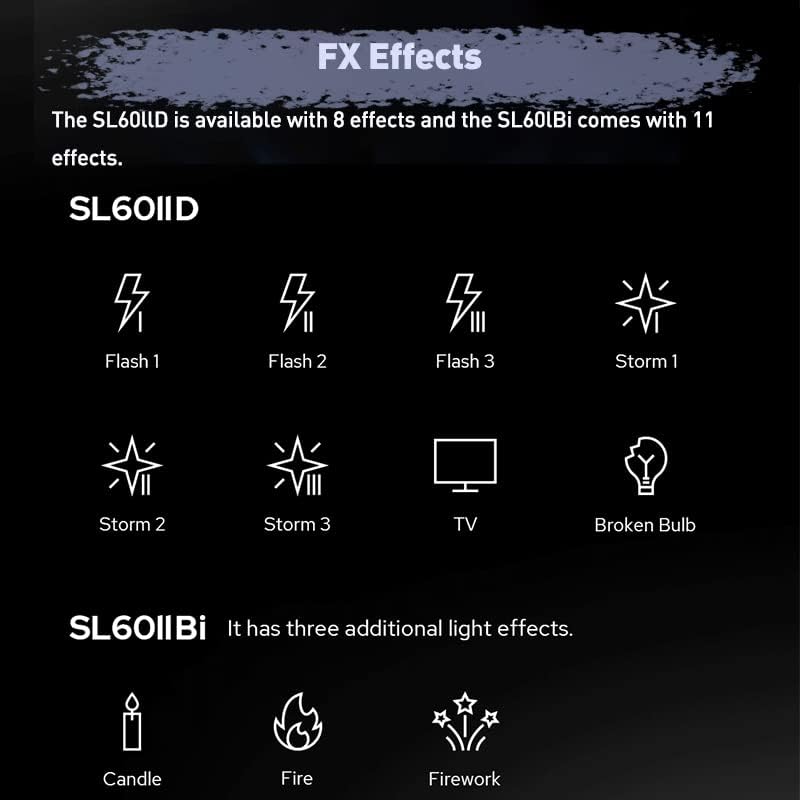
Image 6.1: The control panel with the power switch and adjustment knobs.
6.2 Brightness Adjustment
Rotate the DIM control knob on the back panel to adjust the light's brightness from 0% to 100%.
6.3 FX Effects
The SL60IID offers 8 special effects to simulate various lighting scenarios:
- Flash 1
- Flash 2
- Flash 3
- Storm 1
- Storm 2
- Storm 3
- TV
- Broken Bulb
To activate an FX effect, press the FX button on the control panel and then use the CCT/FX knob to select the desired effect.

Image 6.2: Visual representation of the 8 built-in FX effects.
6.4 App Control
The Godox SL60IID can be controlled wirelessly via the Godox Light mobile application. Download the app from your device's app store.
- Ensure Bluetooth is enabled on your mobile device.
- Open the Godox Light app and follow the in-app instructions to connect to your SL60IID light.
- Once connected, you can adjust brightness, select FX effects, and control other parameters directly from your phone.

Image 6.3: Controlling the light parameters using the Godox Light mobile application.
7. Maintenance
- Regularly clean the light's exterior with a soft, dry cloth. Do not use solvents or abrasive cleaners.
- Ensure the ventilation openings are free from dust and obstructions to maintain proper cooling.
- Store the light in a dry, dust-free environment when not in use.
- Avoid dropping or subjecting the light to strong impacts.
8. Troubleshooting
| Problem | Possible Cause | Solution |
|---|---|---|
| Light does not turn on | No power supply; Power cable loose; Power switch off | Check power connection; Ensure power switch is on. |
| Light output is weak | Brightness set too low | Adjust brightness using the DIM knob or app. |
| App control not working | Bluetooth off; App not connected; Light not in range | Ensure Bluetooth is on; Reconnect in app; Move closer to light. |
| Overheating warning | Poor ventilation; Prolonged high power use | Ensure clear airflow around the light; Reduce power output or allow to cool. |
9. Specifications
| Feature | Specification |
|---|---|
| Model | SL60IID |
| Power Output | 60W |
| Color Temperature | 5600K (Daylight) |
| CRI | 96+ |
| TLCI | 97+ |
| Illuminance (1m, with reflector) | 18,600 Lux |
| Dimming Range | 0% - 100% |
| FX Effects | 8 types |
| Mount Type | Bowens Mount |
| Control Methods | Control Panel, Godox Light App, Remote Control (optional) |
| Product Dimensions | 13 x 9 x 9 inches |
| Item Weight | 6.09 pounds |
10. Warranty and Support
This product is covered by a manufacturer's warranty. Please refer to the warranty card included with your purchase for specific terms and conditions. For technical support, service, or warranty claims, please contact your retailer or the official Godox customer service.
For more information, visit the official GODOX website or contact their support channels.