1. Introduction
This manual provides essential information for the setup, operation, maintenance, and troubleshooting of your ASUS ROG Strix GA15DH Gaming Desktop PC. This high-performance desktop is designed for gaming, featuring an AMD Ryzen 7 3800X processor, NVIDIA GeForce RTX 2070 SUPER graphics, 16GB DDR4 RAM, and a combination of 512GB PCIe SSD and 1TB HDD storage, running on Windows 10 Home.
2. Safety Information
- Operate this product in environments with ambient temperatures between 5 ℃ (41 ℉) and 40 ℃ (104 ℉).
- Ensure proper ventilation to prevent overheating. Do not block ventilation openings.
- Use only the power adapter and cables supplied with the product or specified by the manufacturer.
- Avoid exposing the device to moisture, dust, or extreme temperatures.
- Do not attempt to disassemble or repair the device yourself. Refer all servicing to qualified service personnel.
3. Package Contents
Verify that all items are present in your product package:
- GA15DH-AH772 Desktop PC
- USB Keyboard & Mouse
- Power Cord
- User Guide
- Warranty Card
4. Physical Overview
4.1 Front and Side View

Figure 4.1: Front and side view of the ROG Strix GA15DH, showcasing the customizable RGB lighting strip on the front panel and the transparent side panel revealing internal components.

Figure 4.2: Detailed front view of the ROG Strix GA15DH, highlighting the power button and the distinctive ventilation design.
4.2 Internal Components View

Figure 4.3: Internal view of the ROG Strix GA15DH, displaying the motherboard, CPU cooler, and the NVIDIA GeForce RTX graphics card.
4.3 Rear Panel View

Figure 4.4: Rear panel of the ROG Strix GA15DH, showing the array of input/output ports including USB, audio, video (HDMI, DisplayPort), and network connections.
4.4 Top and Angled Views

Figure 4.5: Angled view of the ROG Strix GA15DH, highlighting the integrated carrying handle for portability.
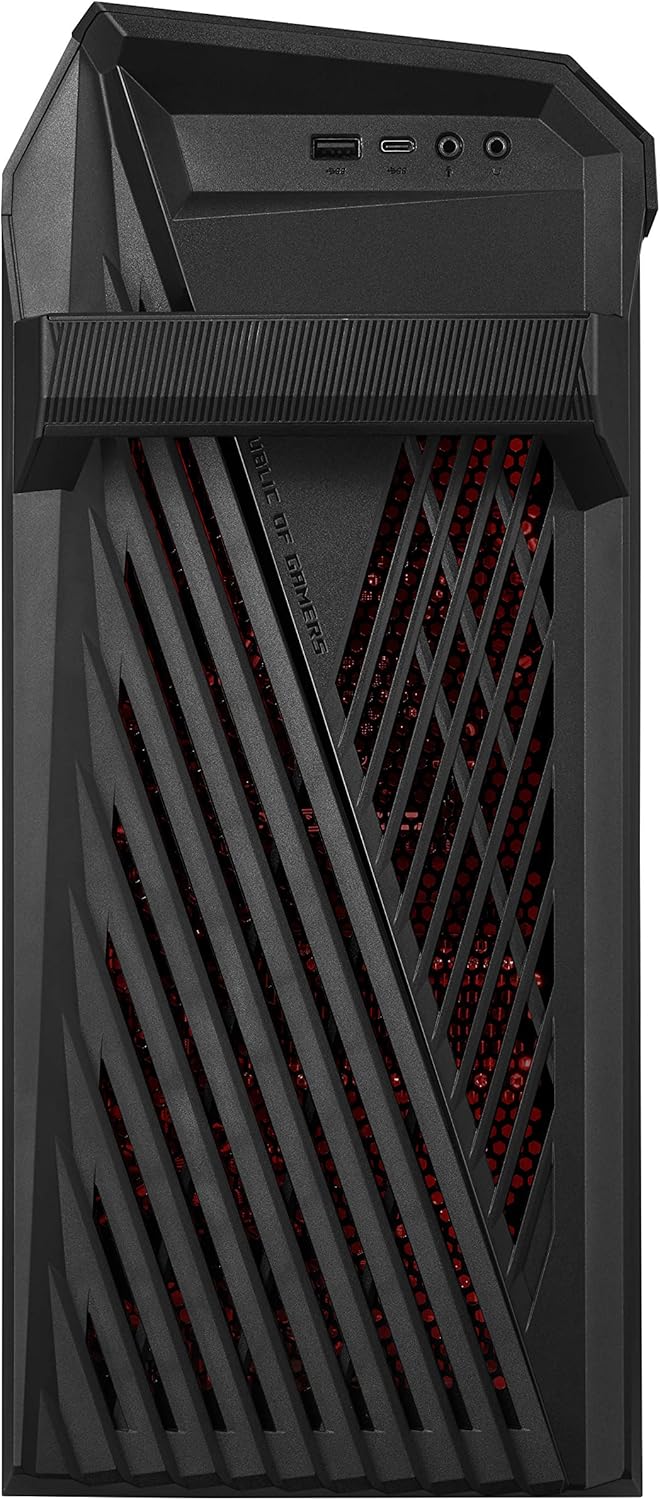
Figure 4.6: Top front view of the ROG Strix GA15DH, illustrating additional front-facing ports for convenient access.
5. Initial Setup
5.1 Connecting Peripherals
- Monitor: Connect your monitor to one of the video output ports (HDMI or DisplayPort) on the graphics card at the rear of the PC.
- Keyboard and Mouse: Connect the included USB keyboard and mouse to any available USB ports on the rear or front of the PC.
- Network: For a wired connection, connect an Ethernet cable from your router to the LAN port on the rear of the PC. For wireless, ensure the Wi-Fi antenna (if external) is connected.
- Audio: Connect speakers or headphones to the appropriate audio jacks on the rear or front panel.
5.2 Power Connection
- Connect the power cord to the power input on the rear of the PC.
- Plug the other end of the power cord into a grounded electrical outlet.
5.3 First Boot-Up
- Press the power button located on the front panel of the PC.
- Follow the on-screen instructions to complete the Windows 10 Home initial setup, including language, region, and user account creation.
6. Basic Operation
6.1 Power On/Off
- Power On: Press the power button on the front panel.
- Shut Down: In Windows, click the Start button, then Power > Shut down. Do not force power off by holding the power button unless necessary.
- Restart: In Windows, click the Start button, then Power > Restart.
6.2 Connecting to Wi-Fi
- Click the Wi-Fi icon in the system tray (bottom-right corner of the screen).
- Select your desired Wi-Fi network from the list.
- Enter the network security key (password) if prompted, then click Connect.
6.3 Aura Sync RGB Lighting
Your ROG Strix GA15DH features customizable ASUS Aura Sync RGB chassis lighting. To customize lighting effects and colors, use the ASUS Armoury Crate software pre-installed on your system. This software allows synchronization with other Aura Sync compatible devices.
7. Care and Maintenance
7.1 Cleaning the PC
- Always power off and unplug the PC before cleaning.
- Use a soft, lint-free cloth slightly dampened with water or a mild cleaning solution to wipe exterior surfaces.
- Use compressed air to clear dust from ventilation openings and ports. Do not spray liquid directly onto the PC.
7.2 Ventilation
The ROG Strix GA15DH incorporates Flow Tech Ventilation to optimize internal cooling. Ensure that the PC is placed in an area with adequate airflow and that all ventilation openings are unobstructed. Regularly check for dust buildup in the vents and clean as described above.
7.3 Software Updates
Regularly update your Windows operating system, graphics drivers (NVIDIA GeForce Experience), and ASUS utilities (Armoury Crate) to ensure optimal performance and security. These updates often include performance enhancements and bug fixes.
8. Troubleshooting
- No Power: Ensure the power cord is securely connected to both the PC and the electrical outlet. Verify the outlet is functional.
- No Display: Check that the monitor is properly connected to the graphics card's video output and that the monitor is powered on and set to the correct input source.
- No Internet Connection: For wired connections, check the Ethernet cable and router status. For Wi-Fi, ensure the Wi-Fi adapter is enabled and you are connected to the correct network with the correct password.
- System Slowdown/Freezing: Close unnecessary applications. Check Task Manager for high resource usage. Ensure drivers and Windows are up to date. Consider running a system scan for malware.
- Unusual Noises: If you hear grinding or clicking noises, back up your data immediately and contact ASUS support.
For more complex issues, refer to the ASUS support website or contact their customer service.
9. Specifications
| Feature | Specification |
|---|---|
| Model | GA15DH-AH772 |
| Processor | AMD Ryzen 7 3800X (8-Core, up to 4.5 GHz) |
| Graphics | NVIDIA GeForce RTX 2070 SUPER 8GB GDDR6 |
| RAM | 16 GB DDR4 3200 MHz |
| Storage | 512 GB PCIe NVMe M.2 SSD + 1 TB HDD (7200 RPM) |
| Operating System | Windows 10 Home |
| Wireless Connectivity | Wi-Fi 5 (802.11ac), Bluetooth |
| USB Ports | 8x USB 3.0 Ports (total, including front/rear) |
| Video Output Ports | 1x HDMI, 3x DisplayPort (on GPU) |
| Dimensions (LxWxH) | 42.1 x 7.3 x 19.6 inches |
| Item Weight | 24.3 pounds |
| Color | Star Black |
10. Warranty and Support
10.1 Product Warranty
Your ASUS ROG Strix GA15DH PC comes with a limited warranty. Please refer to the included Warranty Card in your package for detailed terms, conditions, and duration of the warranty coverage. Keep your proof of purchase for warranty claims.
10.2 Technical Support
For technical assistance, driver downloads, FAQs, and further support, please visit the official ASUS support website. You can also contact ASUS customer service directly using the contact information provided on their website or in your warranty documentation.
- ASUS Support Website: www.asus.com/support/


