
Cuifati Cuifatix46an5kvtz-01
Mini LED Projector User Manual
Model: Cuifatix46an5kvtz-01 | Brand: Cuifati
Introduction
This Mini LED Projector is designed for versatile use in outdoor recreation, entertainment venues, and home theaters. Its compact and portable design allows for easy transport, enabling you to enjoy movies, videos, and games in various dark environments, whether at home, in a courtyard, or during travel and camping. It supports multiple input interfaces including HDMI, AV, VGA, USB, and SD Card, facilitating easy connection to a wide range of devices for high-definition image and video display. With support for up to 1080P HD displaying, you can experience clear and vibrant content anytime, anywhere.

Image: The Cuifati Mini LED Projector in use, projecting a vibrant movie scene onto a screen, with a remote control held by a hand in the foreground. This illustrates the projector's primary function and portability.
Package Contents
Please verify that all items listed below are included in your package. If any items are missing or damaged, please contact customer support.
- 1 x Mini LED Projector
- 1 x Remote Control (Batteries not included)
- 1 x Power Adapter (US/EU/UK/EU - specific to region)
- 1 x AV Cable
- 1 x User Manual

Image: A flat lay of the Cuifati Mini LED Projector and its accessories, including the projector unit, remote control, power adapter, and AV cable, laid out on a white surface. This visually confirms the items expected in the product package.
Video: An unboxing video demonstrating the contents of the Mini LED Projector package. It shows the projector, remote control, power adapter, and AV cable being removed from the box, providing a clear visual guide to what is included.
Product Overview and Features
The Cuifati Mini LED Projector is engineered for optimal performance and user convenience. Key features include:
- Long-Life LED Light Source: Utilizes a 30,000-hour LED light source, which is harmless, radiation-free, and environmentally friendly.
- High Definition Display: Supports 720P and 1080P HD display, delivering clear and natural images and videos on a large screen.
- High Brightness: 1500 lumens brightness ensures stunning true color presentations with rich color and detail.
- Multiple Input Interfaces: Equipped with HDMI, USB, AV, VGA, and 3.5mm Earphone Port for broad compatibility.
- Adjustable Viewing Experience: Manual focusing and adjustable aspect ratio (4:3) with a projection distance of 1.0-2.8 meters.
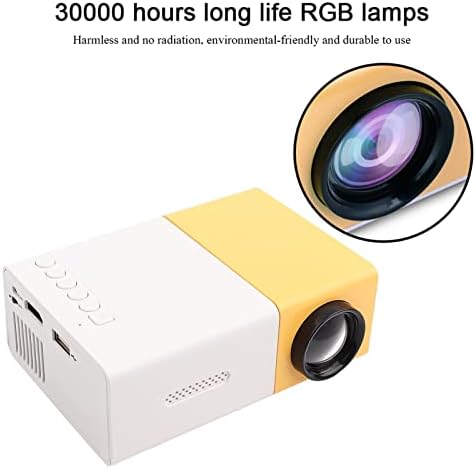
Image: A close-up view of the Mini LED Projector, emphasizing its lens and the text "30000 hours long life RGB lamps," indicating the durability and eco-friendliness of its light source.

Image: The Mini LED Projector shown with an overlay indicating "Support 1080P HD Displaying," illustrating its capability to project high-definition content for a clear viewing experience.

Image: A split image demonstrating the "1500lm High Brightness" of the projector, comparing a scene with common lumen to the brighter, more vibrant output of 1500 lumens, highlighting improved visual quality.
Setup
Follow these steps to set up your Mini LED Projector:
- Placement: Place the projector on a stable, flat surface. Ensure there is adequate ventilation around the unit.
- Power Connection: Connect the power adapter to the projector's DC12V-1.5A input port and then plug it into a power outlet.
- Connecting Devices:
- HDMI: Use an HDMI cable to connect your device (e.g., laptop, TV box, game console) to the projector's HDMI port.
- AV: Use the provided AV cable to connect devices with AV output to the projector's AV port.
- VGA: Connect devices with VGA output (e.g., desktop PC) to the projector's VGA port.
- USB: Insert a USB drive into the USB port to play media files directly.
- Micro SD: Insert a Micro SD card into the Micro SD slot to play media files.
- Audio Output: Connect external speakers or headphones to the 3.5mm Earphone Port for enhanced audio.
- Power On: Press the power button on the projector or the remote control to turn on the unit.

Image: A circular diagram illustrating the various input interfaces of the Mini LED Projector, including HDMI, AV, USB, and Micro SD, and the types of devices they can connect to, such as laptops, game consoles, and TV boxes.
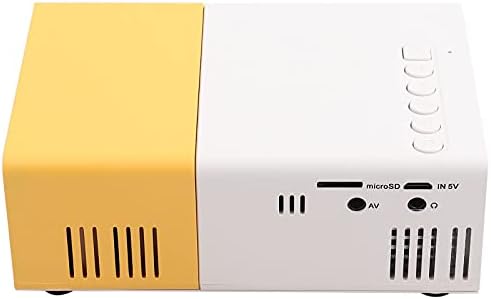
Image: A detailed view of the back panel of the Mini LED Projector, clearly showing all available input ports including USB, Micro SD, AV, and the 3.5mm earphone jack, essential for understanding connectivity options.
Operating Instructions
Once the projector is powered on and a device is connected, you can begin operating it:
- Source Selection: Use the "Source" button on the remote control or the projector's control panel to select the correct input source (HDMI, AV, VGA, USB, Micro SD).
- Focus Adjustment: Rotate the focus ring on the projector lens until the projected image is clear and sharp.
- Volume Control: Adjust the volume using the remote control or the projector's built-in controls.
- Media Playback (USB/Micro SD):
- Navigate through folders and files using the remote control's arrow keys.
- Select the desired audio, video, or image file to play.
- Supported formats include:
- Audio: MP3, WMA, OGG, AAG, FLAC, APE, WAV
- Image: JPEG, BMP, PNG
- Video: Supports Full Format Files
- Text: TXT
- Aspect Ratio: The projector supports a 4:3 aspect ratio. Adjust your source device settings if necessary for optimal display.
Specifications
| Feature | Detail |
|---|---|
| Brand | Cuifati |
| Model Number | Cuifatix46an5kvtz-01 |
| Light Source | LED, 30,000 hours life |
| Native Resolution | 320 x 240 pixels |
| Support Resolution | 720P, 1080P |
| Brightness | 1500lm |
| Contrast Ratio | 2800:1 |
| Focusing Mode | Manual focusing |
| Displayable Colors | 1.67M |
| Aspect Ratio | 4:3 |
| Projection Distance | 1.0-2.8m |
| Projection Screen Size | 10-60 inches |
| Input Power | DC12V-1.5A |
| Dimensions | Approx. 127 x 81.5 x 48.5mm / 5 x 3.2 x 1.9in |
| Weight | 500g / 15.5 ounces |
| Connectivity Technology | VGA, USB, HDMI |
| Special Features | Built-In Speaker, Lightweight, Built-In Media Player |
Maintenance
Proper maintenance ensures the longevity and optimal performance of your projector:
- Cleaning the Lens: Use a soft, lint-free cloth specifically designed for optical lenses. Do not use abrasive cleaners or cloths that could scratch the lens.
- Cleaning the Exterior: Wipe the projector's exterior with a soft, dry cloth. For stubborn dirt, a slightly damp cloth can be used, but ensure no moisture enters the device.
- Ventilation: Ensure the ventilation vents are clear of dust and obstructions to prevent overheating. Do not block the vents during operation.
- Storage: When not in use for extended periods, store the projector in a cool, dry place, away from direct sunlight and extreme temperatures.
- Power Off Properly: Always power off the projector using the designated power button and allow it to cool down before unplugging or moving.
Troubleshooting
If you encounter issues with your projector, refer to the following common problems and solutions:
| Problem | Possible Cause / Solution |
|---|---|
| No image projected |
|
| Image is blurry |
|
| No sound |
|
| Remote control not working |
|
| Projector overheats and shuts down |
|
Warranty and Support
The Cuifati Mini LED Projector comes with a 90-day exchange warranty. For any product issues or support inquiries, please contact Cuifati customer service.

Image: The Cuifati brand logo, which may be used for identification and support contact.

Image: Text stating "CUIFATI 90-day warranty," confirming the warranty period for the product.
For further assistance, please visit the official Cuifati store on Amazon: Cuifati Store
Ask a question about this manual
Ask about setup, troubleshooting, compatibility, parts, safety, or missing instructions. Manuals+ will review the question and use this page’s manual context to help answer it.