
1. Introduction
Thank you for choosing the Yard Force NX60i Robotic Lawnmower. This manual provides essential information for the safe and efficient operation, installation, and maintenance of your new robotic lawnmower. The NX60i is designed to maintain lawns up to 600 m², featuring a powerful 28V 2.0 Ah Lithium-ion battery, a cutting width of 180 mm, and adjustable cutting heights from 20 mm to 60 mm (5 levels). It includes advanced safety features like the iRadar ultrasonic sensor for obstacle detection and an active safety function to prevent collisions. The mower also offers convenient control via a smartphone application and a user-friendly LCD control panel with a numeric keypad.

Figure 1: Front view of the Yard Force NX60i Robotic Lawnmower.
2. Safety Instructions
Always read and understand all safety warnings and instructions before operating the robotic lawnmower. Failure to follow these instructions may result in electric shock, fire, and/or serious injury.
2.1 General Safety
- Keep children and pets away from the working area of the robotic lawnmower.
- Do not operate the mower in wet conditions or rain.
- Ensure the boundary wire is correctly installed and secured to prevent tripping hazards.
- Turn off the mower and disconnect it from the charging station before performing any maintenance or cleaning.
- Do not ride on the mower.
- Do not use the mower if any parts are damaged or missing.
2.2 Blade Safety
- The blades are sharp. Exercise extreme caution when handling them.
- Always wear protective gloves when inspecting or replacing blades.
- Ensure the mower is completely stopped and powered off before accessing the blades.
2.3 Battery Safety
- Use only the specified battery and charger provided by the manufacturer.
- Do not expose the battery to extreme temperatures or direct sunlight.
- Do not attempt to open or modify the battery pack.
3. Package Contents
Verify that all items listed below are included in your package. If any items are missing or damaged, contact your retailer.
- 1x Yard Force NX60i Robotic Lawnmower
- 1x Charging Station
- 120 m Boundary Wire
- 150 pcs Fixing Pegs
- 9 m Power Cable
- 6 pcs Spare Blades
- 3 pcs Spare Screws
- 3 pcs Cable Connectors
- Spacer Ruler
- User Manual (this document)
4. Setup
4.1 Charging Station Placement
Choose a flat, level area with access to a power outlet. The charging station should be placed in a shaded area if possible, to protect it from direct sunlight and rain. Ensure there is enough clear space around the charging station for the mower to dock easily.
4.2 Boundary Wire Installation
The boundary wire defines the mowing area for your robot. Lay the 120-meter boundary wire around the perimeter of your lawn, securing it with the provided fixing pegs. Maintain a distance of approximately 20 cm from the edge of the lawn or obstacles. For detailed instructions on complex lawn layouts, refer to the full installation guide.
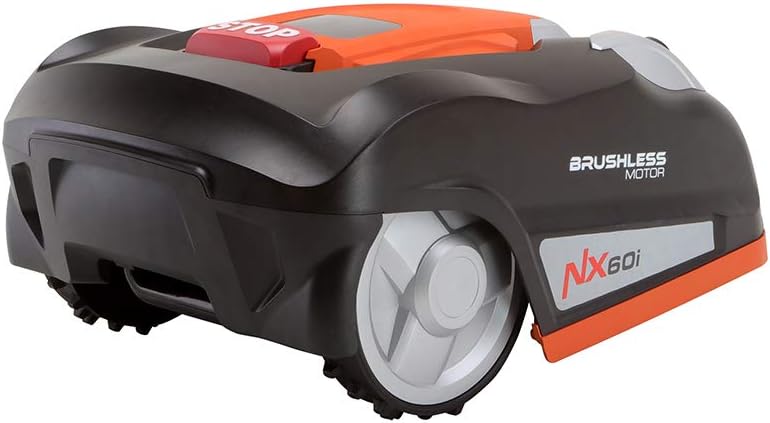
Figure 2: Side view of the robotic lawnmower, showing wheel and cutting deck area.
4.3 Initial Charging
Once the charging station and boundary wire are set up, connect the power cable. Place the robotic lawnmower onto the charging station to allow its 28V 2.0 Ah Lithium-ion battery to fully charge before its first operation.
4.4 App Setup and Connectivity
The NX60i can be easily controlled via a smartphone application using its WLAN connection. Download the official Yard Force app from your device's app store. Follow the in-app instructions to pair your mower with your smartphone. This allows for convenient scheduling and monitoring.

Figure 3: Smartphone showing the Yard Force application for remote control.
5. Operating Instructions
5.1 Starting the Mower
To start the mower, ensure it is within the boundary wire and fully charged. Press the 'START' button on the LCD control panel or initiate mowing via the smartphone app. The mower will begin its programmed mowing cycle.

Figure 4: The robotic lawnmower actively mowing a lawn.
5.2 Cutting Height Adjustment
The cutting height can be adjusted between 20 mm and 60 mm in 5 levels. Locate the cutting height adjustment knob, usually on the top or side of the mower, and rotate it to your desired setting.
5.3 Scheduling Mowing Times
You can set up to two individual mowing times for each day using either the smartphone app or the LCD control panel. Regular mowing helps maintain a healthy lawn.
5.4 iRadar Ultrasonic Sensor
The iRadar ultrasonic sensor provides active safety by detecting obstacles at a distance of 20-60 cm, allowing the mower to avoid collisions. This feature enhances safety and protects both the mower and garden objects.
5.5 Edge Cutting Function
The NX60i includes an edge cutting function to ensure your garden edges are neatly trimmed, contributing to a clean and orderly appearance.
5.6 LCD Control Panel and Keypad
The mower features an intuitive LCD control panel and a numeric keypad, allowing for easy operation and programming even without the smartphone application.
6. Maintenance
Regular maintenance ensures the longevity and optimal performance of your Yard Force NX60i.
6.1 Blade Replacement
The blades should be inspected regularly and replaced when dull or damaged. Your package includes 6 spare blades and 3 spare screws. To replace, turn off the mower, wear protective gloves, and carefully unscrew the old blades before attaching new ones.

Figure 5: A user performing maintenance, possibly inspecting or replacing blades.
6.2 Cleaning
Clean the mower regularly, especially the cutting deck and wheels, to prevent grass clippings from accumulating. Use a brush or damp cloth. Do not use a high-pressure washer or immerse the mower in water.
6.3 Battery Care
For optimal battery life, store the mower in a cool, dry place during off-season periods. Ensure the battery is fully charged before long-term storage and recharge it periodically.
7. Troubleshooting
This section addresses common issues you might encounter with your robotic lawnmower.
7.1 Mower Not Starting or Charging
- Check Power Connection: Ensure the charging station is properly connected to the power outlet and the power cable is not damaged.
- Check Mower Placement: Verify the mower is correctly docked in the charging station, and its charging contacts align.
- Battery Level: Ensure the battery has sufficient charge.
- Safety Sensor: If the mower indicates a lift sensor error, check if the lift sensor is properly connected internally (as noted in some user experiences, this might require professional inspection if not easily accessible).
7.2 Mower Not Following Boundary Wire
- Wire Connection: Ensure the boundary wire is securely connected to the charging station.
- Wire Damage: Inspect the boundary wire for any breaks or cuts. Repair with cable connectors if necessary.
- Interference: Check for strong electromagnetic interference from other electronic devices nearby.
7.3 Mower Getting Stuck Frequently
- Obstacles: Remove any small objects, toys, or garden tools from the mowing area.
- Uneven Terrain: The mower has limited ground clearance. Ensure the lawn is relatively even.
- iRadar Sensor: Ensure the ultrasonic sensors are clean and unobstructed.
7.4 PIN Code Issues
If you encounter issues with the PIN code (e.g., incorrect PIN or a refurbished unit with a locked PIN), refer to the specific instructions in the full manual for resetting or recovering the PIN. If the issue persists, contact customer support.
8. Specifications
| Feature | Specification |
|---|---|
| Model Number | NX60i |
| Brand | Yard Force |
| Battery Type | Lithium-ion |
| Battery Voltage | 28 V |
| Battery Capacity | 2.0 Ah |
| Cutting Width | 180 mm (18 cm) |
| Cutting Height | 20 mm - 60 mm (5 levels) |
| Recommended Lawn Area | Up to 600 m² |
| Obstacle Detection | iRadar Ultrasonic Sensor (20-60 cm) |
| Connectivity | WLAN, Smartphone App Control |
| Motor Type | Brushless Motor |
| Product Dimensions (L x W x H) | 57 x 40 x 28.2 cm |
| Item Weight | 8.5 kg |
| Material | Plastic, Metal |
| Country of Origin | China |
9. Warranty and Support
For warranty information and customer support, please refer to the documentation provided with your purchase or contact your retailer. Keep your proof of purchase for any warranty claims.
For technical assistance or spare parts, please visit the official Yard Force website or contact their customer service department.


