
Introduction
This manual provides instructions for the ZdalaMit NB887UD NB887 replacement remote control. This remote is designed to function as a direct replacement for the original remote controls of specific Magnavox DVD VCR Combo Player models. No programming or pairing is required for its operation.
Compatible Magnavox DVD VCR Combo Player Models:
- ZV427MG9A
- ZV427MG9
- RZV427MG9A
- RZV427MG9
Setup
To begin using your ZdalaMit NB887UD NB887 replacement remote control, follow these simple steps:
- Install Batteries: Open the battery compartment cover on the back of the remote control.
- Insert Batteries: Insert two (2) 1.5V AAA alkaline batteries, ensuring the positive (+) and negative (-) terminals are aligned correctly as indicated inside the compartment.
- Close Cover: Replace the battery compartment cover securely.
Once batteries are installed, the remote control is ready for immediate use with your compatible Magnavox DVD VCR Combo Player. No additional programming or setup is necessary.

Image 1: Front view of the ZdalaMit NB887UD NB887 Replacement Remote Control, showing all buttons and layout.
Operating Instructions
The NB887UD NB887 remote control provides full functionality for your Magnavox DVD VCR Combo Player. Familiarize yourself with the main button groups:
- Power Control:
- STANDBY-ON (Red Button): Turns the player on or off.
- Source Selection:
- SOURCE: Cycles through available input sources.
- VCR: Selects the VCR function.
- DVD: Selects the DVD function.
- Numeric and Text Input:
- 0-9 Buttons: For direct channel selection, time input, or menu navigation.
- ABC, DEF, GHI, JKL, MNO, PQRS, TUV, WXYZ: Used for text input in certain menus.
- SPACE: Inserts a space during text input.
- CLEAR: Clears current input or selection.
- Menu and Navigation:
- DISPLAY: Shows on-screen display information.
- DISC MENU: Accesses the DVD disc menu.
- TITLE: Accesses the DVD title menu.
- SETUP: Enters the system setup menu.
- Directional Pad (Up, Down, Left, Right): Navigates through menus and options.
- OK: Confirms a selection.
- RETURN: Goes back to the previous menu or screen.
- Playback Controls:
- Play (▶): Starts playback.
- Pause (⏸): Pauses playback.
- Stop (⏹): Stops playback.
- Rewind (⏪): Rewinds playback.
- Fast Forward (⏩): Fast forwards playback.
- Skip Back (⏮): Skips to the previous track/chapter.
- Skip Forward (⏭): Skips to the next track/chapter.
- CM SKIP: Skips commercial breaks (if supported by the player).
- RAPID PLAY: Initiates rapid playback.
- SEARCH: Activates search function.
- Recording Controls:
- REC (Red Button): Starts recording.
- REC MODE: Selects recording mode.
- D.DUBBING (Red Button): Initiates direct dubbing.
- TIMER SET: Sets timer recording.
- Audio/Video Controls:
- AUDIO: Selects audio tracks or modes.
- HDMI: Selects HDMI output (if applicable).
- TRACKING (+/-): Adjusts VCR tracking.
- OPEN/CLOSE: Opens or closes the disc tray.
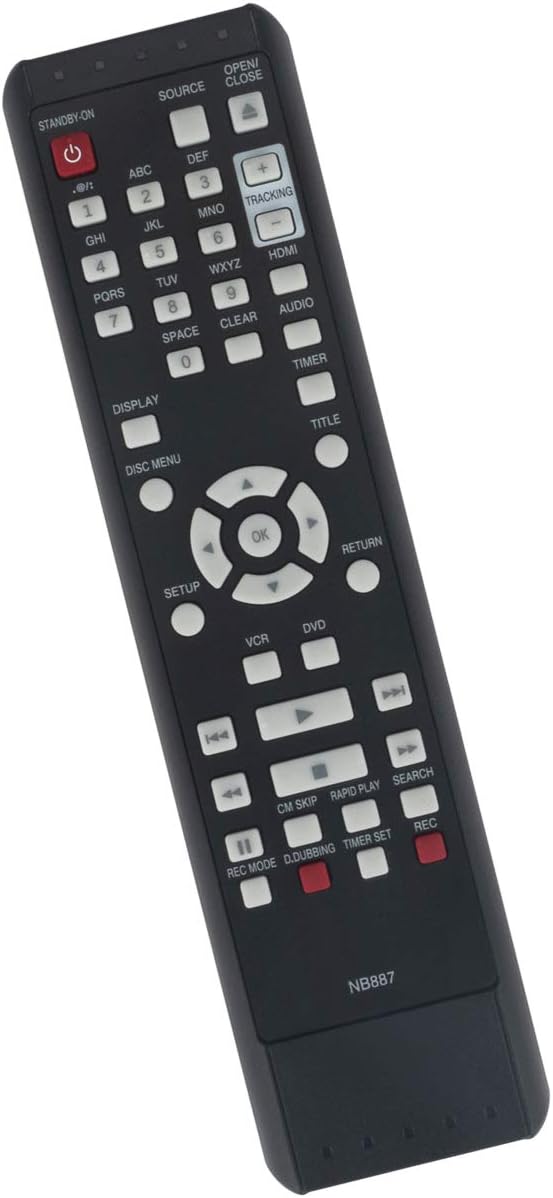
Image 2: Angled view of the remote control, highlighting the ergonomic design.
Maintenance
Proper maintenance ensures the longevity and optimal performance of your remote control.
- Battery Replacement: Replace batteries when the remote's response becomes sluggish or it stops functioning. Always replace both batteries simultaneously with new 1.5V AAA alkaline batteries. Do not mix old and new batteries, or different types of batteries.
- Cleaning: Wipe the remote control with a soft, dry cloth. For stubborn dirt, slightly dampen the cloth with water or a mild, non-abrasive cleaner. Avoid using harsh chemicals or solvents, as these can damage the remote's surface or internal components.
- Storage: If the remote will not be used for an extended period, remove the batteries to prevent leakage, which can cause damage. Store the remote in a cool, dry place away from direct sunlight and extreme temperatures.
Troubleshooting
If you encounter issues with your remote control, try the following troubleshooting steps:
- Remote Not Responding:
- Ensure the batteries are inserted correctly with the correct polarity.
- Replace the batteries with fresh 1.5V AAA alkaline batteries.
- Check for any obstructions between the remote control and the Magnavox DVD VCR Combo Player. Ensure you are within the effective range and line of sight.
- Specific Functions Not Working:
- Verify that the correct mode (DVD or VCR) is selected on the remote and the player for the desired function.
- Some functions may be specific to certain menus or playback states. Refer to your Magnavox player's manual for specific operation details.
- Intermittent Operation:
- This often indicates low battery power. Replace the batteries.
- Ensure the remote's infrared emitter is clean and unobstructed.
Specifications
| Feature | Detail |
|---|---|
| Model | NB887UD / NB887 |
| Brand | ZdalaMit |
| Compatible Devices | Magnavox DVD VCR Combo Players (ZV427MG9A, ZV427MG9, RZV427MG9A, RZV427MG9) |
| Power Supply | 2 x 1.5V AAA Alkaline Batteries (not included) |
| Product Dimensions | 6.8 x 2 x 0.6 inches (approximately) |
| Item Weight | 3 ounces (approximately) |
| Color | Black |
| Max Number of Supported Devices | 1 |
Warranty and Support
For any questions, concerns, or support regarding your ZdalaMit NB887UD NB887 replacement remote control, please contact the seller or manufacturer directly. Specific warranty details may vary by retailer or region. Please retain your purchase receipt for any warranty claims.
Your satisfaction is important. Do not hesitate to reach out if you require assistance.