
MISTRAL MHV912R
MISTRAL Mimica MHV912R High Velocity Stand Fan User Manual
Model: MHV912R
Introduction
Thank you for purchasing the MISTRAL Mimica MHV912R High Velocity Stand Fan. This manual provides important information for the safe and efficient operation of your fan. Please read it thoroughly before use and retain it for future reference.
Important Safety Instructions
Always follow basic safety precautions when using electrical appliances to reduce the risk of fire, electric shock, and injury to persons.
- Read all instructions before using this fan.
- Ensure the power supply matches the voltage specified on the fan's rating label.
- Do not operate any fan with a damaged cord or plug. Discard the fan or return to an authorized service facility for examination and/or repair.
- Do not run cord under carpeting. Do not cover cord with throw rugs, runners, or similar coverings. Arrange cord away from traffic area and where it will not be tripped over.
- Do not insert fingers or foreign objects into any openings.
- Unplug the fan from the outlet when not in use, when moving it from one location to another, and before cleaning.
- Do not use outdoors.
- This appliance is not intended for use by persons (including children) with reduced physical, sensory or mental capabilities, or lack of experience and knowledge, unless they have been given supervision or instruction concerning use of the appliance by a person responsible for their safety.
- Children should be supervised to ensure that they do not play with the appliance.
Package Contents
- 1 x MISTRAL Mimica MHV912R Stand Fan Unit
- 1 x Remote Control
- 1 x Extension Rod (for height adjustment)
- 1 x User Manual (this document)
Setup and Assembly
Your MISTRAL Mimica MHV912R fan is designed for easy assembly and height adjustment.
- Unpack Components: Carefully remove all parts from the packaging. Ensure all listed package contents are present.
- Base Assembly: Place the fan base on a stable, flat surface.
- Attach Fan Head: Securely attach the fan head unit to the top of the main stand. Ensure it clicks into place or is firmly tightened.
- Height Adjustment (Optional):
- For a shorter, table-top configuration, use the fan head directly on the base without the extension rod.
- For a taller, stand fan configuration, insert the provided extension rod between the fan head and the base. The pieces are designed to snap together easily. Ensure a secure connection.
- Power Connection: Plug the power cord into a suitable electrical outlet.

Image 1: Front view of the MISTRAL Mimica MHV912R Stand Fan.

Image 2: Angled front view of the MISTRAL Mimica MHV912R Stand Fan, showcasing its sleek design.

Image 3: Straight front view of the MISTRAL Mimica MHV912R Stand Fan.

Image 4: Rear view of the MISTRAL Mimica MHV912R Stand Fan, showing the power cord connection.

Image 5: Size comparison of the MISTRAL Mimica MHV912R Stand Fan, illustrating its 39-inch (99 cm) height.
Operating Instructions
The MISTRAL Mimica MHV912R fan can be operated using the touch control panel on the base or the included remote control.
Control Panel Overview
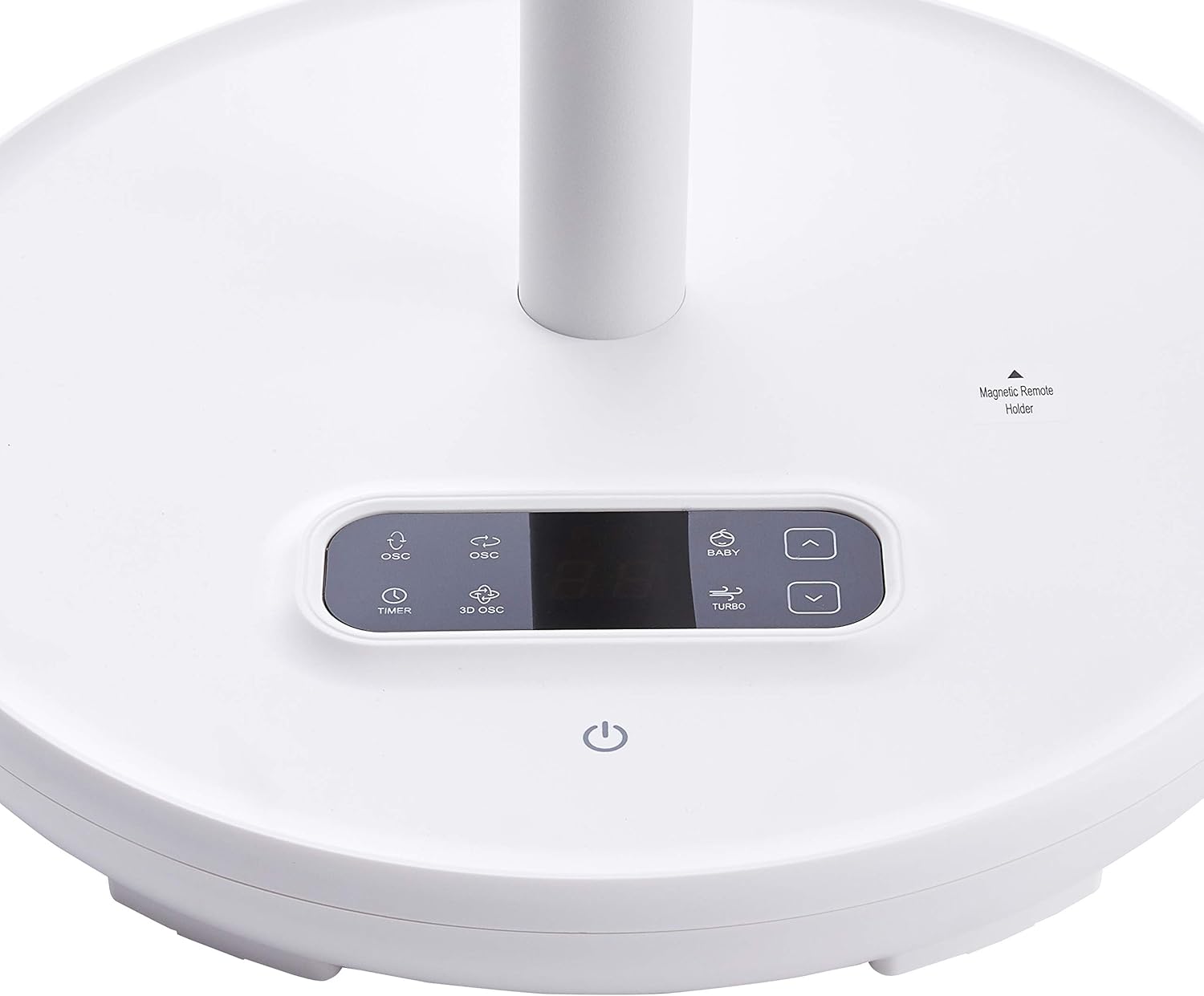
Image 6: Close-up of the MISTRAL Mimica MHV912R fan's touch control panel on the base.
- Power Button: Turns the fan On or Off.
- Speed Selection: Adjusts between 6 fan speeds.
- Oscillation (OSC): Activates horizontal oscillation (left and right).
- 3D Oscillation (3D OSC): Activates both horizontal and vertical (up and down 100°) oscillation for wider air distribution.
- Timer: Sets the fan to automatically turn off after a specified duration (up to 12 hours).
- Mode Selection: Cycles through different airflow modes (Auto, Natural Breeze, Sleep).
Remote Control
The remote control provides convenient access to all fan functions from a distance. It can be stored on the magnetic remote holder on the fan base to prevent misplacement.

Image 7: The remote control for the MISTRAL Mimica MHV912R fan, showing buttons for power, speed, oscillation, 3D oscillation, and timer.
- Power Button: Turns the fan On or Off.
- Speed Buttons (Up/Down): Adjusts the fan speed.
- OSC Button: Toggles horizontal oscillation.
- 3D OSC Button: Toggles 3D oscillation.
- Timer Button: Sets or adjusts the timer.
Airflow Modes
- Auto Mode: The fan senses the room temperature and automatically adjusts the fan speed to maintain optimal comfort.
- Natural Breeze Mode: The fan speed alternates between high and low settings to simulate a natural outdoor breeze.
- Sleep Mode: The fan gradually decreases its airflow over a 2-hour period before turning off, providing a quiet and comfortable environment for sleep.
Maintenance and Cleaning
Regular cleaning will help maintain your fan's performance and extend its lifespan.
- Before Cleaning: Always unplug the fan from the power outlet before cleaning.
- Exterior Cleaning: Use a soft, damp cloth to wipe the exterior surfaces of the fan. Do not use abrasive cleaners or solvents, as these may damage the finish.
- Grille and Blades: The front grille can be carefully removed for cleaning the fan blades. Use a soft brush or vacuum cleaner with a brush attachment to remove dust and debris from the blades and inside the grille. Ensure all parts are dry before reassembling and operating the fan.
- Storage: When not in use for extended periods, store the fan in a cool, dry place, preferably in its original packaging.
Troubleshooting
| Problem | Possible Cause | Solution |
|---|---|---|
| Fan does not turn on. | No power supply; Power cord not properly plugged in; Power outlet is faulty. | Check if the power cord is securely plugged into a working outlet. Test the outlet with another appliance. |
| Weak airflow. | Fan speed is too low; Grille or blades are dusty. | Increase the fan speed. Clean the fan grille and blades as per maintenance instructions. |
| Fan makes unusual noise. | Loose parts; Obstruction in the fan blades. | Unplug the fan and check for any loose parts or obstructions. Ensure the fan head is securely attached. |
| Remote control not working. | Batteries are depleted; Obstruction between remote and fan; Remote not pointed correctly. | Replace the batteries in the remote control. Ensure there are no obstructions and point the remote directly at the fan's receiver. |
Specifications
| Feature | Detail |
|---|---|
| Brand | MISTRAL |
| Model | MHV912R |
| Fan Type | High Velocity Stand Fan (12-inch) |
| Motor Type | DC Motor |
| Speed Selection | 6 Speeds |
| Oscillation | Left and Right Oscillation, Up and Down Oscillation (100°), 3D Oscillation |
| Timer | 12 Hour Programmed Timer |
| Control | Remote Control, Sensor Touch Panel |
| Fan Blades | 9 + 5 Fan Blades |
| Airflow Modes | Auto, Natural Breeze, Sleep |
| Height | Adjustable (Table to Floor height) |
| Color | White |
| Material | Plastic |
| Item Weight | 2.94 Kilograms |
| Power Source | Corded Electric |
Warranty and Support
The MISTRAL Mimica MHV912R High Velocity Stand Fan comes with a Limited Warranty. Please refer to the warranty card included with your purchase for specific terms and conditions, including the warranty period and coverage details.
For technical support, service, or warranty claims, please contact MISTRAL customer service through their official website or the contact information provided in your warranty documentation. Do not attempt to repair the appliance yourself.
Related documentsMHV912R


Ask a question about this manual
Ask about setup, troubleshooting, compatibility, parts, safety, or missing instructions. Manuals+ will review the question and use this page’s manual context to help answer it.