
1. Introduction
This manual provides instructions for the safe and efficient operation, maintenance, and troubleshooting of your MISTRAL Mimica MHV901R High Velocity Table Fan. Please read this manual thoroughly before using the appliance and retain it for future reference.
2. Safety Instructions
- Always ensure the fan is unplugged from the power outlet before cleaning, maintenance, or when not in use.
- Do not insert fingers or any objects through the grille when the fan is operating.
- Keep the fan away from water or other liquids. Do not operate in wet or damp environments.
- Ensure the power cord is not damaged, pinched, or placed under heavy objects.
- This appliance is not intended for use by persons (including children) with reduced physical, sensory, or mental capabilities, or lack of experience and knowledge, unless they have been given supervision or instruction concerning use of the appliance by a person responsible for their safety.
- Do not use the fan near curtains, plants, or other objects that could obstruct airflow or be drawn into the fan.
- Place the fan on a stable, flat surface to prevent it from tipping over.
3. Product Overview
The MISTRAL Mimica MHV901R is a 9-inch high velocity table fan designed for efficient air circulation. It features sensor touch controls, an LED display, and a remote control for convenient operation.

Figure 1: Front view of the MISTRAL Mimica MHV901R High Velocity Table Fan.

Figure 2: Close-up of the control panel on the fan base, showing touch buttons for various functions.
Key Features:
- Sensor touch controls
- Room temperature display
- LED display
- 3 speed selections
- 8 hours timer
- Automatic up and down oscillation of 70°
- Automatic left and right oscillation of 70°
- Natural and Eco modes
- Remote control included
- Back handle for easy portability
4. Setup
4.1 Unpacking
- Carefully remove the fan and all packaging materials from the box.
- Verify that all components are present: the fan unit and the remote control.
- Retain packaging for storage or in case of return.
4.2 Placement
Place the fan on a firm, level surface. Ensure there is adequate space around the fan for optimal airflow and oscillation. Avoid placing the fan directly against walls or furniture that could obstruct its movement.
4.3 Power Connection
- Ensure the fan is in the OFF position before plugging it in.
- Plug the power cord into a standard electrical outlet. The fan operates on corded electric power.

Figure 3: Back view of the fan with the power cord and handle.
5. Operating Instructions
The fan can be operated using the sensor touch controls on the base or the included remote control.
5.1 Power On/Off
- Press the Power button (
 ) on the control panel or remote to turn the fan ON or OFF.
5.2 Speed Selection
- Press the Speed button () repeatedly to cycle through the 3 available fan speeds. The LED display will indicate the current speed setting.
5.3 Oscillation
- Press the Horizontal Oscillation button () to activate or deactivate the automatic 70° left and right oscillation.
- Press the Vertical Oscillation button () to activate or deactivate the automatic 70° up and down oscillation.
5.4 Modes (Natural & Eco)
- Press the Mode button () to switch between Normal, Natural, and Eco modes.
- Natural Mode: Simulates natural breeze by varying fan speed.
- Eco Mode: Adjusts fan speed based on room temperature for energy efficiency.
5.5 Timer Function
- Press the Timer button (
 ) repeatedly to set the desired operating time up to 8 hours. The fan will automatically turn off after the set time.
5.6 Room Temperature Display
The LED display on the fan base shows the current room temperature, providing ambient information at a glance.
6. Maintenance
6.1 Cleaning
- Always unplug the fan before cleaning.
- Use a soft, damp cloth to wipe the exterior surfaces of the fan. Do not use abrasive cleaners or solvents.
- For cleaning the fan blades, use a vacuum cleaner with a brush attachment or compressed air to remove dust from the grilles.
- Ensure the fan is completely dry before plugging it back in and operating.
6.2 Storage
When not in use for extended periods, store the fan in its original packaging in a cool, dry place, away from direct sunlight and moisture.
7. Troubleshooting
- Fan does not turn on:
- Check if the power cord is securely plugged into a working electrical outlet.
- Ensure the power button has been pressed.
- Fan is not oscillating:
- Verify that the oscillation button for the desired direction (horizontal or vertical) has been activated.
- Weak airflow:
- Check if the fan speed is set to a higher setting.
- Ensure the grilles are not blocked by dust or debris. Clean as per maintenance instructions.
If problems persist, please contact customer support.
8. Specifications
| Feature | Detail |
|---|---|
| Brand | MISTRAL |
| Model | MHV901R |
| Electric Fan Design | Table Fan |
| Size | 9 inches |
| Colour | White |
| Power Source | Corded Electric |
| Wattage | 45.0 watts |
| Product Dimensions | 24D x 33.2W x 23H centimetres |
| Item Weight | 2.1 Kilograms |
| Number of Pieces | 1 |
| Controller Type | Remote Control |
| Special Features | Remote Controlled, Timer, Sensor Touch, Room Temperature Display, LED Display, Natural & Eco Modes, Automatic Oscillation (70° Up/Down, 70° Left/Right) |
| Mounting Type | Tabletop Mount |
| Room Type | Home Office |
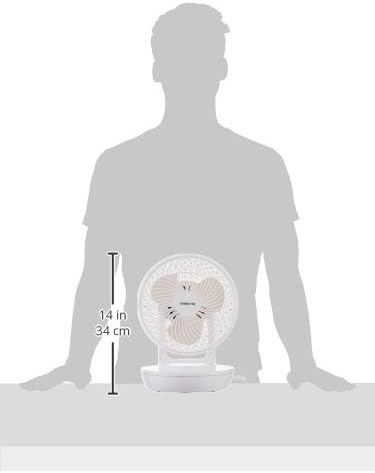
Figure 4: Product dimensions for the MISTRAL Mimica MHV901R fan.
9. Warranty and Support
9.1 Warranty Information
This MISTRAL Mimica MHV901R fan comes with a 1-Year Standard Brand Warranty from the date of purchase. Please retain your proof of purchase for warranty claims.
9.2 Returns Policy
For information regarding returns or replacements, please refer to the retailer's specific return policy. For purchases made on Amazon, a 15-day refund/replacement policy typically applies.
9.3 Customer Support
For technical assistance, warranty claims, or further inquiries, please contact MISTRAL customer support through their official website or the contact details provided with your purchase documentation.

