
Fisher-Price GRP99
Fisher-Price Calming Clouds Mobile & Soother Instruction Manual
Model: GRP99
Introduction
The Fisher-Price Calming Clouds Mobile & Soother is designed to assist in your baby's sleep routine. This versatile product functions as a motorized crib mobile for newborns and converts into a tabletop sound machine with a nightlight for toddlers. It features customizable music, sounds, and lights, along with a sound sensor that automatically reactivates the calming functions when your baby makes noise.

Image: The Fisher-Price Calming Clouds Mobile & Soother in its complete crib mobile configuration.
Important Safety Information
Please read and retain these instructions for future reference. Adult assembly is required. Keep small parts away from children before assembly. Ensure all components are securely fastened before use. Discontinue use of the crib mobile when the child begins to push up on hands and knees or reaches 5 months of age, whichever comes first. Always place the tabletop soother on a stable, flat surface away from the edge of the crib or playpen.
Package Contents
Verify that all components are present before beginning assembly:
- Cloud Unit (Sound Machine/Projector)
- Mobile Arm
- Crib Attachment Bracket
- Mobile Hanger with Plush Clouds and Moon Toys
Setup and Assembly
1. Battery Installation
- Locate the battery compartment on the back of the Cloud Unit.
- Using a Phillips head screwdriver, loosen the screw on the battery compartment cover.
- Insert 3 AA (LR6) alkaline batteries, ensuring correct polarity (+/-).
- Replace the cover and tighten the screw.

Image: Rear view of the cloud unit, highlighting the battery compartment and control buttons.
2. Crib Mobile Assembly
- Attach the crib attachment bracket to the mobile arm. Ensure it clicks securely into place.
- Position the mobile arm and bracket onto the crib rail. Adjust the bracket to fit snugly and tighten any securing mechanisms.
- Slide the Cloud Unit onto the top of the mobile arm until it locks into position.
- Hang the mobile hanger with plush clouds and moon toys from the hook on the bottom of the Cloud Unit.
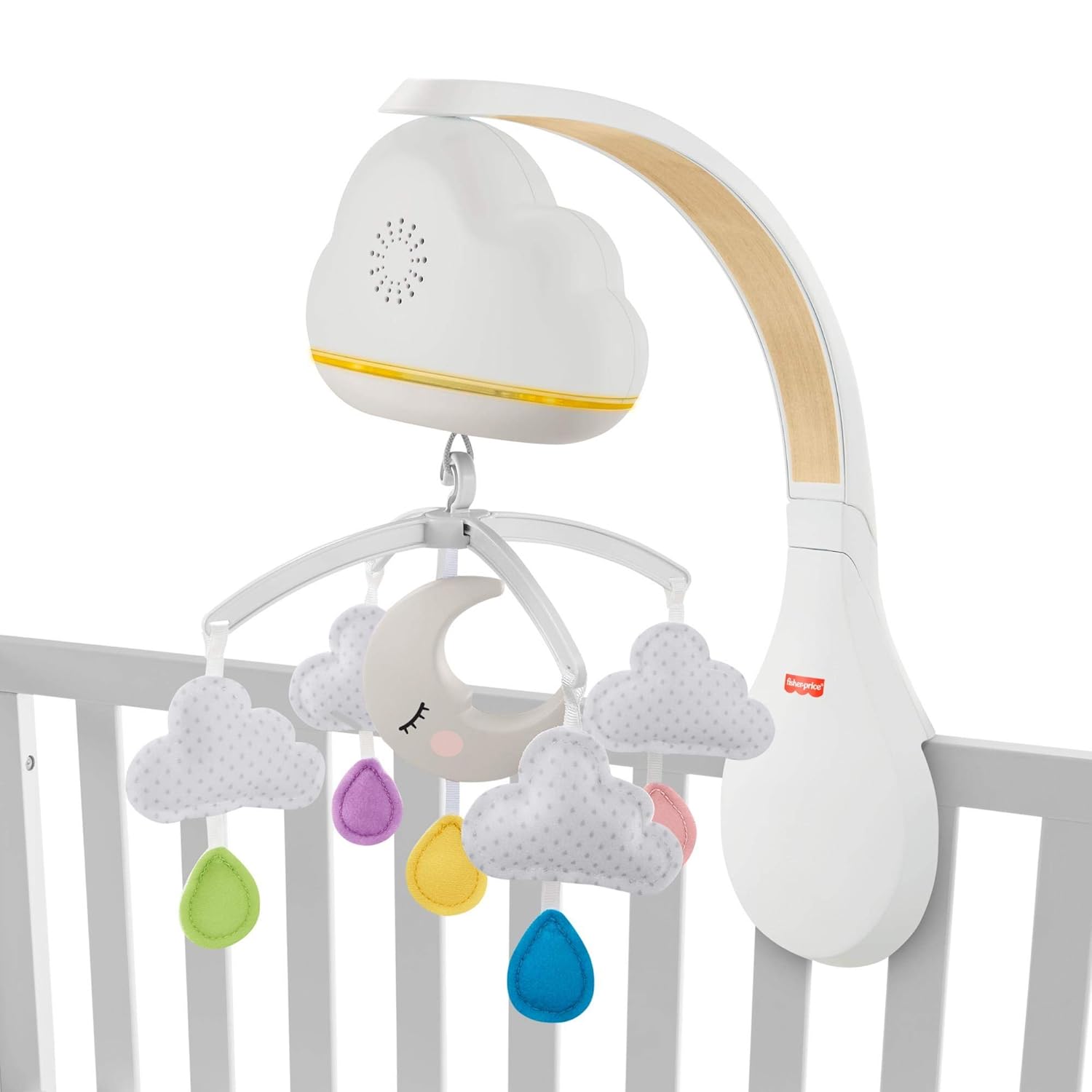
Image: Side view of the mobile securely attached to a crib rail.

Image: Detailed view of the mobile's attachment to the crib from the rear.
3. Converting to Tabletop Soother
When your child begins to push up on hands and knees (approximately 5 months of age), convert the unit to a tabletop soother:
- Carefully detach the Cloud Unit from the mobile arm by pressing the release button (if applicable) and sliding it off.
- Remove the mobile arm and crib attachment bracket from the crib.
- Place the Cloud Unit on a flat, stable surface in the nursery, away from the crib.

Image: The cloud unit functioning as a tabletop soother with a child sleeping in the background.
Operating Instructions
Controls Overview
The Cloud Unit features several buttons for controlling its functions:
- Power/Volume Button: Turns the unit on/off and adjusts volume levels.
- Music/Sounds Button: Cycles through various melodies and soothing sounds.
- Lights Button: Activates or changes light projection modes.
- Motion Button: (Crib Mobile Mode Only) Activates or deactivates the mobile's rotation.
- Sound Sensor Button: Toggles the sound sensor feature on/off.
Power On/Off and Volume
Press the Power/Volume button to turn the unit on. Press repeatedly to cycle through volume levels (low, medium, high) and then off. Hold the button to turn off directly.
Music and Sounds
Press the Music/Sounds button to select from a variety of pre-programmed melodies and soothing sounds designed to help your baby relax and sleep.
Lights and Projection
Press the Lights button to activate the gentle light projection. Cycle through different light modes or turn the lights off as desired.
Mobile Motion (Crib Mode Only)
When in crib mobile configuration, press the Motion button to start or stop the gentle rotation of the hanging toys. This feature is not available in tabletop soother mode.
Sound Sensor Feature
Activate the Sound Sensor feature by pressing its dedicated button. When active, the unit will automatically restart its calming functions (music, lights, motion) if it detects noise from your baby, helping them settle back to sleep without manual intervention.
Care and Maintenance
Cleaning
Wipe the unit with a clean, damp cloth. Do not immerse in water. Do not use abrasive cleaners or solvents. The plush toys can be surface-cleaned with a mild soap and water solution.
Battery Replacement
Replace batteries when the unit's functions become weak or inconsistent. Always use fresh AA (LR6) alkaline batteries. Do not mix old and new batteries or different types of batteries.
Troubleshooting
- Unit does not turn on:
Ensure batteries are installed correctly with proper polarity. Replace with fresh batteries. - No sound or weak sound:
Check battery levels and replace if necessary. Adjust the volume setting. - Mobile does not rotate:
Ensure the unit is in crib mobile mode and the motion button is activated. Check for any obstructions to the mobile's movement. Verify battery levels. - Sound sensor is too sensitive or not sensitive enough:
The sound sensor is designed to detect baby's cries. Environmental background noise may trigger it. Ensure the unit is placed in a quiet area for optimal performance. There is no adjustable sensitivity setting.
Product Specifications
| Feature | Specification |
|---|---|
| Model Number | GRP99 |
| Product Dimensions (L x W x H) | 10.43 x 5.71 x 13.58 inches |
| Item Weight | 1.98 pounds |
| Material Type | Plastic |
| Batteries Required | 3 AA batteries (not included) |
| Special Feature | Musical, Lights, Motion, Sound Sensor |
| Mounting Type | Crib Mount (convertible to tabletop) |
Warranty and Support
This Fisher-Price product is covered by a limited warranty against defects in materials and workmanship. For specific warranty details, claims, or technical support, please visit the official Fisher-Price website or contact their customer service department. Keep your purchase receipt as proof of purchase.
For further assistance, please visit the Fisher-Price Store.
Related Documents - GRP99
 |
Fisher-Price GRP99 Crib Mobile: Soothing Music, Nightlight & Sounds The Fisher-Price GRP99 Crib Mobile offers soothing music, calming sounds, and a gentle nightlight to help your baby fall asleep. Features include cry detection and a special playlist. Easy assembly and battery replacement. |
 |
Fisher-Price Delani 5-in-1 Convertible Crib Owner's Manual Owner's manual and assembly instructions for the Fisher-Price Delani 5-in-1 Convertible Crib by Dream On Me. Includes safety warnings, parts list, hardware, assembly steps, conversion modes, and care instructions. |
 |
Fisher-Price FXC59 Settle & Sleep Projection Soother Owner's Manual Owner's manual for the Fisher-Price FXC59 Settle & Sleep Projection Soother, providing instructions on setup for crib and table use, battery installation, features, and safety guidelines. |
 |
Fisher-Price Iris 4-in-1 Convertible Crib Owner's Manual Comprehensive owner's manual and assembly guide for the Fisher-Price Iris 4-in-1 Convertible Crib by Dream On Me, including safety tips, warnings, parts list, assembly instructions, conversion modes, and furniture care. |
 |
Fisher-Price Crib-To-Twin Bed Assembly and Conversion Instructions Comprehensive instructions for assembling the Fisher-Price Crib-To-Twin Bed, including safety warnings, component lists, step-by-step assembly guides for both crib and twin bed configurations, operation, maintenance, and storage information. |
 |
Fisher-Price DYW47 Deluxe Soother User Manual and App Guide Comprehensive user manual and guide for the Fisher-Price DYW47 Deluxe Soother, covering setup, features, app control, safety information, and compatibility. |
Ask a question about this manual
Ask about setup, troubleshooting, compatibility, parts, safety, or missing instructions. Manuals+ will review the question and use this page’s manual context to help answer it.