
Samson SWC88XHQ7-K
Samson Concert 88x Handheld Wireless System User Manual
Model: SWC88XHQ7-K
Introduction
This manual provides detailed instructions for the setup, operation, and maintenance of your Samson Concert 88x Handheld Wireless System with Q7 Microphone (K Band). The Concert 88x system is designed to deliver professional-grade audio performance with exceptional ease of use, making it ideal for a variety of applications including live performances, public speaking, and recording.
The system features a rack-mountable CR88x receiver offering 100 wireless frequencies across a 25 MHz bandwidth, ensuring reliable signal transmission. Its True Diversity design minimizes signal dropouts, while tone-key and auto-mute technologies prevent unwanted noise. The CH88 handheld transmitter, equipped with a Samson Q7 dynamic microphone capsule, provides an enhanced dynamic range and excellent transient response, with a super-cardioid pickup pattern to reduce ambient noise and feedback.
What's in the Box
- CH88 Handheld Transmitter with Q8x Dynamic Capsule
- CR88x Receiver
- Rackmount Kit
- Owner's Manual (this document)

Image: Components included with the Samson Concert 88x Handheld Wireless System. This image displays the CR88x receiver, the CH88 handheld microphone, a power adapter, and the rackmount kit, illustrating all items typically found in the product packaging.
Setup Guide
1. Receiver Placement and Connections
Place the CR88x receiver in a location that is clear of obstructions and away from other wireless devices that might cause interference. Ensure the antennas are fully extended and positioned vertically for optimal reception.

Image: Front view of the Samson CR88x UHF Wireless Receiver. This image shows the receiver with its two antennas extended, indicating readiness for signal reception.

Image: Rear view of the Samson CR88x UHF Wireless Receiver. This image highlights the various input and output ports on the back of the receiver, including power input, balanced XLR output, and unbalanced 1/4" output.
- Connect the supplied power adapter to the POWER DC IN jack on the rear panel of the CR88x receiver and plug it into an AC outlet.
- Connect the BALANCED OUTPUT (XLR) or UNBALANCED OUTPUT (1/4") to your mixer, PA system, or audio interface. Use the appropriate cable for your setup.
- Extend the two antennas on the receiver.
2. Transmitter Battery Installation
The CH88 handheld transmitter requires two AA batteries for operation.
- Unscrew the bottom section of the CH88 handheld microphone to reveal the battery compartment.
- Insert two fresh AA batteries, observing the correct polarity (+/-) as indicated inside the compartment.
- Securely screw the bottom section back onto the microphone.

Image: The Samson CR88x receiver positioned above the CH88 handheld microphone. This image provides a clear view of both main components of the wireless system.
Operating Instructions
1. Powering On and Channel Selection
- Press the POWER button on the CR88x receiver to turn it on. The display will illuminate.
- Press the SCAN button on the receiver. The system will automatically scan for the clearest available frequency. Once found, the display will show the selected channel number.
- Turn on the CH88 handheld transmitter by pressing and holding its power button until the indicator light illuminates.
- Align the IR windows of the receiver and the transmitter (located on the front of the receiver and near the base of the microphone). Press the IR button on the receiver. The transmitter and receiver will synchronize, and the receiver's "READY" indicator will light up, confirming a successful connection.

Image: The Samson CR88x receiver and CH88 handheld microphone positioned for infrared synchronization. This image demonstrates how to align the IR windows on both devices to pair them.
2. Adjusting Volume and Gain
- Use the VOLUME knob on the CR88x receiver to adjust the overall output level of the wireless system.
- The CH88 handheld transmitter features adjustable gain control. To access it, unscrew the bottom section of the microphone. Use a small screwdriver to adjust the gain trim pot for optimal microphone sensitivity, ensuring the "PEAK" indicator on the receiver only flashes occasionally during the loudest parts of your performance.
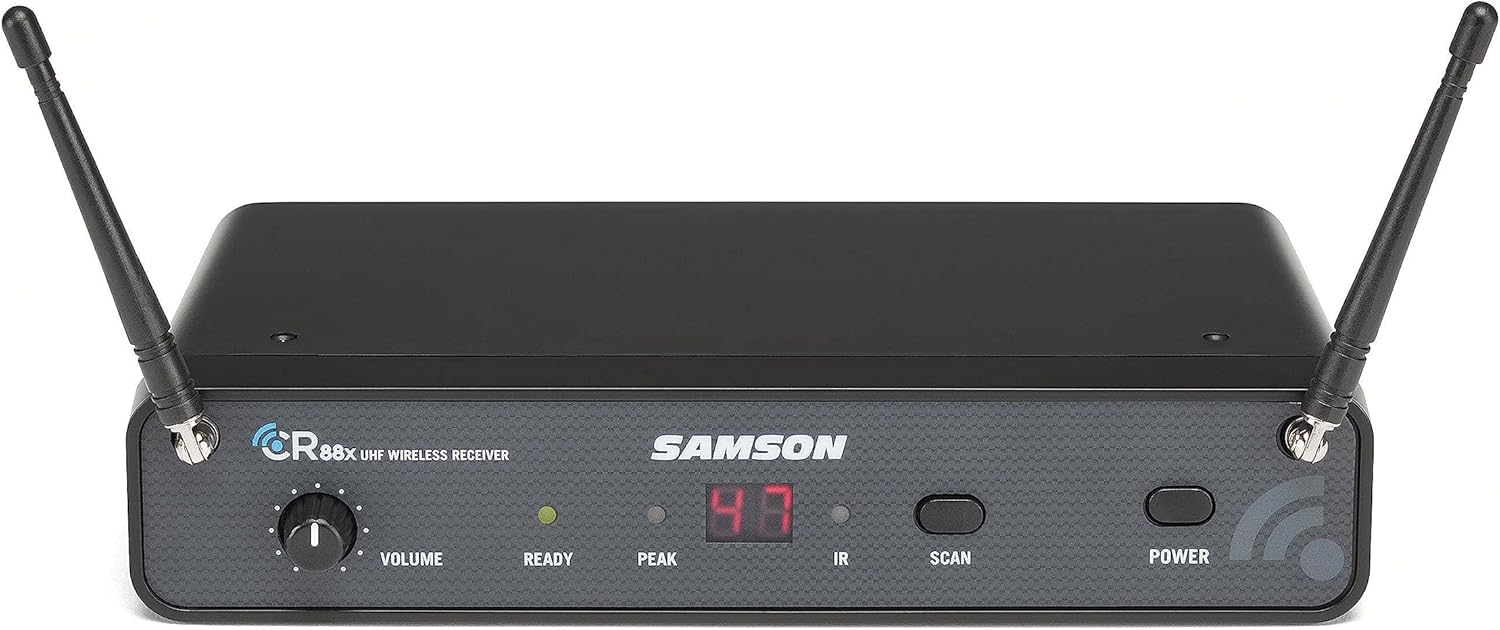
Image: Detailed view of the Samson CR88x receiver's front panel. This image clearly shows the volume knob, LED indicators for "READY" and "PEAK", and buttons for "IR", "SCAN", and "POWER".
Maintenance
- Cleaning: Use a soft, dry cloth to clean the exterior of the receiver and transmitter. Do not use abrasive cleaners or solvents.
- Battery Replacement: Replace batteries in the CH88 transmitter when the battery indicator light begins to dim or flash, or when audio quality degrades. Always use fresh AA alkaline batteries.
- Storage: When not in use for extended periods, remove batteries from the transmitter and store the system in a cool, dry place.
Troubleshooting
| Problem | Possible Cause | Solution |
|---|---|---|
| No sound from receiver |
|
|
| Intermittent audio or dropouts |
|
|
| Distorted audio |
|
|
Specifications
| Feature | Detail |
|---|---|
| Model Name | SWC88XHQ7-K |
| Microphone Form Factor | Handheld |
| Frequency Band | K Band: 470–494 MHz |
| Number of Channels | 100 selectable frequencies |
| Operating Range | Up to 300' (line-of-sight) |
| Receiver Type | True Diversity UHF |
| Receiver Outputs | Balanced XLR, Unbalanced 1/4" |
| Transmitter Battery Life | Up to 8 hours (with 2x AA batteries) |
| Microphone Capsule | Samson Q7 Dynamic |
| Polar Pattern | Supercardioid |
| Dimensions (L x W x H) | 12.5 x 9.55 x 3.55 inches |
| Item Weight | 2.94 pounds |
| UPC | 809164224648 |
Warranty Information
Samson Technologies products are designed and manufactured to the highest standards. For specific warranty details, including duration and coverage, please refer to the warranty card included with your product or visit the official Samson Technologies website. Keep your proof of purchase for any warranty claims.
Support and Contact
For technical support, troubleshooting assistance, or service inquiries, please contact Samson Technologies customer support. You can find contact information and additional resources on the official Samson website:
Visit Samson Technologies Official Website
You may also find helpful FAQs and product registration options on their site.
Additional Resources
Explore more about Samson products and their applications:

Image: A musician performing with Samson audio equipment. This image shows a woman playing an acoustic guitar and singing into a Samson microphone, illustrating a typical use case for the wireless system.
For more information on Samson's range of products and their commitment to audio innovation, visit their official brand store on Amazon:
Related documentsSWC88XHQ7-K


Ask a question about this manual
Ask about setup, troubleshooting, compatibility, parts, safety, or missing instructions. Manuals+ will review the question and use this page’s manual context to help answer it.