
Introduction
Thank you for choosing the Inateck iPad Keyboard Case BK2006. This manual provides detailed instructions to help you set up, operate, and maintain your keyboard case, ensuring optimal performance and longevity. Please read this manual thoroughly before use.

Image: The Inateck iPad Keyboard Case BK2006 with an iPad securely placed, ready for use.
Compatibility
The Inateck iPad Keyboard Case BK2006 is designed for the following iPad models:
- iPad 9th Generation (2021) 10.2"
- iPad 8th Generation (2020) 10.2"
- iPad 7th Generation (2019) 10.2"
- iPad Air 3rd Generation (2019) 10.5"
- iPad Pro (2017) 10.5"
Note: This keyboard is not compatible with iPad Air 4 (2020) or newer iPad models not listed above.
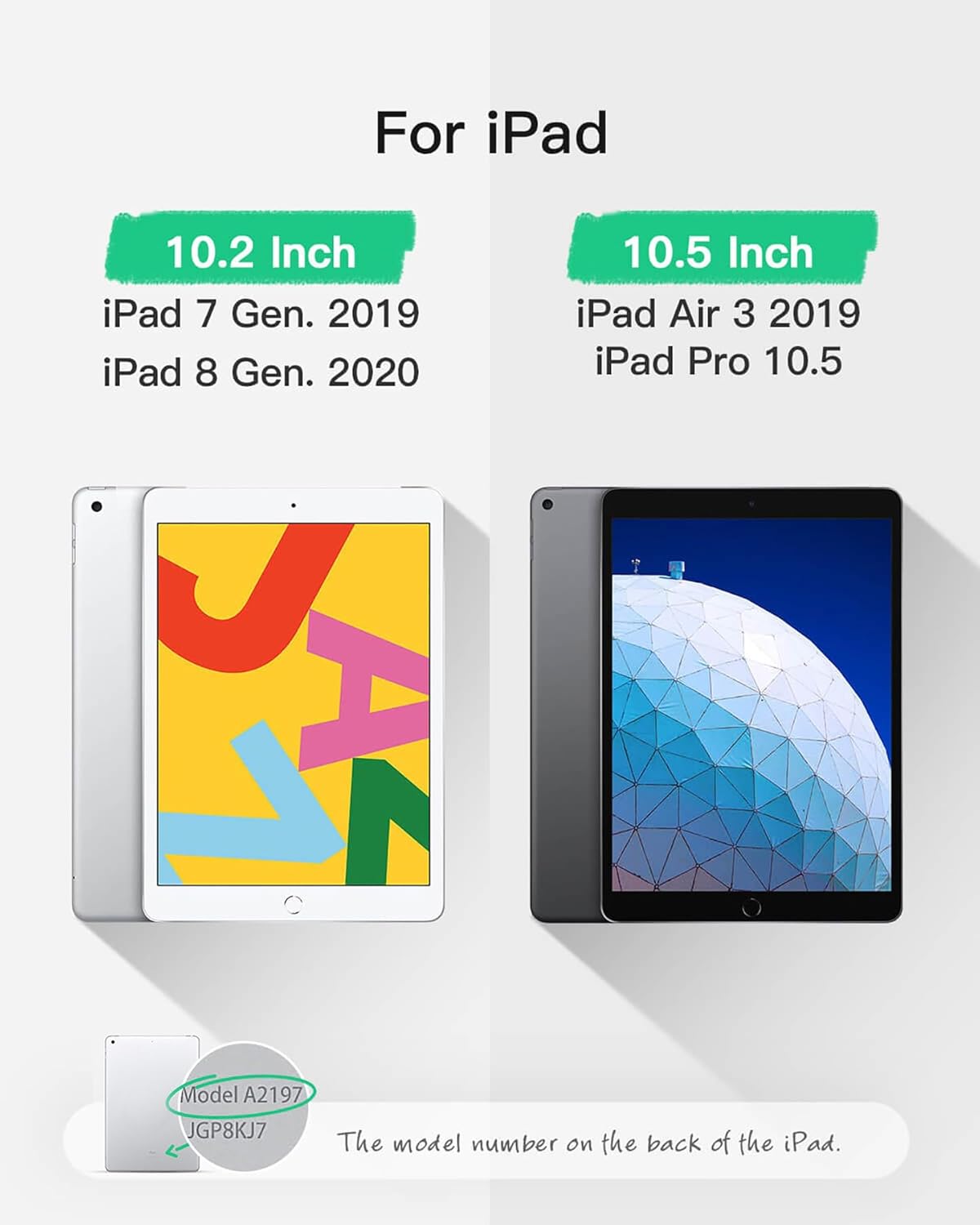
Image: Visual guide to compatible iPad models and how to locate the model number on the back of your iPad.
Package Contents
Please verify that all items are present in your package:
- Inateck iPad Keyboard Case BK2006
- USB Charging Cable
- User Manual (this document)
Product Features
Ultra-Light and Thin Design
The keyboard is only 0.5 cm thick, and 1.5 cm when capped with the cover. The overall weight is approximately 360g (0.7 pounds), making it highly portable.

Image: The slim profile of the keyboard case, highlighting its lightweight design.
Automatic Power On/Off
The BK2006 features an auto-switch function. When your iPad is locked into the keyboard's magnetic strip, the keyboard powers on automatically. It powers off when separated, eliminating the need for a physical power switch.

Image: The keyboard automatically powers on when the iPad is correctly positioned in the magnetic stand.
Extended Battery Life
Enjoy prolonged usage with a battery that lasts up to 90 days on a single charge (based on 2-3 hours of charging). This means you may only need to charge the device approximately four times per year.

Image: Illustrates the long standby time, allowing for extended use between charges.
Convenient Shortcut Keys
The keyboard features an innovative 6-row layout with an extra row dedicated to function shortcut keys. Easily access functions like screen lock, volume adjustment, and more with a single press, without needing to combine with the Fn key.

Image: Detailed view of the iOS shortcut keys for quick access to iPad functions.
Adjustable Viewing Angles
The case allows for multiple viewing angles, enabling you to find the most comfortable position for typing, watching, or browsing.

Image: Demonstrates the adjustable angles for comfortable use.
Setup Guide
1. Charging the Keyboard
- Connect the provided USB charging cable to the charging port on the keyboard.
- Connect the other end of the cable to a USB power adapter (not included) or a computer's USB port.
- The charging indicator light will illuminate. Allow 2-3 hours for a full charge.
- The indicator light will change or turn off once fully charged.
2. Bluetooth Pairing
- Ensure the keyboard is charged.
- Place your iPad into the keyboard case, ensuring it is securely seated in the magnetic strip. The keyboard will automatically power on.
- On your iPad, go to Settings > Bluetooth.
- Turn on Bluetooth. Your iPad will search for discoverable devices.
- Locate and select "Inateck BK2006" (or similar name) from the list of devices.
- Follow any on-screen prompts to complete the pairing process. A successful connection will be indicated on your iPad.
3. Attaching Your iPad
- Open the keyboard case.
- Align your iPad with the protective frame of the case.
- Gently press your iPad into the frame until it snaps securely into place. Ensure all corners are properly seated.
- Position the iPad into the magnetic groove above the keyboard to activate the auto power-on feature and set your desired viewing angle.
Operating Instructions
1. Automatic Power On/Off
- To power on the keyboard, simply place your iPad into the magnetic groove above the keyboard.
- To power off the keyboard, remove your iPad from the magnetic groove or close the case.
2. Using Shortcut Keys
The top row of keys provides quick access to various iPad functions:
- Home: Return to the home screen.
- Search: Activate iPad search.
- Brightness: Adjust screen brightness.
- Media Controls: Play/pause, previous track, next track.
- Volume: Mute, volume down, volume up.
- Lock Screen: Lock your iPad screen.
3. Adjusting Viewing Angle
The magnetic groove allows you to adjust the iPad to various comfortable viewing angles. Simply lift and reposition the iPad within the groove to find your preferred angle.
Maintenance
- Cleaning: Use a soft, damp cloth to wipe the surface of the keyboard and case. Avoid harsh chemicals or abrasive materials.
- Storage: When not in use for extended periods, store the keyboard case in a cool, dry place. Ensure the case is closed to protect the keyboard and iPad.
- Battery Care: To prolong battery life, avoid fully discharging the keyboard frequently. Charge it regularly, even if not completely depleted.
Troubleshooting
- Keyboard not pairing:
- Ensure the keyboard is fully charged.
- Make sure Bluetooth is enabled on your iPad.
- Try forgetting the device in your iPad's Bluetooth settings and re-pairing.
- Restart both your iPad and the keyboard (by removing and re-inserting the iPad).
- Some users reported needing to perform a factory reset on the keyboard by pressing ESC and += keys simultaneously during initial pairing if issues persist.
- Keyboard not responding:
- Check if the keyboard is powered on (iPad is in the magnetic groove).
- Verify Bluetooth connection.
- Ensure the keyboard has sufficient battery charge.
- iPad not fitting securely:
- Double-check your iPad model against the compatibility list.
- Ensure the iPad is pressed firmly into all four corners of the case frame.
Specifications
| Feature | Detail |
|---|---|
| Model Number | BK2006 |
| Connectivity | Bluetooth |
| Operating System | iOS |
| Material | Acrylonitrile Butadiene Styrene |
| Item Weight | 15.2 ounces (approx. 430g) |
| Product Dimensions | 0.59 x 0.59 x 0.59 inches (approx. 1.5 x 1.5 x 1.5 cm) |
| Battery Type | Lithium Polymer (included) |
| Battery Life | Up to 90 days standby (2-3 hours charge) |
| Special Features | Lightweight, Rechargeable, Auto Power On/Off |
Warranty and Support
Inateck products are designed for reliability and performance. For warranty information, technical support, or any inquiries regarding your Inateck iPad Keyboard Case BK2006, please refer to the official Inateck website or contact their customer service directly. Keep your purchase receipt for warranty claims.


