
Introduction
This manual provides essential information for the safe and efficient operation of your Hama Basic S6 Paper Shredder. Please read these instructions carefully before using the device and keep them for future reference.
The Hama Basic S6 is designed for shredding paper documents into strips, ensuring the secure disposal of sensitive information. It features an automatic start/stop function and an 8-liter collection container.
Safety Instructions
Please observe the following safety precautions to prevent injury or damage to the shredder.
- Keep hands, loose clothing, hair, and ties away from the paper entry slot.
- Do not shred metal objects such as staples, paper clips, or CDs/DVDs, as this model is designed for paper only.
- Unplug the shredder from the power outlet when not in use, before cleaning, or before moving.
- Do not allow children to operate the shredder. Keep the device out of reach of children and pets.
- Do not operate the shredder if the power cord is damaged or if the device is malfunctioning.
- Ensure the shredder is placed on a stable, level surface.
- Do not overload the shredder beyond its specified sheet capacity.
- This device is intended for indoor use only.
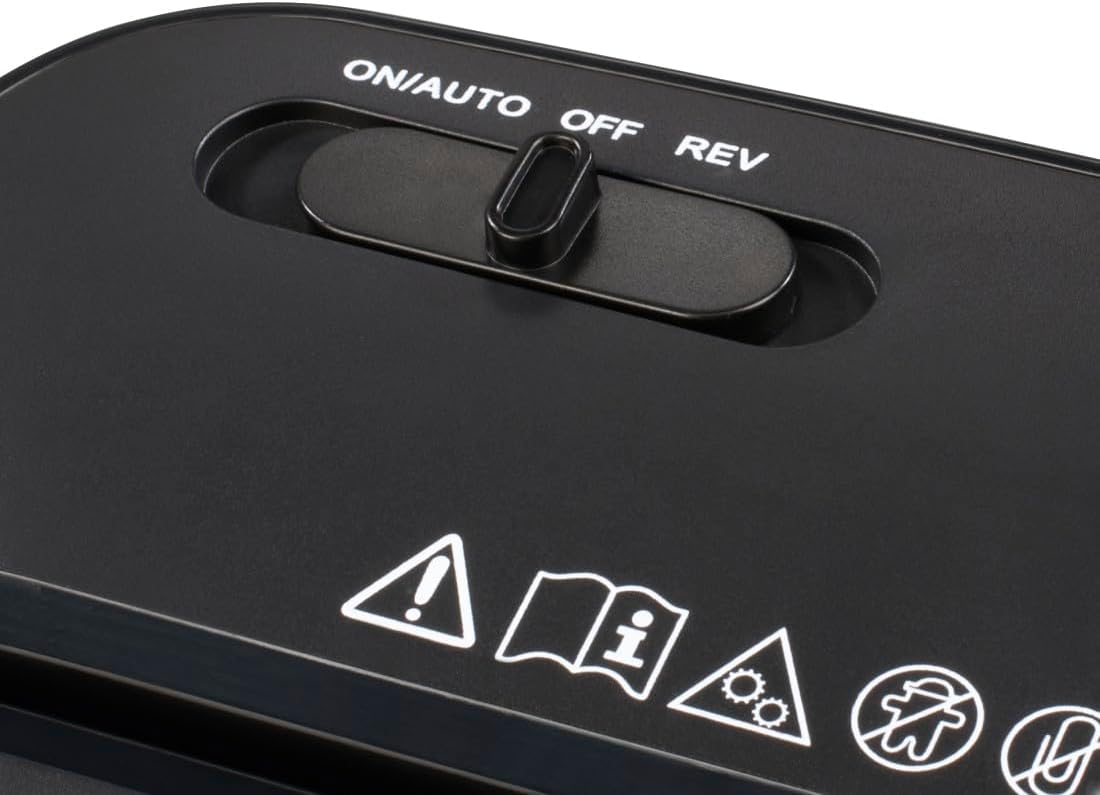
Image: Close-up of the shredder's control panel, showing the ON/AUTO/OFF/REV switch and various safety symbols, including warnings for hands, loose clothing, and general caution.
Setup
Unpacking: Carefully remove the shredder from its packaging. Retain the packaging for future transport or storage.
Placement: Place the shredder on a flat, stable surface near a power outlet. Ensure there is adequate space around the unit for ventilation and access to the waste bin.
Assemble Waste Bin: Ensure the shredder head is securely seated on top of the waste collection bin.
Power Connection: Plug the power cord into a standard electrical outlet. Ensure the voltage matches the shredder's requirements.

Image: The Hama Basic S6 paper shredder positioned on the floor next to an office desk, illustrating a typical setup environment.
Operating Instructions
Power On: Locate the switch on the top of the shredder head. Slide the switch to the "ON/AUTO" position. The shredder is now in standby mode, ready to operate automatically when paper is inserted.
Shredding Documents: Insert up to 6 sheets of A4 paper (80 gsm) into the paper entry slot. The shredder will automatically start and shred the paper into strips. Once shredding is complete, the motor will stop automatically.
Reverse Function: In case of a paper jam, slide the switch to the "REV" (Reverse) position. This will reverse the shredding mechanism, helping to clear the jam. Once the jam is cleared, return the switch to "ON/AUTO" or "OFF".
Power Off: When you have finished shredding, slide the switch to the "OFF" position. For extended periods of non-use, unplug the shredder from the power outlet.
Emptying the Waste Bin: Regularly check the waste bin through the transparent window. When the bin is full, slide the switch to "OFF" and unplug the shredder. Carefully lift the shredder head off the bin and empty the shredded paper. Replace the shredder head securely before resuming operation.

Image: A document being inserted into the Hama Basic S6 paper shredder, demonstrating the strip-shredding process.

Image: The Hama Basic S6 paper shredder, showing the shredder head detached from the waste bin, which is partially filled with shredded paper.
Maintenance
Regular maintenance ensures the longevity and optimal performance of your shredder.
Cleaning: Disconnect the power cord before cleaning. Use a soft, dry cloth to wipe the exterior of the shredder. Do not use abrasive cleaners or solvents. For the cutting blades, you may use specialized shredder oil sheets or liquid oil applied to a sheet of paper, then shred it.
Blade Oiling: To maintain cutting performance and reduce wear, oil the shredder blades periodically (e.g., after every 30 minutes of continuous shredding or when performance decreases). Follow the instructions provided with your shredder oil product.
Emptying the Waste Bin: Always empty the waste bin before it becomes overfilled. Overfilling can lead to paper jams and strain the motor.

Image: A close-up view of green and white paper strips, representing the output of the shredder after documents have been processed.
Troubleshooting
If you encounter issues with your Hama Basic S6 Paper Shredder, refer to the following common problems and solutions:
| Problem | Possible Cause | Solution |
|---|---|---|
| Shredder does not turn on. | No power, switch in "OFF" position, or shredder head not properly seated. | Check power cord connection. Ensure switch is in "ON/AUTO". Re-seat the shredder head firmly on the waste bin. |
| Paper jam. | Too many sheets inserted, or paper not inserted straight. | Slide switch to "REV" to clear the jam. If unsuccessful, unplug, carefully remove paper manually (use caution with blades), then plug in and try again. Reduce sheet count for future shredding. |
| Shredder stops during operation. | Overheating (thermal overload protection), or waste bin is full. | Allow the shredder to cool down for at least 30 minutes. Empty the waste bin. |
| Shredded paper is not uniform. | Blades may need oiling or are dull. | Apply shredder oil as per maintenance instructions. If problem persists, contact support. |
Specifications

Image: A diagram illustrating the physical dimensions of the Hama Basic S6 paper shredder, with measurements for height, width, and depth.
| Feature | Detail |
|---|---|
| Model Number | 00050541 |
| Cut Type | Strip Cut |
| Security Level (DIN 66399) | P-2 (for general internal documents) |
| Standard Sheet Capacity | 6 sheets (A4, 80 gsm) |
| Waste Bin Capacity | 8 Liters |
| Shredding Material | Paper |
| Operation Mode | Automatic Start/Stop, Reverse |
| Power Source | Corded Electric |
| Audible Noise | 70 Decibels |
| Item Dimensions (D x W x H) | 11.42"D x 11.42"W x 5.51"H (approx. 29cm D x 29cm W x 14cm H) |
| Item Weight | 1668.83 Grams (approx. 1.67 kg) |
| Color | Black |
| Material | Polypropylene (PP) |

Image: A diagram explaining the DIN 66399 security levels for shredders, indicating that Security Level P2 is suitable for general internal data.
Warranty
Hama products are covered by a manufacturer's warranty. Please refer to your purchase documentation or the Hama website for specific warranty terms and conditions applicable to your region. Keep your proof of purchase for any warranty claims.
Support
For technical assistance, troubleshooting beyond this manual, or spare parts, please contact Hama customer support.
Online Support: Visit the official Hama website for FAQs, product information, and contact forms.
Retailer Support: You may also contact the retailer from whom you purchased the shredder for assistance.


