
Introduction
Thank you for choosing the reiga 52 Inch Black Modern Ceiling Fan. This manual provides essential information for the safe installation, operation, and maintenance of your new ceiling fan. Please read these instructions thoroughly before beginning installation and retain them for future reference.
Safety Information
To reduce the risk of electric shock, fire, or personal injury, always follow these basic safety precautions:
- Read all instructions before installing the fan.
- Disconnect power at the main circuit breaker or fuse box before beginning installation or performing any maintenance.
- All electrical wiring must be performed by a qualified electrician and comply with all local and national electrical codes.
- The fan must be mounted to a structurally sound ceiling joist or an outlet box marked "Acceptable for Fan Support of 35 lbs (15.9 kg) or less."
- Ensure the installation site allows for blade clearance from walls and other obstructions.
- Do not operate the fan with damaged blades or any visible defects.
- Avoid placing objects in the path of the fan blades.
Package Contents
Carefully unpack your fan and inspect the contents to ensure all parts are present and undamaged. If any parts are missing or damaged, contact customer support.
- Fan Motor Assembly
- Fan Blades (3)
- LED Light Panel
- Remote Control
- Mounting Hardware Kit
- Downrods (6-inch and 10-inch)
- Canopy
- Hanger Bracket
Product Overview
The reiga 52 Inch Black Modern Ceiling Fan features a sleek 3-blade design with an integrated LED light. It is equipped with a quiet and energy-efficient DC motor, offering 6 speed settings and reversible airflow for year-round comfort. Control options include a remote, a smart WiFi app, and voice commands via compatible smart devices.

Image: The reiga 52 Inch Black Modern Ceiling Fan installed in a contemporary living room, showcasing its modern aesthetic and three-blade design.
Setup and Installation
Before installation, ensure the power is OFF at the circuit breaker. This fan is suitable for rooms ranging from 100 to 250 square feet.
1. Pre-Installation
- Verify that the ceiling electrical box is securely mounted and rated for fan support.
- Ensure you have all necessary tools, including a screwdriver, wire strippers, and a ladder.
2. Mounting the Hanger Bracket
- Attach the hanger bracket to the ceiling electrical box using the provided screws. Ensure it is firmly secured to a ceiling joist or an approved fan support box.
- Connect the house electrical wires to the connector terminal on the hanger bracket. Use a narrow flat-head screwdriver for the small diameter plastic connector shields.
3. Downrod Selection and Assembly
Choose either the 6-inch or 10-inch downrod based on your ceiling height and desired fan clearance. The hanger ball is pre-fastened to the 6-inch rod but can be transferred to the 10-inch rod if preferred. Using the longer downrod can simplify wiring connections.
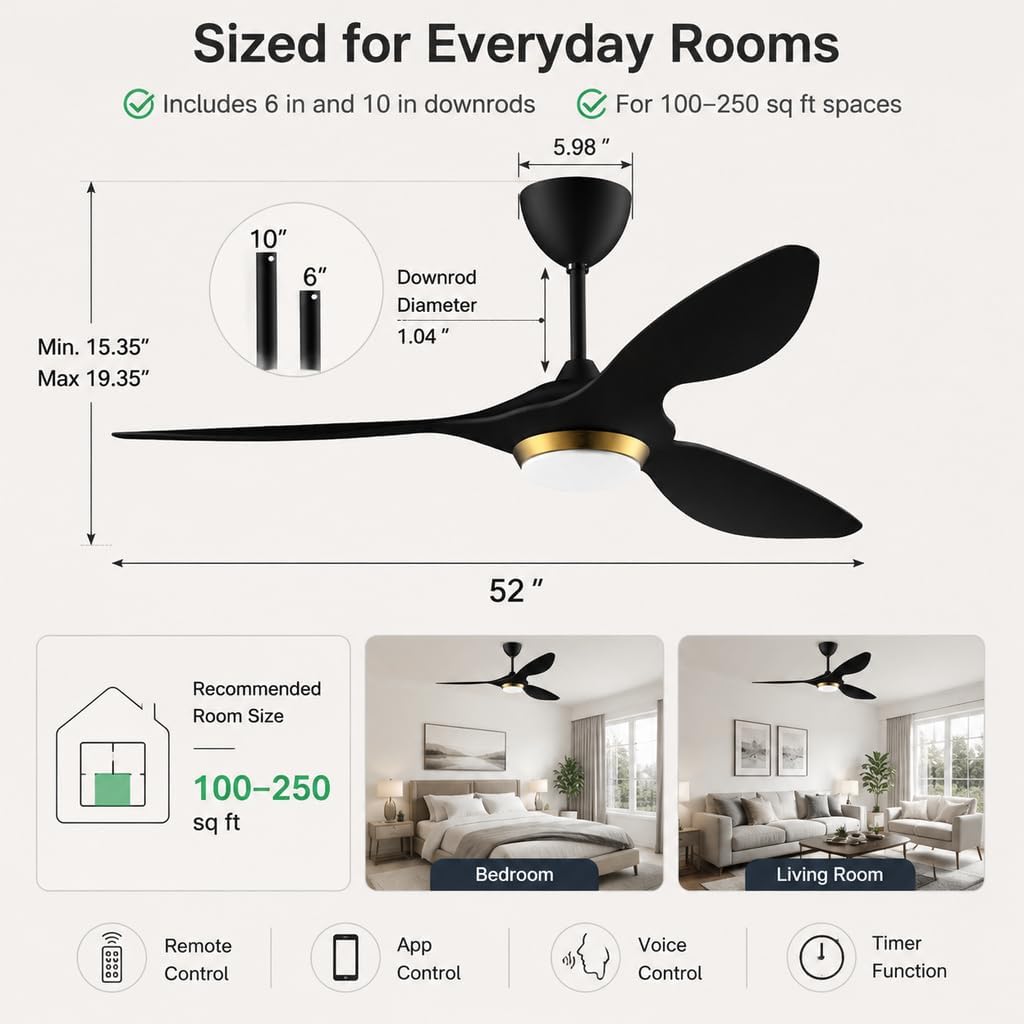
Image: A diagram illustrating the fan's dimensions, including the two downrod options (6 and 10 inches) and the recommended room size for optimal performance.
4. Wiring and Remote Receiver Placement
- Carefully connect the fan's wires to the corresponding house wires as per local electrical codes. Ensure all connections are secure.
- The remote receiver unit must be placed inside the hanger bracket, resting just above the hanging ball. Ensure it fits without obstruction before proceeding.
- When connecting plastic connectors, ensure they are aligned correctly and do not force them, as this may cause damage.
5. Attaching Fan Blades
- Securely attach the three fan blades to the motor housing using the provided screws.
6. Installing the LED Light Panel and Canopy
- Connect the LED light panel wires to the fan motor assembly.
- Carefully push the canopy up to cover the hanger bracket and secure it in place.
Operating Instructions
Your reiga ceiling fan can be controlled via the included remote, a smart app, or voice commands.
1. Remote Control Functions
The remote control allows for convenient operation of all fan and light features.

Image: The remote control for the reiga ceiling fan, showing buttons for power, fan speed (1-6), light on/off, light color temperature, and timer functions.
- Power On/Off: Press the power button to turn the fan and light on or off.
- Fan Speed: Select from 6 distinct fan speeds (1-6).
- Light Control: Turn the light on/off independently from the fan.
- Light Color Temperature: Cycle through 3000K (Warm White), 4000K (Natural White), and 5700K (Cool White).
- Light Dimming: Adjust the brightness of the LED light.
- Timer: Set the fan to turn off after 1, 3, or 8 hours.
- Reverse Mode (Summer/Winter): Toggle between forward (cooling breeze) and reverse (circulates warm air) modes.
2. Smart App Control
The fan is compatible with the Smart Life app, allowing for advanced control and scheduling.
- Download the Smart Life app from your device's app store.
- Follow the in-app instructions to pair your fan with your home WiFi network.
- Once connected, you can control fan speed, light settings, timer, and reverse mode directly from your smartphone or tablet.
3. Voice Control
Integrate your reiga fan with smart home assistants like Amazon Alexa or Google Home for convenient voice control.

Image: A family interacting with a smart speaker to control the reiga ceiling fan, demonstrating its voice control capabilities with Alexa and Google Home.
- Enable the Smart Life skill/action in your smart assistant's app.
- Link your Smart Life account to your smart assistant.
- Use commands such as "Alexa, turn on the ceiling fan" or "Hey Google, set fan speed to 3."
4. Reversible Airflow (Summer/Winter Mode)
The fan features a reversible motor for year-round use. This function can typically be activated via the remote control or smart app.

Image: A visual representation of the fan's reversible airflow, showing downward airflow for cooling in summer and upward airflow for circulating warm air in winter.
- Summer Mode: Blades rotate counter-clockwise, creating a downward breeze for a cooling effect.
- Winter Mode: Blades rotate clockwise, drawing air up towards the ceiling to circulate warm air trapped near the ceiling.
5. Light Memory Function
The fan's light features a memory function, retaining the last used brightness and color temperature settings when power is removed (e.g., turning off a wall switch) and restored.
Maintenance
Regular maintenance ensures optimal performance and longevity of your ceiling fan.
- Cleaning: Periodically wipe the fan blades and motor housing with a soft, damp cloth. Do not use abrasive cleaners or solvents.
- Blade Inspection: Check fan blades for any cracks or damage. Replace damaged blades immediately.
- Tighten Screws: Periodically check and tighten all screws on the fan and mounting hardware to ensure secure operation.
Troubleshooting
If you encounter issues with your fan, refer to the following common problems and solutions:
| Problem | Possible Cause | Solution |
|---|---|---|
| Fan does not start | No power, loose wiring, remote not paired, remote receiver issue. | Check circuit breaker. Ensure all wiring connections are secure. Re-pair remote control. Contact support if receiver is suspected faulty. |
| Light does not work | Loose wiring, LED panel issue, remote battery. | Check light panel wiring. Replace remote batteries. |
| Fan makes noise | Loose screws, unbalanced blades, motor issue. | Tighten all screws. Ensure blades are securely attached and balanced. If noise persists, contact support. |
| Remote control not working | Dead batteries, remote not paired, obstruction. | Replace remote batteries. Re-pair remote with fan. Ensure no obstructions between remote and fan. |
| Smart app/WiFi connectivity issues | Incorrect WiFi password, weak signal, app not updated. | Verify WiFi password. Ensure fan is within WiFi range. Update Smart Life app. Restart router and fan. |
| Fan wobbles | Loose mounting, unbalanced blades. | Ensure hanger bracket is securely mounted. Check blade attachment and balance. |
Specifications
| Feature | Detail |
|---|---|
| Brand | reiga |
| Model Number | YFT-7062-GB |
| Color | Black |
| Product Dimensions | 52"D x 52"W x 19"H |
| Electric Fan Design | Ceiling Fan |
| Power Source | AC/DC |
| Number of Blades | 3 |
| Blade Material | Acrylonitrile Butadiene Styrene (ABS) |
| Light Type | LED |
| Special Features | Dimmable, Timer, Wi-Fi Enabled |
| Controller Type | App Control, Remote Control, Voice Control |
| Number of Speeds | 6 |
| Noise Level | 40 Decibels |
| Wattage | 24 watts |
| Air Flow Capacity | 5614 Cubic Inches Per Minute |
| Voltage | 110 Volts |
| Indoor Outdoor Usage | Indoor |
| Item Weight | 19.8 Pounds |
Warranty and Support
For warranty information, technical support, or replacement parts, please contact reiga customer service directly. Refer to the contact information provided with your purchase or on the official reiga website.
