1. Introduction
Thank you for choosing the VIVOSUN Digital pH Meter, TDS/EC Pen, and 3-in-1 Soil Tester kit. This comprehensive set provides essential tools for accurately monitoring water quality and soil conditions, crucial for healthy plant growth and various applications. This manual will guide you through the setup, operation, and maintenance of each device to ensure optimal performance and longevity.

Figure 1: The VIVOSUN Digital pH Meter, TDS/EC Pen, and 3-in-1 Soil Tester Kit.
2. Setup
2.1. Digital pH Meter
- Battery Installation: The pH meter typically comes with batteries pre-installed. If replacement is needed, refer to the battery compartment for correct orientation.
- Calibration: The pH meter features one-touch automatic calibration. Use the provided buffer powders (pH 4.00, pH 6.86, pH 9.18) mixed with distilled water to calibrate the device for accurate readings.

Figure 2: Key features of the VIVOSUN Digital pH Meter, including long-lasting battery life, enhanced readability, automatic calibration, and precise results.
2.2. 3-in-1 TDS & EC Pen
- Battery Installation: The TDS/EC meter also typically includes pre-installed batteries. Replace as needed following the battery compartment instructions.
- Initial Check: Turn on the device to ensure the LCD screen is functional.

Figure 3: Key features of the VIVOSUN 3-in-1 TDS Meter, highlighting long-lasting battery life, simple mode switch, hands-free viewing, and accurate measurements.
2.3. 3-in-1 Soil Tester
- No Batteries Required: This device operates without batteries, drawing power from the soil.
- Preparation: Ensure the probes are clean before first use.

Figure 4: The VIVOSUN 3-in-1 Soil Tester is battery-free and features a double-sensor design for effective and accurate measurements.
3. Operating Instructions
3.1. Digital pH Meter
- Remove the protective cap.
- Turn on the pH meter by pressing the 'ON/OFF' button.
- Immerse the electrode into the solution to be tested. Ensure the liquid level is below the immersion line.
- Gently stir and wait for the reading to stabilize on the LCD screen.
- Press the 'HOLD' button to lock the reading for easy recording.
- After use, rinse the electrode with distilled water and replace the protective cap.
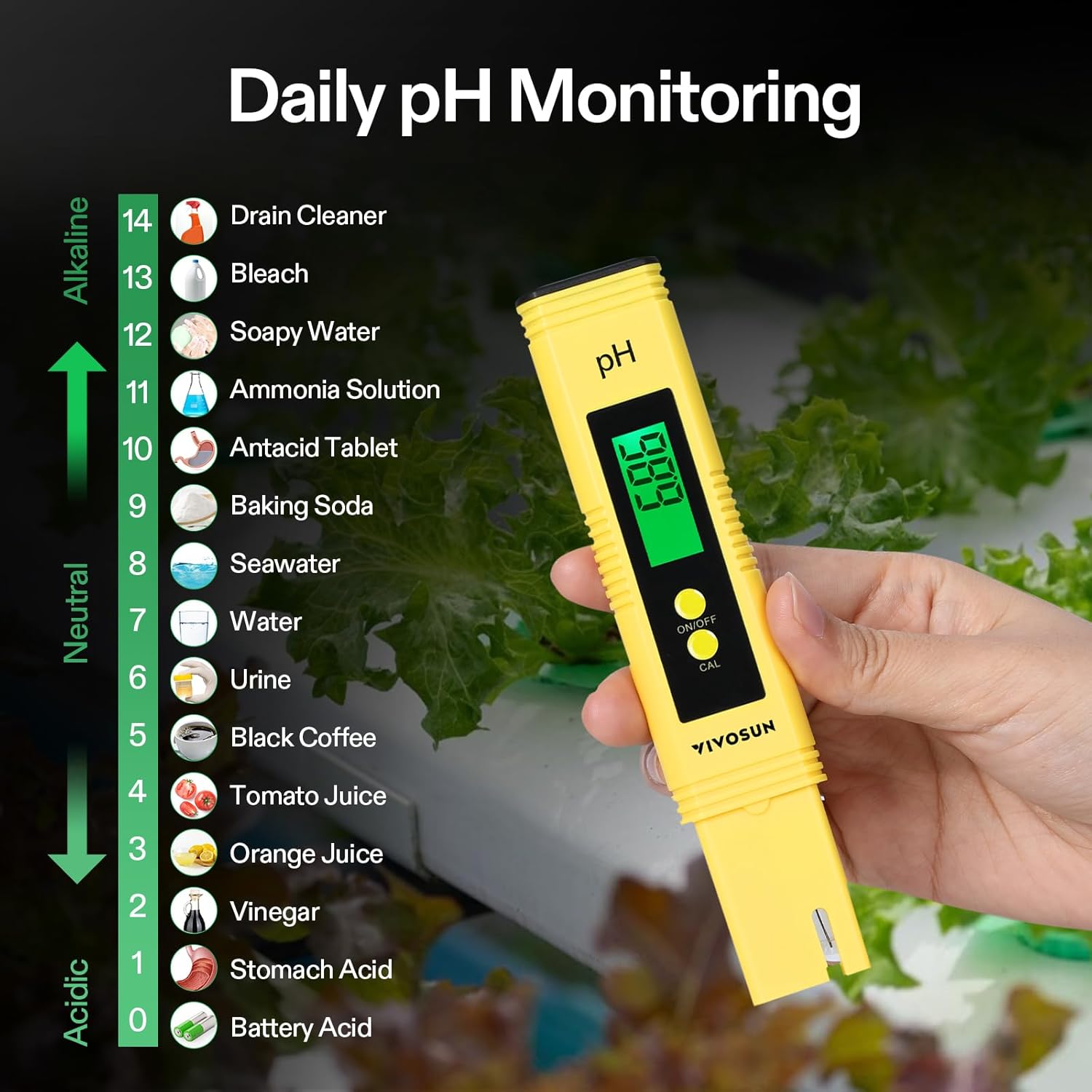
Figure 5: The Digital pH Meter in use, demonstrating various pH levels for common substances.
3.2. 3-in-1 TDS & EC Pen
- Remove the protective cap.
- Turn on the TDS/EC meter by pressing the 'ON/OFF' button.
- Press the 'MODE' button to switch between TDS (ppm), EC (µS/cm), and Temperature (°C/°F) modes.
- Immerse the electrode into the solution to be tested.
- Gently stir and wait for the reading to stabilize.
- Press the 'HOLD' button to lock the reading.
- After use, rinse the electrode with distilled water and replace the protective cap.
3.3. 3-in-1 Soil Tester
- Switch the selector to the desired function: 'MOIST' for moisture, 'LIGHT' for light intensity, or 'pH' for soil pH.
- Insert the probes 2-4 inches into the soil, ensuring full contact with the soil.
- Adjust the probe's position until the indicator shows some movement.
- Wait for approximately 10 minutes for the reading to stabilize.
- Read the value on the dial.
- After use, remove the probe from the soil and wipe it clean.

Figure 6: Step-by-step guide for using the VIVOSUN 3-in-1 Soil Tester to measure moisture, pH, and light levels.
4. Maintenance
- Cleaning: Always rinse the electrodes/probes of all meters with distilled water after each use to prevent contamination and ensure accurate readings. For the soil tester, wipe the probes clean with a cloth.
- Storage: Store all devices in a cool, dry place. Ensure protective caps are on the pH and TDS/EC meters.
- Calibration: Recalibrate the pH meter regularly, especially if readings appear inconsistent or after prolonged storage.
5. Troubleshooting
- Inaccurate Readings (pH/TDS): Ensure the device is properly calibrated. Clean the electrode thoroughly. Check battery levels.
- No Reading/Device Not Turning On: Check battery installation and ensure batteries are not depleted.
- Soil Tester Not Responding: Ensure probes are fully inserted into moist soil. The device is passive and requires moisture for conductivity. Clean probes if dirty.
- pH Meter Issues: Some users have reported initial issues with pH meters (e.g., DOA or poor battery connection). If experiencing such problems, contact customer support.
6. Specifications
Digital pH Meter
- Features: Automatic Temperature Compensation (ATC), easy-to-read LCD, sensitive glass electrode.
- Operating Temperature: 0-60 °C / 32-140 °F.
3-in-1 TDS & EC Pen
- Functions: Measures TDS, EC, and Temperature.
- Features: ATC, long battery life, auto shut-off, durable titanium alloy electrode, hold function.
- Operating Temperature: 0.1-80 °C / 32-176 °F.
3-in-1 Soil Tester
- Functions: Tests soil moisture, light levels, and pH.
- Features: One-button operation, battery-free, double-sensor design.
- Moisture Scale: 1-10 (1=Dry, 10=Wet).
- Light Scale: 0-2000 lux (Dark to Light).
- pH Scale: 3.5-8 (3.5=Acidic, 8=Alkaline).
- Dimensions: 10.8" x 1.8".

Figure 7: Automatic Temperature Compensation (ATC) ensures reliable readings across various temperatures for both pH and TDS meters.

Figure 8: Detailed view of the 3-in-1 Soil Tester's light scale, pH sensor, and moisture sensor.

Figure 9: Product dimensions of the VIVOSUN 3-in-1 Soil Tester.
7. Warranty and Support
VIVOSUN products are designed for reliability and performance. For any questions, technical support, or warranty claims, please refer to the contact information provided with your product packaging or visit the official VIVOSUN website. Keep your purchase receipt for warranty validation.


