
Introduction
This manual provides essential information for the safe and effective use of your Juice BoomPRO Portable Bluetooth Speaker. Please read this manual thoroughly before using the product and retain it for future reference.
The Juice BoomPRO is a universal portable Bluetooth speaker designed to deliver immersive 360-degree sound. It features a 10W output, IPX5 splashproof rating, up to 15 hours of playtime, and a 10m Bluetooth range. It is compatible with smartphones, tablets, and MP3 devices.
Important Safety Information
- Do not expose the speaker to extreme temperatures or direct sunlight.
- Do not immerse the speaker in water, despite its splashproof rating.
- Keep away from children.
- Use only the provided charging cable.
- Do not attempt to disassemble or modify the speaker.
- Dispose of the product responsibly according to local regulations.
Package Contents
Please check that all items are present:
- Juice BoomPRO Bluetooth Speaker
- Charging Cable
- User Manual (this document)
 Image: The Juice BoomPRO speaker along with its charging cable and user manual, as typically found in the product packaging.
Product Overview
Familiarize yourself with the various parts of your Juice BoomPRO speaker.
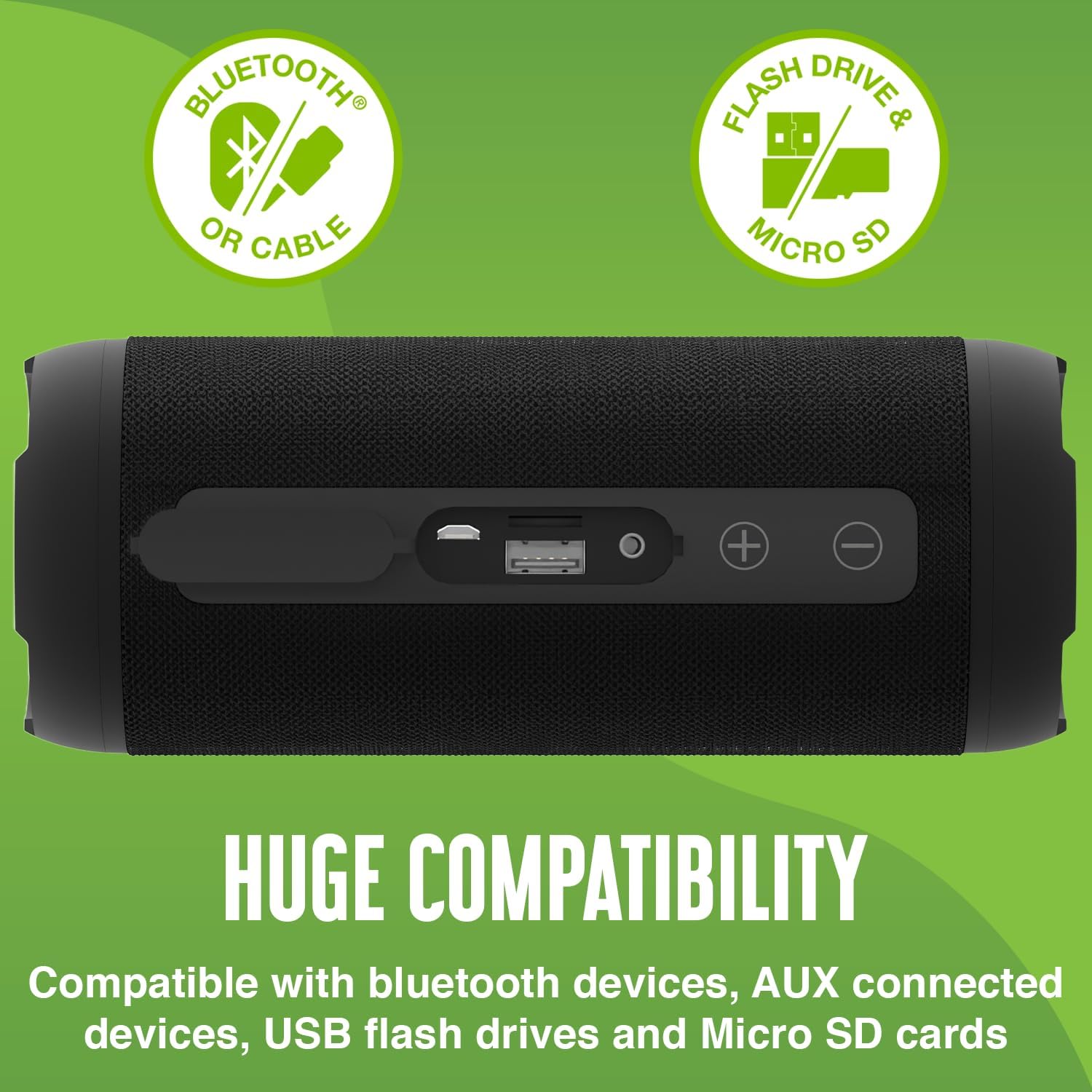
Image: Top view of the Juice BoomPRO speaker, highlighting the control panel with buttons for play/pause, power/mode, volume up, and volume down.

Image: Side view of the Juice BoomPRO speaker, showing the covered port section which includes the charging port, USB port, and AUX input.
Controls and Ports
| Component | Function |
|---|---|
| Power/Mode Button | Press and hold to power on/off. Short press to switch between Bluetooth, AUX, USB, and Micro SD modes. |
| Play/Pause Button | Press to play or pause audio. |
| Volume Up (+) | Press to increase volume. |
| Volume Down (-) | Press to decrease volume. |
| Charging Port (Micro USB) | Connect the charging cable to power the device. |
| USB Port | Insert a USB flash drive for audio playback. |
| Micro SD Card Slot | Insert a Micro SD card for audio playback. |
| AUX Input | Connect external audio devices using a 3.5mm audio cable. |
Setup
Charging the Speaker
- Connect the provided charging cable to the Micro USB port on the speaker.
- Connect the other end of the cable to a USB power adapter (not included) or a computer's USB port.
- The charging indicator light will illuminate. It will turn off or change color once fully charged.
- A full charge provides up to 15 hours of playtime.
Bluetooth Pairing
- Ensure the speaker is charged and powered on.
- The speaker will automatically enter Bluetooth pairing mode, indicated by a flashing LED light.
- On your device (smartphone, tablet, etc.), enable Bluetooth and search for available devices.
- Select "Juice BoomPRO" from the list of devices.
- Once paired, the LED light will stop flashing and remain solid. You can now play audio wirelessly.
- The speaker has a Bluetooth range of up to 10 meters.
Operating Instructions
Playing Audio
After successful Bluetooth pairing, you can play music from your connected device. Use the Play/Pause button on the speaker or your device to control playback.
Switching Modes
Short press the Power/Mode button to cycle through available input modes: Bluetooth, AUX, USB, and Micro SD.
Volume Control
Press the Volume Up (+) button to increase the volume and the Volume Down (-) button to decrease it.
Using AUX Input
Connect a 3.5mm audio cable (not included) from your external audio device to the AUX input port on the speaker. The speaker will automatically switch to AUX mode.
Using USB/Micro SD
Insert a USB flash drive or a Micro SD card containing audio files into the respective port. The speaker will automatically switch to the corresponding mode and begin playback.
 Image: A person relaxing outdoors, listening to music from the Juice BoomPRO speaker, demonstrating its portability and outdoor use.
Maintenance
Cleaning
Wipe the speaker with a soft, dry cloth. Do not use abrasive cleaners or solvents.
Storage
Store the speaker in a cool, dry place away from direct sunlight and extreme temperatures.
Battery Care
- To prolong battery life, fully charge the speaker before first use.
- If the speaker will not be used for an extended period, charge it at least once every three months.
Troubleshooting
| Problem | Solution |
|---|---|
| Speaker does not power on. | Ensure the speaker is charged. Press and hold the Power/Mode button for a few seconds. |
| Cannot pair via Bluetooth. | Ensure Bluetooth is enabled on your device and the speaker is in pairing mode. Move the speaker closer to your device. Forget "Juice BoomPRO" from your device's Bluetooth list and try pairing again. |
| No sound. | Check the volume levels on both the speaker and your connected device. Ensure the correct input mode is selected (Bluetooth, AUX, USB, Micro SD). |
| Poor sound quality. | Move the speaker closer to your Bluetooth device to avoid interference. Ensure audio files are not corrupted if playing from USB/Micro SD. |
| Battery life is shorter than expected. | Ensure the speaker is fully charged. High volume levels can reduce playtime. |
Specifications
- Model: JUI-SPKER-BOOMPRO-ECO-BLK
- Brand: Juice
- Connectivity: Bluetooth
- Speaker Output: 10 Watts
- Audio Output Mode: Stereo
- Playtime: Up to 15 hours
- Bluetooth Range: Up to 10 meters
- Water Resistance: IPX5 (Splashproof)
- Dimensions: 8 x 19.1 x 13.2 cm
- Weight: 520 g
- Material: Plastic
- Compatibility: Bluetooth devices, non-Bluetooth devices (via AUX), USB flash drives, Micro SD cards
Warranty and Support
The Juice BoomPRO speaker comes with a 1-year guarantee. For warranty claims or technical support, please contact Juice customer service.
For more information, visit the official Juice website: www.juice.co.uk
 Image: The Juice BoomPRO speaker displayed with a prominent "1 Year Guarantee" text, indicating product assurance.
