1. Introduction
This manual provides essential information for the safe and effective operation, maintenance, and setup of your STANLEY SL227-IN 2200W 180mm Large Angle Grinder. Please read these instructions carefully before using the tool to ensure proper function and to prevent injury or damage.
The STANLEY SL227-IN is a powerful corded electric angle grinder designed for heavy-duty applications such as grinding, cutting, and polishing various materials including metal, concrete, and tile.
2. General Safety Instructions
Always follow basic safety precautions when using electrical tools to reduce the risk of fire, electric shock, and personal injury.
2.1 Work Area Safety
- Keep the work area clean and well-lit. Cluttered or dark areas invite accidents.
- Do not operate power tools in explosive atmospheres, such as in the presence of flammable liquids, gases, or dust. Power tools create sparks which may ignite the dust or fumes.
- Keep children and bystanders away while operating a power tool. Distractions can cause you to lose control.
2.2 Electrical Safety
- Power tool plugs must match the outlet. Never modify the plug in any way.
- Avoid body contact with earthed or grounded surfaces such as pipes, radiators, ranges, and refrigerators. There is an increased risk of electric shock if your body is earthed or grounded.
- Do not expose power tools to rain or wet conditions. Water entering a power tool will increase the risk of electric shock.
- Do not abuse the cord. Never use the cord for carrying, pulling, or unplugging the power tool. Keep cord away from heat, oil, sharp edges, or moving parts. Damaged or entangled cords increase the risk of electric shock.
2.3 Personal Safety
- Always wear eye protection. Safety glasses or goggles are essential.
- Wear appropriate personal protective equipment (PPE) such as dust masks, non-skid safety shoes, hard hats, or hearing protection when necessary.
- Dress properly. Do not wear loose clothing or jewelry. Keep your hair and clothing away from moving parts.
- Stay alert, watch what you are doing, and use common sense when operating a power tool.
- Do not overreach. Keep proper footing and balance at all times.
2.4 Angle Grinder Specific Safety
- Always ensure the guard is correctly positioned and securely fastened before operation.
- Use only grinding wheels and accessories that are rated for the speed of the grinder and are in good condition.
- Never force the tool. Allow the grinder to reach full speed before applying it to the workpiece.
- Be aware of kickback. Kickback is a sudden reaction to a pinched or snagged rotating wheel. Always maintain a firm grip on the tool.
- Disconnect the plug from the power source before making any adjustments, changing accessories, or storing the tool.
3. Product Overview
The STANLEY SL227-IN is a robust angle grinder designed for demanding tasks. Familiarize yourself with its components for safe and efficient use.

Image 1: STANLEY SL227-IN 2200W 180mm Large Angle Grinder. This image shows the main unit of the angle grinder, highlighting its yellow and black housing, the grinding disc, and the side handle attachment point.
Key Components:
- Motor Housing: Contains the powerful 2200W motor.
- Gear Head: Houses the gears that drive the spindle.
- Spindle Lock Button: Used to lock the spindle for disc changes.
- Side Handle: Provides additional grip and control during operation. Can be mounted on either side.
- Protective Guard: Shields the user from sparks and debris. Adjustable for different working angles.
- Power Cord: For connecting to an electrical outlet.
- On/Off Switch: To control the power to the tool.
4. Setup
Before operating the angle grinder, ensure it is properly assembled and all safety components are in place.

Image 2: STANLEY SL227-IN Angle Grinder with included wrench. This image displays the angle grinder from a side view, showing the power cord and the spanner wrench used for disc installation.
4.1 Attaching the Protective Guard
- Ensure the tool is unplugged.
- Place the protective guard over the gear head, aligning the tabs with the slots.
- Rotate the guard to the desired position to protect against sparks and debris.
- Tighten the guard's clamping screw firmly to secure it in place.
4.2 Mounting the Side Handle
- The side handle can be screwed into either the left or right side of the gear head.
- Choose the position that provides the best control and comfort for your application.
- Screw the handle in clockwise until it is securely tightened.
4.3 Installing the Grinding/Cutting Disc
- Ensure the tool is unplugged.
- Press and hold the spindle lock button.
- Place the inner flange onto the spindle.
- Position the grinding or cutting disc onto the spindle, ensuring it sits flush against the inner flange.
- Screw the outer flange (locking nut) onto the spindle.
- While still holding the spindle lock button, use the provided spanner wrench to firmly tighten the outer flange.
- Release the spindle lock button.
5. Operating Instructions
Always wear appropriate safety gear, including eye protection, gloves, and hearing protection, before operating the grinder.
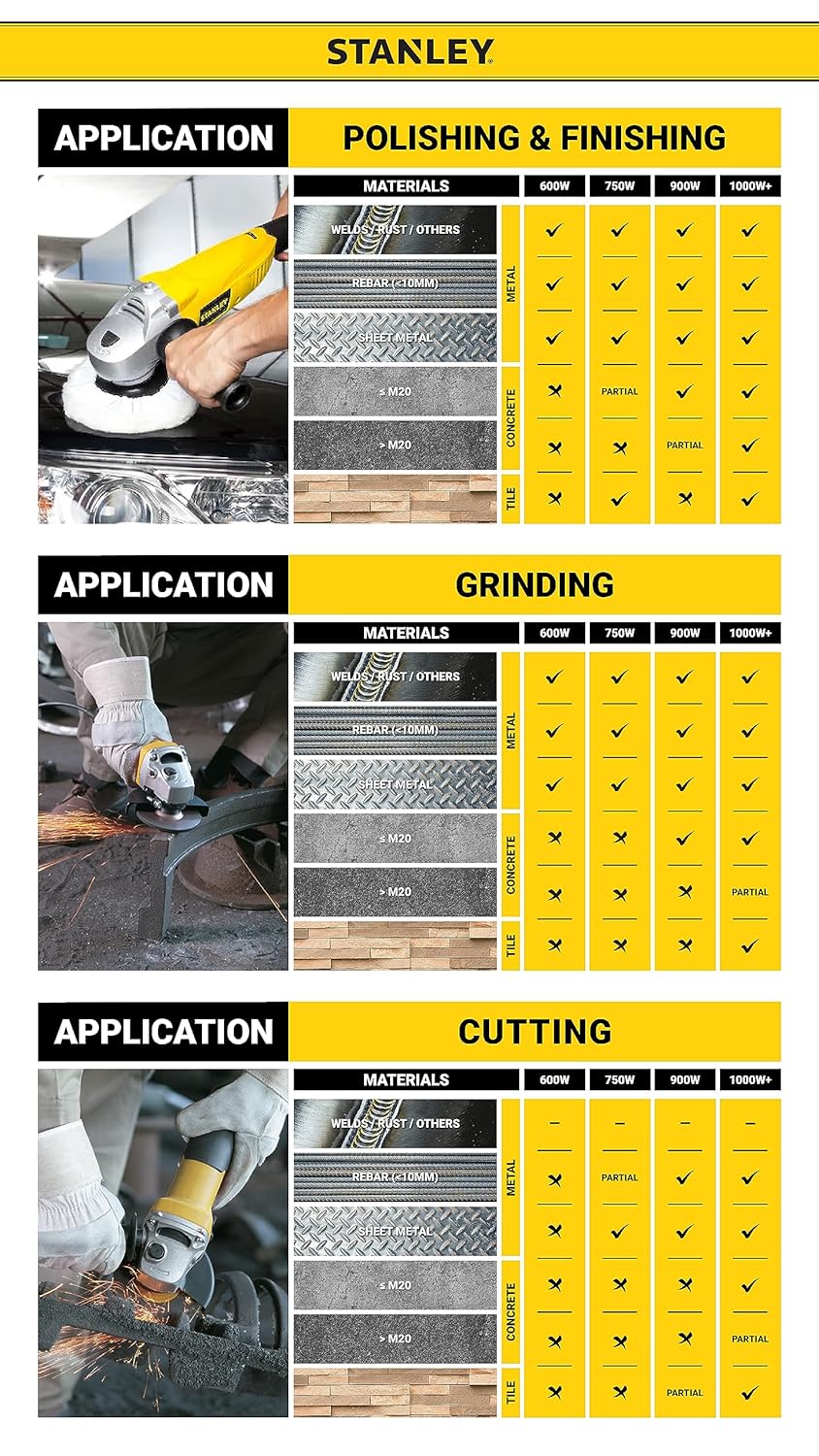
Image 3: STANLEY Angle Grinder Application Guide. This visual guide illustrates suitable applications for angle grinders based on wattage, including polishing, grinding, and cutting for various materials like metal, concrete, and tile.
5.1 Powering On/Off
- To turn on: Push the slide switch forward until it locks into the ON position.
- To turn off: Push the slide switch backward to the OFF position. For models with a paddle switch, simply release the paddle.
5.2 Grinding Techniques
- Hold the grinder firmly with both hands.
- Allow the disc to reach full operating speed before contacting the workpiece.
- Apply light, even pressure. Do not force the tool.
- Maintain an angle of approximately 15-30 degrees between the disc and the workpiece for optimal material removal and control.

Image 4: A user operating the STANLEY SL227-IN angle grinder to grind a metal surface. Sparks are visible, indicating active material removal. The user is wearing appropriate safety gear including gloves and a hard hat.
5.3 Cutting Techniques
- Use a thin cutting disc for this application.
- Hold the grinder at a 90-degree angle to the workpiece.
- Make shallow passes, gradually increasing the depth of the cut.
- Ensure the workpiece is securely clamped to prevent movement.
5.4 Polishing Techniques
- Attach a suitable polishing pad or disc.
- Apply polishing compound if required.
- Use gentle, even pressure and move the grinder in a consistent pattern across the surface.
6. Maintenance
Regular maintenance ensures the longevity and safe operation of your STANLEY SL227-IN angle grinder.
6.1 Cleaning
- Always unplug the tool before cleaning.
- Use a soft brush or compressed air to clean dust and debris from the ventilation openings.
- Do not use water or chemical cleaners.
6.2 Carbon Brush Replacement
- The carbon brushes are wear items and will need replacement over time.
- When the motor performance decreases significantly or sparks become excessive, the brushes may need inspection.
- Refer to a qualified service technician for carbon brush replacement to ensure proper installation and tool function.
6.3 Storage
- Store the grinder in a dry, secure location out of reach of children.
- Ensure the power cord is neatly coiled and not kinked.
7. Troubleshooting
This section addresses common issues you might encounter with your angle grinder.
| Problem | Possible Cause | Solution |
|---|---|---|
| Tool does not start | No power supply Faulty power cord/plug Worn carbon brushes | Check power outlet and connections Inspect cord for damage; replace if necessary Have brushes inspected/replaced by a technician |
| Excessive sparking from motor | Worn carbon brushes Motor overload | Have brushes inspected/replaced by a technician Reduce pressure on the tool; allow it to cool |
| Reduced power/speed | Worn carbon brushes Overload Damaged disc | Have brushes inspected/replaced by a technician Reduce load Replace disc |
| Vibration during operation | Damaged or unbalanced disc Loose components | Replace disc Check all fasteners (guard, handle, flanges) |
8. Specifications
Key technical specifications for the STANLEY SL227-IN 2200W 180mm Large Angle Grinder:
| Feature | Specification |
|---|---|
| Model Number | SL227-IN |
| Power Source | Corded Electric |
| Wattage | 2200 Watts |
| Maximum Rotational Speed | 8500 RPM |
| Disc Diameter | 180mm (7 inch) |
| Item Weight | 4.42 Kilograms |
| Product Dimensions | 24 x 12 x 23 cm |
| Material | Metal |
| Country of Origin | China |
9. Warranty and Support
Your STANLEY SL227-IN Angle Grinder comes with a manufacturer's warranty and dedicated customer support.
9.1 Warranty Information
This product is covered by a 1-year warranty provided by the manufacturer from the date of purchase. Please retain your purchase receipt as proof of purchase for warranty claims.
9.2 Customer Support
For any warranty-related issues, product feedback, or technical assistance, please contact STANLEY customer care:
- Customer Care Number: 1860-425-1111
- Operating Hours: 10 AM to 5 PM, Monday to Friday (except government holidays)


