
HADEN 5021961199102
Haden Combination Microwave Oven User Manual
Model: 5021961199102
Brand: HADEN
1. Introduction
This manual provides comprehensive instructions for the safe and efficient operation of your Haden Combination Microwave Oven. Please read this manual thoroughly before using the appliance and retain it for future reference. This appliance combines microwave, convection oven, and grill functions, offering versatile cooking options.

Image: Front view of the Haden Combination Microwave Oven, showcasing its sleek silver and black design on a wooden kitchen counter.
2. Important Safety Instructions
When using electrical appliances, basic safety precautions should always be followed to reduce the risk of fire, electric shock, and injury to persons, including the following:
- Read all instructions before using the appliance.
- Do not operate the oven if the cord or plug is damaged, if it is not working properly, or if it has been damaged or dropped.
- Do not heat liquids or other foods in sealed containers since they are liable to explode.
- Only allow children to use the oven without supervision when adequate instructions have been given so that the child is able to use the oven in a safe way and understands the hazards of improper use.
- Maintain the inside of the oven. Regularly clean the oven cavity, door seals, and adjacent parts.
- Do not use corrosive chemicals or vapours in this appliance.
- Do not use this appliance for commercial purposes. It is intended for household use only.
- Ensure proper ventilation around the appliance.
3. Product Overview
Familiarize yourself with the components and control panel of your Haden Combination Microwave Oven.
3.1 Components
- Oven Cavity: The interior space where food is cooked.
- Glass Turntable: A rotating glass plate that ensures even cooking.
- Roller Ring: Supports the glass turntable and allows it to rotate.
- Control Panel: Features a digital LED display and touch pad controls for various functions.
- Door with Handle: For opening and closing the oven.

Image: Close-up view of the interior of the microwave oven, highlighting the removable glass turntable and the clean stainless steel cavity.
3.2 Control Panel

Image: Detailed view of the control panel, showing the LED display, function buttons (Microwave, Grill, Convection, Combination), and the rotary knob for time/menu selection.
- LED Display: Shows time, power level, and program indicators.
- Microwave Button: Selects microwave cooking mode.
- Grill Button: Selects grill cooking mode.
- Convection Button: Selects convection oven mode.
- Microwave + Grill Button: Selects combination microwave and grill mode.
- Microwave + Convection Button: Selects combination microwave and convection mode.
- Menu/Time Knob: Used to select auto cook programs and adjust cooking time.
- Pause/Cancel Button: Stops cooking or clears settings.
- Start/Quick Start Button: Begins cooking or starts quick microwave cooking.
- Weight/Clock Button: Used for weight defrost and setting the clock.
4. Setup
4.1 Unpacking and Placement
- Carefully remove the oven and all materials from the carton and oven cavity.
- Place the oven on a stable, level surface that is strong enough to hold the oven and the food you are cooking.
- Ensure there is adequate ventilation space: at least 20cm of space above the oven, 10cm at the rear, and 5cm on both sides.
- Do not block air vents.
4.2 Initial Setup (Setting the Clock)
- Plug the oven into a standard electrical outlet. The display will show "0:00".
- Press the "Weight/Clock" button once.
- Turn the "Menu/Time" knob to set the hour.
- Press the "Weight/Clock" button again.
- Turn the "Menu/Time" knob to set the minutes.
- Press the "Weight/Clock" button to confirm the setting. The clock is now set.
5. Operating Instructions
This appliance offers multiple cooking modes: Microwave, Grill, Convection, and various combinations.
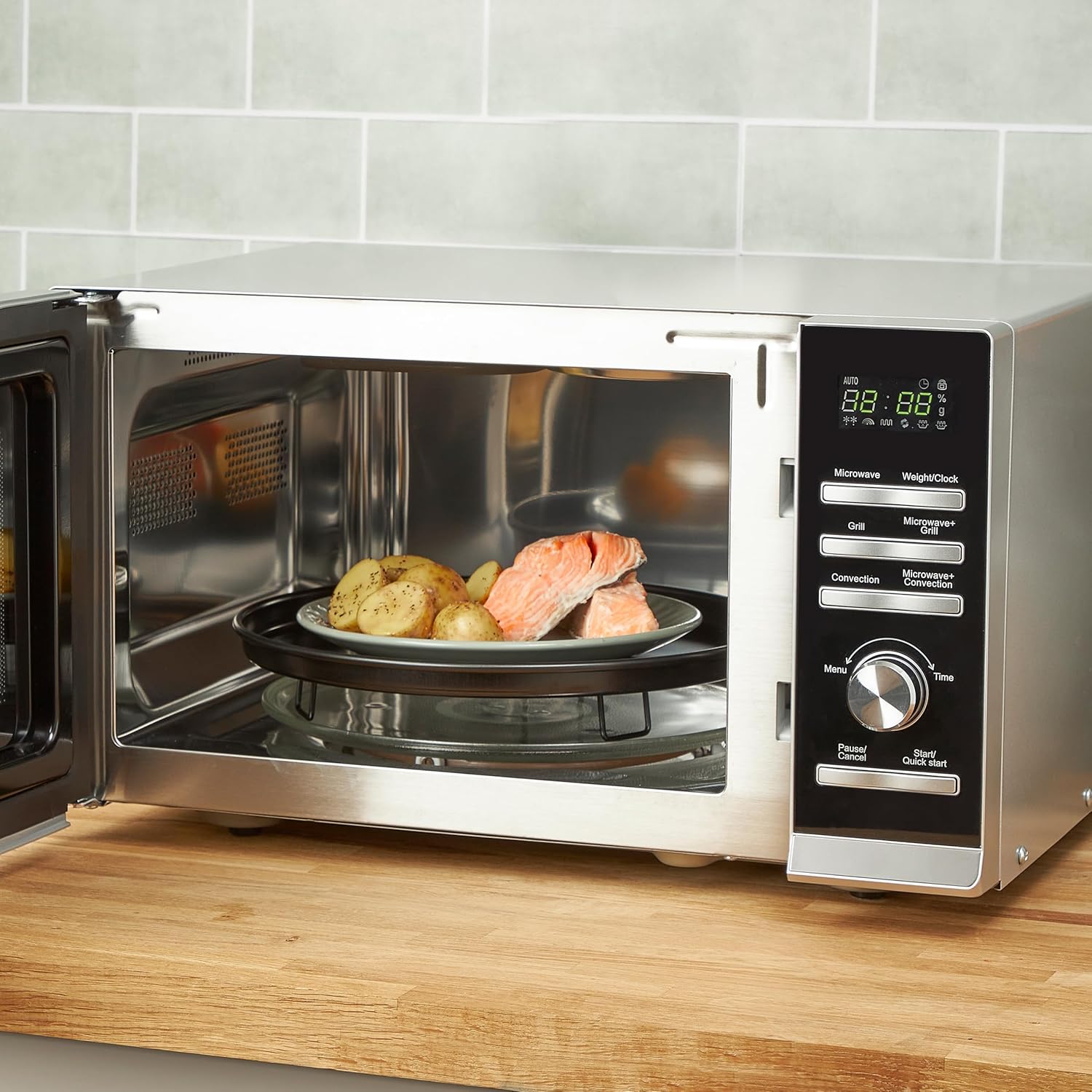
Image: Interior view of the Haden Combination Microwave Oven with a plate of salmon and potatoes cooking on the turntable.
5.1 Microwave Cooking
- Place food in a microwave-safe container on the glass turntable.
- Press the "Microwave" button repeatedly to select the desired power level (P100, P80, P50, P30, P10).
- Turn the "Menu/Time" knob to set the cooking time.
- Press "Start/Quick Start" to begin cooking.
5.2 Grill Cooking
- Place food on the grill rack (if provided) or a heat-resistant dish.
- Press the "Grill" button.
- Turn the "Menu/Time" knob to set the grilling time.
- Press "Start/Quick Start" to begin grilling.
5.3 Convection Cooking
The convection function allows the oven to operate like a traditional oven, using heated air circulation.
- Press the "Convection" button.
- Turn the "Menu/Time" knob to select the desired temperature (e.g., 110°C to 200°C).
- Press "Convection" again to confirm the temperature.
- Turn the "Menu/Time" knob to set the cooking time.
- Press "Start/Quick Start" to begin cooking.
5.4 Combination Cooking (Microwave + Grill / Microwave + Convection)
These modes combine the speed of microwave cooking with the browning capabilities of the grill or the even cooking of convection.
- Microwave + Grill: Press "Microwave + Grill" button, set time, then press "Start/Quick Start".
- Microwave + Convection: Press "Microwave + Convection" button, select temperature, set time, then press "Start/Quick Start".
5.5 Auto Cook Programs
The oven features 8 pre-set auto cook programs for common foods. Refer to the internal oven sticker or a detailed table in the physical manual for specific program details.
- Press the "Menu/Time" knob to enter auto cook mode.
- Turn the "Menu/Time" knob to select the desired program (e.g., A-1 for Popcorn, A-2 for Potato).
- Press "Start/Quick Start" to begin.
5.6 Defrost Function (Speed Defrost)
This function allows for quick and efficient defrosting of food by weight.
- Place the frozen food on the turntable.
- Press the "Weight/Clock" button twice to enter defrost by weight mode.
- Turn the "Menu/Time" knob to select the weight of the food.
- Press "Start/Quick Start" to begin defrosting.
6. Maintenance and Cleaning
Regular cleaning helps maintain the performance and longevity of your oven.
- Always unplug the oven before cleaning.
- Clean the oven cavity after each use with a damp cloth and mild detergent. Avoid abrasive cleaners.
- The glass turntable and roller ring can be washed in warm soapy water or in a dishwasher.
- Wipe the exterior surfaces with a soft, damp cloth.
- Do not allow grease or food particles to build up around the door seal.
7. Troubleshooting
If you encounter issues with your oven, refer to the table below for common problems and solutions.
| Problem | Possible Cause | Solution |
|---|---|---|
| Oven not starting | Door not closed properly; Power cord unplugged; Fuse blown or circuit breaker tripped. | Ensure door is firmly closed; Check power plug; Check household fuse/circuit breaker. |
| Food not cooking evenly | Food not stirred or turned; Incorrect power level/time; Turntable not rotating. | Stir or turn food during cooking; Adjust power/time; Check turntable and roller ring for obstructions. |
| Excessive noise during operation | Turntable or roller ring not correctly placed; Foreign object in cavity. | Re-position turntable and roller ring; Remove any foreign objects. |
| Display shows "E" error code | Internal malfunction. | Unplug the oven for a few minutes, then plug it back in. If the error persists, contact customer support. |
8. Specifications
| Feature | Detail |
|---|---|
| Brand | HADEN |
| Model | 5021961199102 |
| Capacity | 25 Litres |
| Microwave Power | 900 Watts |
| Convection Power | 1950 Watts |
| Grill Power | 1000 Watts |
| Product Dimensions (L x D x H) | 54.7 x 47.3 x 33.7 cm |
| Item Weight | 13 kg |
| Special Features | Auto Cook, Convection Function, Multi Stage Cooking, Defrost, Grill Function, Child Lock System |
| Included Components | Roller Ring, Turntable |

Image: Diagram illustrating the height (33.7 cm), depth (47.3 cm), and length (54.7 cm) of the Haden Combination Microwave Oven.
9. Warranty and Support
Your Haden Combination Microwave Oven comes with a 24-month warranty from the date of purchase, covering manufacturing defects under normal household use. Please retain your proof of purchase for warranty claims.
For technical support, troubleshooting assistance beyond this manual, or warranty claims, please contact Haden customer service. Contact details can typically be found on the Haden official website or on the product packaging.
For more information, visit the official Haden website: Haden Official Store
Related documents5021961199102


Ask a question about this manual
Ask about setup, troubleshooting, compatibility, parts, safety, or missing instructions. Manuals+ will review the question and use this page’s manual context to help answer it.