
Metrel MI 3280 DT
Metrel MI 3280 DT Digital Transformer Analyzer User Manual
Model: MI 3280 DT
1. Introduction
The Metrel MI 3280 Digital Transformer Analyzer is a portable, battery-powered test instrument designed for comprehensive diagnosis of single and three-phase transformers. It performs measurements of turn ratio, phase deviation, excitation current, and winding resistance. Its robust design with IP65 (case closed) and IP54 (case open) protection ensures reliable operation in various environments.
This manual provides essential information for the proper setup, operation, and maintenance of your MI 3280 DT instrument.
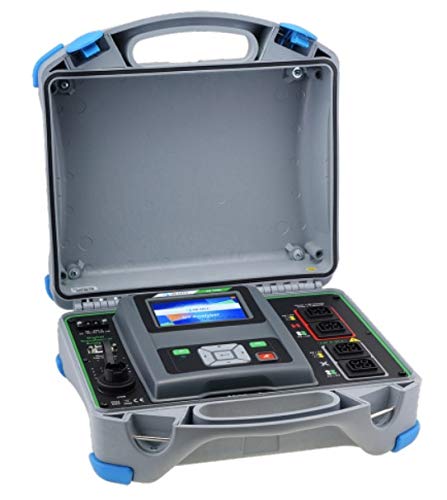
Figure 1: The MI 3280 DT Digital Transformer Analyzer in its protective case.
This image shows the Metrel MI 3280 DT Digital Transformer Analyzer, a grey and black device with a color touch screen, housed within its open, rugged grey and blue protective case. The case features robust latches and a handle, indicating its portability and durability for field use.
2. Package Contents
Upon unpacking, verify that all items listed below are present and undamaged:
- Instrument MI 3280
- 4-wire test lead with Kelvin clips, 2.5 m (4 pieces)
- USB cable
- Mains cable
- Soft carrying bag for accessories
- Metrel ES Manager BASIC Software
- Instruction manual (this document)
- Calibration certificate
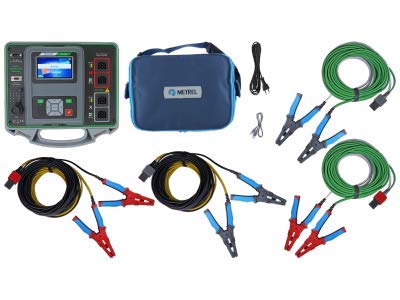
Figure 2: Standard set of the MI 3280 DT with accessories.
This image displays the Metrel MI 3280 DT unit alongside its complete set of accessories. These include multiple sets of color-coded test leads with Kelvin clips, a USB cable, a mains power cable, and a blue soft carrying bag, all essential for the instrument's operation and transport.
3. Setup and Initial Use
3.1 Charging the Battery
The MI 3280 DT is equipped with a built-in charger and rechargeable Li-ion batteries. Before first use, fully charge the instrument by connecting the supplied mains cable to the instrument's power input and a suitable power outlet. The charging indicator on the device will provide status.
3.2 Connecting Test Leads
Proper connection of test leads is crucial for accurate measurements and safety. Refer to the connection diagrams provided in the instrument's on-screen help or the detailed technical documentation for specific test configurations.
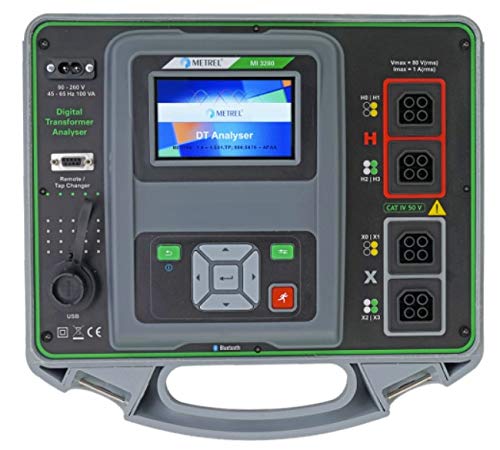
Figure 3: MI 3280 DT Control Panel and Connection Ports.
This image provides a detailed view of the MI 3280 DT's control panel. It highlights the 4.3-inch color touch screen, navigation buttons, and various input/output ports for connecting test leads, including clearly labeled H (High Voltage) and X (Low Voltage) terminals, and a USB port for PC communication.
3.3 Software Installation (Metrel ES Manager BASIC)
The Metrel ES Manager BASIC software is provided for PC communication, test structure creation, data transfer, and report generation. Install the software from the supplied media or download the latest version from the Metrel website. Connect the instrument to your PC using the USB cable for data transfer.
4. Operating the Instrument
4.1 User Interface Overview
The MI 3280 DT features a 4.3-inch high-resolution color touch screen for intuitive navigation. The main menu provides access to various functions including single tests, memory organizer, auto sequences, and general settings.

Figure 4: Main Menu Interface of the MI 3280 DT.
This image shows a close-up of the MI 3280 DT's color touch screen displaying the main menu. Options such as "Single Tests," "Memory Organizer," "Auto Sequences," and "General Settings" are visible, indicating the instrument's user-friendly interface for various testing functions.
4.2 Measurement Functions
The MI 3280 DT performs the following key measurements:
- Turn Ratio Measurement: For single and three-phase transformers.
- Phase Deviation: Measures deviation between high voltage and low voltage windings.
- Excitation Current: Measures the current required to magnetize the transformer core.
- Winding Resistance Measurement: For single and three-phase transformers (up to 1.6 MVA power transformers).
Detailed instructions for each measurement type, including connection diagrams and test parameters, are available within the instrument's built-in help screens.
4.3 Auto Sequences
For advanced users, the instrument offers pre-programmed auto sequences to streamline common testing procedures. These sequences guide the user through a series of measurements, ensuring consistency and efficiency.
4.4 Data Storage and Transfer
Test results can be stored directly on the instrument's internal memory. For analysis, reporting, or long-term archiving, transfer the stored data to a PC using the Metrel ES Manager software via USB or Bluetooth communication.
5. Maintenance and Care
5.1 Cleaning
Clean the instrument's exterior with a soft, damp cloth. Do not use abrasive cleaners or solvents. Ensure the instrument is powered off and disconnected from all test leads and power sources before cleaning.
5.2 Storage
When not in use, store the MI 3280 DT in its protective case in a dry, cool environment, away from direct sunlight and extreme temperatures. Ensure the case is closed to maintain its IP65 protection rating.
5.3 Calibration
To ensure continued accuracy and reliability, regular calibration by an authorized service center is recommended. Refer to the calibration certificate for the recommended calibration interval.
6. Troubleshooting
This section provides solutions to common issues. For problems not listed here, contact Metrel technical support.
| Problem | Possible Cause | Solution |
|---|---|---|
| Instrument does not power on. | Battery discharged; Power cable not connected properly. | Charge the battery; Check power cable connection. |
| Inaccurate measurement readings. | Incorrect test lead connection; Instrument out of calibration; Environmental interference. | Verify lead connections; Arrange for calibration; Minimize external interference. |
| Cannot connect to PC via USB/Bluetooth. | Driver issues; Bluetooth not enabled; Incorrect software settings. | Reinstall Metrel ES Manager software and drivers; Ensure Bluetooth is active on both devices; Check software connection settings. |
7. Technical Specifications
Key technical specifications for the Metrel MI 3280 DT Digital Transformer Analyzer:
- Model: MI 3280 DT
- Power Source: Battery Powered (Li-ion)
- Display: 4.3" TFT High Resolution Colour Touch Screen
- Protection Degree: IP65 (case closed), IP54 (case open)
- Communication: USB, Bluetooth (BT)
- Measurement Functions: Turn Ratio, Phase Deviation, Excitation Current, Winding Resistance
- Winding Resistance Range: Up to 1.6 MVA Power Transformers
- Software: Metrel ES Manager BASIC
- Dimensions: (Refer to detailed technical sheet for exact dimensions)
- Weight: (Refer to detailed technical sheet for exact weight)

Figure 5: Detailed Technical Specifications.
This image displays a page from the product brochure detailing the technical specifications of the MI 3280 DT. It includes precise measurement ranges, resolutions, and accuracies for functions like excitation voltage, turn ratio, excitation current, phase deviation, and winding resistance, along with general specifications like power supply, protection degree, and dimensions.
8. Warranty and Support
8.1 Warranty Information
The Metrel MI 3280 DT Digital Transformer Analyzer comes with a 2-year (24-month) warranty from the manufacturer. This warranty covers defects in materials and workmanship under normal use. Please retain your proof of purchase for warranty claims.
8.2 Technical Support
For technical assistance, service, or warranty inquiries, please contact Metrel customer support. Contact information can typically be found on the Metrel official website or on the product packaging.
For more information, visit the official Metrel website: www.metrel.si
Related documentsMI 3280 DT


Ask a question about this manual
Ask about setup, troubleshooting, compatibility, parts, safety, or missing instructions. Manuals+ will review the question and use this page’s manual context to help answer it.