
1. Introduction
This manual provides essential information for the safe and effective use of your ExpertPower 12V 9AH Rechargeable Sealed Lead Acid (SLA) Battery, Model EXP1290. This battery is designed for various applications, including Uninterruptible Power Supply (UPS) systems, emergency lighting, security systems, and other backup power needs. It features a 12-volt nominal voltage and a 9 amp-hour capacity, utilizing advanced Absorbent Glass Mat (AGM) technology for reliable, maintenance-free operation.

Image 1.1: Two ExpertPower 12V 9AH SLA batteries, illustrating the product's appearance and F2 terminals.
2. Safety Information
Please read and understand all safety instructions before handling or installing the battery. Failure to follow these instructions may result in personal injury or damage to the battery or connected equipment.
- Avoid Short Circuits: Do not allow metal objects to bridge the battery terminals. This can cause severe sparks, heat, and potential injury.
- Sealed Container: Do not attempt to open the sealed battery container. There are no user-serviceable parts inside.
- Keep Away from Sparks and Flames: Batteries can produce flammable gases. Ensure adequate ventilation and keep away from ignition sources.
- Proper Recycling: Batteries contain hazardous materials. Always recycle spent batteries according to local regulations. Do not dispose of in household waste.
- Handling: Although non-spillable, handle the battery with care to prevent physical damage.
3. Product Overview and Features
The ExpertPower EXP1290 battery is engineered for durability and consistent performance. Key features include:
- AGM Technology: The acid is absorbed between the plates and immobilized by a fine fiberglass mat. This design, combined with a valve-regulated, spill-proof construction, allows for safe operation in various orientations.
- Rugged Construction: The high-impact resistant battery case is made from non-conductive ABS plastic, offering strong resistance to shock, vibration, chemicals, and heat.
- Maintenance-Free: Designed for a long service life without the need for electrolyte checks or water additions.
- F2 Terminals: Equipped with standard F2 (0.250 inch) spade terminals for easy connection.

Image 3.1: Internal structure and non-spill design of the ExpertPower AGM battery.

Image 3.2: Highlighting the durability and performance characteristics of the battery.
4. Specifications
Detailed technical specifications for the ExpertPower EXP1290 battery:
| Specification | Value |
|---|---|
| Model Number | EXP1290 |
| Nominal Voltage | 12 Volts |
| Capacity | 9 Amp Hours (20 Hour Rate) |
| Battery Cell Composition | Lead Acid (AGM) |
| Terminal Type | F2 (0.250 inch spade) |
| Product Dimensions (L x W x H) | 5.94 x 2.56 x 3.7 inches (15.1 x 6.5 x 9.4 cm) |
| Item Weight | 10.14 pounds (4.6 kg) per 2-pack, approx. 5.07 lbs (2.3 kg) per battery |
| Recommended Uses | UPS, Backup Power, Alarm/Security Systems, Kids Riding Toys, Electric Scooters |
| Standby Use Voltage Regulation | 13.70-13.90V |
| Cycle Use Voltage Regulation | 14.60-14.80V |
| Initial Current | Less than 2.70A |
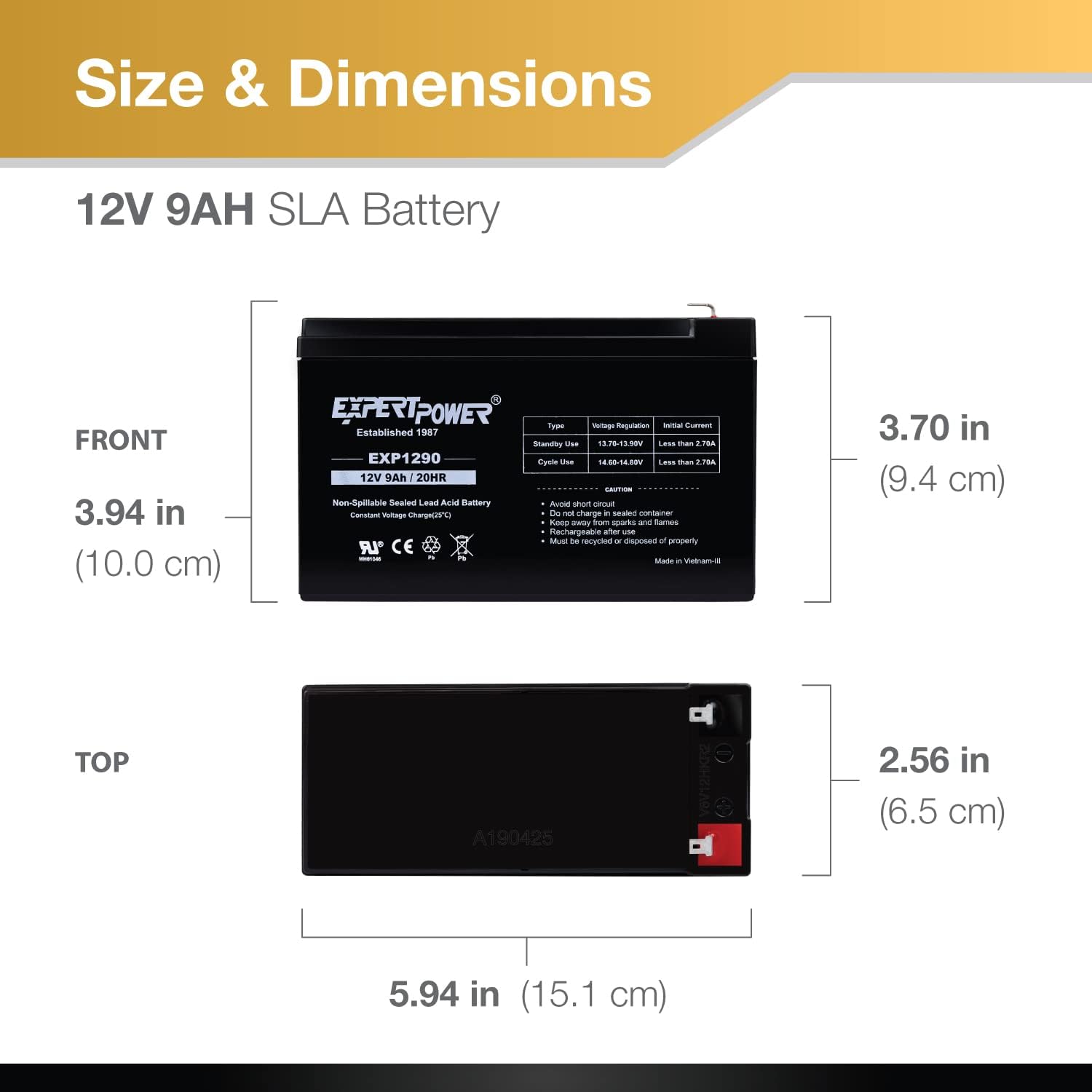
Image 4.1: Detailed dimensions of the ExpertPower EXP1290 battery.

Image 4.2: Key technical specifications of the ExpertPower EXP1290 battery.
5. Setup and Installation
Before installation, ensure the battery's dimensions and terminal type (F2) are compatible with your equipment. Always disconnect power to your device before installing or replacing batteries.
- Verify Compatibility: Compare the physical dimensions of the EXP1290 battery with the space available in your device. Confirm that your device requires a 12V 9AH battery with F2 terminals.
- Prepare Equipment: Turn off and unplug the device (e.g., UPS) where the battery will be installed. Refer to your device's manual for specific battery compartment access instructions.
- Remove Old Battery (if applicable): Carefully disconnect the old battery, noting the polarity (positive and negative terminals). Remove the old battery.
- Install New Battery: Insert the ExpertPower EXP1290 battery into the compartment. Connect the positive (+) terminal of the battery to the positive lead of your device, and the negative (-) terminal to the negative lead. Ensure connections are secure.
- Secure Compartment: Close and secure the battery compartment of your device.
- Initial Charge: For optimal performance, it is recommended to fully charge the battery before its first use, even if it appears to be charged. Use a compatible 12V SLA battery charger.

Image 5.1: Close-up of the F2 terminal, illustrating the connection point.

Image 5.2: Common applications and a reminder to verify battery dimensions for compatibility.
6. Operation
Once installed and fully charged, the ExpertPower EXP1290 battery operates automatically within compatible systems. It is designed for both standby and cycle use.
- Standby Use: In applications like UPS systems, the battery remains connected to a constant voltage charger, providing power only when the main power source fails. The recommended voltage regulation for standby use is 13.70-13.90V.
- Cycle Use: For applications where the battery is regularly discharged and recharged (e.g., electric scooters), the recommended voltage regulation for cycle use is 14.60-14.80V.
- Discharge: Avoid deep discharges that can shorten battery life. Most devices are designed to protect the battery from excessive discharge.
7. Maintenance
The ExpertPower EXP1290 is a maintenance-free battery, meaning it does not require water additions or electrolyte checks. However, proper care can extend its lifespan:
- Keep Clean: Periodically inspect the battery and terminals for dirt, corrosion, or loose connections. Clean terminals with a wire brush if necessary, ensuring power is disconnected first.
- Temperature: Operate and store the battery within recommended temperature ranges (typically 20-25°C or 68-77°F) to maximize lifespan. Extreme temperatures can degrade performance and shorten life.
- Storage: If storing the battery for an extended period, ensure it is fully charged and recharge it every 3-6 months to prevent sulfation and capacity loss. Store in a cool, dry place.
8. Troubleshooting
If you experience issues with your ExpertPower EXP1290 battery, consider the following common problems and solutions:
- Battery Not Holding Charge:
- Ensure the charging system (if external) is functioning correctly and providing the correct voltage.
- Check for loose or corroded terminal connections.
- The battery may have reached the end of its service life. SLA batteries have a finite number of charge/discharge cycles.
- Battery Not Charging:
- Verify that the charger is properly connected and powered.
- Confirm the charger is compatible with 12V SLA batteries and provides the correct charging voltage and current.
- Inspect the battery terminals and charger cables for damage.
- Reduced Runtime:
- This often indicates the battery is aging or has been subjected to frequent deep discharges.
- Ensure the battery is receiving a full charge cycle.
If troubleshooting steps do not resolve the issue, please contact ExpertPower customer support.
9. Warranty and Support
ExpertPower batteries are manufactured to high-quality standards. For specific warranty information, please refer to the documentation included with your purchase or visit the official ExpertPower website. For technical assistance, troubleshooting, or warranty claims, please contact ExpertPower customer support directly.
Recycling: When the battery reaches the end of its useful life, it must be recycled. Do not dispose of batteries in regular waste. Contact your local recycling center or battery retailer for proper disposal instructions.

Image 9.1: Quality and safety certifications for ExpertPower products.


