
Introduction
The Lowrance Active Imaging 3-In-1 Transducer (Model 000-14489-001) is an advanced sonar solution designed to provide detailed underwater views. This transducer integrates CHIRP, SideScan, and DownScan sonar technologies, including FishReveal, to enhance target identification and structure interpretation. This manual provides essential information for the proper installation, operation, and maintenance of your transducer.
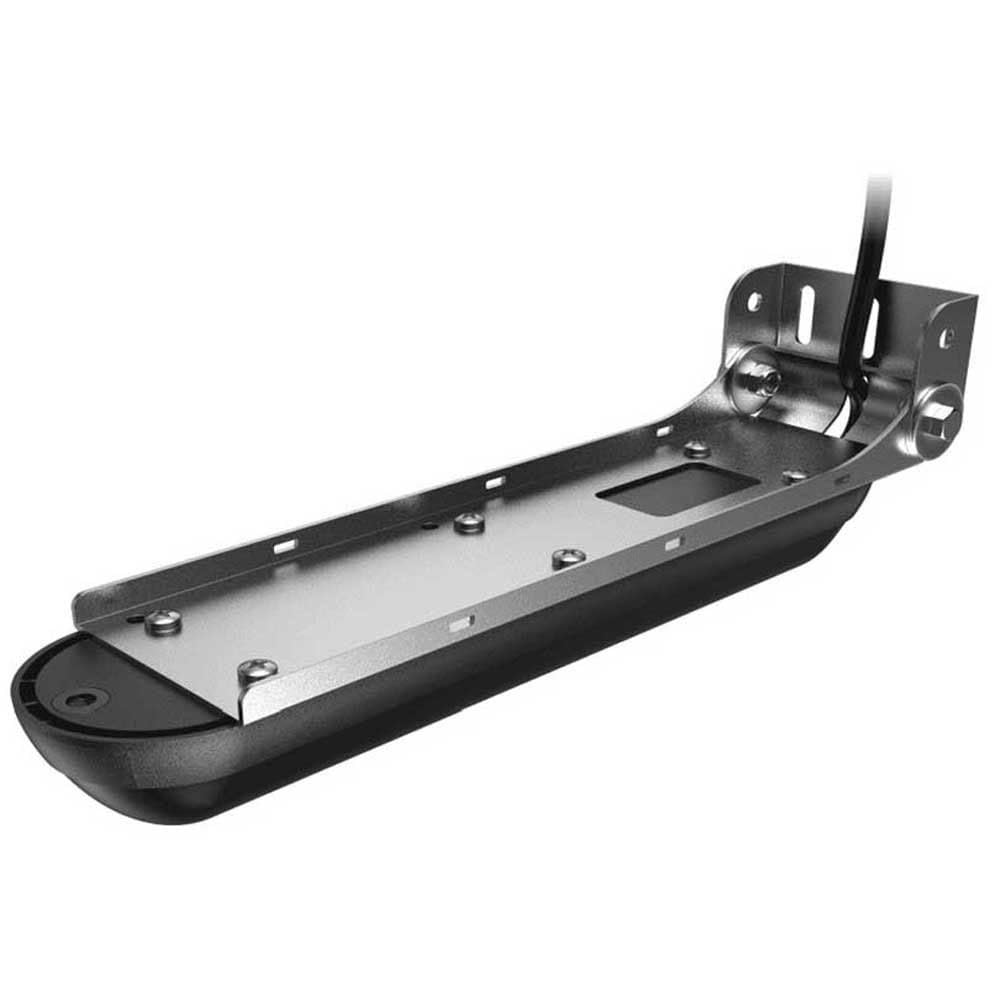
Image: The Lowrance Active Imaging 3-In-1 Transducer, a black, elongated unit with a mounting bracket and cable.
Setup and Installation
Proper installation is crucial for optimal performance of your Active Imaging 3-In-1 Transducer. This section outlines the general steps for mounting and connecting the transducer.
Mounting Options
The transducer supports various mounting configurations, including transom mount and direct step (flush) mount. Ensure the mounting location provides a clear view of the water and minimizes interference.
Transom Mount Bracket Assembly
For transom mounting, use the provided bracket. It is important to thread the transducer cable through the bracket before securing the bracket to the boat's transom. This prevents cable damage and ensures a clean installation.

Image: An exploded diagram illustrating the components and assembly process for the transom mount bracket, showing the transducer, bracket, and fasteners.
Direct Step Mount (Flush Bracket)
To mount the transducer directly to a step or flush surface, a separate flush mount bracket (part no. 000-12602-001, sold separately) is required. Follow the instructions provided with the flush mount kit for proper installation.

Image: An exploded diagram showing the components and assembly for a direct step (flush) mount, indicating the transducer and the separate flush mount bracket.
Cable Routing
Route the transducer cable carefully, avoiding sharp bends, kinks, or areas where it could be pinched or abraded. Secure the cable along its path to prevent movement and damage. Ensure the connector is clean and dry before plugging it into your compatible Lowrance display unit.
Dimensions
Refer to the dimension drawings for precise measurements of the transducer and its mounting bracket to assist with planning your installation.
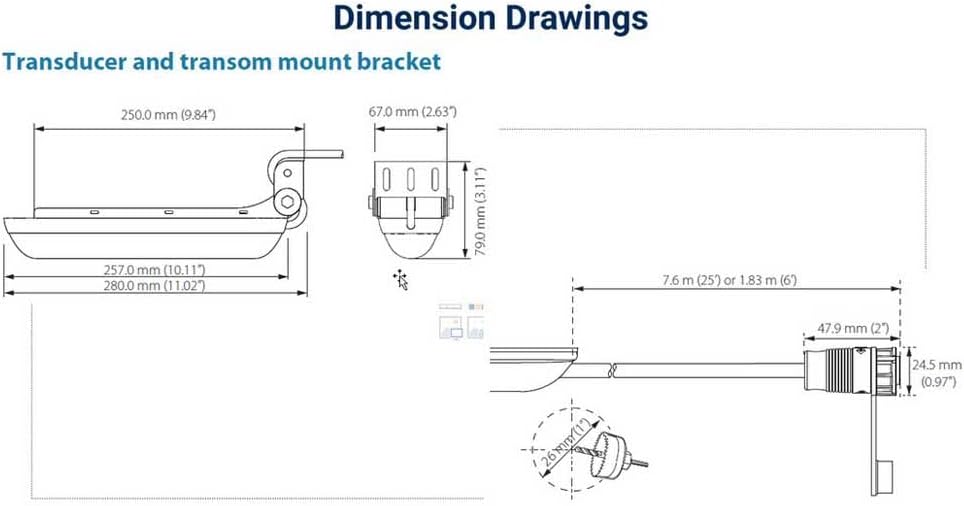
Image: Technical drawing displaying the dimensions of the transducer and its transom mount bracket, including length, width, height, and cable length.
Operating the Transducer
The Active Imaging 3-In-1 Transducer combines multiple sonar technologies to provide a comprehensive view of the underwater environment.
Active Imaging Technology
Active Imaging delivers high-resolution views of structure and cover. It utilizes a new level of refined detail and range, making it easier to identify fish-holding structures such as rockpiles, standing timber, weedbeds, ditches, and drop-offs.

Image: A graphical representation of Active Imaging sonar coverage, showing a wide area scan of the underwater terrain with detailed structure.
SideScan and DownScan with FishReveal
The transducer features SideScan for wide-area coverage to the sides of your boat and DownScan for a detailed, picture-like view directly beneath. FishReveal technology overlays fish arches from CHIRP sonar onto high-resolution DownScan images, allowing for easier identification of fish targets within structure.

Image: A screenshot of a sonar display showing Active Imaging SideScan, revealing detailed underwater structures resembling an amphitheater.
Compatibility
This transducer is compatible with Lowrance HDS LIVE, Elite FS, and Simrad NSS evo3s and GO series displays. Ensure your display unit has the latest software updates for full functionality.
Maintenance
Regular maintenance ensures the longevity and performance of your transducer.
- Cleaning: Periodically clean the transducer face with mild soap and water to remove marine growth, dirt, or oil. Avoid abrasive cleaners or solvents that could damage the transducer material.
- Inspection: Regularly inspect the transducer cable for any signs of wear, cuts, or damage. Check the mounting bracket for looseness or corrosion.
- Storage: If storing your boat for an extended period, ensure the transducer is clean and protected from extreme temperatures or physical impact.
Troubleshooting
If you experience issues with your transducer, consider the following common troubleshooting steps:
- No Sonar Reading: Check all cable connections between the transducer and the display unit. Ensure the display unit is powered on and the sonar source is correctly selected.
- Intermittent Readings or Noise: Verify that the transducer is securely mounted and free from obstructions. Electrical interference from other boat electronics can cause noise; try isolating the transducer's power source or routing its cable away from other electrical wiring.
- Loss of Bottom at Speed: This can occur if the transducer is not properly positioned or if there is excessive turbulence around it. Adjust the transducer's angle or location to ensure it remains in clean water flow at speed.
- Poor Image Clarity: Ensure your display unit's software is up to date. Adjust sensitivity, contrast, and range settings on your display unit to optimize the sonar image for current conditions.
For persistent issues, consult your display unit's manual or contact Lowrance customer support.
Specifications
| Feature | Specification |
|---|---|
| Model Number | 000-14489-001 |
| Brand | Lowrance |
| Power Source | 12 Volt DC |
| Supported Frequencies | Medium and High CHIRP (83/200kHz), 455/800kHz |
| Mounting Type | Transom, Flush step, Jackplate |
| Maximum Measuring Depth | 300 feet (DownScan) |
| Item Weight | 3.5 pounds |
| Item Dimensions (L x W x H) | 8"L x 6"W x 4"H |
| Included Components | 000-14489-001 Transducer |
Warranty Information
The Lowrance 000-14489-001 Active Imaging 3-In-1 Transducer is covered by a 2-year manufacturer's warranty. This warranty covers defects in materials and workmanship under normal use. For specific terms, conditions, and to register your product, please refer to the official Lowrance website or contact their customer service.
Customer Support
For further assistance, technical support, or warranty claims, please visit the official Lowrance website or contact their customer service department. Have your product model number (000-14489-001) and purchase information ready when contacting support.


