
Fronius 4904000033
Fronius TransSteel 2200 Multi-Process Welder
Instruction Manual
1. Product Overview
The Fronius TransSteel 2200 is a versatile and compact 3-in-1 welding solution designed for professional use. This single-phase inverter power source supports MIG/MAG (GMAW), TIG (GTAW), and Stick (SMAW) welding processes, making it suitable for a wide range of applications from fabrication shops to construction sites.
Weighing approximately 33.5 lbs, the TransSteel 2200 is highly portable, offering robust performance and reliability in a lightweight package. Its intelligent design emphasizes ease of use, featuring synergic control and pre-programmed waveforms to simplify welding operations.

Image: The Fronius TransSteel 2200 welding machine, showcasing its compact design with connected MIG torch and ground clamp.
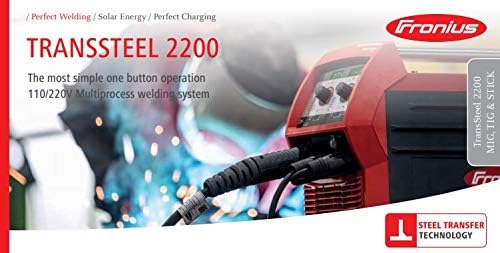
Image: Promotional banner for the TransSteel 2200, emphasizing its one-button operation and 110/220V multiprocess welding system.
2. Safety Information
Welding can be dangerous. It is essential to follow all safety precautions to prevent injury or damage. Read and understand this manual and all safety labels on the equipment before operation.
- Electric Shock Can Kill: Do not touch live electrical parts. Wear dry insulating gloves and protective clothing. Ensure the work area is dry.
- Fumes and Gases Can Be Dangerous: Keep your head out of the fumes. Use ventilation or exhaust to remove fumes from the breathing zone.
- Arc Rays Can Burn Eyes and Skin: Wear a welding helmet with a proper shade filter. Wear protective clothing to cover exposed skin.
- Fire and Explosion Hazard: Remove all flammables from the welding area. Have a fire extinguisher readily available.
- Hot Parts Can Cause Severe Burns: Allow welded materials and equipment to cool before handling.
- Always use proper personal protective equipment (PPE) including welding helmet, gloves, protective clothing, and safety footwear.
3. Key Features
The TransSteel 2200 is engineered with features that enhance its versatility, portability, and ease of use.
3.1 Three Processes, One Power Source
- MIG/MAG (GMAW): Over 60 pre-programmed waveforms are available for Gas Metal Arc Welding, providing optimized settings for various materials and applications.
- TIG (GTAW): Features TIG Pulsing Capabilities with amperage adjustment directly on the torch, offering precise control for high-quality welds. Note: TIG torch is sold separately.
- Stick (SMAW): Capable of Stick welding, providing a robust solution for various electrode types.
- The MIG Spot/Stitch mode simplifies out-of-position welding and thin sheet metal applications.

Image: Detail showing the input connections and a description of the three welding processes (MIG, TIG, Stick) supported by the TransSteel 2200.
3.2 Stationary and Portable Design
- Highly suitable for diverse environments including fabrication shops, construction sites, and assembly work.
- Easy to move with a weight of approximately 33.5 lbs.
- Optional carrying strap available for enhanced portability.
- Equipped with skid runners on the side panels for increased durability and protection in field conditions.
- Supports extension cords of up to 300+ ft without tripping breakers, offering flexibility in power access.

Image: A welder operating the TransSteel 2200 on a job site, illustrating its portability and suitability for various work environments.
3.3 Simple to Operate
- Synergic Based Welding: Users can simply set the material thickness, and the machine automatically prepares for welding, simplifying setup.
- Adaptive Arc: The system automatically compensates for changes in stick-out, maintaining consistent arc performance.
- Includes 2 program slots for saving frequently used weld settings, allowing for quick recall.
- Parameters can be easily adjusted through a convenient turn/press function on the control panel.

Image: A user's hands adjusting settings on the control panel of the TransSteel 2200, highlighting its user-friendly interface.
3.4 Compact TransSteel Design
- The internal wire feeder accommodates both 10 lb and 2 lb wire spools.
- Features a newly developed two-roller motor plate for stable and consistent wire feeding.
- Includes a convenient wearing parts box located inside the power source for easy access to consumables.

Image: An internal view of the TransSteel 2200, showing the wire feeder mechanism and the integrated storage compartment for wearing parts.
4. Setup Guide
Proper setup is crucial for safe and effective operation of your TransSteel 2200.
4.1 Power Connection
- Ensure the power source is turned off before connecting to mains power.
- Connect the power cable to a suitable 120V or 230V AC power outlet. The machine automatically detects the input voltage.
- Verify that the circuit breaker capacity is sufficient for the welding current required. Refer to the specifications section for power requirements.
4.2 Gas Connection (for MIG/TIG)
- Attach the gas hose from your shielding gas cylinder (e.g., Argon, CO2, or mixed gas) to the gas inlet connection on the rear of the TransSteel 2200.
- Secure the connection tightly to prevent gas leaks.
- Open the gas cylinder valve and adjust the flow rate on your gas regulator according to the welding process and material.
4.3 Wire Spool Installation (for MIG)
- Open the side panel of the machine to access the internal wire feeder compartment.
- Place the wire spool (10 lb or 2 lb) onto the spool holder, ensuring it rotates freely.
- Thread the welding wire through the guide tube and into the drive rollers.
- Close the drive roller tension arm and adjust the tension according to the wire type and diameter.
4.4 Torch and Ground Clamp Connection
- Connect the MIG torch (or TIG torch, if purchased separately) to the appropriate front panel connection. Ensure it is securely locked.
- Attach the ground clamp cable to the work piece terminal on the front panel.
- Securely attach the ground clamp directly to the workpiece or a clean, electrically conductive work surface. A poor ground connection can lead to unstable arc and poor weld quality.
5. Operating Instructions
The TransSteel 2200 is designed for intuitive operation. Follow these steps for basic welding procedures.
5.1 Powering On and Process Selection
- Turn on the main power switch located on the rear of the machine.
- The display will illuminate. Use the control panel to select your desired welding process: MIG/MAG, TIG, or Stick.
5.2 Parameter Setting (Synergic Mode)
- For MIG/MAG, select the material type (e.g., Steel, Stainless Steel, Aluminum) and wire diameter.
- Input the material thickness using the control knob. The machine will automatically suggest optimal welding parameters (voltage, wire feed speed).
- For TIG or Stick, adjust the amperage as needed for your application.
- Fine-tune parameters using the turn/press function on the control panel if necessary.
5.3 Using Program Slots
- The TransSteel 2200 features 2 program slots to save your preferred welding settings.
- Once you have set your desired parameters, navigate to the program save function on the display and save to an available slot.
- To recall a saved program, select the desired program slot from the menu.
5.4 Welding Operation
- Ensure all safety precautions are in place, including wearing appropriate PPE.
- Position the torch or electrode correctly relative to the workpiece.
- Initiate the arc according to the selected process (trigger for MIG, scratch/lift for TIG, touch for Stick).
- Maintain a consistent travel speed and arc length for optimal weld quality.
6. Maintenance
Regular maintenance ensures the longevity and optimal performance of your TransSteel 2200.
- Daily/Before Use:
- Inspect all cables (power, welding, ground) for damage or fraying.
- Check torch consumables (contact tip, nozzle, diffuser) for wear and replace if necessary.
- Ensure gas connections are secure and free of leaks.
- Weekly/After Heavy Use:
- Clean the wire feeder rollers and guide tubes to remove dust and debris.
- Use compressed air to blow out dust from the machine's cooling vents. Ensure power is disconnected before doing so.
- Check the condition of the internal wire spool and replace if nearly empty.
- General Tips:
- Store the machine in a clean, dry environment when not in use.
- Only use genuine Fronius replacement parts and consumables.
- Do not attempt repairs beyond the scope of this manual. Refer to qualified service personnel.
7. Troubleshooting
This section provides solutions to common issues you might encounter with your TransSteel 2200.
| Problem | Possible Cause | Solution |
|---|---|---|
| No power to machine | Power cable disconnected, circuit breaker tripped, faulty power outlet. | Check power cable connection. Reset circuit breaker. Test power outlet with another device. |
| No arc / Unstable arc | Poor ground connection, incorrect parameters, worn consumables, wrong gas. | Ensure ground clamp is on clean metal. Verify parameters for material/process. Replace contact tip/nozzle. Check gas type and flow. |
| Wire feeding issues (MIG) | Incorrect drive roller tension, clogged liner, wrong drive rollers, tangled wire spool. | Adjust drive roller tension. Clean or replace torch liner. Ensure correct drive rollers for wire size. Untangle wire spool. |
| Poor weld quality | Incorrect settings, improper technique, contaminated material, insufficient gas shielding. | Adjust voltage/wire speed/amperage. Practice technique. Clean workpiece. Increase gas flow or check for leaks. |
If the problem persists after attempting these solutions, contact Fronius customer support or an authorized service center.
8. Specifications
Detailed technical specifications for the Fronius TransSteel 2200.

Image: A comprehensive table detailing the technical specifications and performance characteristics of the TransSteel 2200 for MIG, TIG, and Stick welding.
| Parameter | Value |
|---|---|
| Model | TransSteel 2200 |
| Part Number | 4904000033 |
| Input Voltage | Multivoltage 120 - 230 V |
| Weight | Approx. 33.5 lbs (15.2 kg) |
| MIG Welding Current | Up to 220 A |
| TIG Welding Current | Up to 230 A |
| Stick Welding Current | Up to 180 A |
| Duty Cycle (220A) | 60% |
| Materials Supported | Steel, Stainless Steel, Silicon Bronze, Flux Cored, Metal-Cored, Self Shielded, Aluminum |
| Wire Diameter (MIG) | Up to 0.045" |
| Electrode Diameter (Stick) | 1/16" - 5/32" |
| Manufacturer | Fronius |
9. Warranty and Support
For detailed warranty information, please refer to the warranty card included with your purchase or visit the official Fronius website. Warranty terms and conditions may vary by region.
For technical support, service, or to locate an authorized service center, please contact Fronius directly through their official website or customer service channels. Always provide your product model number (TransSteel 2200) and part number (4904000033) when seeking support.
Official Fronius Website: www.fronius.com
Related documents4904000033


Ask a question about this manual
Ask about setup, troubleshooting, compatibility, parts, safety, or missing instructions. Manuals+ will review the question and use this page’s manual context to help answer it.