
Whirlpool WHAD201CW
Whirlpool 20-Pint Portable Dehumidifier User Manual
Model: WHAD201CW
1. Product Overview
The Whirlpool 20-Pint Portable Dehumidifier is designed to efficiently remove excess moisture from your indoor environment, improving air quality and comfort. This unit is capable of removing up to 20 pints of moisture per day, suitable for spaces up to 1,500 square feet. It features an intuitive LED humidistat display, multiple fan speeds, and convenient options like a child lock and continuous draining.

Image 1.1: Front view of the Whirlpool 20-Pint Portable Dehumidifier, showcasing its compact and modern design.

Image 1.2: Angled view of the dehumidifier, highlighting its side handles and overall shape.
2. Safety Information
Please read all instructions carefully before operating the dehumidifier to ensure safe and optimal performance. Keep this manual for future reference.
- Always plug the unit into a grounded electrical outlet. Do not use extension cords or adapter plugs.
- Do not operate the dehumidifier if the power cord or plug is damaged.
- Ensure the unit is placed on a level, stable surface to prevent tipping and water spillage.
- Maintain at least 8 inches (20 cm) of clearance around the unit for proper airflow.
- Do not insert fingers or foreign objects into the air inlet or outlet.
- Unplug the dehumidifier before cleaning or performing any maintenance.
- This appliance is not intended for use by persons (including children) with reduced physical, sensory or mental capabilities, or lack of experience and knowledge, unless they have been given supervision or instruction concerning use of the appliance by a person responsible for their safety.
3. Setup and Installation
3.1 Unpacking
Carefully remove the dehumidifier from its packaging. Inspect the unit for any shipping damage. Retain the packaging materials for future storage or transport.
3.2 Caster Wheel Installation
The dehumidifier comes with four caster wheels for easy mobility. Insert each caster wheel firmly into the designated holes at the bottom of the unit until they click into place.
3.3 Placement
Place the dehumidifier in a location where the humidity is highest, such as a basement, garage, or living room. Ensure there is adequate space around the unit for proper air circulation. Avoid placing it against walls or furniture that could block the air intake or exhaust.

Image 3.1: Dehumidifier dimensions, showing approximate measurements of 15" (width) x 11" (depth) x 20" (height).

Image 3.2: Guide for selecting the appropriate dehumidifier size based on room area, indicating the 20-pint model is suitable for up to 1,500 sq. ft.
3.4 Power Connection
Plug the dehumidifier into a standard, grounded 120V AC electrical outlet. The unit is now ready for operation.
4. Operating Instructions
4.1 Control Panel Overview
The dehumidifier features an electronic control panel with an LED display for easy operation.

Image 4.1: Overview of the control panel features, including the LED display and various function indicators.
4.2 Power On/Off
Press the Power button to turn the unit on or off.
4.3 Setting Desired Humidity Level
Use the humidity control buttons (usually Up/Down arrows) to set your desired humidity level. The LED display will show the current room humidity and your set humidity. The unit will operate until the desired level is reached, then cycle on and off to maintain it.
4.4 Fan Speed Selection
Press the Fan Speed button to cycle through available fan speeds (e.g., Low, High). Higher fan speeds will dehumidify faster but may produce more noise.
4.5 Timer Function
The 24-hour timer allows you to program the unit to turn on or off automatically after a set period. Consult the full manual for detailed timer programming instructions.

Image 4.2: Visual representation of key operating features: efficient moisture removal, automatic 24-hour turn on/shut off timer, and 2-speed fan for air circulation.
4.6 Child Lock Function
Activate the child lock to prevent accidental changes to settings. Refer to the control panel for the specific button combination or sequence to engage/disengage the child lock.
4.7 Continuous Draining Option
For extended operation without emptying the water bucket, connect a standard garden hose (not included) to the continuous drain port. Ensure the hose is sloped downwards to a suitable drain or floor drain to allow gravity drainage.

Image 4.3: Illustration of the continuous draining feature, allowing for direct water removal via a hose.
4.8 Loss of Power Protection
In the event of a power outage, the unit will automatically resume operation with the last settings once power is restored.
5. Maintenance
5.1 Emptying the Water Bucket
When the water bucket is full, the unit will automatically shut off and an indicator light will illuminate. Carefully remove the bucket from the front of the unit and empty the collected water. Reinsert the bucket securely to resume operation.
5.2 Cleaning the Air Filter
The dehumidifier is equipped with a removable, easy-to-clean air filter. A 'Clean Filter' alert will indicate when the filter needs attention. Regularly cleaning the filter ensures optimal performance and air quality.
- Turn off and unplug the dehumidifier.
- Locate and remove the air filter (typically on the side or back of the unit).
- Wash the filter with warm, soapy water. Rinse thoroughly.
- Allow the filter to air dry completely before reinserting it into the unit.

Image 5.1: Side view of the dehumidifier with the air filter access panel open, illustrating how to remove the filter for cleaning.
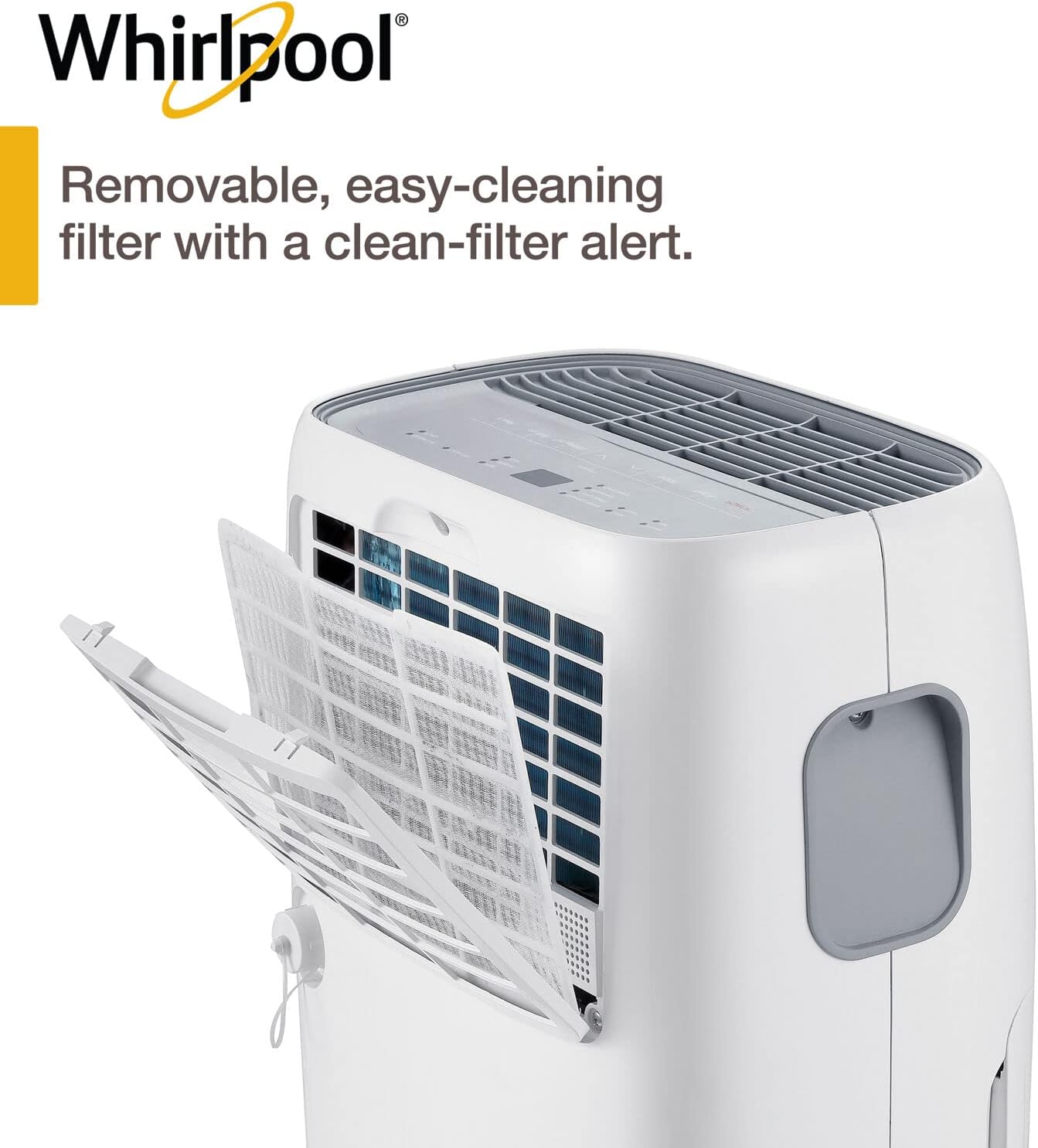
Image 5.2: Detailed view of the removable filter, emphasizing its design for easy cleaning and the associated alert system.
5.3 General Cleaning
Wipe the exterior of the dehumidifier with a soft, damp cloth. Do not use harsh chemicals or abrasive cleaners. Ensure the unit is dry before plugging it back in.
5.4 Storage
If storing the unit for an extended period, ensure the water bucket is empty and the filter is clean and dry. Store the dehumidifier in an upright position in a cool, dry place, away from direct sunlight and extreme temperatures.
6. Troubleshooting
Before contacting customer support, please refer to the following table for common issues and their solutions.
| Problem | Possible Cause | Solution |
|---|---|---|
| Dehumidifier does not turn on. | No power, power cord unplugged, circuit breaker tripped. | Check power connection, ensure outlet is functional, reset circuit breaker. |
| Unit is running but not collecting water. | Humidity level set too high, room temperature too low, air filter clogged. | Lower desired humidity setting, ensure room temperature is above 5°C (41°F), clean air filter. |
| "Full Bucket" indicator is on, but bucket is not full. | Bucket not inserted correctly, sensor malfunction. | Ensure bucket is fully and correctly seated. If issue persists, contact support. |
| Unit is noisy. | Unit not on a level surface, fan speed too high, internal component issue. | Place on a level surface, try a lower fan speed. If excessive, contact support. |
7. Specifications
| Feature | Detail |
|---|---|
| Model | WHAD201CW |
| Capacity | 20 Pints/Day |
| Coverage Area | Up to 1,500 sq ft |
| Item Weight | 14.4 kg |
| Color | White |
| Special Feature | Programmable, Auto-Shutoff, Timer, Child Lock |
| Included Components | Dehumidifier, 4 Caster Wheels, Manual, Warranty Card |
| Power Supply | 120V AC (Standard) |
8. Warranty and Support
8.1 Warranty Information
This Whirlpool dehumidifier comes with a 1-Year Limited Warranty. This warranty covers defects in materials and workmanship under normal use. Please refer to the included warranty card for full terms and conditions, including what is covered and exclusions.

Image 8.1: Visual confirmation of product warranty.
8.2 Customer Support
For technical assistance, warranty claims, or to order replacement parts, please contact Whirlpool Customer Service. Contact information can typically be found on the Whirlpool official website or on the warranty card provided with your product.