
FEZIBO EU-Y-SDE-48G-DD
FEZIBO 48x24 Inch Height Adjustable Electric Standing Desk
Model: EU-Y-SDE-48G-DD
Introduction
This manual provides comprehensive instructions for the assembly, operation, and maintenance of your FEZIBO 48 x 24 Inch Height Adjustable Electric Standing Desk, Model EU-Y-SDE-48G-DD. Please read this manual thoroughly before assembly and use to ensure proper function and safety. Keep this manual for future reference.

Image: The FEZIBO 48x24 Inch Electric Standing Desk in Rustic Brown, featuring a raised monitor shelf with two integrated drawers, and an electric height adjustment control panel.
Setup and Assembly
The desk package includes all necessary assembly tools and detailed instructions. Assembly is recommended for two people.
Required Tools:
- Basic Assembly Tools (included)
- Drill (recommended for faster assembly)
Included Components:
- Assembly Instructions with Diagram (1)
- Basic Assembly Tools (including spare parts)
- Desk Hooks (Set of 2)
- 2 Drawers
- Lockable Casters

Image: A close-up of the desk surface with an open instruction manual, indicating easy installation.
Assembly Tips:
- Assemble the desk on a stable, level surface.
- Follow the provided instructions and diagrams carefully.
- Ensure all connections are secure before use.
Operating Instructions
Height Adjustment:
The desk features an electric height adjustment system, allowing you to transition between sitting and standing positions. The height can be adjusted between 27.36 inches and 46.06 inches.
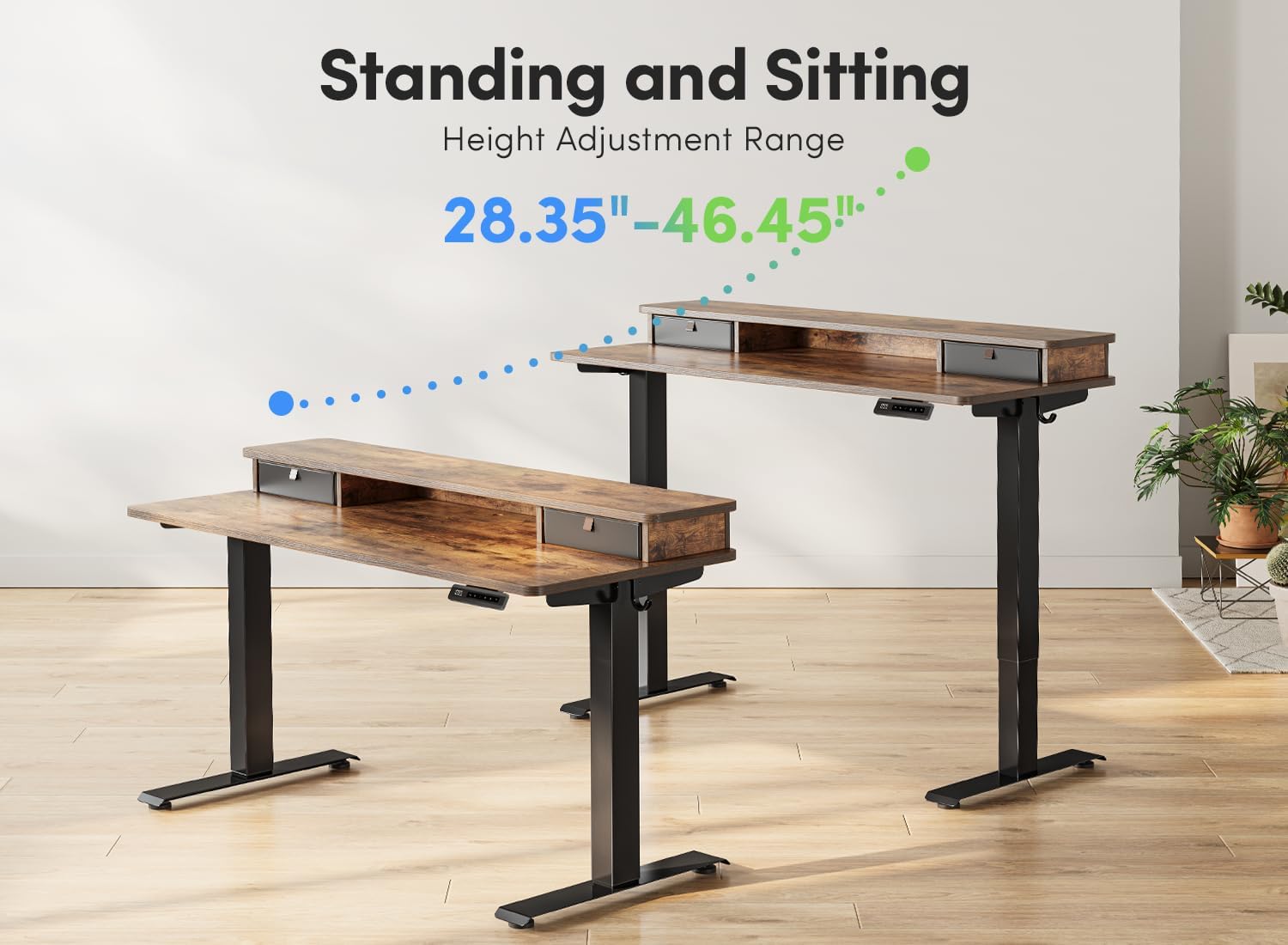
Image: Two desks demonstrating the height adjustment range, one in a lower sitting position and one in a higher standing position.
Control Panel Functions:

Image: A close-up of the desk's control panel, showing the digital height display, up/down arrows, and four memory preset buttons (1, 2, 3, 4).
- Up/Down Arrows: Use these buttons to manually adjust the desk height.
- Memory Height Settings (1, 2, 3, 4): Press and hold a numbered button (1-4) to save the current height. To recall a saved height, press the corresponding numbered button.
- Reset: If the desk encounters an issue or after a power outage, press and hold the DOWN button for 5 seconds to reset the system.
Anti-Collision Technology:
The desk is equipped with an anti-collision system. If the desk encounters an obstacle during height adjustment, it will automatically reverse its movement by 2cm to prevent potential damage or injury.

Image: A desk chair positioned under the desk, illustrating how the anti-collision system prevents the desk from lowering onto the chair.
Child Lock Feature:

Image: A close-up of the control panel showing the 'LOC' indicator and instructions for locking/unlocking the desk.
- To Lock: Press and hold the "1" and "2" buttons simultaneously for 3 seconds. The display will show "LOC".
- To Unlock: Press and hold the "1" and "2" buttons simultaneously for 3 seconds again. The display will return to the current height.
Maintenance
Cleaning:
- Wipe the desk surfaces with a dry cloth.
- Avoid using abrasive cleaners or harsh chemicals that may damage the finish.
General Care:
- Regularly check all screws and fasteners to ensure they are tight.
- Ensure the desk is not overloaded. The maximum weight recommendation is 176 pounds.
Troubleshooting
Motor Not Responding / Desk Not Moving:
- Check if the power cable is securely connected to both the desk and a working power outlet.
- Perform a system reset: Press and hold both the UP and DOWN buttons simultaneously for 5 seconds. Release the buttons when the green light flashes once. The desk should then begin its reset procedure.
- Ensure the child lock is not activated. If "LOC" is displayed, unlock the desk by pressing and holding buttons "1" and "2" for 3 seconds.
Desk Movement is Uneven or Jerky:
- Ensure the desk is not overloaded beyond the 176 lbs weight capacity.
- Verify that all assembly screws are tightened properly.
- Clear any obstructions around or under the desk that might impede movement.
Anti-Collision System Triggering Frequently:
- Check for any objects or furniture that might be in the path of the desk during height adjustment.
- Ensure the desk is on a stable and level surface.
Specifications
| Feature | Detail |
|---|---|
| Brand | FEZIBO |
| Model Number | EU-Y-SDE-48G-DD |
| Product Dimensions (D x W x H) | 24"D x 48"W x 27.1"H |
| Adjustable Height Range | 27.36" - 46.06" (Minimum Height: 28 Inches, Maximum Height: 47.8 Inches) |
| Color | Rustic Brown (Top), Black (Base) |
| Top Material Type | Wood |
| Base Material | Alloy Steel |
| Lifting Mechanism | Electric |
| Maximum Weight Recommendation | 176 Pounds |
| Number of Drawers | 2 (Double Drawer) |
| Included Components | Assembly Instructions, Basic Assembly Tools, Desk Hooks (2), 2 Drawers, Lockable Casters |
| Required Assembly | Yes |
| Recommended People for Assembly | 2 |
| Special Features | Adjustable height, Ergonomic, Sturdy, Easy assembly, Electric standing desk, Anti-collision technology |
| UL Listed | Yes |
| Item Weight | 20 Kilograms |
Warranty Information
The FEZIBO 48x24 Inch Height Adjustable Electric Standing Desk comes with a 5-year manufacturer's limited warranty. This warranty covers manufacturing defects and ensures the product meets quality standards under normal use.
For specific details regarding warranty coverage and claims, please refer to the documentation included with your product or contact customer support.
Customer Support
For any questions, assembly assistance, troubleshooting, or warranty concerns, please contact FEZIBO customer support.
Contact Information:
- Phone: +1 702-620-5156 (U.S.)
- Hours: Monday - Friday, 24/5
Please have your model number (EU-Y-SDE-48G-DD) and purchase information ready when contacting support.
Related documentsEU-Y-SDE-48G-DD


Ask a question about this manual
Ask about setup, troubleshooting, compatibility, parts, safety, or missing instructions. Manuals+ will review the question and use this page’s manual context to help answer it.