Introduction
The Kasa Smart Security Camera EC60 is designed to provide reliable indoor surveillance with 1080p HD video, motion detection, two-way audio, and night vision capabilities. This manual provides detailed instructions for setting up, operating, and maintaining your EC60 camera.
Package Contents
- 1x Kasa Spot Camera
- Power Adapter
- 1x 10 ft USB Cable
- 1x Quick Start Guide
- 2 x Mounting Screws
- 1x Mounting Template
Product Overview
Familiarize yourself with the components of your Kasa Smart Security Camera EC60.

Image: Front view of the Kasa Smart Security Camera EC60, showing the lens and compact design.
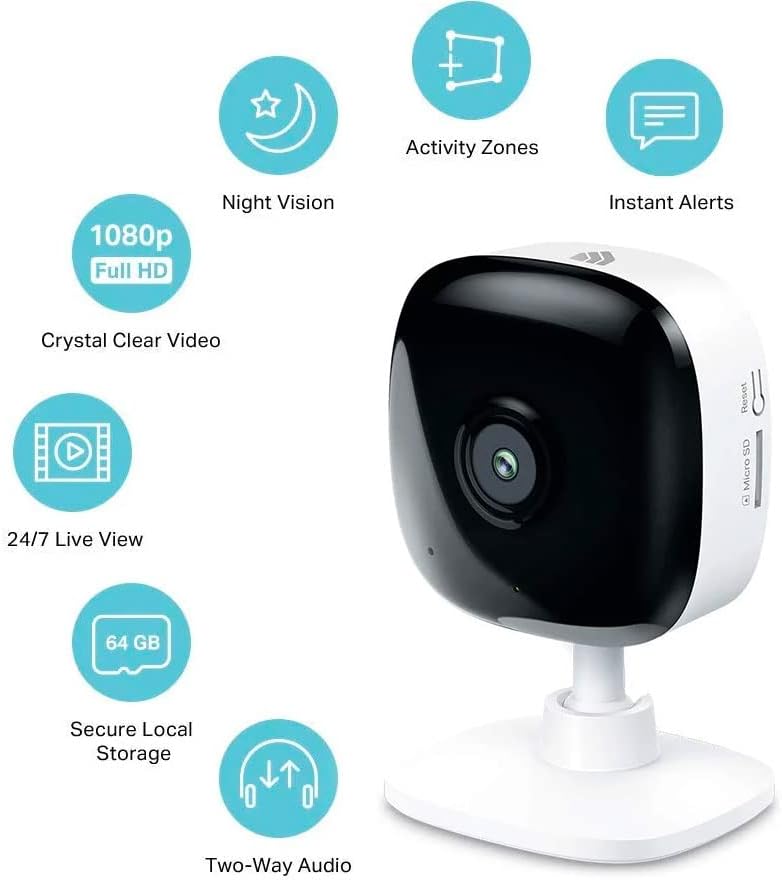
Image: Kasa Smart Security Camera EC60 with icons illustrating key features like Night Vision, Activity Zones, Instant Alerts, 1080p Full HD, 24/7 Live View, Secure Local Storage (64GB), and Two-Way Audio.
- Camera Lens: Captures 1080p Full HD video.
- MicroSD Card Slot: For local storage up to 64 GB (card not included).
- Reset Button: Used for factory reset.
- Microphone: For two-way audio communication.
- Speaker: For two-way audio communication.
- Power Port: Connects to the power adapter.
Setup Guide
- Download the Kasa Smart App: Search for "Kasa Smart" on the Apple App Store or Google Play Store and download the application.
- Create a Kasa Account: Open the Kasa Smart app and follow the on-screen instructions to create an account or log in if you already have one.
- Power On the Camera: Connect the provided USB cable to the camera's power port and the power adapter. Plug the adapter into a power outlet. The camera's LED indicator will blink orange and green, indicating it's ready for setup.
- Add Device in App: In the Kasa Smart app, tap the '+' icon (usually in the top right corner) and select 'Device' > 'Cameras' > 'Kasa Spot (EC60)'.
- Connect to Wi-Fi: Follow the app's instructions to connect your camera to your home 2.4GHz Wi-Fi network. Ensure your phone is connected to the same Wi-Fi network during setup.
- Positioning and Mounting:
The EC60 camera is designed for indoor use and can be placed on a flat surface or wall-mounted. Use the included mounting template and screws for wall installation.
- Choose a location with a clear view of the area you wish to monitor and within range of your Wi-Fi signal.
- For wall mounting, use the template to mark screw positions, drill pilot holes, and secure the camera base with the provided screws.
- Insert MicroSD Card (Optional): If you plan to use local storage, gently insert a MicroSD card (up to 64GB, not included) into the MicroSD card slot on the side of the camera.
Operating Instructions
Live View and Recording
Access real-time video feed and review recorded footage through the Kasa Smart app.

Image: A smartphone displaying the Kasa Smart app's live view interface, showing a cat and options for two-way audio. This illustrates how to monitor your camera feed remotely.
- Open the Kasa Smart app and select your EC60 camera from the device list to view the live feed.
- Recorded footage can be accessed from the app's timeline or event history.
Motion and Sound Detection
The camera detects motion and sound, sending instant alerts to your smartphone.
- Customize activity zones within the app to focus detection on specific areas.
- Adjust sensitivity settings for motion and sound detection to minimize false alerts.
Two-Way Audio
Communicate through the camera using the built-in microphone and speaker.
- Tap the microphone icon in the live view interface of the Kasa Smart app to speak.
- The camera's microphone is always active for listening.
Night Vision
The EC60 provides clear video up to 30 feet in low-light conditions using infrared night vision.
- Night vision activates automatically in dim lighting.
- The night vision image will be in black and white.
Smart Actions
Integrate your EC60 camera with other Kasa Smart devices to create automated routines.

Image: Diagram illustrating a Smart Action: "Camera detects movement" (Action) triggers "Lights turn on" (Trigger). This demonstrates how the camera can interact with other Kasa devices.
- In the Kasa Smart app, navigate to the 'Smart Actions' section to set up rules.
- Example: Have Kasa lights turn on when the camera detects motion.
Voice Control Integration
Control your camera and view its feed using voice commands with Amazon Alexa or Google Assistant.

Image: A Kasa Smart Camera EC60 next to an Amazon Echo Show, displaying the camera's live feed. A speech bubble indicates the command "Alexa, Show me living room camera." This highlights voice control capabilities.
- Link your Kasa Smart account to your Alexa or Google Home account through their respective apps.
- Use commands like "Alexa, show me the [camera name]" or "Hey Google, show me the [camera name]" on compatible devices.
Maintenance
- Cleaning: Use a soft, dry cloth to clean the camera lens and body. Avoid abrasive cleaners or solvents.
- Firmware Updates: Regularly check the Kasa Smart app for firmware updates to ensure optimal performance and security.
- MicroSD Card Management: If using a MicroSD card, periodically check its status in the app and format it if necessary to maintain recording quality.
- Environmental Conditions: Ensure the camera is used within its specified operating temperature (0°C-40°C) and humidity (10%~90%RH, non-condensing) ranges.
Troubleshooting
- Camera not connecting to Wi-Fi:
- Ensure your Wi-Fi network is 2.4GHz. The EC60 does not support 5GHz networks.
- Verify the Wi-Fi password is correct.
- Move the camera closer to your Wi-Fi router to improve signal strength.
- Restart your router and the camera.
- No motion/sound alerts:
- Check the activity zone settings in the Kasa Smart app to ensure they cover the desired area.
- Adjust the motion/sound detection sensitivity.
- Ensure notifications are enabled for the Kasa Smart app in your phone's settings.
- Poor video quality or choppy recordings:
- Check your Wi-Fi signal strength. A weak signal can affect video streaming.
- Ensure your internet connection is stable and has sufficient bandwidth.
- If using a MicroSD card, ensure it is a high-quality card and consider formatting it.
- Microphone issues (e.g., unable to turn off):
- While the microphone cannot be physically disabled via software, you can mute the audio recording in the Kasa Smart app settings for privacy.
- For complete audio suppression, some users have physically covered the microphone hole on the device.
Specifications
| Model Name | EC60 |
| Video Capture Resolution | 1080p Full HD |
| Connectivity Technology | Wi-Fi (2.4GHz) |
| Night Vision Range | Up to 30 feet |
| Storage Options | MicroSD card (up to 64GB, not included), Cloud Storage (Kasa Care Plan) |
| Two-Way Audio | Yes |
| Motion/Sound Detection | Yes, with customizable activity zones |
| Voice Control | Amazon Alexa, Google Assistant |
| Indoor/Outdoor Usage | Indoor |
| Operating Temperature | 0°C-40°C (32°F-104°F) |
| Dimensions (L x W x H) | 2.32 x 1.95 x 3.5 inches |
| Item Weight | 8.8 ounces |
| UPC | 840030701917 |
Warranty and Support
Warranty Information
The Kasa Smart Security Camera EC60 comes with a 2-year warranty from the date of purchase. Please retain your proof of purchase for warranty claims. This warranty covers manufacturing defects and malfunctions under normal use.
Customer Support
For technical assistance, troubleshooting, or further inquiries, please visit the official Kasa Smart support website or contact their customer service. You can often find FAQs, video tutorials, and contact information on the Kasa Smart website.
For additional resources, refer to the official Kasa Smart store: Kasa Smart Store