
1. Product Overview
The DROK 24V 480W Adjustable DC Power Supply is a buck converter designed to convert AC 110V/220V input to a variable DC output ranging from 0-24V. This unit provides a maximum current of 20A and a rated power of 480W. It features an integrated LED display for output voltage monitoring, a cooling fan for temperature regulation, and essential protection mechanisms.

Figure 1: DROK 24V 480W Adjustable DC Power Supply
Key Features:
- Adjustable Output Voltage: Provides a DC output from 0-24V with 0.1V precision.
- Dual Input Voltage: Supports AC 110V or 220V input, selectable via a switch.
- Integrated LED Display: Clearly shows the output voltage.
- Cooling System: Equipped with a heat sink and an automatic cooling fan to maintain safe operating temperatures.
- Protection Features: Includes Over Load Protection, Over Voltage Protection, and Short Circuit Protection.
2. Setup Instructions
Follow these steps to set up your DROK power supply.
2.1 Input Voltage Selection
Before connecting the power supply, ensure the input voltage switch is set correctly for your region (110V or 220V). The default setting is typically 220V. Incorrect selection can damage the unit.

Figure 2: Input Voltage Selector Switch. Set to 110V or 220V as required.
2.2 Wiring Connections
Connect the input AC power and output DC load to the designated terminals. Ensure all connections are secure to prevent electrical hazards.
- Input (AC): Connect your AC power source to the 'N' (Neutral) and 'L' (Live) terminals. The '⌒' terminal is for ground.
- Output (DC): Connect your DC load to the '+V' (Positive) and '-V' (Negative) terminals.

Figure 3: Terminal connections for AC input and DC output.
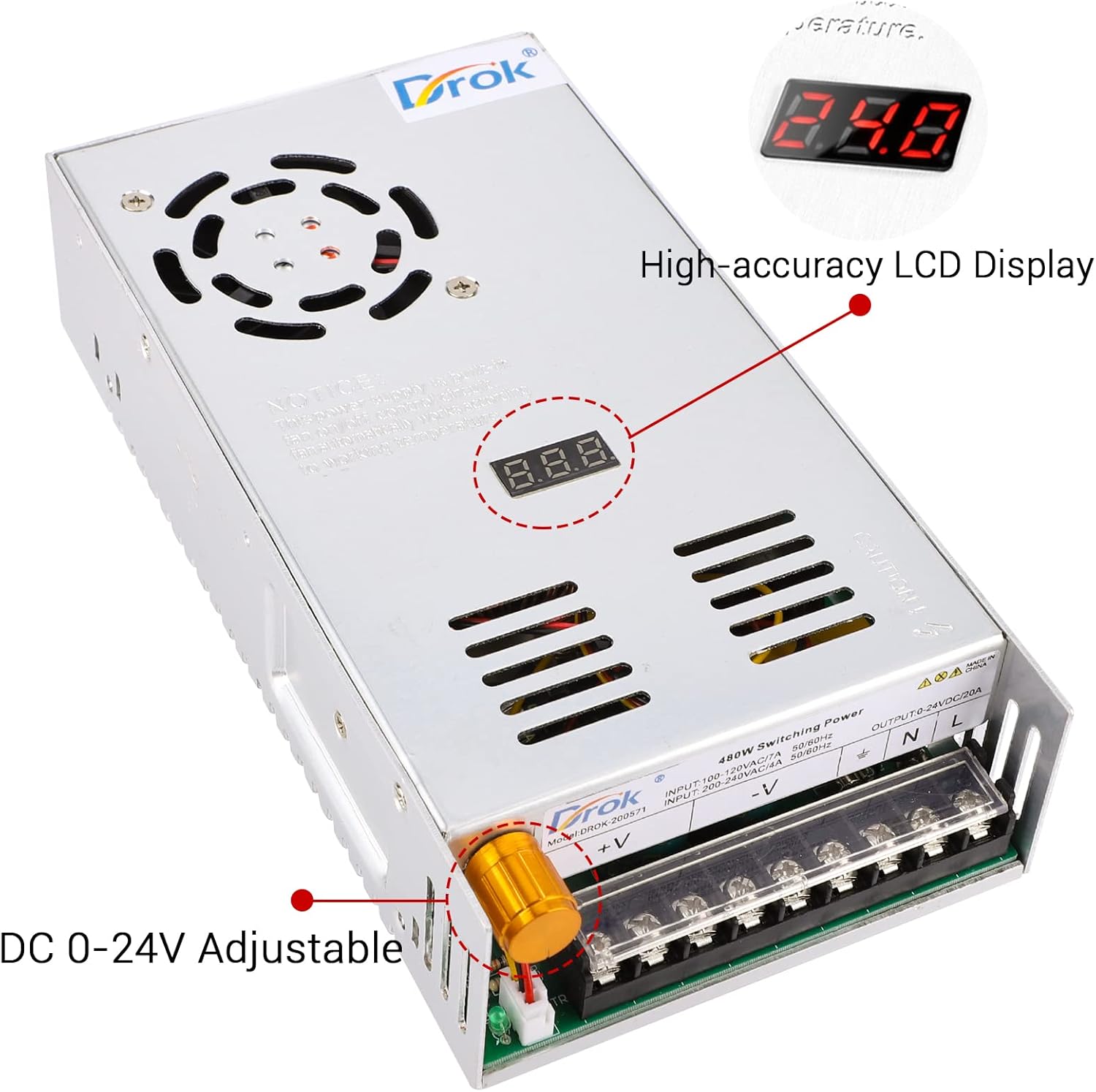
Figure 4: Product view highlighting the DC 0-24V adjustable knob and high-accuracy LCD display.
3. Operating Instructions
Once properly connected, the power supply is ready for operation.
3.1 Adjusting Output Voltage
The output voltage can be adjusted using the potentiometer knob located on the side of the unit. Rotate the knob clockwise to increase the voltage and counter-clockwise to decrease it. The current model (Single Display Fix Current) does not allow for current adjustment; the actual current drawn will depend on the connected load, up to a maximum of 20A.
Video 1: Demonstration of voltage adjustment and input voltage selection on a DROK power supply. This video shows the process of setting the input voltage and adjusting the output voltage using the control knob, with readings displayed on the unit and an external multimeter.
3.2 Monitoring Output
The integrated LED display provides a real-time reading of the output voltage. For this specific model, the current display (if present) indicates the maximum current capacity, not the adjustable current. The actual current is determined by the load connected.
3.3 Cooling Fan Operation
The cooling fan automatically activates when the internal temperature reaches a certain threshold to prevent overheating. It operates with minimal noise. Ensure the fan vents are not obstructed.

Figure 5: Location of the smart cooling fan on the power supply unit.
4. Maintenance
To ensure optimal performance and longevity of your power supply, follow these maintenance guidelines:
- Keep the unit in a clean, dry, and well-ventilated area.
- Regularly check that the cooling fan vents are free from dust and obstructions.
- Avoid exposing the unit to excessive moisture or extreme temperatures.
- Do not attempt to open the casing or modify the internal components, as this may void the warranty and pose safety risks.
5. Troubleshooting
If you encounter issues with your power supply, refer to the following common problems and solutions:
| Problem | Possible Cause | Solution |
|---|---|---|
| No output voltage/Unit not powering on |
|
|
| Output voltage is unstable or incorrect |
|
|
| Cooling fan not running |
|
|
| Current reading on display (if applicable) is fixed or not adjustable |
|
|
6. Specifications
| Parameter | Value |
|---|---|
| Model Number | 20050 |
| Input Voltage | AC 110V/220V (selectable) |
| Output Voltage | DC 0-24V (Adjustable) |
| Max Output Current | 20A (Load Dependent) |
| Rated Power | 480W |
| Voltage Precision | 0.1V |
| Product Dimensions | 1.97 x 4.53 x 1.97 inches (50 x 115 x 50 mm) |
| Item Weight | 1.83 pounds |
| Protection | Over Load, Over Voltage, Short Circuit |

Figure 6: Product dimensions.
7. Warranty and Support
7.1 Warranty Information
This DROK power supply comes with a 1-year warranty from the date of purchase. This warranty covers manufacturing defects and malfunctions under normal use. Please retain your proof of purchase for warranty claims.
7.2 Customer Support
For technical assistance, troubleshooting, or warranty inquiries, please contact DROK customer service. Refer to the product packaging or the official DROK website for contact details.


