
Retevis EUA9152BX2-C9157AX4
Retevis RT618 Walkie Talkie User Manual
Model: EUA9152BX2-C9157AX4 | Brand: Retevis
Introduction
This manual provides comprehensive instructions for the safe and efficient operation of your Retevis RT618 Walkie Talkie. The RT618 is a compact and lightweight PMR446 license-free two-way radio designed for clear and reliable communication in various environments such as hotels and retail settings. It features dual PTT buttons, a fixed antenna, and comes with a headset for enhanced privacy and security.
Package Contents
Upon opening the package, please verify that all items listed below are present and in good condition:
- 4 x Retevis RT618 PMR446 Walkie Talkie
- 4 x 1000 mAh Battery
- 4 x Original Earpiece/Headset
- 4 x Belt Clip
- 2 x 2-in-1 USB Charging Cable
- 4 x Wrist Strap
- 2 x User Manual (this document)

Figure 1: Overview of the Retevis RT618 Walkie Talkie package contents. Includes four radios, four headsets, charging cables, batteries, and belt clips.
Product Overview
Familiarize yourself with the various parts and controls of your RT618 walkie talkie.

Figure 2: Front and side view of the RT618 walkie talkie with key components labeled, including the dual PTT buttons, channel selectors, power button, and volume control.
- Side PTT Button: Press and hold to transmit.
- Front PTT Button: An enlarged button on the front for easy transmission without needing to grip the radio.
- Channel +/- Buttons: Used to select the desired communication channel.
- Power Button: Turns the device on or off.
- Volume +/- Control: Adjusts the listening volume.
- Indicator Light: Provides status feedback (e.g., transmitting, receiving, low battery).

Figure 3: Detailed views of the RT618's indicator light, channel selection buttons, volume adjustment, and the USB charging port.
Setup
1. Battery Installation
Insert the 1000 mAh Lithium-ion battery into the compartment on the back of the walkie talkie, ensuring proper alignment of the contacts. Close the battery cover securely.
2. Charging the Battery
Before first use, fully charge the walkie talkie battery. Use the provided 2-in-1 USB Y-type charging cable to charge two RT618 units simultaneously. Connect the cable to a standard USB power source (e.g., wall adapter, computer USB port, car charger).

Figure 4: The 2-in-1 USB Y-type charging cable allows for convenient simultaneous charging of two RT618 walkie talkies from a single USB power source.
The indicator light will show charging status. A full charge typically takes approximately 3-4 hours. The average battery usage time is 10 hours.
3. Attaching Accessories
Belt Clip: Attach the belt clip to the back of the walkie talkie for easy carrying.
Headset: Connect the headset's 2-pin connector to the audio jack on the side of the walkie talkie. Ensure the connection is firm. The headset features a 360-degree rotatable clip for comfortable wear.

Figure 5: The included headset with its dimensions and features, such as the 360-degree rotatable clip for optimal positioning.
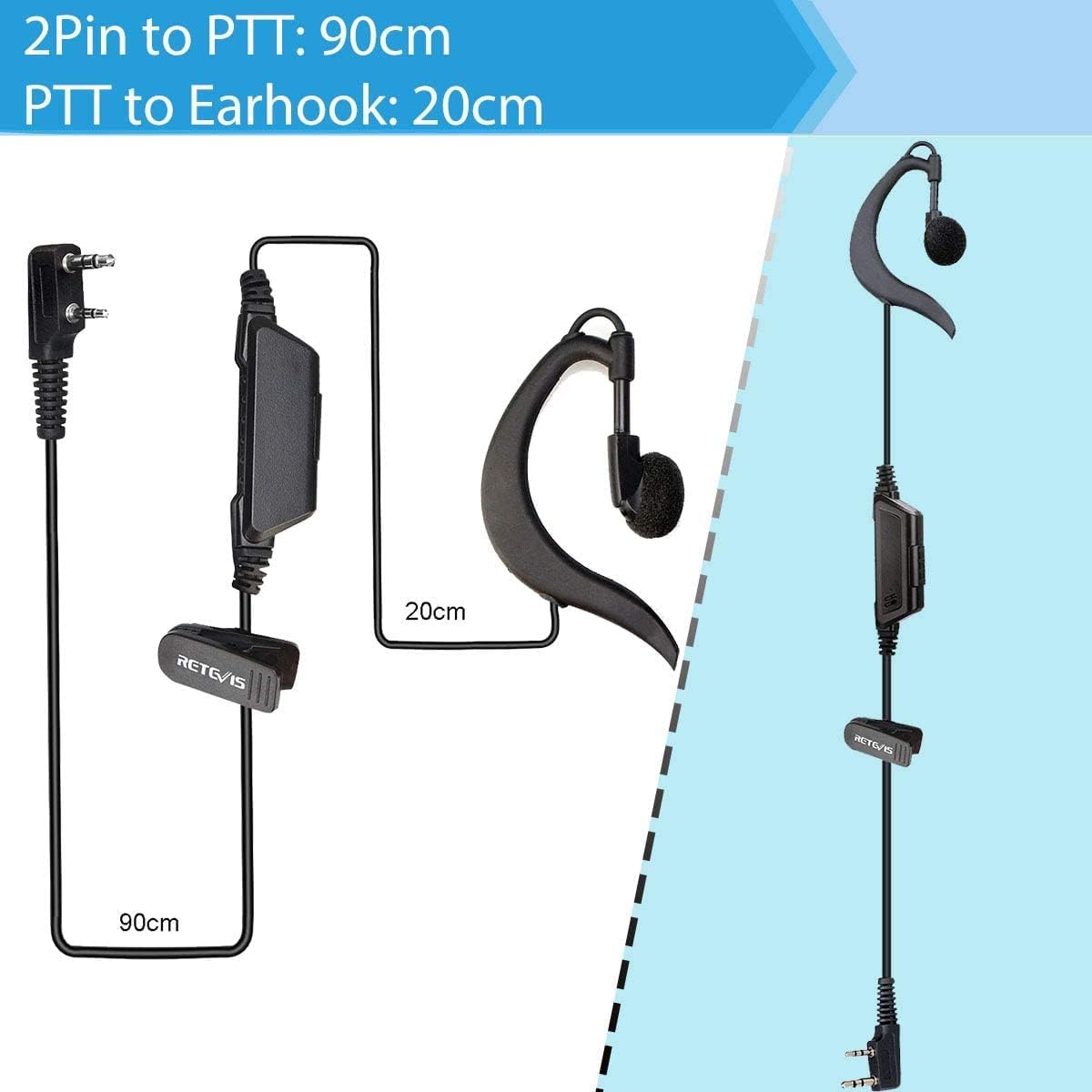
Figure 6: Detail of the 2-pin connector for the headset, ensuring proper connection to the walkie talkie.

Figure 7: Cable length specifications for the headset, indicating the distance from the 2-pin connector to the PTT button (90cm) and from the PTT button to the earhook (20cm).
Operating Instructions
1. Power On/Off
Press and hold the Power button until the device turns on or off. A voice prompt will indicate the power status.
2. Channel Selection
Use the Channel +/- buttons to select one of the 16 available channels. Ensure all radios intended for communication are set to the same channel.
3. Adjusting Volume
Use the Volume +/- control to adjust the listening volume to a comfortable level.
4. Transmitting and Receiving
To transmit, press and hold either the Side PTT button or the Front PTT button. Speak clearly into the microphone. Release the PTT button to stop transmitting and listen for a response. The indicator light will illuminate when transmitting.
When receiving a signal, the indicator light will also illuminate.
5. VOX Function (Voice Operated Exchange)
The RT618 supports VOX, allowing hands-free transmission when your voice is detected. Refer to the advanced settings section (if applicable, or general knowledge for PMR446) for enabling and adjusting VOX sensitivity. (Note: Specific VOX activation steps are not detailed in the provided data, so a general statement is used).
Maintenance
- Cleaning: Wipe the radio with a soft, damp cloth. Do not use harsh chemicals or abrasive cleaners.
- Storage: Store the walkie talkie in a cool, dry place when not in use. Remove batteries if storing for extended periods.
- Battery Care: Avoid overcharging or completely draining the battery. Recharge regularly to maintain battery health.
- Water Resistance: The device is water-resistant, but not waterproof. Avoid submerging it in water.
Troubleshooting
| Problem | Possible Cause | Solution |
|---|---|---|
| No power | Battery not installed correctly or discharged. | Ensure battery is properly installed. Charge the battery fully. |
| Cannot communicate with other radios | Radios are on different channels or out of range. | Verify all radios are on the same channel. Move closer to the other radio. Check for obstructions. |
| Poor audio quality / Static | Weak signal, interference, or low battery. | Move to an open area. Recharge battery. Check for sources of interference. |
| Headset not working | Headset not fully plugged in or damaged. | Ensure headset connector is firmly inserted. Try another headset if available. |
Specifications
| Feature | Detail |
|---|---|
| Model | EUA9152BX2-C9157AX4 |
| Tuner Technology | PMR446 |
| Number of Channels | 16 |
| Frequency Range | 446.00625-446.19375MHz |
| Max Talk Range | Up to 1.5 km (actual test distance) / 3 km (maximum stated) |
| Battery Type | Lithium-ion |
| Battery Capacity | 1000 mAh |
| Average Battery Life | 10 Hours |
| Voltage | 3.7 Volts |
| Water Resistance Level | Water-repellent |
| Dimensions (Product) | 4.5 x 22 x 17 cm (packaging dimensions) / 1.7cm thin, 80g light (radio dimensions) |
| Weight (Product) | 805 g (packaging weight) / 80g (radio weight) |
| Special Features | Long Range, Lightweight, Dual PTT, VOX, Emergency Function |

Figure 8: The RT618 walkie talkie is designed to be thin (1.7cm) and lightweight (80g) for comfortable portability.

Figure 9: Detailed dimensions of the RT618 walkie talkie, providing precise measurements for its compact design.
Warranty and Support
Retevis products are designed for reliability and performance. For warranty information and technical support, please refer to the official Retevis website or contact the seller directly. The standard return policy allows for refund/replacement within 30 days.
For further assistance, you may visit the Retevis Store on Amazon.
Official Product Videos
No official product videos from the seller were found in the provided data for this model.
Related documentsEUA9152BX2-C9157AX4


Ask a question about this manual
Ask about setup, troubleshooting, compatibility, parts, safety, or missing instructions. Manuals+ will review the question and use this page’s manual context to help answer it.