
Orion Motor Tech Voltage Transformer
Orion Motor Tech 3000W Voltage Transformer User Manual
Model: Voltage Transformer
Introduction
This user manual provides comprehensive instructions for the safe and efficient operation of your Orion Motor Tech 3000W Voltage Transformer. This device is designed to convert electrical voltage, allowing you to use appliances with different voltage requirements (110V or 220V) across various regions. Please read this manual thoroughly before use to ensure proper functionality and safety.
Safety Information
Always adhere to the following safety precautions to prevent electric shock, fire, or damage to the unit and connected devices:
- Ensure the voltage selector switch on the back of the unit is set to the correct input voltage (110V or 220V) before plugging the transformer into a power outlet. Incorrect voltage selection can cause severe damage.
- Do not overload the transformer. The total wattage of all connected appliances must not exceed the transformer's maximum capacity (3000W).
- Place the transformer in a well-ventilated area. Do not block the ventilation vents.
- Keep the unit away from water, moisture, and extreme temperatures.
- Do not open the transformer casing. There are no user-serviceable parts inside. Refer all servicing to qualified personnel.
- Unplug the transformer from the power outlet when not in use.
- If the circuit breaker trips, reduce the electrical load before resetting.
Product Overview
The Orion Motor Tech 3000W Voltage Transformer is designed for versatility and safety. Key components and features include:
- 3000W Capacity: Capable of handling most household appliances.
- Voltage Conversion: Steps up voltage from 110V to 220V and steps down from 220V to 110V.
- Multiple Output Sockets: Includes 2 US standard and 2 universal sockets compatible with Type A, B, C, E, F, G, & I plugs.
- USB Ports: Two 5V USB-A ports for charging personal electronics.
- Safety Protections: Built-in circuit breaker for overload and short circuit protection.
- Efficient Cooling: Vents on both sides for heat dissipation.
- Convenient Handle: Integrated handle for easy portability.

Figure 1: Front view of the Orion Motor Tech 3000W Voltage Transformer with key components labeled, including the handle, USB 5V ports, power outputs (220V and 110V), power switch, power indicator, and ventilation vents.

Figure 2: Side view of the Orion Motor Tech 3000W Voltage Transformer showing its approximate dimensions: 15.8cm height, 22.4cm depth, and 21.74cm width.
Specifications
| Feature | Detail |
|---|---|
| Brand | Orion Motor Tech |
| Model Number | Voltage Transformer (ST-3000VA) |
| Power Capacity | 3000W |
| Input Voltage | 110V or 220V (selectable) |
| Output Voltage | 110V and 220V |
| USB Output | 2 x 5V USB-A Ports |
| Current Rating | 13.6 Amps |
| Frequency | 50 Hz / 60 Hz |
| Dimensions (approx.) | 31 x 25 x 20 cm (Package Dimensions) |
| Power Source | Corded Electric |
Setup
- Unpack the Transformer: Carefully remove the transformer from its packaging. Inspect for any signs of damage.
- Choose a Location: Place the transformer on a stable, flat surface in a well-ventilated area, away from direct sunlight, heat sources, and moisture. Ensure the side vents are not obstructed.
- Select Input Voltage: Locate the voltage selector switch on the back of the transformer. Set it to match the voltage of your wall outlet (e.g., 220V for UK/Europe, 110V for North America). This step is critical to prevent damage.
- Connect to Power: Plug the transformer's power cord into a grounded wall outlet.
- Power On: Flip the ON/OFF switch on the front panel to the 'ON' position. The power indicator light should illuminate.

Figure 3: Rear view of the Orion Motor Tech 3000W Voltage Transformer, highlighting the ventilation grilles and the location of the voltage selector switch (not explicitly visible but implied by the rear view).
Operating Instructions
Connecting Appliances:
- Ensure the transformer is powered on.
- Identify the voltage requirement of your appliance (e.g., 110V or 220V).
- Plug your appliance into the corresponding output socket on the front panel (either "OUTPUT 220V" or "OUTPUT 110V"). The universal sockets are designed to accommodate various plug types.
- If using the USB ports, connect your USB-powered device to either of the "USB 5V" ports.
- Turn on your appliance.
Important: Always ensure the total wattage of all connected appliances does not exceed 3000W. If the transformer's circuit breaker trips, it indicates an overload. Disconnect some appliances, wait a minute, and then reset the breaker (if applicable, or it may auto-reset).
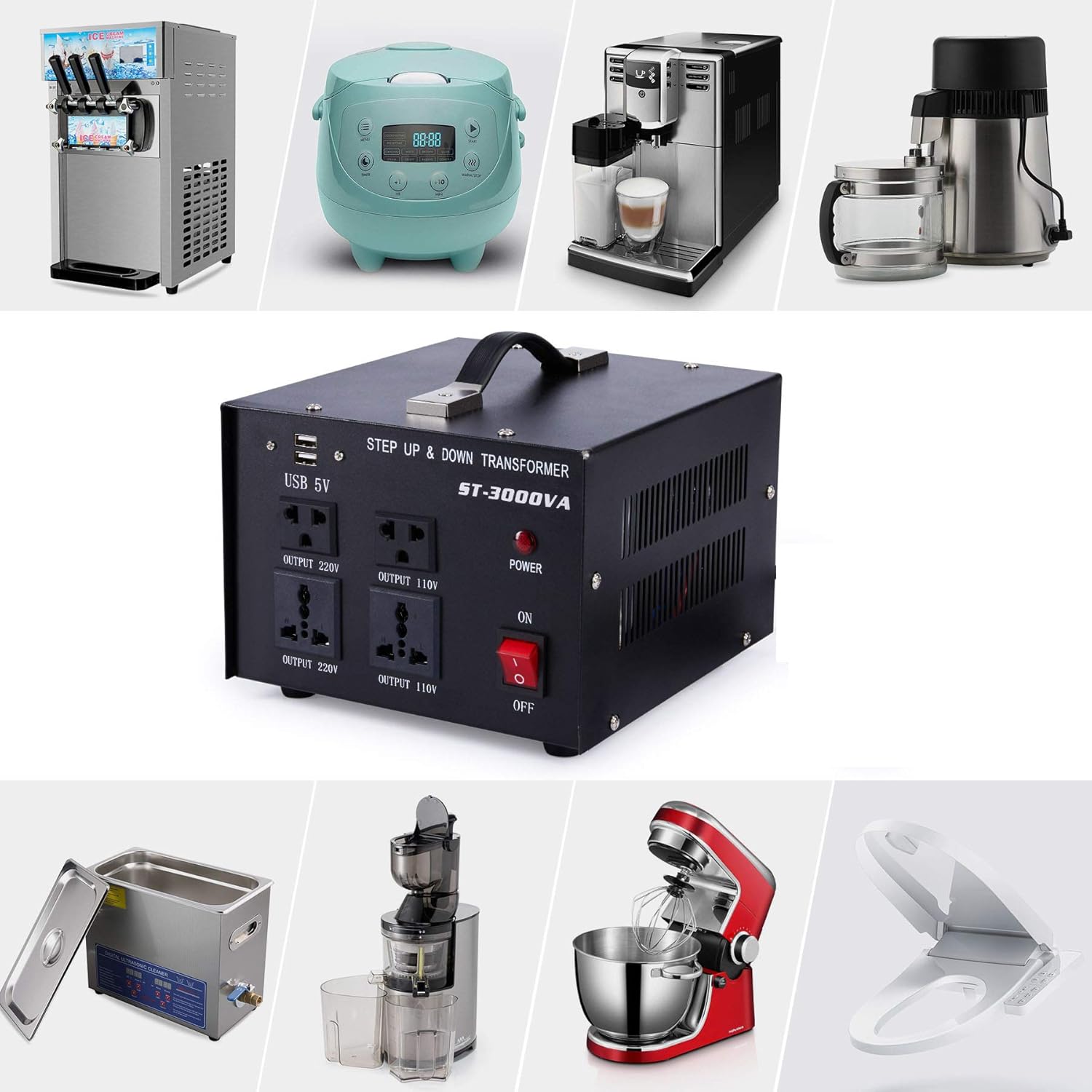
Figure 4: Examples of various household and commercial appliances, such as ice cream machines, rice cookers, coffee machines, blenders, ultrasonic cleaners, juicers, stand mixers, and smart toilet seats, that can be powered by the Orion Motor Tech 3000W Voltage Transformer.
Maintenance
- Cleaning: Disconnect the transformer from the power outlet before cleaning. Use a soft, dry cloth to wipe the exterior. Do not use liquid cleaners or aerosols.
- Ventilation: Periodically check that the ventilation vents are clear of dust and debris to ensure proper airflow and prevent overheating.
- Storage: When not in use for extended periods, store the transformer in a cool, dry place, away from direct sunlight and extreme temperatures.
Troubleshooting
| Problem | Possible Cause | Solution |
|---|---|---|
| Transformer does not power on. | No power from wall outlet; Power switch is OFF; Internal fuse/breaker tripped. | Check wall outlet with another device. Ensure power switch is ON. If a circuit breaker tripped, reduce load and reset. |
| Connected appliance does not work. | Incorrect output socket used; Appliance is faulty; Transformer overloaded. | Ensure appliance is plugged into the correct voltage output (110V or 220V). Test appliance directly if possible. Reduce total wattage of connected devices. |
| Transformer makes unusual noise or smells burnt. | Overload; Internal fault. | Immediately turn off and unplug the transformer. Do not use it. Contact customer support. |
| Circuit breaker trips frequently. | Overload; Faulty appliance; Insufficient household circuit capacity. | Ensure total wattage is below 3000W. Test appliances individually. Consult an electrician if household circuit capacity is suspected. |
Warranty and Support
Orion Motor Tech products are designed for durability and performance. For warranty information, technical support, or service inquiries, please visit the official Orion Motor Tech store or contact their customer service directly.
Orion Motor Tech Store: Visit Store
Related documentsVoltage Transformer

Ask a question about this manual
Ask about setup, troubleshooting, compatibility, parts, safety, or missing instructions. Manuals+ will review the question and use this page’s manual context to help answer it.