
FEZIBO FEZIBO
FEZIBO Electric Height Adjustable Standing Desk User Manual
Model: FEZIBO (152 x 60 cm, Brown Top with Black Frame)
1. Product Overview
The FEZIBO Electric Height Adjustable Standing Desk is designed to promote a healthier and more productive work environment. This desk allows users to easily switch between sitting and standing positions, reducing sedentary time and improving overall well-being. It features a robust electric lifting system, anti-collision technology, and a durable construction.

Image 1.1: The FEZIBO Electric Height Adjustable Standing Desk (152 x 60 cm, Brown Top with Black Frame).
The desk is equipped with a reliable motor for smooth height adjustments and includes memory buttons for saving preferred height settings. Its industrial-grade alloy steel frame ensures stability, even at maximum height.
2. Safety Information
Please read and understand all safety instructions before assembly and use. Failure to follow these instructions may result in injury or damage to the product.
- Do not exceed the recommended weight limit of 80 kg (176 pounds) on the desktop.
- Exercise caution during assembly to prevent injury.
- Keep children and pets away from the desk during height adjustments.
- Ensure no obstacles are in the path of the desk's movement (up or down) to prevent activation of the anti-collision system or damage.
- Do not sit or stand on the desk.
- Only use the provided power adapter and cables.
3. Setup and Assembly
The FEZIBO standing desk is designed for straightforward assembly. All necessary tools and hardware are typically included. The desktop comes in two sections for easier handling and assembly.
3.1 Unpacking
- Carefully open the packaging and remove all components.
- Verify that all parts listed in the assembly guide are present and undamaged.
- Place components on a soft, clean surface to prevent scratches during assembly.
3.2 Assembly Steps
Follow the detailed instructions provided in the included assembly manual. General steps include:
- Attach the lifting columns to the desktop sections.
- Connect the crossbar and side brackets to the lifting columns.
- Install the foot pads to the base of the lifting columns.
- Mount the control panel and motor.
- Connect all cables according to the diagram.
- Ensure all screws are tightened securely.

Image 3.1: Product dimensions and available color combinations.
Note: Pay close attention to the orientation of parts, especially when attaching the desktop sections and motor components, to avoid reassembly.
4. Operating Instructions
The FEZIBO standing desk features an intuitive control panel for easy height adjustment and memory functions.
4.1 Height Adjustment
- Press and hold the UP (▲) button to raise the desk.
- Press and hold the DOWN (▼) button to lower the desk.
- Release the button at your desired height. The desk operates smoothly and quietly.
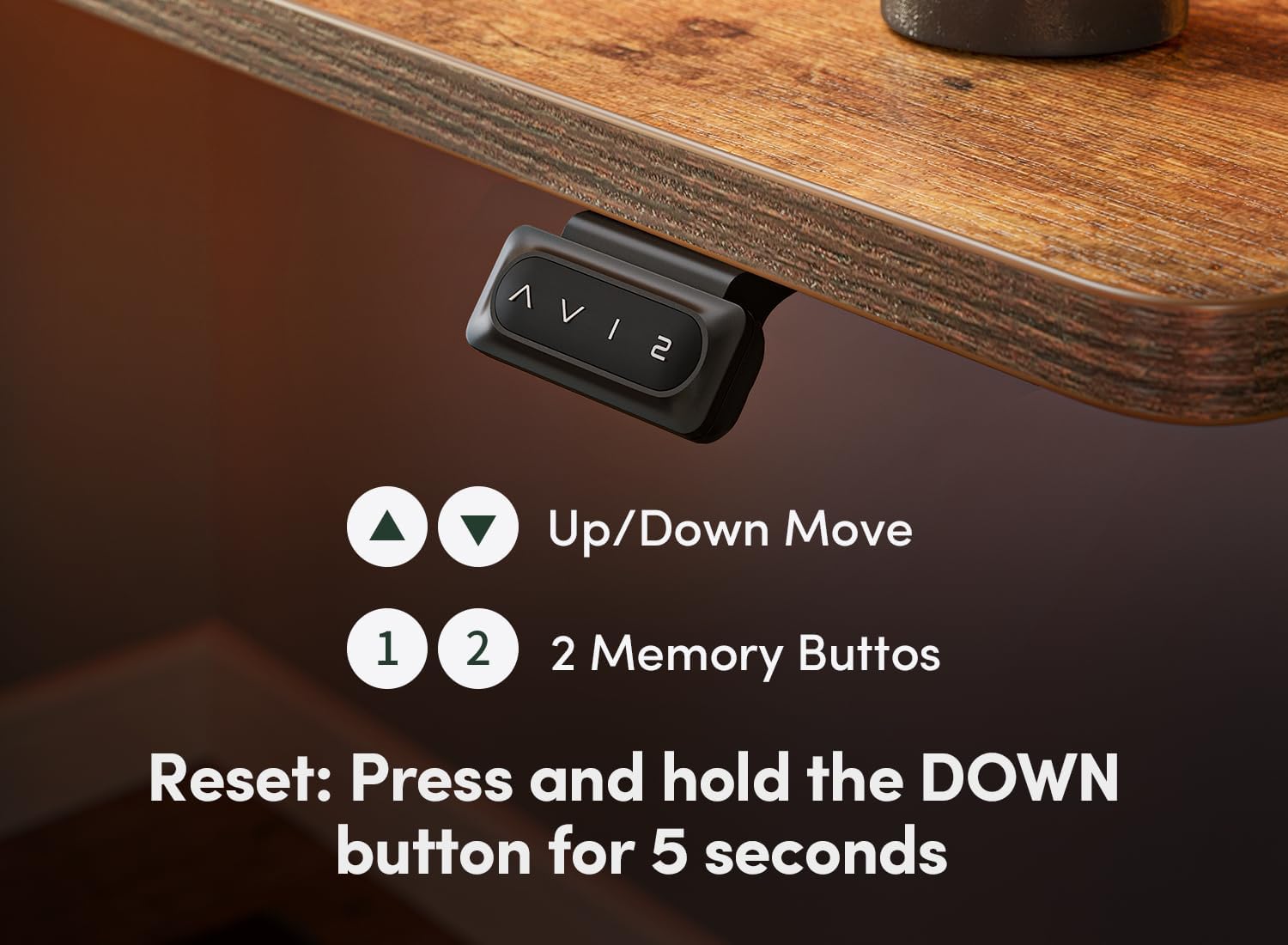
Image 4.1: Control panel with Up/Down and Memory Buttons.
4.2 Memory Presets
The desk includes two memory buttons (1 and 2) to save your preferred sitting and standing heights.
- Adjust the desk to your desired height using the UP/DOWN buttons.
- Press and hold one of the memory buttons (1 or 2) until you hear a beep or see the display flash, indicating the height has been saved.
- To recall a saved height, simply press the corresponding memory button (1 or 2). The desk will automatically move to the saved position.
4.3 Anti-Collision Technology
The desk is equipped with an anti-collision system. If the desk encounters an obstacle during height adjustment, it will automatically stop and reverse its movement by approximately 2 cm to prevent damage or injury.

Image 4.2: Anti-Collision Technology in action.
5. Maintenance
To ensure the longevity and optimal performance of your FEZIBO standing desk, follow these simple maintenance guidelines:
- Regularly wipe the desktop surface with a soft, damp cloth. Avoid abrasive cleaners.
- Check all screws and connections periodically to ensure they remain tight.
- Keep the area around the lifting columns clear of dust and debris.
- Do not spill liquids directly onto the control panel or motor components.
6. Troubleshooting
If you encounter any issues with your FEZIBO standing desk, refer to the following common troubleshooting steps:
6.1 Desk Not Moving or Intermittent Movement
- Check Power Connection: Ensure the power cable is securely plugged into both the desk and a working wall outlet.
- Reset the System: If the desk stops moving or exhibits erratic behavior, a system reset may resolve the issue.
- Press and hold the DOWN (▼) button for 5 seconds.
- The desk should move to its lowest position and then slightly back up, indicating a successful reset.
- If the issue persists, unplug the desk from the power outlet for 10-15 minutes, then plug it back in and attempt the reset again.
- Check for Obstacles: Ensure there are no objects obstructing the desk's movement, which could trigger the anti-collision system.
6.2 Uneven Movement
- Perform a Reset: An uneven movement can sometimes be corrected by performing a system reset as described above.
- Check for Loose Connections: Ensure all frame components and desktop sections are securely fastened.
If these steps do not resolve the problem, please contact FEZIBO customer support for further assistance.
7. Specifications
| Feature | Detail |
|---|---|
| Brand | FEZIBO |
| Model Number | FEZIBO |
| Color | Brown (Desktop), Black (Frame) |
| Product Dimensions (L x W x H) | 152 cm x 60 cm x 75-118 cm (Adjustable Height) |
| Material | Alloy Steel (Frame), Wood (Desktop) |
| Weight Capacity | Up to 80 kg (176 lbs) |
| Height Adjustment Range | 72 cm to 118 cm (28.3" to 45") |
| Special Features | Electric Height Adjustment, Memory Presets, Anti-Collision Technology, Ergonomic Design |

Image 7.1: Illustration of the desk's height adjustment range.
8. Warranty and Support
FEZIBO provides technical assistance for any questions or warranty issues you may encounter during assembly and use of your standing desk.
- For warranty information, please refer to the documentation included with your product or visit the official FEZIBO website.
- For technical support or assistance with any issues, please contact FEZIBO customer service. Contact details can typically be found on the product packaging or the brand's official website.
Related documentsFEZIBO


Ask a question about this manual
Ask about setup, troubleshooting, compatibility, parts, safety, or missing instructions. Manuals+ will review the question and use this page’s manual context to help answer it.