
Brightever ST0001-WH
Brightever Touch Control Table Lamps User Manual
Model: ST0001-WH
Product Overview
Thank you for choosing the Brightever Set of 2 Touch Control Table Lamps. These versatile lamps are designed to enhance your living space with convenient lighting and charging capabilities. Featuring a sleek metal base and a white fabric lampshade, they offer 3-way dimmable lighting, dual USB charging ports, and an AC outlet, making them ideal for bedrooms, living rooms, offices, and study areas.

Image: The Brightever Touch Control Table Lamps, highlighting their touch control feature and integrated USB charging ports.
Safety Instructions
Please read all instructions carefully before assembly and use. Keep this manual for future reference.
- Always unplug the lamp from the power outlet before cleaning, changing the light bulb, or performing any maintenance.
- Do not use this lamp in wet locations or near water.
- Ensure the voltage of your power supply matches the lamp's requirements (120V).
- Use only A19 LED bulbs with an E26 base. Do not exceed the maximum compatible wattage of 100 Watts (for incandescent equivalent).
- Keep the lamp away from flammable materials.
- This lamp is for indoor use only.
- Do not attempt to disassemble or modify the lamp. Refer all servicing to qualified personnel.
Setup Guide
Follow these steps to assemble your Brightever table lamp:
- Unpack Components: Carefully remove all parts from the packaging. You should have the lamp base, lampshade, and two A19 LED bulbs.
- Attach Lampshade:
- Unscrew the fixing ring from the lamp holder on the base.
- Place the fabric lampshade onto the lamp holder.
- Screw the fixing ring back onto the lamp holder to secure the lampshade.
- Install Bulb: Screw the provided A19 LED bulb into the E26 socket until it is snug.
- Connect to Power: Plug the lamp's power cord into a standard 120V AC wall outlet.

Image: Lamp dimensions and bulb type, illustrating key features for setup.
Operating Instructions
Your Brightever table lamp is designed for ease of use:
Touch Control Dimmable Lighting:
The lamp features a highly sensitive touch control sensor integrated into its metal base and pole. Simply tap any metal part of the lamp to cycle through the brightness settings:
- First Tap: Low brightness setting (ideal for soft ambient light).
- Second Tap: Medium brightness setting (suitable for general illumination).
- Third Tap: High brightness setting (perfect for reading or task lighting).
- Fourth Tap: Turns the lamp OFF.
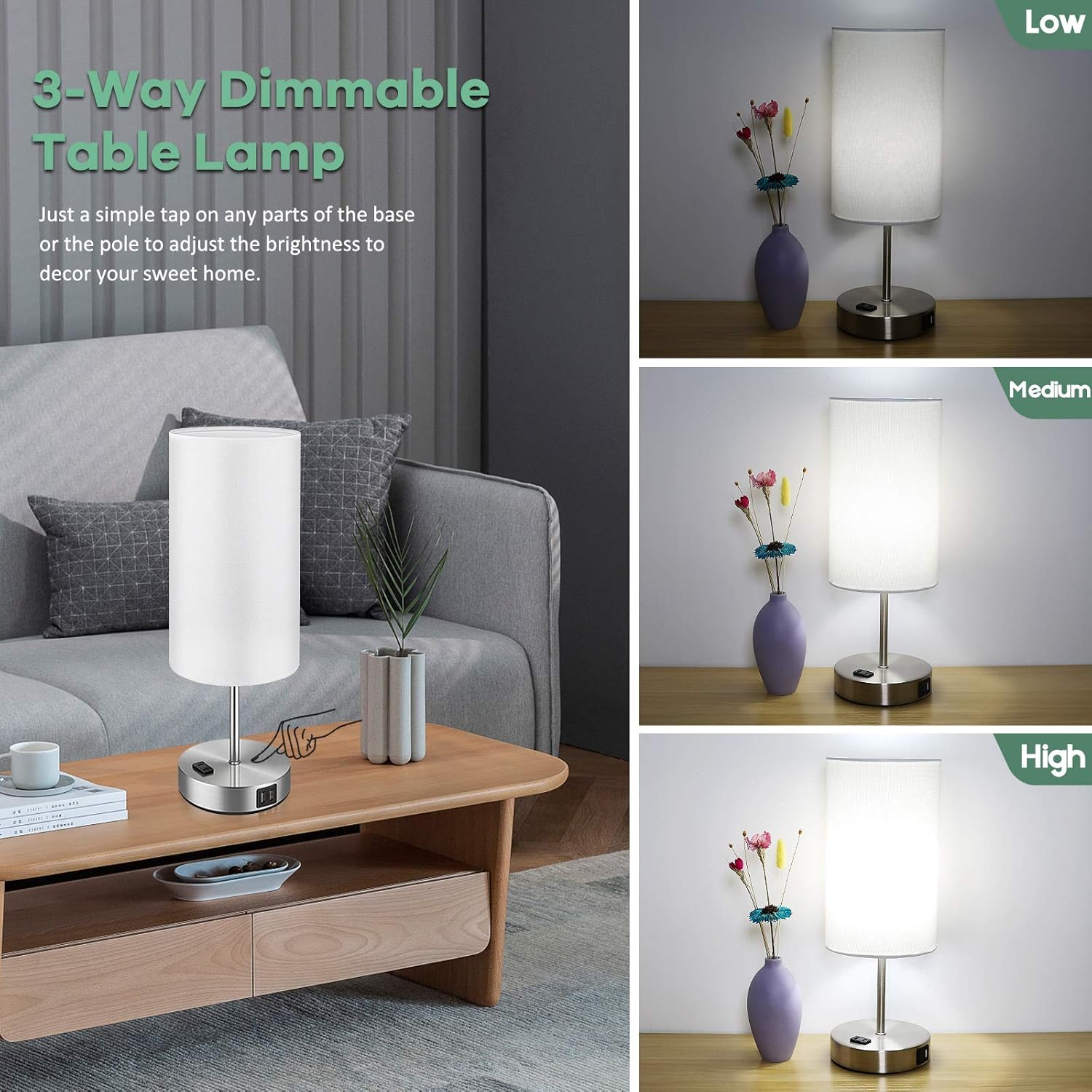
Image: Demonstration of the 3-way dimmable function, showing low, medium, and high light levels.
USB Charging Ports & AC Outlet:
The lamp is equipped with dual 5V/2.1A USB charging ports and one 2-prong AC outlet on its base. These ports are functional whether the lamp light is on or off, as long as the lamp is plugged into a wall outlet. This allows you to conveniently charge your electronic devices such as smartphones, tablets, e-readers, and more.

Image: The lamp's integrated USB charging ports and AC outlet in use, providing convenient power for devices.
Maintenance
To ensure the longevity and optimal performance of your lamp:
- Cleaning: Always unplug the lamp before cleaning. Wipe the metal base and lampshade with a soft, dry cloth. Do not use abrasive cleaners or polishes as they may damage the finish.
- Bulb Replacement: If the included LED bulb needs replacement, ensure the lamp is unplugged and the bulb has cooled down. Replace with an A19 LED bulb with an E26 base. The lamp is compatible with bulbs up to 100 Watts (incandescent equivalent).

Image: Key components of the lamp, useful for understanding maintenance points.
Troubleshooting
If you encounter any issues with your lamp, please refer to the following common solutions:
| Problem | Possible Cause | Solution |
|---|---|---|
| Lamp does not turn on. | Not plugged in; loose bulb; power outage. | Ensure power cord is securely plugged into a live outlet. Tighten the light bulb. Check your home's circuit breaker. |
| Touch control is unresponsive or inconsistent. | Loose connection; static electricity; incompatible bulb. | Ensure all connections are secure. Unplug and replug the lamp. Ensure you are using a dimmable LED bulb. Try touching a different part of the metal base/pole. |
| Light flickers. | Loose bulb; unstable power; incompatible bulb. | Tighten the bulb. Try plugging the lamp into a different outlet. Ensure the bulb is a dimmable LED. |
| USB ports or AC outlet not charging. | Lamp not plugged in; device cable issue; device not compatible. | Ensure the lamp is plugged into a live wall outlet. Try a different charging cable or device. |

Image: Comparison illustrating the stable, flicker-free lighting provided by Brightever lamps, which aids in eye protection.
Specifications
| Feature | Detail |
|---|---|
| Brand | Brightever |
| Model Number | ST0001-WH |
| Dimensions (D x W x H) | 5.95" x 5.95" x 15.9" |
| Base Material | Metal |
| Shade Material | Gunny Cloth |
| Switch Type | Touch Control |
| Light Source Type | Dimmable LED Bulbs with E26 Socket |
| Included Bulbs | 2 x A19 LED Bulbs |
| Bulb Wattage | 7 Watts (LED) |
| Maximum Compatible Wattage | 100 Watts |
| Brightness | 800 Lumen |
| Color Temperature | 5000 Kelvin (Daylight White) |
| Power Source | Corded Electric |
| Connectivity | Dual 5V/2.1A USB Charging Ports, One 2-Prong AC Outlet |
| Indoor/Outdoor Usage | Indoor Only |
Warranty and Support
Brightever stands behind the quality of its products. For any questions, concerns, or support needs regarding your table lamps, please contact our customer service team. We are committed to ensuring your satisfaction.
Please refer to your purchase receipt or the product packaging for specific warranty details and contact information. You can also visit the official Brightever store on Amazon for more information and support resources:
Ask a question about this manual
Ask about setup, troubleshooting, compatibility, parts, safety, or missing instructions. Manuals+ will review the question and use this page’s manual context to help answer it.