
1. Introduction
Thank you for choosing the JEKCA Husky 01S-M04 building block set. This manual provides detailed instructions to guide you through the assembly process, ensuring a sturdy and enjoyable building experience. Please read all instructions carefully before beginning.
2. What's in the Box
Your JEKCA Husky 01S-M04 package should contain the following components:
- Bricks (over 1130 pieces)
- Instruction Manual (this document)
- Pin Driver
- Pins
- Quick Guide
3. Safety Information
This product contains small parts and is recommended for individuals aged 14 years or above. Keep small parts away from young children to prevent choking hazards. Adult supervision is advised for younger builders within the recommended age range.
4. Assembly Instructions
The JEKCA building system utilizes a patented interlocking brick-through technology, ensuring a strong and stable structure without the need for glue. Follow the step-by-step instructions provided in the included Quick Guide and detailed manual for optimal results.
4.1 General Assembly Process
- Identify Bricks: Sort your bricks by color and shape as indicated in the manual.
- Position Bricks: Place the bricks according to the diagrams in your instruction manual.
- Insert Pin: Insert a pin through the designated hole in the top brick, ensuring it passes through the corresponding hole in the brick below.
- Secure with Pin Driver: Use the provided pin driver to gently turn the pin 90 degrees. This action locks the bricks together, creating a secure connection.
- Repeat: Continue this process for all connections as shown in the manual.
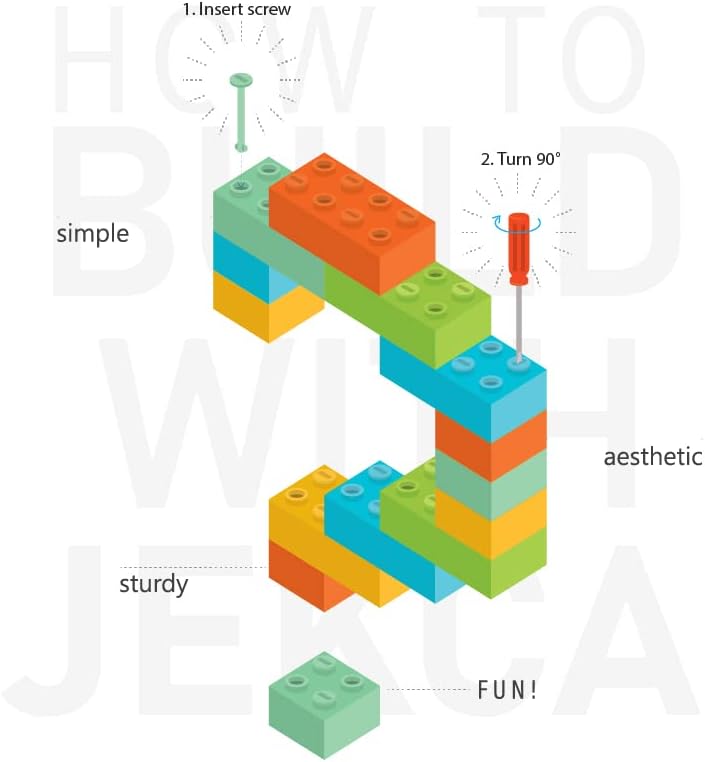
Image: Illustration of the JEKCA interlocking mechanism, demonstrating how to insert a pin and turn it 90 degrees to secure bricks.

Image: Detailed steps for connecting JEKCA bricks, showing alignment, pin insertion, and locking by turning the pin.
4.2 Model Specific Assembly
Refer to the dedicated instruction manual included in your package for the specific build sequence of the Husky 01S-M04 model. Each step is illustrated to ensure accurate placement of all 1130+ pieces.

Image: A side view of the fully assembled JEKCA Husky 01S-M04 model, showcasing its detailed brick construction.

Image: A front-side view of the completed JEKCA Husky 01S-M04 model, highlighting the texture and color variations.
5. Operating Your JEKCA Model
Once assembled, your JEKCA Husky 01S-M04 model is a sturdy display piece. While the interlocking mechanism provides significant stability, avoid applying excessive force or dropping the model to prevent disassembly or damage. It is designed for display and light handling.
6. Maintenance
To keep your JEKCA model in optimal condition:
- Cleaning: Dust regularly with a soft, dry cloth or a soft brush. For stubborn dirt, a slightly damp cloth can be used, but avoid harsh chemicals or abrasive cleaners.
- Storage: Store the model in a stable location away from direct sunlight and extreme temperatures to prevent material degradation or discoloration.
- Disassembly (Optional): If you wish to disassemble the model, use the pin driver to carefully unlock each pin by turning it 90 degrees in the opposite direction of assembly.
7. Troubleshooting
If you encounter any issues during assembly or with your completed model, consider the following:
- Difficulty Connecting Bricks: Ensure the pins are correctly aligned and fully inserted before turning with the pin driver. Do not force connections.
- Loose Connections: Verify that all pins have been turned 90 degrees to lock the bricks. If a section feels loose, re-check the pins in that area.
- Missing Pieces: Double-check the packaging and sorting area. If pieces are genuinely missing, please contact JEKCA customer support.
- Model Instability: Review the assembly steps in the manual to ensure all sections are correctly built and interlocked.
8. Specifications
| Feature | Detail |
|---|---|
| Brand Name | JEKCA |
| Model Name | Husky 01S-M04 |
| Model Number | ST19PT10-M04 |
| Material Type | Plastic |
| Number of Pieces | 1130 |
| Recommended Age | 14 years and above |
| Item Dimensions (L x W x H) | 11.81 x 3.7 x 9.37 inches (30.0 x 9.4 x 23.8 cm) |
| Item Weight | 0.89 Kilograms |
| Color | Gray |
| Educational Objective | Concentration, Construction Skills |
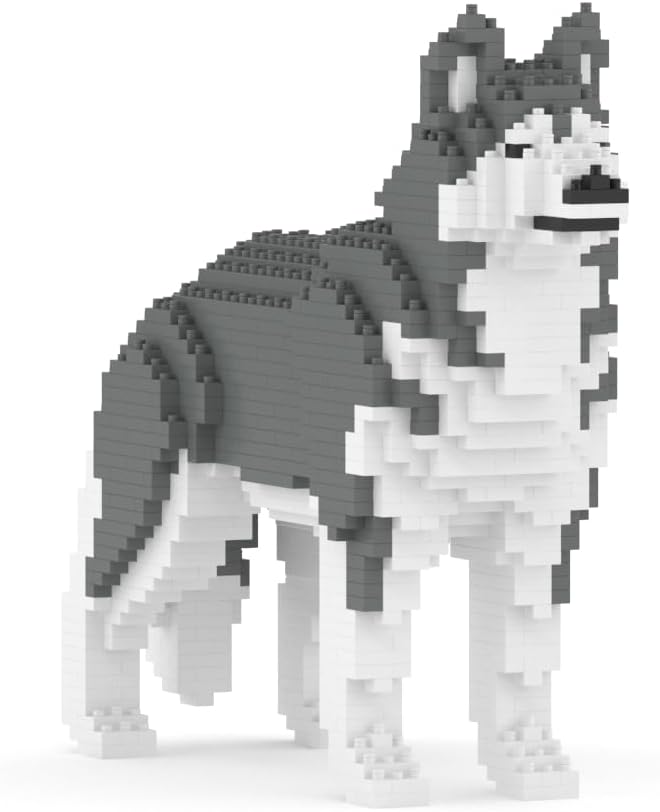
Image: The JEKCA Husky model displayed next to a 13-inch iPad Pro, illustrating its 1:1 scale and dimensions.
9. Warranty and Support
JEKCA products are designed for quality and durability. For any questions, concerns, or assistance with missing parts, please contact JEKCA customer support through their official website or the retailer where the product was purchased. Please retain your proof of purchase.
Visit the official JEKCA Store for more information: JEKCA Store