
1. Product Overview
The Donerton Wireless Headphones Model I66 are designed for an enhanced audio experience with extended playtime and robust features. These earbuds are compact, lightweight, and built for active lifestyles, offering high-fidelity sound and water resistance.

Figure 1: Donerton Wireless Headphones I66 and Charging Case with Key Features.
- Extended Playtime: Enjoy up to 5-7 hours of playback on a single charge, with the portable charging case providing an additional 145 hours, totaling 150 hours. A quick 10-minute charge offers up to 1 hour of playtime.
- Secure Fit for Sports: Designed to be compact and ultra-lightweight, ensuring a comfortable and secure fit during workouts, runs, and other sports activities.
- Premium Stereo Sound: Equipped with 10mm composite diaphragm and HiFi drivers for a rich, high-fidelity audio experience.
- 4-Mics Noise Reduction: Built-in high-quality microphones with noise cancellation for clear hands-free calls and voice assistant use in noisy environments.
- IP7 Waterproof: Constructed with high-quality waterproof materials, making them durable against sweat and suitable for various water activities like swimming, jogging, and cycling.
2. Setup and Pairing
2.1 Charging the Earbuds and Case
Before first use, fully charge the earbuds and the charging case.
- Place the earbuds into the charging case. Ensure they are correctly seated.
- Connect the USB-C charging cable to the charging case and a power source.
- The LED display on the case will indicate the charging status.
2.2 Initial Pairing
Follow these steps for the first-time connection:
- Take both earbuds out of the charging box. They will automatically power on and connect to each other.
- Enable Bluetooth on your mobile device.
- Search for "Touch Two A1" (or similar model name) in the list of available Bluetooth devices.
- Select the device to pair. Once connected, you will hear a confirmation tone.
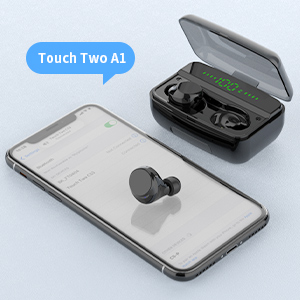
Figure 2: Earbud Pairing with a Mobile Device.
3. Operating Instructions
The Donerton Wireless Headphones feature smart touch control sensors for easy management of audio and calls.
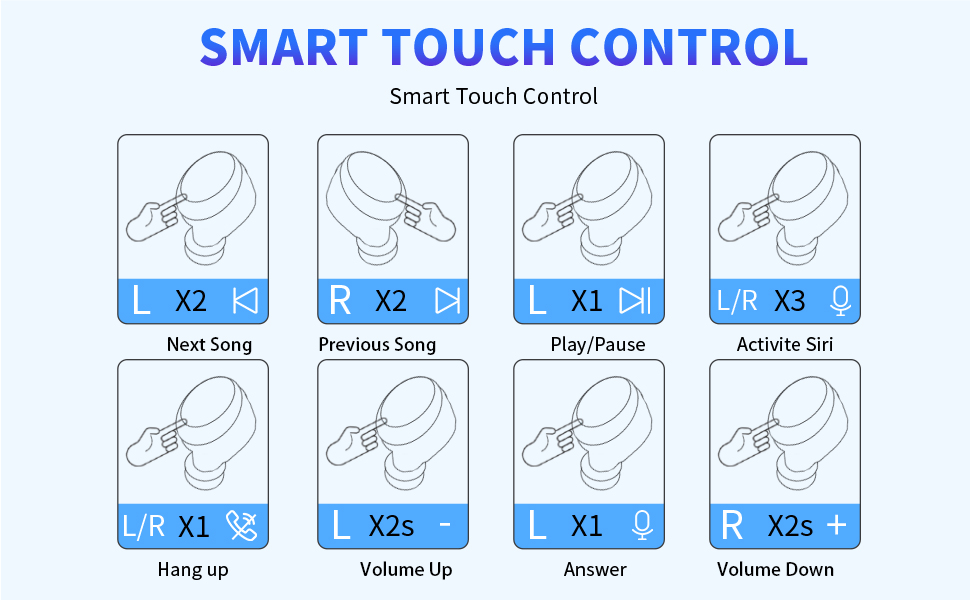
Figure 3: Smart Touch Control Functions.
- Play/Pause Music: Single tap on either earbud.
- Next Song: Double tap the left earbud.
- Previous Song: Double tap the right earbud.
- Volume Up: Double tap the right earbud (or specific gesture as per diagram).
- Volume Down: Double tap the left earbud (or specific gesture as per diagram).
- Answer Call: Single tap on either earbud.
- Hang Up Call: Single tap on either earbud.
- Activate Voice Assistant (Siri): Triple tap on either earbud.
4. Maintenance
4.1 Water Resistance
The Donerton Wireless Headphones are IP7 waterproof, making them resistant to sweat and suitable for various water activities. The earbuds and case can even be washed with water and soap.

Figure 4: IP7 Waterproof Feature for Active Use.
4.2 Cleaning
Regularly clean the earbuds and charging case with a soft, dry cloth. For deeper cleaning, especially after water exposure, use water and mild soap as indicated by the IP7 rating. Ensure all components are completely dry before charging or storing.
5. Troubleshooting
If you encounter any issues with your Donerton Wireless Headphones, please refer to the following common solutions:
- No Sound/Connection Issues: Ensure both earbuds are charged and properly paired with your device. Try unpairing and re-pairing the earbuds.
- Earbuds Not Charging: Check that the charging cable is securely connected and the charging case has power. Ensure earbuds are correctly seated in the case.
- Uncomfortable Fit: Experiment with the different sized eartips provided to find the most comfortable and secure fit for your ears.
- Sound Quality Issues: Ensure the earbuds are clean and free from debris. Check your device's audio settings.
6. Specifications
| Brand | Donerton |
| Model Number | I66 |
| Model Name | C3S |
| Color | Brown Black |
| Ear Placement | In Ear |
| Noise Control | Sound Isolation |
| Connectivity Technology | Wireless (Bluetooth 5.0) |
| Bluetooth Range | 15.24 Meters |
| Battery Average Life | 6 Hours (earbuds), 150 Hours (with charging case) |
| Battery Charge Time | 1 Hour |
| Water Resistance Level | IP7 Waterproof |
| Control Method | Touch, Voice |
| Item Weight | 20 Grams |
| Carrying Case Weight | 89 Grams |
7. Warranty and Support
Donerton provides a 1-year warranty for this product. If there is a problem within one month of purchase, the product can be returned and exchanged. For further assistance or warranty claims, please contact Donerton customer support.


